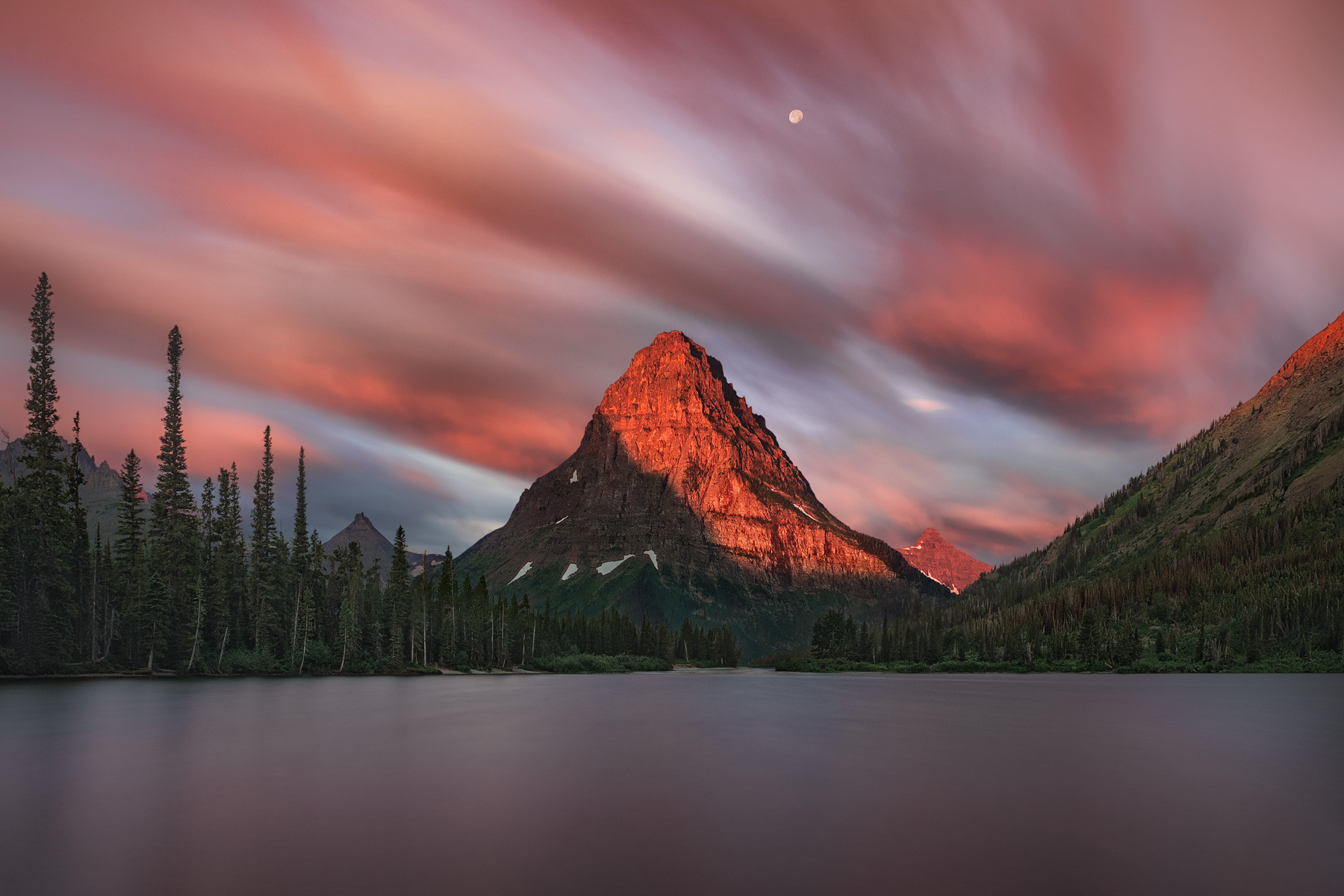
A single 155-second exposure over a grand alpine lake.
Details
My intuition was telling me to ditch the Hasselblad and try something different: experiment with shooting the entire vividly-hued sunrise in just one long exposure. I love how the changing of colors, light, fast-moving clouds, and even the moon in the scene ended up averaging out.
Canon 5D Mark2
Canon 24-105@24mm
f/8
155 seconds
ISO 100
(I think I used the Hoya 9-stop ND filter)
Processing
I used a Linear Raw Profile in Camera Raw (Lightroom) to eliminate the considerably adulterated adjustments found in Adobe Raw Profiles. Then I did the 4 most important/foundational/influential adjustments that raw files ever go through custom instead of generic (the brightening "gamma" curve, endpoints, mid-tones, and global contrast curve) this did almost all of the heavy lifting, cutting down massively in labor, getting the image almost completely corrected before a single slider was slid! This is an amazing revolution in photo editing today. Lastly, most of the fine-tuning was done in Lossless Raw Layers in Photoshop with no "adjustment layers" or "smart object layers" (to avoid degrading pixel edits as much as I could).
For those who might wonder, yes the moon was there. With some creative custom sharpening techniques, I was able to get it to be quite sharp even at 155 seconds!
I'd love to see a version without the long exposure on the clouds. I think the "smoothed over" clouds takes away from the image...making it about the clouds more than the peak.
Thank you for you feedback. It’s not your cup of tea. 👍🏼
chez wrote:
I'd love to see a version without the long exposure on the clouds. I think the "smoothed over" clouds takes away from the image...making it about the clouds more than the peak.
Is adding a 2.2 gamma adjustment "brightening curve" as simple as adding a curve adjustment in ACR or LR with the midpoint input/output set at 128, 186?
Hi Mark, that is a lovely image. My favorite thing is to be near the mountains when the sun is just rising or setting.
You talk a lot about your lossless processing but I really want to know what offering you made to the sky gods to keep that moon still over 155 seconds. This secret would be worth a lot to me and many others! I’ve done some LE blue hour moon photos here in the Alps and I always end up compositing or trashing the work.
I used some advanced custom sharpening techniques to make the moon sharp. It’s the real moon that was there. These are techniques that they teach. A little bit too complicated to try to write out a tutorial here. As long as the moon isn’t blown out, I can usually get it back to looking pretty darn good.
bmike-vt wrote:
Hi Mark, that is a lovely image. My favorite thing is to be near the mountains when the sun is just rising or setting.
You talk a lot about your lossless processing but I really want to know what offering you made to the sky gods to keep that moon still over 155 seconds. This secret would be worth a lot to me and many others! I’ve done some LE blue hour moon photos here in the Alps and I always end up compositing or trashing the work.
RoamingScott wrote:
Cool shot, I like the smooth clouds, makes the mountain pop out in a 3d type way.
I've had to do some clever moon movement adjustments before and know what a pain that is, good job!
See reply above. Amazing what can be done. I basically made a copy of the moon, but my selection of it was a perfect circle around it without the blur. After I copied it, then I cloned it out!
Then I pasted the copy back in to where it was! And then I used some very special custom sharpening techniques. The moon actually turned out fairly decent here because it was not clipping. But by doing what I did, including the very special and custom sharpening it turned out pretty darn good. Overcoming limitations!
tsaphoto wrote:
Wonderful photo.
Is adding a 2.2 gamma adjustment "brightening curve" as simple as adding a curve adjustment in ACR or LR with the midpoint input/output set at 128, 186?
Here you go:
2.2 GAMMA CURVE (punch in these points into your LR curve and save):
0-12 / 14-63 / 30-98 / 61-139 / 129-191 / 190-224 / 255-254
Mark Metternich wrote:
I used some advanced custom sharpening techniques to make the moon sharp. It’s the real moon that was there. These are techniques that they teach. A little bit too complicated to try to write out a tutorial here. As long as the moon isn’t blown out, I can usually get it back to looking pretty darn good.
2.2 GAMMA CURVE (punch in these points into your LR curve and save):
0-12 / 14-63 / 30-98 / 61-139 / 129-191 / 190-224 / 255-254
Thank you. Is there any advantage to doing this in LR/ACR versus creating the gamma curve directly in a profile via DNG Editor, like your old tutorial? Do I want to import the pic into LR/ACR as a completely linear profile and only then apply the gamma curve correction to it?
Also, does your newest Ultimate Quality Adobe Lossless RAW video cover all of this in depth?
Thank you. Is there any advantage to doing this in LR/ACR versus creating the gamma curve directly in a profile via DNG Editor, like your old tutorial? Do I want to import the pic into LR/ACR as a completely linear profile and only then apply the gamma curve correction to it?
Also, does your newest Ultimate Quality Adobe Lossless RAW video cover all of this in-depth?
Great question! I did PM you... Sorry about the delay.
YES, my new 7.5-hour full course "The Ultimate Quality Workflow - Adobe Lossless Raw Layers" (almost 5 years in the making) covers EVERYTHING and much more!
YES, import the Raw image into Lightroom, then apply the Linear Profile to it (this critically omits all of Adobes adulterated and baked-in adjustments) then using separate individual curve masks we can now do an extremely precise and CUSTOM Gamma Curve, CUSTOM End Points curve, CUSTOM Mid-Tones curve, and CUSTOM global (and even local) contrast (tone-mapping) curves! If people would just get a hang of this (and it is so easy an 8-year-old could do it) many images can be nearly done (a heck of a lot closer than any Adobe profile!!!) and some even completely done before sliding a single slider in Lightroom/Camera Raw! This MASSIVELY boosts quality for many reasons. It is so easy to learn and it is the future now in top-quality photo editing.
Then when you do start sliding any sliders, it is incredible how sensitive, easy, conservative, and natural Lightroom reacts! Usually, not much needs to be done.
Also, include the fact that we can bring this superior, more data-rich raw file into Photoshop as a full-fledged Raw Layer, if we want to, we can use an unprecedented "pure raw" workflow, which avoids all data loss! Many Photographers have no idea how degrading the old, conventional way of processing images is. If pushing quality into the future is not their thing, then no problem. But for those who want to capitalize on the cutting-edge of technology, it is absolutely incredible.