p.2 #2 · Image Backup in the Field Without a Computer
Anyone every tried SSK Personal Cloud ? I found it listed on amazon. Reviews are mixed. One guy says he got it to copy directly from an SD card via reader and includes his instructions. Another reviewer says it definitely does not work. Apparently you control it via a phone app.
p.2 #3 · Image Backup in the Field Without a Computer
I think the devices I've been looking for were hiding in plain sight. Apparently they are now categorized as "wireless external drives". In addition to that SSK Personal Cloud device, there are several other promising options that might be workable for direct card to device backups. https://www.techradar.com/news/best-wireless-drives shows a few name-brand choices. I am going to do some further research to confirm that SD or CFE cards can be copied directly to these things either via built-in or attached readers. Looks like most have an option for control via a phone app rather than a PC.
p.2 #4 · Image Backup in the Field Without a Computer
Except that many of these are no longer available....
jeffbuzz wrote:
I think the devices I've been looking for were hiding in plain sight. Apparently they are now categorized as "wireless external drives". In addition to that SSK Personal Cloud device, there are several other promising options that might be workable for direct card to device backups. https://www.techradar.com/news/best-wireless-drives shows a few name-brand choices. I am going to do some further research to confirm that SD or CFE cards can be copied directly to these things either via built-in or attached readers. Looks like most have an option for control via a phone app rather than a PC.
p.2 #5 · Image Backup in the Field Without a Computer
tsdevine wrote:
Except that many of these are no longer available....
Yeah, that's what I'm finding or rather *not* finding. The more I dig the less I like what I find. Reviews seem ambivalent at best but mostly negative. The only positives are from obvious youtube shills who got one for free to test.
The Nexto devices really looked like the best option but I am really not sure what's going on with the company. "https://www.nextodi.com" is flagged by my security software as a hazard. It looks like the domain is no longer registered. Perhaps they've disappeared like gnarbox. Sadly, several retailers continue to offer "new" devices which clearly have zero warranty or support in the case of gnarbox.
I guess I am back to where I started using my small-ish laptop.
Apr 18, 2023 at 11:35 AM
AmbientMike Offline • • • • • • [X]
p.2 #6 · Image Backup in the Field Without a Computer
BenjaminSmith wrote:
I do not know a way to back up images in the field without a laptop or WiFi - I'll be in the mountains of the Cordillera Huayhuash without either for two weeks. Any suggestions? Thx!
If it makes a difference I'll be using a A7RV.
It's got dual cards, I'd probably just use 2 of those. Especially if both can be micro SD + adapter
Some of these inexpensive name brand micro SD cards really aren't bad. Granted I'm not using 60mp, but if you don't need to really blast you can get say 2 128gb for under $25 IIRC. 256gb might be cheaper per gb. About the last thing I want to do is bother with a laptop on a trip. Mostly just used cards to this point.
Can't you just get a bigger micro SD on your pixel? I'd probably just use in camera though. I suppose you could hook up cords and reader to your phone. I thought droids can take different cards? USB OTG $3 I think, card readers not that expensive. Lots of options
It worked well, but next time, I might used mirrored image recording instead, and just take more cards. I like to travel with a single backpack, so less is better. I'm certainly leaving the GoPro behind next time.
Interesting... looks like a godsend for travelers but one review mentioned file transfer speeds of only 1GB/min to an external drive, which sounds painfully slow (two hours to transfer a full 128GB SD card??!). What sort of speeds did you experience, and were there any issues related to copying multiple cards and folder organization? I'd also be a bit nervous to trust such a relatively new no-name product for critical projects.
I tend to mirror SD cards in-camera for backup (I've collected 6x128GB and 6x64GB over the years for that purpose), but on longer trips or assignments I'd potentially run out of cards.
p.2 #8 · Image Backup in the Field Without a Computer
This must be an improved version, as the RAVPower version I have (looks the same visually) is painfully slow transferring photos from the card to the drive.
wordfool wrote:
Interesting... looks like a godsend for travelers but one review mentioned file transfer speeds of only 1GB/min to an external drive, which sounds painfully slow (two hours to transfer a full 128GB SD card??!). What sort of speeds did you experience, and were there any issues related to copying multiple cards and folder organization? I'd also be a bit nervous to trust such a relatively new no-name product for critical projects.
I tend to mirror SD cards in-camera for backup (I've collected 6x128GB and 6x64GB over the years for that purpose), but on longer trips or assignments I'd potentially run out of cards....Show more →
p.2 #9 · Image Backup in the Field Without a Computer
On the trip, I shot 128 GB and I backed up about 80. Painfully slow? Yup, but I simply set it up and let it go. (Did something else.) You can pick the backup folder or create a folder for the files. You can also choose the files to back up, but it's somewhat tedious. The app is not super intuitive. The easiest method is to back up the entire card by hitting a single button on the unit rather than picking files and locations in the app. The second easiest thing would be to use the app and back up the entire card to a folder you choose. I was using a solid state drive for backup.
On the road, I also tried to use the unit as a wifi hotspot, and it didn't work. I suspect the ethernet connection required going through a log in screen with password. I tried it at home before leaving and it worked fine (and I set up the unit). Since we were booking lodging with a cc card, I was hoping to use the extra security.
p.2 #10 · Image Backup in the Field Without a Computer
Yeah, not unworkable. Just wanted to make sure people understood it’s not really on par with how technology has advanced. (But in this space there are few options) Everything has become much faster and it raises the bar of expectations.
jay w wrote:
On the trip, I shot 128 GB and I backed up about 80. Painfully slow? Yup, but I simply set it up and let it go. (Did something else.) You can pick the backup folder or create a folder for the files. You can also choose the files to back up, but it's somewhat tedious. The app is not super intuitive. The easiest method is to back up the entire card by hitting a single button on the unit rather than picking files and locations in the app. The second easiest thing would be to use the app and back up the entire card to a folder you choose. I was using a solid state drive for backup.
On the road, I also tried to use the unit as a wifi hotspot, and it didn't work. I suspect the ethernet connection required going through a log in screen with password. I tried it at home before leaving and it worked fine (and I set up the unit). Since we were booking lodging with a cc card, I was hoping to use the extra security....Show more →
p.2 #11 · Image Backup in the Field Without a Computer
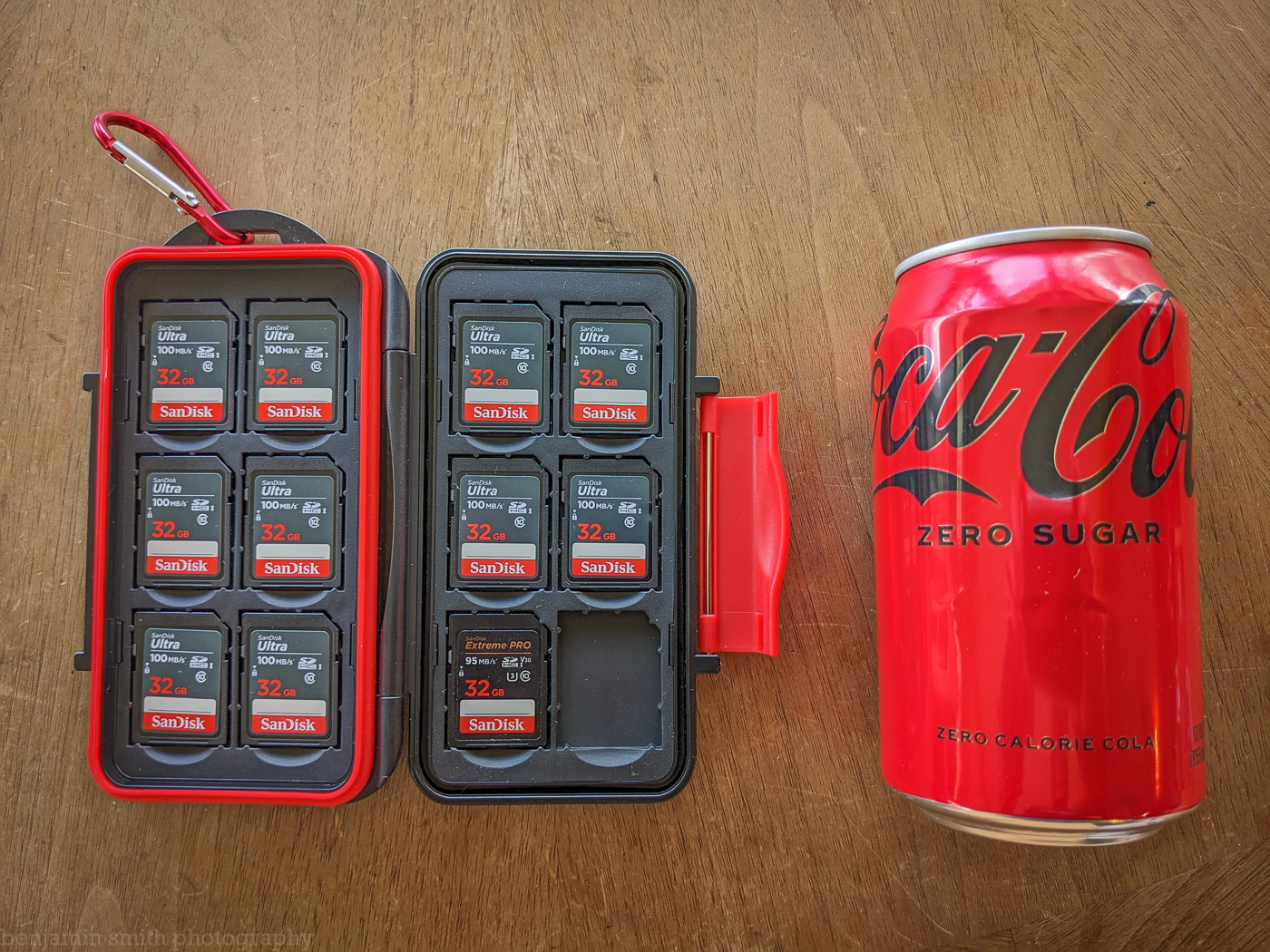
here's my solution: 12 SD cards in a case for storage in a location away from the camera.
Advantages:
Daily backup completed with no additional work - the A7RV mirrors all images to a 32 Gb card in Slot 2, removed and replaced daily.
No extra devices, apps, or potential connectivity issues.
No additional battery draw.
The backup is physically remote from the camera. (Us flight control engineer types like physical separation of redundant systems)
160 grams total weight.
Total cost $86 not including Coke Zero.
I can't foresee myself in a situation away from wifi or without my laptop for longer than this two week trip. If that were to happen I might rethink this strategy. I'll report back in July!
p.2 #14 · Image Backup in the Field Without a Computer
I think he's going to have the camera copy his shots to these cards. But that does sort of seem to imply he's going to shoot 32 GB cards (hopefully faster than these).
Good question.
jeffbuzz wrote:
Just so I'm clear, you are going to shoot 32GB UHS-I cards in your a7RM5? Raw?
p.2 #15 · Image Backup in the Field Without a Computer
I also am an Android user. Specifically I am using an S20+ and there's a good reason I haven't ditched it yet...
My solution for a week in Africa was shoving a 1TB card into the phone which was FAR less expensive than buying more cards for cameras. When we'd return from a game drive I'd transfer the photos from two cameras over usb (A9 & A7III) to the phone sd card, then I'd hook up a usb drive to the phone and copy the photos to that. Despite bringing roughly 5TB of storage for one week, my wife and I only used around 280GB (photos and video) which worked out pretty well. Since I didn't have to wipe the card in the phone I had redundant backups and we could look at what was shot on the phone.
FWIW, considering the cost of the type A cfexpress cards it would cost less to find a refurbed S20+ and shove a 1TB card into it.
p.2 #16 · Image Backup in the Field Without a Computer
Yep, the card in slot 2 will be these exact 32 gb cards. That's good for 500 shots per card. I know myself - I've never shot that number in a day despite being in some pretty extraordinary places. Yes, the cards are slow, but then slow is my style. After all, I'm taking a tilt-shift lens. I could regret it if a condor spends time around us and I miss THE shot, but I'll play those odds.
p.2 #17 · Image Backup in the Field Without a Computer
now the iPhone 15 properly supports the USBC standard so making backups on the go should be trivial, with USB hubs that are also SSD enclosures might be really quick to dump cards or even directly from camera


 I could regret it if a condor spends time around us and I miss THE shot, but I'll play those odds.