This topic is in the 2022 archive. You can read it and like its posts here. It is read only.
Archive 2022Sharpening & Diffraction
p.1 #1Sharpening & Diffraction
There was a thread on the Sony forum where there were discussions around shooting at f/16 and impacts of diffraction. While some people may focus stack, if you don't, and require more depth of field....should you avoid f/16 at all costs? Many answered no (including me) as getting the depth of field you need, to me, trumps diffraction.
Here is a RAW file with a capture at f/16. This scene didn't require it, but I was testing the performance of a lens and it seemed like a good candidate for this exercise. This was shot on a Sony a7R III, which I realize won't show the same level of diffraction as a higher resolution sensor, but it's the highest resolution camera I have.
The challenge is to process this RAW file and post your final version, focusing on sharpening. I realize sharpening is somewhat to taste, but I'm curious to see the outcome. Please post links to full size processed images.
RAW File
My 1st attempt.
Full Size
Multiple attempts are fine, ultimately we're trying to see what different approaches yield.
If you aren't interested in this "game" for back of a better term, please just ignore this thread.
-Tim
Here is a RAW file with a capture at f/16. This scene didn't require it, but I was testing the performance of a lens and it seemed like a good candidate for this exercise. This was shot on a Sony a7R III, which I realize won't show the same level of diffraction as a higher resolution sensor, but it's the highest resolution camera I have.
The challenge is to process this RAW file and post your final version, focusing on sharpening. I realize sharpening is somewhat to taste, but I'm curious to see the outcome. Please post links to full size processed images.
RAW File
My 1st attempt.
 |
||
| https://www.devine.photography/img/s/v-10/p487316422-6.jpg | ||
|
Full Size
Multiple attempts are fine, ultimately we're trying to see what different approaches yield.
If you aren't interested in this "game" for back of a better term, please just ignore this thread.
-Tim
Aug 21, 2022 at 05:29 AM
p.1 #2Sharpening & Diffraction
Tim, I downloaded your file and brought it into Lightroom.
There's really nothing wrong with that file as far as I'm concerned. If I wanted to strengthen the appearance of sharpness, I'd add a bit of Texture and focus on the Detail slider in the Sharpening section of Lightroom. But I don't see the need for a lot more.
I'm with you by the way on the balance between diffraction and sharpness. I will take diffraction over sharpness every single time if a small aperture is what's required to make the image successful. In my work I routinely shoot at f/16 and rarely shoot wider than f/8 (on a GFX 50R camera). I'll shoot at f/19 if that's what's needed. So f/16 on your Sony would be fine with me if the lens was up to the task.
Are you familiar with Bruce Haley's work in his two books Home Fires (Volume 1 and 2)? It's excellent photography and great storytelling. It's all shot with Sony cameras (I think an RX1R for Volume 1, and one of its successors for Volume 2). As I read through the pictures I was amazed at how everything was sharp and in focus. I asked Bruce and he explained that there's nothing more going on than f/16.
People fuss way too much about sharpness.
Aug 21, 2022 at 08:22 AM
p.1 #3Sharpening & Diffraction
No I haven't seen those books, will have to check them out. I often shoot stopped down as well, and I tend to favor lenses that hold up well at smaller apertures. I've had some that are very sharp at wider apertures, but seem to peter out stopped down, more than can be explained by just diffraction alone.
rdeloe wrote:
Tim, I downloaded your file and brought it into Lightroom.
There's really nothing wrong with that file as far as I'm concerned. If I wanted to strengthen the appearance of sharpness, I'd add a bit of Texture and focus on the Detail slider in the Sharpening section of Lightroom. But I don't see the need for a lot more.
I'm with you by the way on the balance between diffraction and sharpness. I will take diffraction over sharpness every single time if a small aperture is what's required to make the image successful. In my work I routinely shoot at f/16...Show more →
Aug 21, 2022 at 08:43 AM
p.1 #4Sharpening & Diffraction
Tim,
Thanks for starting this. Improving my editing is one skill I definitely need to work on. Plus I look forward to seeing what others come up with.
I think it would be helpful if people also commented on what they did to the image.
Typical edit:
Capture One
Lens Corrections:
I assume this is the G2 lens.
Capture One incorrectly identifies it as the G1, so I switch to the manufacture profile (I believe this is embedded in the RAW file).
Chromatic Aberration, Diffraction Correction, Hide distorted area all checked.
Distortion set to 100
Sharpness falloff set to 0
light falloff set to 50
Histogram:
White balance and exposure look good, leave as is.
Auto adjust dynamic range and levels: it chose Shadow set set 25, black level set to 5, white level set to 225.
The white building looked to bright so pull highlights back -30.
add 10 saturation.
Done
For the more processed add:
clarity 10
structure 5
manually pull white level to 233
add adjustment layer to bright white front of barn: add structure 20 and -10 highlight.
Edit: Comments and criticism of my edits are welcome
Typical:
https://drive.google.com/file/d/1Pfps0vEcvSE5hsqT1EUS68ARDsMkT3Mh/view?usp=sharing
More:
https://drive.google.com/file/d/1zIRVgoCURkufVVN_3wJTzGEPZWZcdFS2/view?usp=sharing
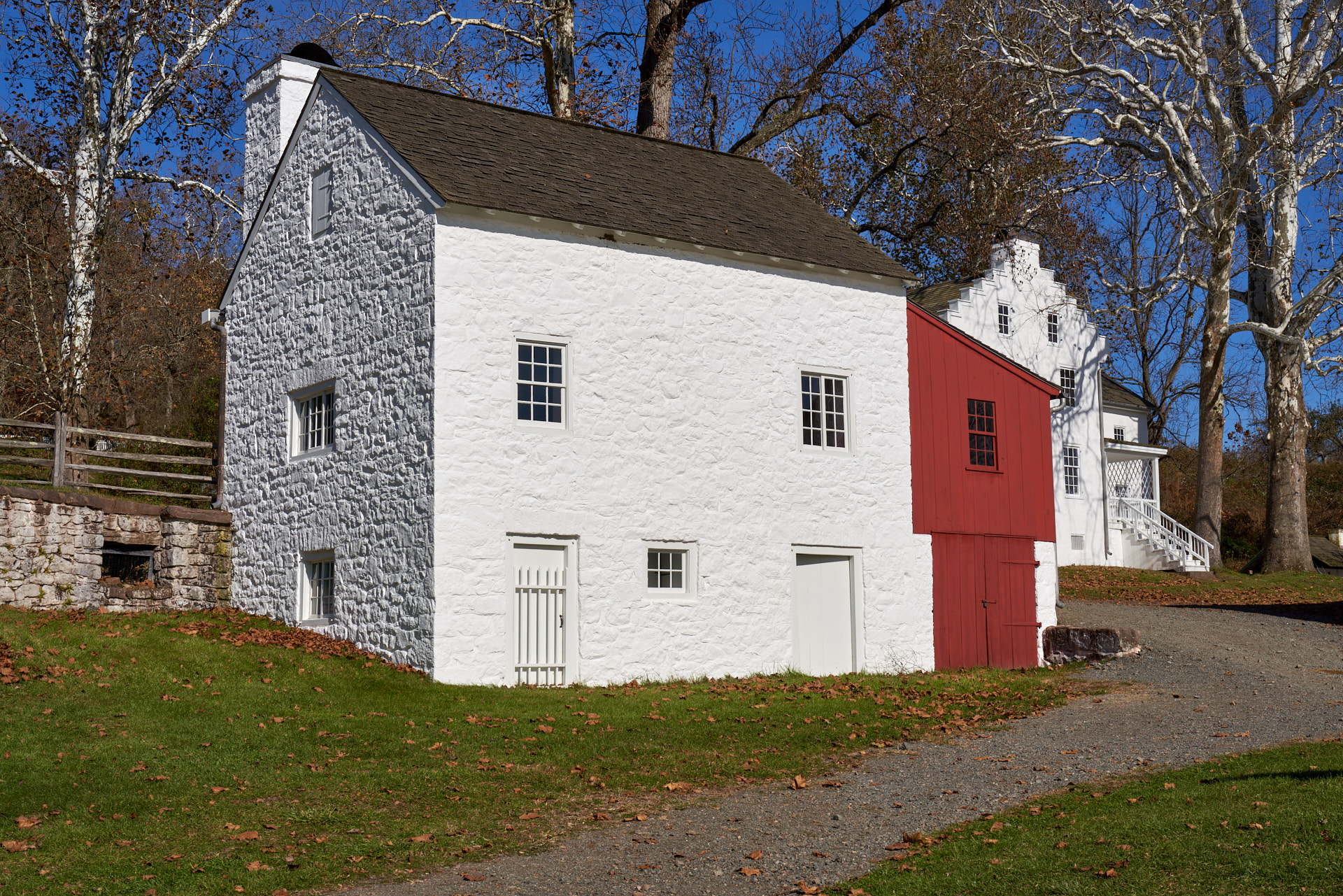
More processed (at web resolution I don't see much difference between my edits)
Thanks for starting this. Improving my editing is one skill I definitely need to work on. Plus I look forward to seeing what others come up with.
I think it would be helpful if people also commented on what they did to the image.
Typical edit:
Capture One
Lens Corrections:
I assume this is the G2 lens.
Capture One incorrectly identifies it as the G1, so I switch to the manufacture profile (I believe this is embedded in the RAW file).
Chromatic Aberration, Diffraction Correction, Hide distorted area all checked.
Distortion set to 100
Sharpness falloff set to 0
light falloff set to 50
Histogram:
White balance and exposure look good, leave as is.
Auto adjust dynamic range and levels: it chose Shadow set set 25, black level set to 5, white level set to 225.
The white building looked to bright so pull highlights back -30.
add 10 saturation.
Done
For the more processed add:
clarity 10
structure 5
manually pull white level to 233
add adjustment layer to bright white front of barn: add structure 20 and -10 highlight.
Edit: Comments and criticism of my edits are welcome
Typical:
https://drive.google.com/file/d/1Pfps0vEcvSE5hsqT1EUS68ARDsMkT3Mh/view?usp=sharing
More:
https://drive.google.com/file/d/1zIRVgoCURkufVVN_3wJTzGEPZWZcdFS2/view?usp=sharing
More processed (at web resolution I don't see much difference between my edits)
Aug 21, 2022 at 08:44 AM
p.1 #5Sharpening & Diffraction
Hi Tim,
Great thread. I run your RAW image through DXO DeepPrime (with global sharpening selected).
In LR, I used the sharpening:
Amount: 40
Radius: 0.8
Detail: 70
Mask: 0
Here is the result: (download the full JPEG)
_https://www.fredmiranda.com/Buzz/TSD_20211107_5146-ARW_DP.jpg
Great thread. I run your RAW image through DXO DeepPrime (with global sharpening selected).
In LR, I used the sharpening:
Amount: 40
Radius: 0.8
Detail: 70
Mask: 0
Here is the result: (download the full JPEG)
_https://www.fredmiranda.com/Buzz/TSD_20211107_5146-ARW_DP.jpg
Aug 21, 2022 at 09:50 AM
p.1 #6Sharpening & Diffraction
I use small apertures frequently when shooting macro with my Sigma 150. My usual process is to let DxO do its lens sharpness correction, then export a dng to C1 for its diffraction correction. In this case I also added minimal amounts of Smart Lighting and Clearview in DxO (+10 each) but I did not use optical distortion corrections for the lens. No other sharpening was applied. The results are as follows.

Full image: https://i.ibb.co/yP3vCXx/TSD-20211107-5146-Dx-O-C1.jpg
Full image: https://i.ibb.co/yP3vCXx/TSD-20211107-5146-Dx-O-C1.jpg
Aug 21, 2022 at 01:14 PM
p.1 #7Sharpening & Diffraction
Ho1972 wrote:
I use small apertures frequently when shooting macro with my Sigma 150. My usual process is to let DxO do its lens sharpness correction, then export a dng to C1 for its diffraction correction. In this case I also added minimal amounts of Smart Lighting and Clearview in DxO (+10 each) but I did not use optical distortion corrections for the lens. No other sharpening was applied. The results are as follows.
https://i.ibb.co/kBdbTxP/TSD-20211107-5146-Dx-O-C1.jpg
Full image: https://i.ibb.co/yP3vCXx/TSD-20211107-5146-Dx-O-C1.jpg
I wonder if something happened during the export and upload process, because the file I downloaded is significantly less sharp than the the RAW file with default settings.
Aug 21, 2022 at 01:26 PM
p.1 #8Sharpening & Diffraction
Fred Miranda wrote:
Hi Tim,
Great thread. I run your RAW image through DXO DeepPrime (with global sharpening selected).
In LR, I used the sharpening:
Amount: 40
Radius: 0.8
Detail: 70
Mask: 0
Here is the result: (download the full JPEG)
_https://www.fredmiranda.com/Buzz/TSD_20211107_5146-ARW_DP.jpg
Are you happy with the amount of sharpening you've used here Fred? I ask because to my eye it looks strongly over-sharpened. Did you sharpen the image that DXO DeepPrime sharpened?
Aug 21, 2022 at 01:27 PM
p.1 #9Sharpening & Diffraction
rdeloe wrote:
Great thread. I run your RAW image through DXO DeepPrime (with global sharpening selected).
In LR, I used the sharpening:
Amount: 40
Radius: 0.8
Detail: 70
Mask: 0
Here is the result: (download the full JPEG)
_https://www.fredmiranda.com/Buzz/TSD_20211107_5146-ARW_DP.jpgAre you happy with the amount of sharpening you've used here Fred? I ask because to my eye it looks strongly over-sharpened. Did you sharpen the image that DXO DeepPrime sharpened?
I think it does not look very natural although extremely sharp and noise-free,. Perhaps there is a need to tone down the LR's sharpening, especially "detail".
The detail slider is Lightroom's deconvolution sharpening but I don't think it's needed after running DeepPrime.
I had Lightroom's sharpening set to zero before using DXO DeepPrime.
Here is another image using same DeepPrime settings (global sharpening checked) but using much less sharpening in LR:
Amount: 25
Radius: 0.5
Detail: 25
Mask: 0
_https://www.fredmiranda.com/Buzz/TSD_20211107_5146-ARW_DP2.jpg
Fred Miranda wrote
Hi Tim,Great thread. I run your RAW image through DXO DeepPrime (with global sharpening selected).
In LR, I used the sharpening:
Amount: 40
Radius: 0.8
Detail: 70
Mask: 0
Here is the result: (download the full JPEG)
_https://www.fredmiranda.com/Buzz/TSD_20211107_5146-ARW_DP.jpg
I think it does not look very natural although extremely sharp and noise-free,. Perhaps there is a need to tone down the LR's sharpening, especially "detail".
The detail slider is Lightroom's deconvolution sharpening but I don't think it's needed after running DeepPrime.
I had Lightroom's sharpening set to zero before using DXO DeepPrime.
Here is another image using same DeepPrime settings (global sharpening checked) but using much less sharpening in LR:
Amount: 25
Radius: 0.5
Detail: 25
Mask: 0
_https://www.fredmiranda.com/Buzz/TSD_20211107_5146-ARW_DP2.jpg
Aug 21, 2022 at 01:44 PM
p.1 #10Sharpening & Diffraction
rdeloe wrote:
I wonder if something happened during the export and upload process, because the file I downloaded is significantly less sharp than the the RAW file with default settings.
The image host may have resized it or it could be user error. I'll look into it later.
I wonder if something happened during the export and upload process, because the file I downloaded is significantly less sharp than the the RAW file with default settings.
The image host may have resized it or it could be user error. I'll look into it later.
Aug 21, 2022 at 01:45 PM
p.1 #11Sharpening & Diffraction
Ho1972 wrote:
The image host may have resized it or it could be user error. I'll look into it later.
Looks like it's not a problem at your end after all.
I downloaded your file again, and it looks fine when I view it from my desktop. But when I bring it into Lightroom, it turns to soft mush. Very strange. I have to figure out what Lightroom is doing.
Strangely, Fred's file is not turned to mush when imported into LR.
------------------
Edit: It's definitely something I was doing! I may not have given LR a chance to build the 1:1 preview before using Compare. All good now.
rdeloe wrote
I wonder if something happened during the export and upload process, because the file I downloaded is significantly less sharp than the the RAW file with default settings.Looks like it's not a problem at your end after all.
I downloaded your file again, and it looks fine when I view it from my desktop. But when I bring it into Lightroom, it turns to soft mush. Very strange. I have to figure out what Lightroom is doing.
Strangely, Fred's file is not turned to mush when imported into LR.
------------------
Edit: It's definitely something I was doing! I may not have given LR a chance to build the 1:1 preview before using Compare. All good now.
Aug 21, 2022 at 01:57 PM
p.1 #12Sharpening & Diffraction
So it appears I like waaay less sharpening than other people. 
https://drive.google.com/file/d/1UIV9uAzb0ib083VtQZA50x9_es2wha6X/view?usp=sharing
https://drive.google.com/file/d/1UIV9uAzb0ib083VtQZA50x9_es2wha6X/view?usp=sharing
Aug 21, 2022 at 02:06 PM
p.1 #13Sharpening & Diffraction
rdeloe wrote:
Looks like it's not a problem at your end after all.
I'm not so sure. I downloaded the file and it showed 7360px on the long edge, should have been 7952. Here is a link to what I think is the correct version.
Link
It may still be oversharpened for your taste but I typically sharpen for print.
Looks like it's not a problem at your end after all.
I'm not so sure. I downloaded the file and it showed 7360px on the long edge, should have been 7952. Here is a link to what I think is the correct version.
Link
It may still be oversharpened for your taste but I typically sharpen for print.
Aug 21, 2022 at 02:33 PM
p.1 #14Sharpening & Diffraction
Ho1972 wrote:
I'm not so sure. I downloaded the file and it showed 7360px on the long edge, should have been 7952. Here is a link to what I think is the correct version.
Link
It may still be oversharpened for your taste but I typically sharpen for print.
It is not looking soft on my side.
The size difference may be due to whether or not you've applied the automatic lens correction. I noticed that there's a significant alteration to the file depending on whether I turn the correction profile on or off.
rdeloe wrote
Looks like it's not a problem at your end after all.Link
It may still be oversharpened for your taste but I typically sharpen for print.
It is not looking soft on my side.
The size difference may be due to whether or not you've applied the automatic lens correction. I noticed that there's a significant alteration to the file depending on whether I turn the correction profile on or off.
Aug 21, 2022 at 03:20 PM
p.1 #15Sharpening & Diffraction
So in my original post, I started in DxO PureRAW with Deep Prime. I didn't do any sharpening there though. Brought it into Lightroom and set sharpening to 30. Did some basic exposure adjustments. Then took it into Photoshop and ran it through Topaz Sharpen AI, taking the defaults. It chose the "Out of focus - Very Blurry" model with a "Remove blur - 6" and "Suppress Noise - 24".
Need to catch up on the posts, been out and about all day.
-Tim
Aug 21, 2022 at 03:25 PM
p.1 #16Sharpening & Diffraction
Other than yours being darker (or mine being lighter), I think our sharpening looks somewhat similar. And it does seem less than other examples posted.
I'm usually a little conservative when it comes to sharpening (not saying that's good.....just that's usually how my processing ends up.)
rdeloe wrote:
So it appears I like waaay less sharpening than other people.
https://drive.google.com/file/d/1UIV9uAzb0ib083VtQZA50x9_es2wha6X/view?usp=sharing
Aug 21, 2022 at 03:35 PM
p.1 #17Sharpening & Diffraction
I like this one better than the other Fred. That other one looks a little crunchy.
Fred Miranda wrote:
rdeloe wrote
Fred Miranda wrote
Hi Tim,Great thread. I run your RAW image through DXO DeepPrime (with global sharpening selected).
In LR, I used the sharpening:
Amount: 40
Radius: 0.8
Detail: 70
Mask: 0
Here is the result: (download the full JPEG)
_https://www.fredmiranda.com/Buzz/TSD_20211107_5146-ARW_DP.jpg
The detail slider is Lightroom's deconvolution sharpening but I don't think it's needed after running DeepPrime.
I had Lightroom's sharpening set to zero before using DXO DeepPrime.
Here is another image using same DeepPrime settings (global sharpening checked) but using much less sharpening in LR:
Amount: 25
Radius: 0.5
Detail: 25
Mask: 0
_https://www.fredmiranda.com/Buzz/TSD_20211107_5146-ARW_DP2.jpg
Aug 21, 2022 at 03:37 PM
p.1 #18Sharpening & Diffraction
Here's a little tweak of my original, a little local contrast boost. Very subtle, but gives slightly more detail to the grass.
Unsharp Mask:
Amount - 5%
Radius - 60 pixels
Threshold -1
Second
Unsharp Mask:
Amount - 5%
Radius - 60 pixels
Threshold -1
Second
Aug 21, 2022 at 03:53 PM
crow high
Offline
Activity
[X]
Details
p.1 #19Sharpening & Diffraction
Did I do worse? :P Yeup. image deleted.
Edited on Aug 21, 2022 at 05:25 PM · View previous versions
Aug 21, 2022 at 05:17 PM
p.1 #20Sharpening & Diffraction
Raw file through DXO Pure Raw - basic adjustments in LR - PS ran in Aurora, then selective color adjustments, exposure adjustments, luminosity mask sharpening to front of barn to bring the texture out.
Full Size https://www.flickr.com/photos/settntrenz/52302066548/in/photostream/
Very nice Tamron Lens Tim

Full Size https://www.flickr.com/photos/settntrenz/52302066548/in/photostream/
Very nice Tamron Lens Tim
Aug 21, 2022 at 05:17 PM