This topic is in the 2022 archive. You can read it and like its posts here. It is read only.
Archive 2022Leica 28mm Summaron & CV 50mm APO on the SL2-S
p.2 #1Leica 28mm Summaron & CV 50mm APO on the SL2-S
Could definitely something else going on then. But on Sony it is a noticeable improvement IMHO.
highdesertmesa wrote:
tsdevine wrote
A Zeiss UV or Kenko Zeta L41 filter (something with a 410nm cutoff) might get rid of that magenta, it does on Sony. But only if it is bothersome I guess.highdesertmesa wrote
This was also my first outing using the CV 50 APO on the SL2-S, and I was just as impressed as when I used it on the M10-R, perhaps more so, particularly with regard to color. The only negative I noticed was what appears to be some magenta color shift at the edges of the frame, which I never saw on the M10-R.Feb 22, 2022 at 10:06 PM
p.2 #2Leica 28mm Summaron & CV 50mm APO on the SL2-S
flash wrote:
Try a coulpe of different profiles with the CV to see what happens.
GordonIn camera lens profiles? Do those affect the DNGs? They seem to give the same results as no profile at all.
Changing the lens profile in C1 from "Manufacturer Profile" to "Generic" or any other available lens has no effect except alters how distortion and vignette correction are carried out if I apply them.Depends on the lens. With some there's almost no effect. With others, especially older wides the in camera profiles can correct for vignetting, distortion and Italian flag syndrome where one or both edges will have a magenta cast and the centre a cyan cast.
With CV lenses it's definitely worth trying a couple if you're getting colour cast issues.
GordonSo is it baked into the DNG or is it just carried as instructions in the DNG that can be turned on/off in post?baked into the DNG.
Gordon
Strange then that with either the 50 Lux profile (latest ver.), 50 Cron profile (latest ver.), or no profile selected, they're looking the same in C1 to me. I'll test several profiles plus no profile on a light gray wall tomorrow to be sure.
highdesertmesa wrote
flash wrote
highdesertmesa wrote
flash wrote
highdesertmesa wrote
I actually have a Zeiss UV on the CV 50 APO, so I don't think it's leaking UV. In fact, my 28 Lux has the same issue, but my 28 Summaron (no filter) does not – so I'm wondering if the extra UV filtering from the filters is affecting the image – will have to test without them.Gordon
Changing the lens profile in C1 from "Manufacturer Profile" to "Generic" or any other available lens has no effect except alters how distortion and vignette correction are carried out if I apply them.
With CV lenses it's definitely worth trying a couple if you're getting colour cast issues.
Gordon
Gordon
Strange then that with either the 50 Lux profile (latest ver.), 50 Cron profile (latest ver.), or no profile selected, they're looking the same in C1 to me. I'll test several profiles plus no profile on a light gray wall tomorrow to be sure.
Feb 22, 2022 at 10:20 PM
p.2 #3Leica 28mm Summaron & CV 50mm APO on the SL2-S
highdesertmesa wrote:
GordonIn camera lens profiles? Do those affect the DNGs? They seem to give the same results as no profile at all.
Changing the lens profile in C1 from "Manufacturer Profile" to "Generic" or any other available lens has no effect except alters how distortion and vignette correction are carried out if I apply them.Depends on the lens. With some there's almost no effect. With others, especially older wides the in camera profiles can correct for vignetting, distortion and Italian flag syndrome where one or both edges will have a magenta cast and the centre a cyan cast.
With CV lenses it's definitely worth trying a couple if you're getting colour cast issues.
GordonSo is it baked into the DNG or is it just carried as instructions in the DNG that can be turned on/off in post?baked into the DNG.
GordonStrange then that with either the 50 Lux profile (latest ver.), 50 Cron profile (latest ver.), or no profile selected, they're looking the same in C1 to me. I'll test several profiles plus no profile on a light gray wall tomorrow to be sure.
Lot's of lenses need little or no corrections so the profile does nothing except add some exif data. More noticable as the lens gets longer. Also each lens has a different profile for each Leica camera. Sl2 and M10 profiles are different as each lens needs different corrections, for example. The most dramatic profiles are for wider and older lenses and the least are for newer and longer lenses, geneally. Most inbuilt profiles are subtle.
Gordon
flash wrote
highdesertmesa wrote
flash wrote
highdesertmesa wrote
flash wrote
Try a coulpe of different profiles with the CV to see what happens.Gordon
Changing the lens profile in C1 from "Manufacturer Profile" to "Generic" or any other available lens has no effect except alters how distortion and vignette correction are carried out if I apply them.
With CV lenses it's definitely worth trying a couple if you're getting colour cast issues.
Gordon
Gordon
Lot's of lenses need little or no corrections so the profile does nothing except add some exif data. More noticable as the lens gets longer. Also each lens has a different profile for each Leica camera. Sl2 and M10 profiles are different as each lens needs different corrections, for example. The most dramatic profiles are for wider and older lenses and the least are for newer and longer lenses, geneally. Most inbuilt profiles are subtle.
Gordon
Feb 23, 2022 at 02:56 PM
p.2 #4Leica 28mm Summaron & CV 50mm APO on the SL2-S
WOW...These are terrific images! I'm very happy to see the results you achieved with the
Summaron 5.6/28, I have one arriving tomorrow that I will use on my Sony A7RIIIa body, I have a Summicron 35mm f/2.0 ASPH that I've been using, and am very impressed with the images.
Your images make me homesick, I was born in Taos and spent much of my youth there. I'll be back in New Mexico when the weather clears.
Edited on Feb 24, 2022 at 07:25 AM · View previous versions
Feb 23, 2022 at 03:39 PM
p.2 #5Leica 28mm Summaron & CV 50mm APO on the SL2-S
flash wrote:
Try a coulpe of different profiles with the CV to see what happens.
GordonIn camera lens profiles? Do those affect the DNGs? They seem to give the same results as no profile at all.
Changing the lens profile in C1 from "Manufacturer Profile" to "Generic" or any other available lens has no effect except alters how distortion and vignette correction are carried out if I apply them.Depends on the lens. With some there's almost no effect. With others, especially older wides the in camera profiles can correct for vignetting, distortion and Italian flag syndrome where one or both edges will have a magenta cast and the centre a cyan cast.
With CV lenses it's definitely worth trying a couple if you're getting colour cast issues.
GordonSo is it baked into the DNG or is it just carried as instructions in the DNG that can be turned on/off in post?baked into the DNG.
Gordon
Damn! I was afraid that was the case.
I only have two M-mount lenses, both Voightlander...and 50mm.
sigh When will Leica give us the option to dial in the FL just to enable IBIS!?!?!?!
highdesertmesa wrote
flash wrote
highdesertmesa wrote
flash wrote
highdesertmesa wrote
I actually have a Zeiss UV on the CV 50 APO, so I don't think it's leaking UV. In fact, my 28 Lux has the same issue, but my 28 Summaron (no filter) does not – so I'm wondering if the extra UV filtering from the filters is affecting the image – will have to test without them.Gordon
Changing the lens profile in C1 from "Manufacturer Profile" to "Generic" or any other available lens has no effect except alters how distortion and vignette correction are carried out if I apply them.
With CV lenses it's definitely worth trying a couple if you're getting colour cast issues.
Gordon
Gordon
Damn! I was afraid that was the case.
I only have two M-mount lenses, both Voightlander...and 50mm.
sigh When will Leica give us the option to dial in the FL just to enable IBIS!?!?!?!
Feb 23, 2022 at 04:13 PM
p.2 #6Leica 28mm Summaron & CV 50mm APO on the SL2-S
flash wrote:
Changing the lens profile in C1 from "Manufacturer Profile" to "Generic" or any other available lens has no effect except alters how distortion and vignette correction are carried out if I apply them.Depends on the lens. With some there's almost no effect. With others, especially older wides the in camera profiles can correct for vignetting, distortion and Italian flag syndrome where one or both edges will have a magenta cast and the centre a cyan cast.
With CV lenses it's definitely worth trying a couple if you're getting colour cast issues.
GordonSo is it baked into the DNG or is it just carried as instructions in the DNG that can be turned on/off in post?baked into the DNG.
GordonStrange then that with either the 50 Lux profile (latest ver.), 50 Cron profile (latest ver.), or no profile selected, they're looking the same in C1 to me. I'll test several profiles plus no profile on a light gray wall tomorrow to be sure.Lot's of lenses need little or no corrections so the profile does nothing except add some exif data. More noticable as the lens gets longer. Also each lens has a different profile for each Leica camera. Sl2 and M10 profiles are different as each lens needs different corrections, for example. The most dramatic profiles are for wider and older lenses and the least are for newer and longer lenses, geneally. Most inbuilt profiles are subtle.
Gordon
Edit – never mind. I tested it and yes, the corrections are BAKED IN "for real" – turning off the lens profile in Capture One has zero effect, and all the profiles affect the DNGs different. Dang.
---------------------------------------------
Alpha_Geist wrote:
GordonIn camera lens profiles? Do those affect the DNGs? They seem to give the same results as no profile at all.
Changing the lens profile in C1 from "Manufacturer Profile" to "Generic" or any other available lens has no effect except alters how distortion and vignette correction are carried out if I apply them.Depends on the lens. With some there's almost no effect. With others, especially older wides the in camera profiles can correct for vignetting, distortion and Italian flag syndrome where one or both edges will have a magenta cast and the centre a cyan cast.
With CV lenses it's definitely worth trying a couple if you're getting colour cast issues.
GordonSo is it baked into the DNG or is it just carried as instructions in the DNG that can be turned on/off in post?baked into the DNG.
GordonDamn! I was afraid that was the case.
I only have two M-mount lenses, both Voightlander...and 50mm.
sigh When will Leica give us the option to dial in the FL just to enable IBIS!?!?!?!
Yeah, this sucks. We need a generic focal length entry.
Edited on Feb 23, 2022 at 05:04 PM · View previous versions
highdesertmesa wrote
flash wrote
highdesertmesa wrote
flash wrote
highdesertmesa wrote
In camera lens profiles? Do those affect the DNGs? They seem to give the same results as no profile at all.Changing the lens profile in C1 from "Manufacturer Profile" to "Generic" or any other available lens has no effect except alters how distortion and vignette correction are carried out if I apply them.
With CV lenses it's definitely worth trying a couple if you're getting colour cast issues.
Gordon
Gordon
Gordon
Edit – never mind. I tested it and yes, the corrections are BAKED IN "for real" – turning off the lens profile in Capture One has zero effect, and all the profiles affect the DNGs different. Dang.
---------------------------------------------
Alpha_Geist wrote:
flash wrote
highdesertmesa wrote
flash wrote
highdesertmesa wrote
flash wrote
Try a coulpe of different profiles with the CV to see what happens.Gordon
Changing the lens profile in C1 from "Manufacturer Profile" to "Generic" or any other available lens has no effect except alters how distortion and vignette correction are carried out if I apply them.
With CV lenses it's definitely worth trying a couple if you're getting colour cast issues.
Gordon
Gordon
I only have two M-mount lenses, both Voightlander...and 50mm.
sigh When will Leica give us the option to dial in the FL just to enable IBIS!?!?!?!
Yeah, this sucks. We need a generic focal length entry.
Edited on Feb 23, 2022 at 05:04 PM · View previous versions
Feb 23, 2022 at 04:30 PM
p.2 #7Leica 28mm Summaron & CV 50mm APO on the SL2-S
bdickers wrote:
WOW...These are terrific images! I'm very happy to see the results you achieved with the
Summaron :5.6/28, I have one arriving tomorrow that I will use on my Sony A7RIIIa body, I have a Summicron 35mm f/2.0 ASPH that I've been using, and am very impressed with the images.
Your images make me homesick, I was born in Taos and spent much of my youth there. I'll be back in New Mexico when the weather clears.
Thank you! I live in Placitas (north of ABQ), but we visit far northern NM every chance we get
Feb 23, 2022 at 04:34 PM

p.2 #8Leica 28mm Summaron & CV 50mm APO on the SL2-S
highdesertmesa wrote:
Last one...
Good stuff. I love Taos, I recognize the GMC and have stayed at the Taos Inn.
Last one...
Good stuff. I love Taos, I recognize the GMC and have stayed at the Taos Inn.
Feb 23, 2022 at 04:35 PM
p.2 #9Leica 28mm Summaron & CV 50mm APO on the SL2-S
At least when using the Leica M Adapter L, I can verify the lens profile selected in-camera on the SL2-S permanently and unalterably affects the DNG files.
This is so much laziness and arrogance on Leica's part to not let us just dial in a focal length instead of having to choose a profile in order to get IBIS to work (since IBIS on any camera can't work without knowing the focal length). It's lazy because the effort required would be minimal, and it's arrogant because it assumes you would never adapt a non-Leica lens.
It's really hard to tell from these, but it looks like the profile for the Leica 50 APO might be the most neutral at the edges for the CV 50 APO.
Exposures may differ a bit, but WB was set the same for all. Wall is a light grey/sand color. Need to retest on something pure white to be sure I guess.
The first image is a screenshot of all the DNGs with no edits. There is nothing I can do in C1 to turn off the correction – it's baked in. Second image is with vignetting corrected as best I could (switching the profile from "Manufacturer Profile" to "Generic" so that I can get access to the vignetting correction slider, which is grayed out otherwise).
The CV 50 APO on the SL2-S sensor definitely has noticeable edge color shift. Trying to pick which profile best corrects the color shift feels like deciding which bullet to shoot myself with
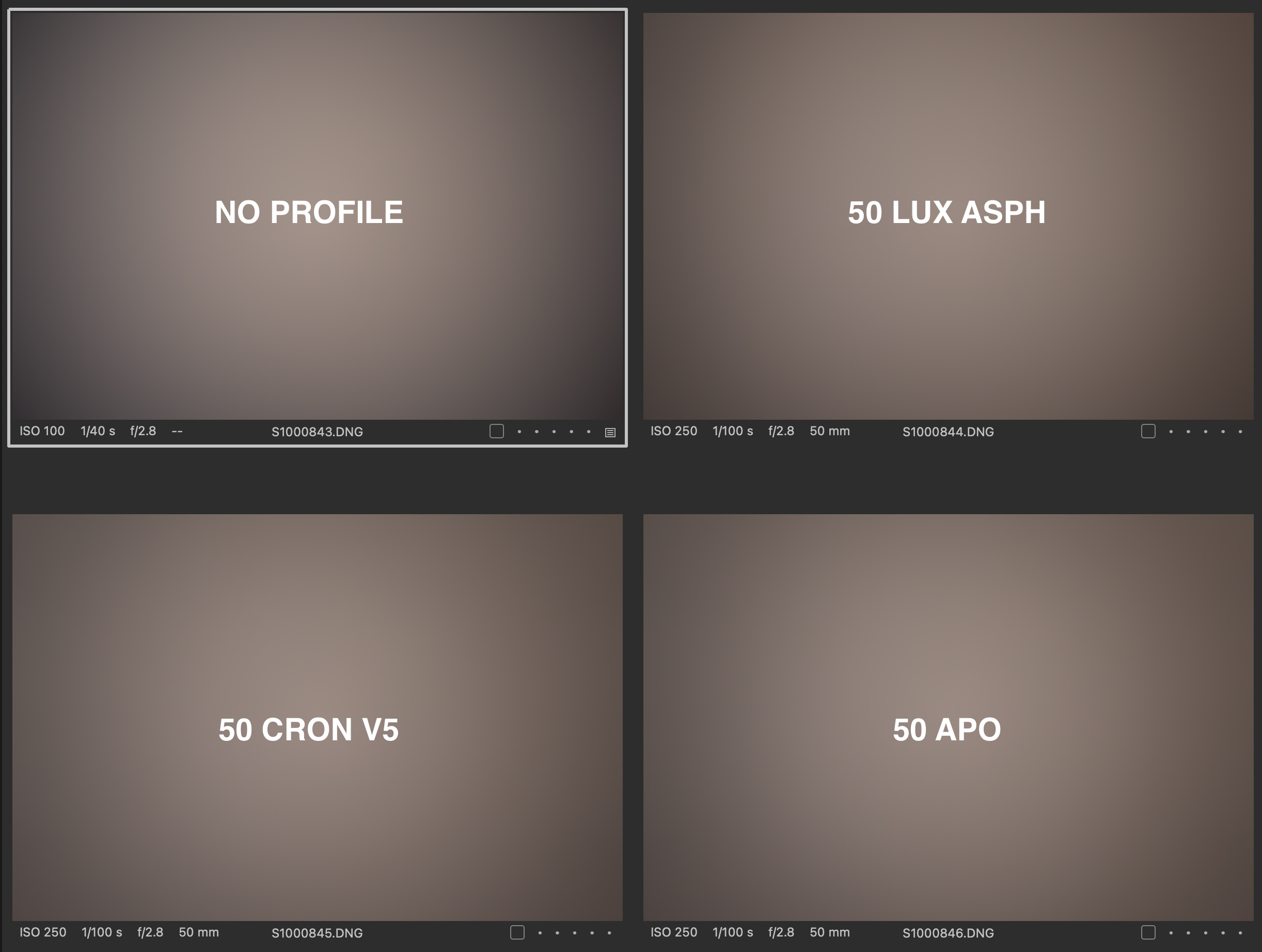
No edits
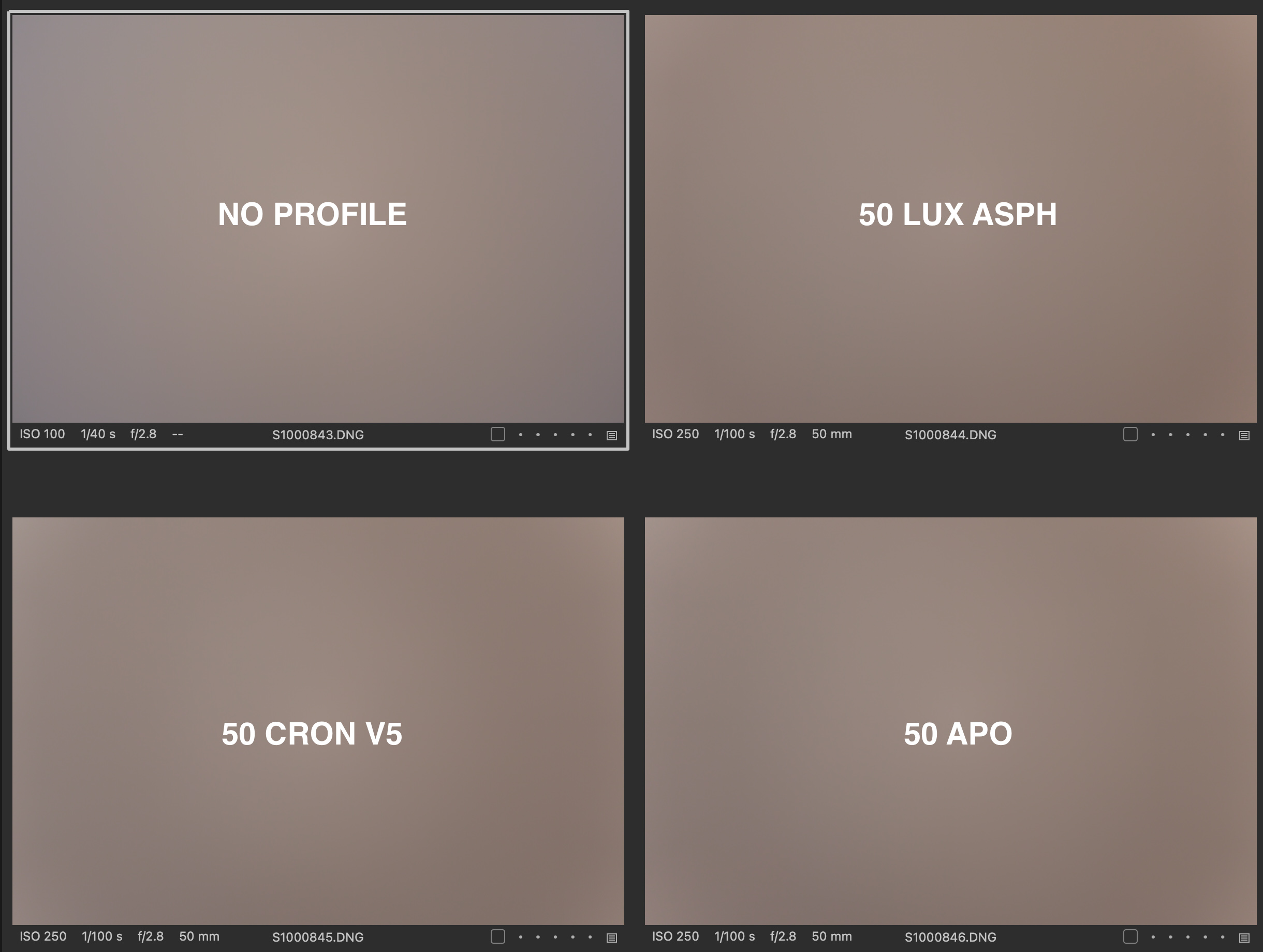
Vignette corrected
This is so much laziness and arrogance on Leica's part to not let us just dial in a focal length instead of having to choose a profile in order to get IBIS to work (since IBIS on any camera can't work without knowing the focal length). It's lazy because the effort required would be minimal, and it's arrogant because it assumes you would never adapt a non-Leica lens.
It's really hard to tell from these, but it looks like the profile for the Leica 50 APO might be the most neutral at the edges for the CV 50 APO.
Exposures may differ a bit, but WB was set the same for all. Wall is a light grey/sand color. Need to retest on something pure white to be sure I guess.
The first image is a screenshot of all the DNGs with no edits. There is nothing I can do in C1 to turn off the correction – it's baked in. Second image is with vignetting corrected as best I could (switching the profile from "Manufacturer Profile" to "Generic" so that I can get access to the vignetting correction slider, which is grayed out otherwise).
The CV 50 APO on the SL2-S sensor definitely has noticeable edge color shift. Trying to pick which profile best corrects the color shift feels like deciding which bullet to shoot myself with
© highdesertmesa
No edits
Vignette corrected
Feb 23, 2022 at 05:27 PM
p.2 #10Leica 28mm Summaron & CV 50mm APO on the SL2-S
The S1R allows setting a focal length for IBIS only. I would assume the S1 and S5 with the same 24MP sensor as the SLS are the same. An option?
Also it is possible to make your own profiles that you can apply in Lightroom. Don't know about C1. Then if the camera profile gets close you can have a 1 click correction. I haven't used it since the M9 so I'd have to do some research to find the plug in. I'm sure a search would find it. Personally I do what you've done. Take some pics and choose the closest. Then apply some corrections in LR.
Gordon
Feb 24, 2022 at 01:41 AM
p.2 #11Leica 28mm Summaron & CV 50mm APO on the SL2-S
flash wrote:
The S1R allows setting a focal length for IBIS only. I would assume the S1 and S5 with the same 24MP sensor as the SLS are the same. An option?
Also it is possible to make your own profiles that you can apply in Lightroom. Don't know about C1. Then if the camera profile gets close you can have a 1 click correction. I haven't used it since the M9 so I'd have to do some research to find the plug in. I'm sure a search would find it. Personally I do what you've done. Take some pics and choose the...Show more →
Yes, I think it would be an easy option for Leica to add a focal length selection for IBIS. That’s how Canon does it — just a simple three digit entry. Fujifilm’s GFX 100S has the best implementation since it lets you save custom presets with custom names.
I am glad Leica has the profiles for their own lenses and that they let us set them manually — but this is not because they were being accommodating toward non-Leica lenses, they simply have to have a way to identity their own non-6-bit-coded lenses. In any case, like you said, I’ll just pick the closest profile. Need to test them against a blue sky since the magenta cast at the edges really stands out that way and makes a comparison easier.
Feb 24, 2022 at 08:51 AM
p.2 #12Leica 28mm Summaron & CV 50mm APO on the SL2-S
Following up on my test above showing the cyan drift with the CV 50 APO on the SL2-S.
I highly recommend subscribing to Reid Reviews and reading his most recent article that compares the Leica 35 APO and the CV 35 APO on the M10M, M11, and M10-R. His results on color drift mirror mine when APOs are used on a Leica BSI sensor. There are some bigger revelations in the article, and I highly recommend reading it if you're considering the M11 versus the M10-R or M10M.
https://www.reidreviews.com
Mar 04, 2022 at 08:24 PM