jrhoffman75 wrote:
According to a post on DPReview you can use EOS Utility and just select the earlier version in the update option. No personal experience doing it.
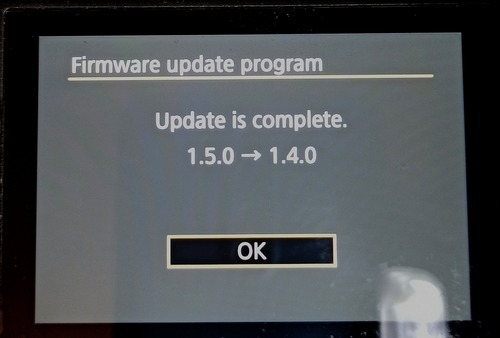
After that I tried to rollback to 1.2 with file on the memory card (without computer) , I had a warning message as an older version was found on the card and only asking if I want to delete the file .
After that I tried to rollback to 1.2 with file on the memory card (without computer) , I had a warning message as an older version was found on the card and only asking if I want to delete the file .
Both methods failed for me. When using the EOS Utility it says the transfer failed. When trying the card method it won’t allow it, and displays a message that it is older firmware.
From the comments, is it safe to say I do not want to do the latest firmware update? I had heard there are problems. But I have seen others saying no problem….
Tollefsen wrote:
From the comments, is it safe to say I do not want to do the latest firmware update? I had heard there are problems. But I have seen others saying no problem….
That's how it is with every firmware update. Most folks who upgrade and have no problems don't post anything. The folks that upgrade and have a problem post often, looking for help obviously. Makes the problem rate seem higher than it really is, and is just a phenomenon of the internet.
If you don't have a real reason to upgrade, it can wait. Seems like you don't shoot a lot of cars, which is one of the primary upgrades in this firmware. So might be worth taking the 'if it ain't broke...don't fix it" approach.
jedibrain wrote:
That's how it is with every firmware update. Most folks who upgrade and have no problems don't post anything. The folks that upgrade and have a problem post often, looking for help obviously. Makes the problem rate seem higher than it really is, and is just a phenomenon of the internet.
If you don't have a real reason to upgrade, it can wait. Seems like you don't shoot a lot of cars, which is one of the primary upgrades in this firmware. So might be worth taking the 'if it ain't broke...don't fix it" approach.
jkochuni wrote:
I tried it, and it is not possible with EOS utility 3.
Make sure you are extracting the zipped file and not just copying and pasting or simply pointing to the zipped file. I noticed this will sometimes present itself as a problem by starting and failing shortly after starting.
I moved the .fir file out, and EOS Utility did copy it over to the camera. Unfortunately instead of doing the update it fails. I know the file is good, because after it is copied over to the memory card the camera firmware updater sees the file and firmware version but will not allow the update to be completed.
Mike Jacks0n wrote:
Make sure you are extracting the zipped file and not just copying and pasting or simply pointing to the zipped file. I noticed this will sometimes present itself as a problem by starting and failing shortly after starting.
Tollefsen wrote:
I think you are right. I may just wait! Thanks for your response!
So far, I've been very impressed with 1.5.0. No lockup issues still for me, and the tracking seems even more telepathic than before. I haven't posted anything because I felt like waiting a bit longer to see if any issues crop up. So far, so good though.
Jesse Evans wrote:
So far, I've been very impressed with 1.5.0. No lockup issues still for me, and the tracking seems even more telepathic than before. I haven't posted anything because I felt like waiting a bit longer to see if any issues crop up. So far, so good though.
The Eye AF on my 28-70 F2 with 1.5 definitely shows more false positives ( detecting eyes in the clothes that are not there) shows a bit more swarming clouds of boxes before locking in, shows more face detections rather than eye detections,and a tiny bit more soft images than the old FW, which was supernaturally accurate. These symptoms would not be noticed if it weren't for me having to shoot hundreds of images of the same model for each set.
Ironically,I find the same lens producing ever slightly sharper shots at the longer end of the lens now ( perhaps a reworking of the IBIS caused this?)
Tollefsen wrote:
From the comments, is it safe to say I do not want to do the latest firmware update? I had heard there are problems. But I have seen others saying no problem….
It seems that after installing the newer firmware the AF settings need to be tweaked a bit, rather than just keeping the same settings from 1.4.0.
Looks like there are people who just ran with the old settings and got convinced that 1.5.0 is broken or something.
I tweaked mine slightly and now it’s better - especially noticeable with eye AF.