p.1 #1 · Stephanie in swimsuits (a7iii and iPhone 13 Pro)
Congratulations to Dexter75 for winning Feature Thread of the Week with 4 votes - View Previous Winners
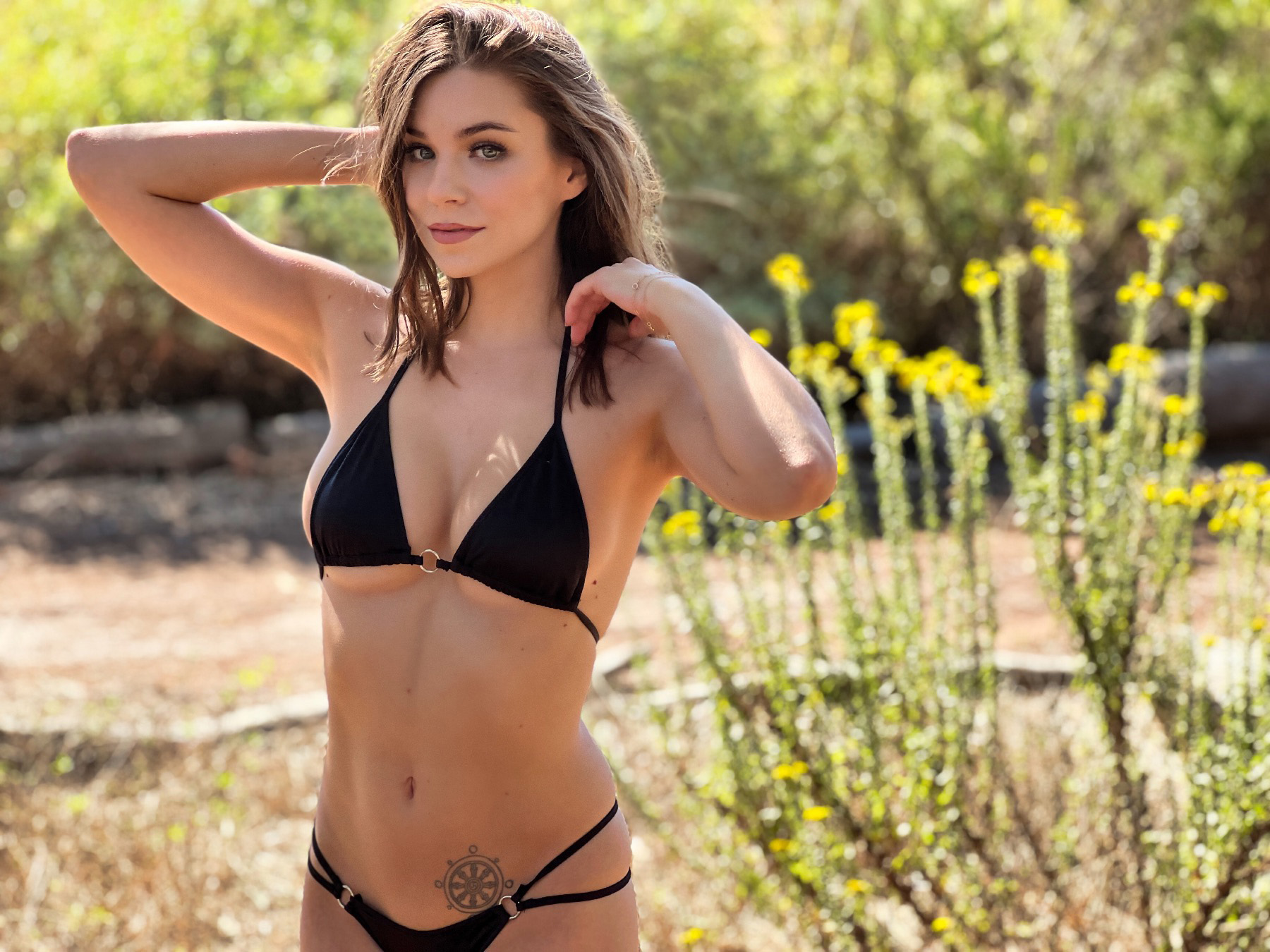
Did a shoot the other day for a client of mine who designs and makes swimsuits. Used my iPhone 13 Pro alongside my a7III with the Sony 85 f/1.8 and the Tamron 28-200 "travel" lens. Don't really mean for this to be a which photo is best thread, but I do this kind of shoot every year with the new iPhone. Photos are just for use on websites and social media. Ive been shooting portraits professionally for 17 years and this is the first time I can confidently say I would have no issues using my iPhone as a primary camera on a shoot like this. Good times!
p.1 #2 · Stephanie in swimsuits (a7iii and iPhone 13 Pro)
I keep telling my family that they are better off using their I-Phone to take a pic, than asking me to take one with my gear, since they are mostly social media use.
As long as you don't pixel peep, you don't see all the artifact / banding patterns that exist throughout. Plenty of areas that look like a topographical map. So, something to be aware of depending on your use.
I'd like to have seen a bit of fill or other light in her eyes, they seem dark (backlit, I know).
Otherwise, yes, the I-Phone can be a legitimate tool.
p.1 #3 · Stephanie in swimsuits (a7iii and iPhone 13 Pro)
RustyBug wrote:
I keep telling my family that they are better off using their I-Phone to take a pic, than asking me to take one with my gear, since they are mostly social media use.
As long as you don't pixel peep, you don't see all the artifact / banding patterns that exist throughout. Plenty of areas that look like a topographical map. So, something to be aware of depending on your use.
I'd like to have seen a bit of fill or other light in her eyes, they seem dark (backlit, I know).
Otherwise, yes, the I-Phone can be a legitimate tool.
Agreed. On my 24 inch 4.5k iMac monitor, I can definitely see the imperfections in the iPhone photos. However, very few people these days are looking at photos on large 4k desktop monitors. Most everyone uses smartphones, tablets and laptops. In fact, most clients I work with these days just have me upload their photos to Dropbox where they look at them and do everything they need with them from their smartphones. These photos look nearly identical on those smaller devices. In fact, I think I actually prefer the fake bokeh quality on the iPhone to the real bokeh quality on the Tamron 😃 I wouldn't use an iPhone for print work obviously, but sadly, those days seem long gone. Its been years since Ive had any print work.
p.1 #5 · Stephanie in swimsuits (a7iii and iPhone 13 Pro)
Hey, it’s an itsy bitsy teenie weenie blue polkadot bikini!!!
It coulda been a song!
Nice shots.
On my Phone I certainly can’t see a difference!
Nice work.
John
p.1 #7 · Stephanie in swimsuits (a7iii and iPhone 13 Pro)
She is a beautiful, sensuous young woman! I agree with "RB". Things just don't look right on her body tones, skin.....But she is beautiful and can carry the composition.
Dan
p.1 #8 · Stephanie in swimsuits (a7iii and iPhone 13 Pro)
Danpbphoto wrote:
She is a beautiful, sensuous young woman! I agree with "RB". Things just don't look right on her body tones, skin.....But she is beautiful and can carry the composition.
Dan
Yeah, I double-checked the various areas to see if they were consistent among pics (i.e. actually her skin). It kinda reminded me of somewhere between a topographical map and burn victim scarring. The "topo" banding exists elsewhere, too ... but, is most readily seen in her skin.
p.1 #9 · Stephanie in swimsuits (a7iii and iPhone 13 Pro)
RustyBug wrote:
The "topo" banding exists elsewhere, too ... but, is most readily seen in her skin.
I've never heard of "topo" banding, but what a great descriptor for this phenomenon! That's exactly what it looks like. What causes that? I know some Fuji files had issues with worm-like noise due to some issue with their color array and adobe's demosaicing algorithm, but this doesn't seem like that.
p.1 #10 · Stephanie in swimsuits (a7iii and iPhone 13 Pro)
RustyBug wrote:
Yeah, I double-checked the various areas to see if they were consistent among pics (i.e. actually her skin). It kinda reminded me of somewhere between a topographical map and burn victim scarring. The "topo" banding exists elsewhere, too ... but, is most readily seen in her skin.
All that being said, she sure is a beautiful young woman! I tend to disregard imperfections, however slight or hard, when observing such beauty! Guess that is being an olde fart!
Dan
p.1 #11 · Stephanie in swimsuits (a7iii and iPhone 13 Pro)
RustyBug wrote:
Yeah, I double-checked the various areas to see if they were consistent among pics (i.e. actually her skin). It kinda reminded me of somewhere between a topographical map and burn victim scarring. The "topo" banding exists elsewhere, too ... but, is most readily seen in her skin.
I believe that’s from the Luminar AI edit and not the iPhone. I’ve noticed it in all my photos edited in Luminar when zoomed in around 200%. I don’t see it on this one but your eyes may be better than mine. I will post an unedited shot off the iPhone and see if it shows up.
p.1 #12 · Stephanie in swimsuits (a7iii and iPhone 13 Pro)
Beautiful images, I see the worms in #1&2 but not in 3. Oddly enough #3 is my favorite before I went looking. Don't know if its her facial expression or just something different.
On a side note, I envy your job. I'm sure that you have good and bad days like everyone else, but I think your good days are definitely "gooder" than most of my good days.
p.1 #13 · Stephanie in swimsuits (a7iii and iPhone 13 Pro)
Danpbphoto wrote:
I tend to disregard imperfections,
Yeah, I look past them also take in the "whole" of an image. But, I often feel compelled to share with our fellow FM'ers ... "in case" it might be something meaningful to them. It's not meant to be negative, just observant.
I've learned long ago, that I can always "print small" to cover a LOT of my own technical imperfections.
p.1 #14 · Stephanie in swimsuits (a7iii and iPhone 13 Pro)
Dexter75 wrote:
I believe that’s from the Luminar AI edit and not the iPhone. I’ve noticed it in all my photos edited in Luminar when zoomed in around 200%. I don’t see it on this one but your eyes may be better than mine. I will post an unedited shot off the iPhone and see if it shows up.
AI ... gotcha.
That's the reason why I don't use AI.
Someday, AI might be an okay thing. And for routine stuff, I guess it probably serves a purpose. But, I (and others I've spoken with feel similar) don't think AI is ready for prime time on the big stage. At least not in terms of without using the same level of critical scrutiny that you would for any other form of critical work.
In other words, the "automatic" aspect of AI might help with some problems, but it also creates other problems that you have to be vigilantly on guard for ... if your work has any degree of critical element to it. Social media ... not that critical.
My guess is that you'll find the topographical banding to be PP / AI related, more so than iPhone (itself) related.
p.1 #15 · Stephanie in swimsuits (a7iii and iPhone 13 Pro)
amacal1 wrote:
I've never heard of "topo" banding, but what a great descriptor for this phenomenon! That's exactly what it looks like. What causes that? I know some Fuji files had issues with worm-like noise due to some issue with their color array and adobe's demosaicing algorithm, but this doesn't seem like that.
I've never heard it mentioned that way before either (but, I've never seen it like that before, too) ... just tried to find a way of describing it, and that's how it struck me.
p.1 #16 · Stephanie in swimsuits (a7iii and iPhone 13 Pro)
Doc25 wrote:
Beautiful images, I see the worms in #1&2 but not in 3. Oddly enough #3 is my favorite before I went looking. Don't know if its her facial expression or just something different.
On a side note, I envy your job. I'm sure that you have good and bad days like everyone else, but I think your good days are definitely "gooder" than most of my good days.
p.1 #17 · Stephanie in swimsuits (a7iii and iPhone 13 Pro)
who designs and makes swimsuits
From a different perspective - if the subject was swimwear and not "hot model" - they feel awkward due to poor fit. ("underboob"). She needed some tape or adjustment to help. Probably none of the guys viewing will care...they might even like it. She might not even mind. It's just the first thing that jumped out to me.
p.1 #18 · Stephanie in swimsuits (a7iii and iPhone 13 Pro)
KE_Photo wrote:
From a different perspective - if the subject was swimwear and not "hot model" - they feel awkward due to poor fit. ("underboob"). She needed some tape or adjustment to help. Probably none of the guys viewing will care...they might even like it. She might not even mind. It's just the first thing that jumped out to me.
Sorry KE but this is just not your Father's Oldsmobile!
This is a designer suit and it's made to fit that way. fortunately this model has pretty small boobs. Plenty of DDD girls out there wearing suits WAY smaller than that! As long as the nipples are pretty much mostly covered the suit is plenty big enough! LoL
It's a brave new and sexy world out there!!!
John
p.1 #19 · Stephanie in swimsuits (a7iii and iPhone 13 Pro)
Doc25 wrote:
Beautiful images, I see the worms in #1&2 but not in 3. Oddly enough #3 is my favorite before I went looking. Don't know if its her facial expression or just something different.
On a side note, I envy your job. I'm sure that you have good and bad days like everyone else, but I think your good days are definitely "gooder" than most of my good days.
Thanks, can't complain most days! Someone else here mentioned they see it photos 1&2 but not 3 which is odd because 3 is the iPhone shot.




 ! Great shots!
