Ronny Olsson wrote:
it will be 1600 or max 2048 for me on the width hereafter
Ronny
O.k., it worked.
The correct way of posting from Flickr was explained to me by Scott (@RoamingScott):
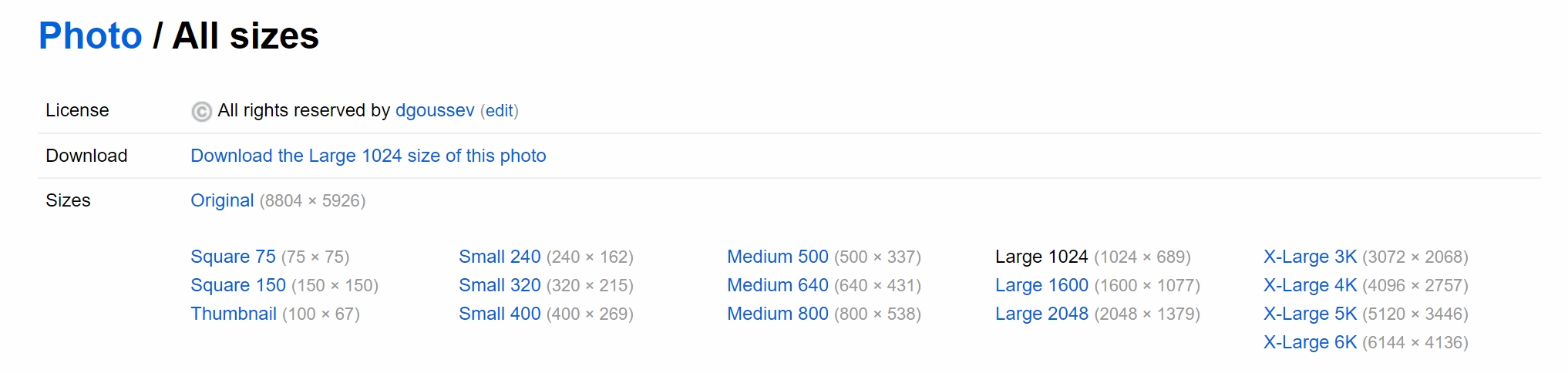
"all you need to do is place the Flickr url that ends in .jpg in your post. Don’t put any tags around it. From desktop (in Flickr), you’d click the download button (when viewing an image, look for the down-pointing arrow in the bottom right corner of the Flickr window), go to “all sizes”, pick the size you want to post, right click on the chosen size and “copy image location” or similar verbiage."
Regardless of the size, the image would appear in FM to have the right side at the right side of the window, without overflowing.
Like, the image I posted above is 5093x3480.
Then you can only use square, small ,medium, large, or original
you can't, for example, post in 1600 x if it's not your largest or original file is 1600 x width
oh well, doesn't matter
I am posting the BBcode as I have always done
then I can choose what I have there
1600 x 1098
OM Digital Solutions OM-1 + OLYMPUS M.150-400mm F4.5 by Ronny Olsson, on Flickr
Ronny Olsson wrote:
Then you can only use square, small ,medium, large, or original
you can't, for example, post in 1600 x if it's not your largest or original file is 1600 x width
oh well, doesn't matter
I am posting the BBcode as I have always done
then I can choose what I have there
If you click on "View all sizes" then you see more options, including 1600 x 1077.
It is important to emphasize that one doesn't need to(!) resize the photos from Flickr for posting on FM, except when one want to resize deliberately, out of a personal concern that the full-sized images can be stolen, the assumption being that after major resizing, the poor-quality photos are of no use to those who might be stealing photos.
ruthenium wrote:
If you click on "View all sizes" then you see more options, including 1600 x 1077.
It is important to emphasize that one doesn't need to(!) resize the photos from Flickr for posting on FM, except when one want to resize deliberately, out of a personal concern that the full-sized images can be stolen, the assumption being that after major resizing, the poor-quality photos are of no use to those who might be stealing photos.
yes I know Dmitri
but if you copy the link address there, it won't be d.jpg at the end and then the link won't work
Ronny Olsson wrote:
yes I know Dmitri
but if you copy the link address there, it won't be d.jpg at the end and then the link won't work
Ronny
Ronny, I see the problem. The correct way to do this:
1) Left-Click on "View all sizes"
2) Left-Click on the size you want, for example "Large 1600"
3) Right-click on "Download the Large 1600 size of this photo" that appears under "license" in the "Download" line
For example, this way I copied the following two links,
"Large 1600"
"https://live.staticflickr.com/65535/53887318439_8f1e7a214c_h_d.jpg"
"Large 4K (4096x2757)"
"https://live.staticflickr.com/65535/53887318439_a302341a17_4k_d.jpg"
Now I am going to post these two (I will remove the photos at the end of the day)
The size is not lost; if you download the two photos in your browser and save the jpgs on your computer, these jpgs will have the expected sizes 1600 pixels and 4096 pixels on the long side.
Note that the 4K image is displayed correctly, with the right edge at the right side of the browser window.
Also, the 4K displays more detail, compared to the "Large 1600" image. I like the former more than the latter. If I wanted to post from Flickr, perhaps posting 4K photos would have been my preference.