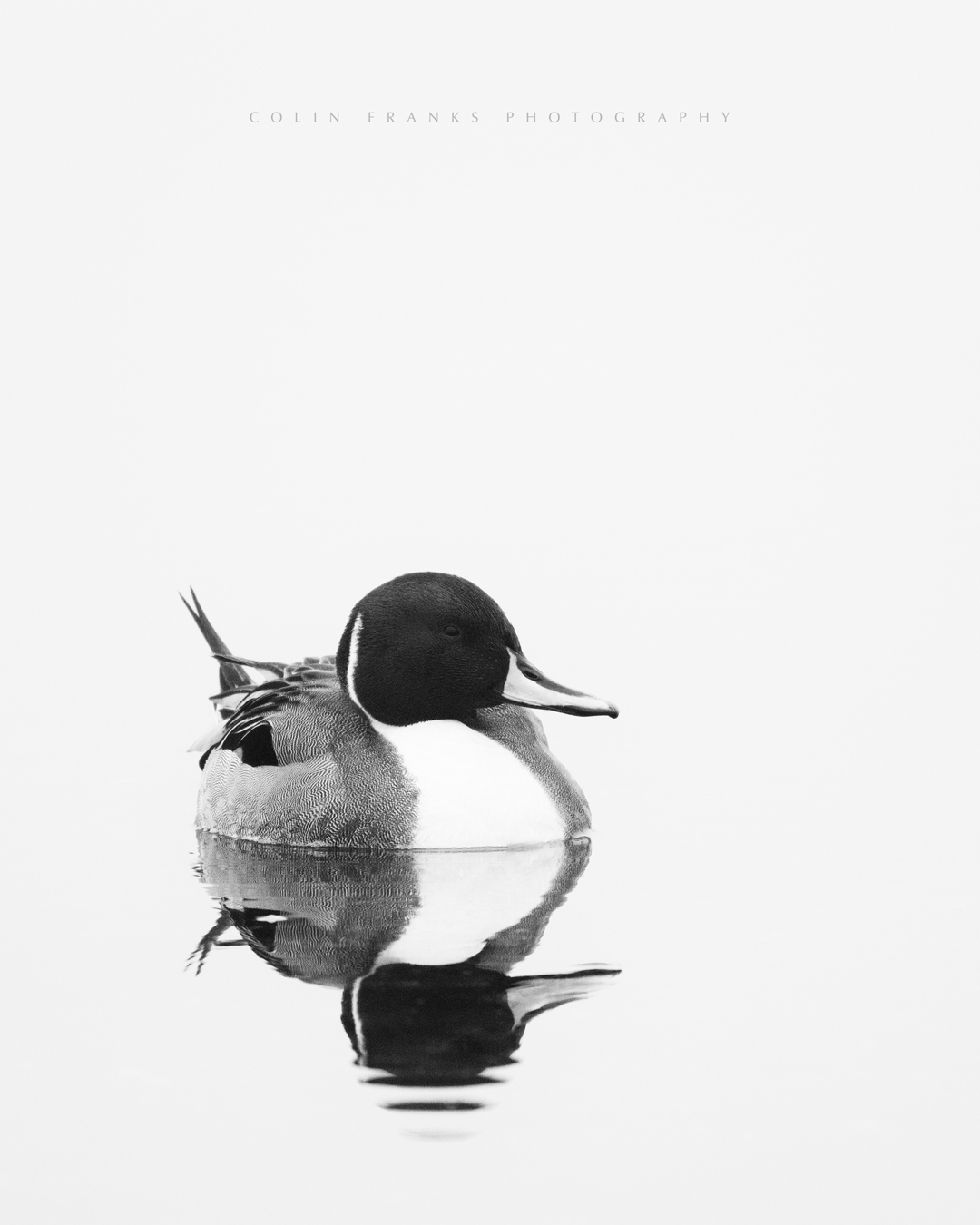
My first shot with the new gear (OM-1 and 150-400). The weather forecast last night was for mostly sun and a little cloud for this morning, so I got up early, drove to our local haunt, only to experience pea soup fog which refused to burn off.
This forced me to get a little creative, and this is the only keeper worth showing (Northern Pintail).
Colin F wrote:
My first shot with the new gear (OM-1 and 150-400). The weather forecast last night was for mostly sun and a little cloud for this morning, so I got up early, drove to our local haunt, only to experience pea soup fog which refused to burn off.
This forced me to get a little creative, and this is the only keeper worth showing (Northern Pintail).
pleasing aesthetics and a good amount of detail (image quality) shown.
I am curious...
how would you compare this image to the same had you used your FF gear?
do you think the amount of detail/image quality captured (as shown by the your presented here) would be notably more apparent had you used the FF gear?
was the ease, or level of difficulty, in capturing the image (and processing it) any more or less than you'd imagine using your FF gear?
Paul_100A wrote:
Pleasing aesthetics and a good amount of detail (image quality) shown.
I am curious...
How would you compare this image to the same had you used your FF gear?
Do you think the amount of detail/image quality captured (as shown by the your presented here) would be notably more apparent had you used the FF gear?
Was the ease, or level of difficulty, in capturing the image (and processing it) any more or less than you'd imagine using your FF gear?
Given that it was very foggy, I don't think I can say anything about image quality yet. I can say though that I'm really liking the smaller, lighter kit, and especially the versatility of the zoom and built-in TC. The faster speed in processing the smaller files is nice, but I didn't have too much trouble with the 50MP files of the A1. The most difficult part was me trying to stand up from sitting on my rubber mat - that took about a minute or two, as my legs just have no strength anymore due to the MND. I had to grab a piece of driftwood and slowly prop myself up.
When I recently bought the OM-1 and 150-400, I also purchased the 1.4 and 2X extenders. The weather was pretty dreary today, with terrible light, so I thought I’d pop the 2X on and give it a torture test. I have trees way off the deck (50’?), and here’s what I got. All of the images have been cropped a fair bit too.
I noticed that Topaz Photo AI did a poor job on the sharpening aspect compared to my old A1 files (no surprise there), and as usual I had to back off the denoise a bit, as I find the default too heavy-handed.
I certainly couldn’t make good prints with these, and they’re barely passable for internet use, but again, given that it’s a 2X on a smaller m4/3 sensor in poor light, I was surprised that they turned out at all. 2000-5000 ISO with relatively low shutter speeds.
This is perfect.
I’ve posted about exactly this a few times here and there lately.
If you are using IS-Auto on the OM-1,
please switch to IS-1 and retry these pics.
I simply always used IS-Auto by default.
A fellow OM-1 150-400 shooter told me he thought IS-1 did a better job for him.
I switched to IS-1 and immediately noticed an improved keeper rate not only with the lens and internal TC but with the 2.0 as well.
*I tried the 2.0TC on the 150-400 several times in the past (with IS-Auto) and the best I could manage was a very low number of ‘good from far but far from good’ images amongst the garbage rest.
I have images captured with IS-1 and the 150-40O with 2.0 that were included in the top picks for my 2024 bird calendar. That’s my highest criteria 😎
If you did retry and you received the same improved results I found…that would be an impressive discovery.
Also…I was a fan of Topaz for numerous years. I used Denoise and Sharpem Ai and then PhotoAi when it was offered.
For most of my Topaz Ai time there was far too many occasions where I just didn’t like and could not use their results. Sometimes Denoise would sharpen better than Sharpen and vs/vc (until the next update changed everything like it often did).
There was just something or other that the app did wrong that I had to wonder “what in the hell did you do that for”. Sometimes this would even be two images in the same burst sequence where one would be processed great and then other would be ‘wtf’. Saying all that I still found enough times that the apps gave me results I liked and at least could put on a layer in PS and adjust to taste further. I tried DXO PR 2 and 3 and they were mostly OK (as good as Topaz’s stuff) but they always skewed either the subject or the borders or both enough that I could not put the PR edits on a layer with the original to adjust to taste. I tried hard to figure out how to prevent PR to not skew the images…i never could prevent it.
Adobe LR’s Denoise never once has let me down. Great results all the time.
I found the OM-1 files respond extremely well to processing in DxO PureRAW, especially for retaining sharpness and detail while reducing high ISO noise.
Thanks Paul for that tip. I've made that setting change.
molson wrote:
I found the OM-1 files respond extremely well to processing in DxO PureRAW, especially for retaining sharpness and detail while reducing high ISO noise.
Thanks. This raises an interesting thing that I've been wondering about for a long time:
After spending $1000 on an Adobe graphics suite ~10 years ago, I had no appetite to shortly thereafter start paying them monthly for the CC subscription, and I still use PS CS6 to this day. I am "at one" with the workflow, and all I have to do is convert all my newer Raw files first into DNGs. I process them in ACR, then into PS for whatever is needed (also have NIK as a plug-in). I've never even tried LR.
But in more recent years, I'm often wondering if I'm missing out on something in terms of all the technical things going on in the background (including lens info), and if I would really benefit from the subscription, and if I did, I still feel like I would want to keep my workflow the same (ACR into PS), as I don't understand what I'd be missing with LR. I'm also not fond of the whole "cataloguing" thing that LR does. I prefer full manual control of my files. Enlighten me.
Colin F wrote:
Thanks Paul for that tip. I've made that setting change.
Thanks. This raises an interesting thing that I've been wondering about for a long time:
After spending $1000 on an Adobe graphics suite ~10 years ago, I had no appetite to shortly thereafter start paying them monthly for the CC subscription, and I still use PS CS6 to this day. I am "at one" with the workflow, and all I have to do is convert all my newer Raw files first into DNGs. I process them in ACR, then into PS for whatever is needed (also have NIK as a plug-in). I've never even tried LR.
But in more recent years, I'm often wondering if I'm missing out on something in terms of all the technical things going on in the background (including lens info), and if I would really benefit from the subscription, and if I did, I still feel like I would want to keep my workflow the same (ACR into PS), as I don't understand what I'd be missing with LR. I'm also not fond of the whole "cataloguing" thing that LR does. I prefer full manual control of my files. Enlighten me....Show more →
“ I'm also not fond of the whole "cataloguing" thing that LR does. I prefer full manual control of my files.”
Ha! that brings me right back to the day when LR suddenly required files be imported, catalogued and so forth instead of me just opening a file in LR to edit and spit out right back where it was.
I suddenly hated LR but still wanted to use it for editing. it took a bit to figure out how to work with it but I assure you its cataloguing utility became a benefit to me.
With the subscription changeover I was as unhappy as anyone one else and resisted until the stand alone was no longer updated.
I was silly to do so because for 10$ a month I get the best of LR and PS.
I’ve never not looked at a piece of software to replace LR. I’ve paid for a quite a few and tried even more.
LR’s Denoise has all but put out that fire. I have very little urge to keep abreast of the LR alternatives nowadays. LR’s Denoise does the trick every time.
Colin F wrote:
Thanks. This raises an interesting thing that I've been wondering about for a long time:
After spending $1000 on an Adobe graphics suite ~10 years ago, I had no appetite to shortly thereafter start paying them monthly for the CC subscription, and I still use PS CS6 to this day. I am "at one" with the workflow, and all I have to do is convert all my newer Raw files first into DNGs. I process them in ACR, then into PS for whatever is needed (also have NIK as a plug-in). I've never even tried LR.
But in more recent years, I'm often wondering if I'm missing out on something in terms of all the technical things going on in the background (including lens info), and if I would really benefit from the subscription, and if I did, I still feel like I would want to keep my workflow the same (ACR into PS), as I don't understand what I'd be missing with LR. I'm also not fond of the whole "cataloguing" thing that LR does. I prefer full manual control of my files. Enlighten me....Show more →
I would suggest downloading a trial version of DxO PureRAW 3. You can use it to convert your raw files to DNG and then process them in your normal workflow. DxO has superior raw conversion and noise reduction capabilities for Olympus files (and Fuji X files) compared to ACR or Lightroom, and their lens correction profiles are also better. If you like it, it's a one-time purchase; I couldn't imagine using OM gear without it.
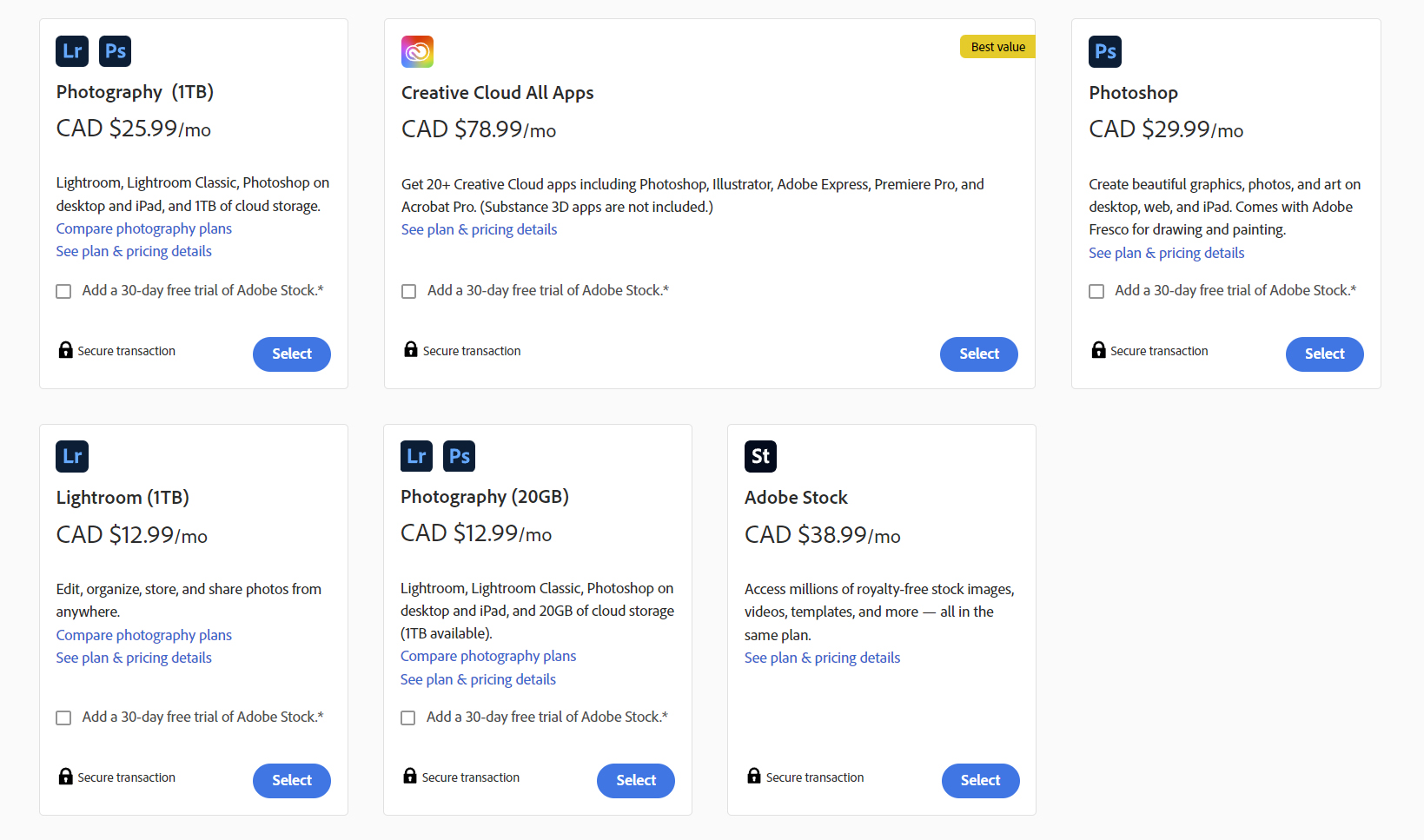
Paul: I looked at the options a while ago, and it's clear as mud:
As usual, we Canadians pay more than Americans, so let's just say it's $20 per month; well that $2400 I've saved over the last ten years, and yet I somehow got my images done with CS6. There's a reason why so many people hate Adobe now, it's called corporate greed.
I'm still not clear on what LR can do that ACR & PS cannot. It was my understanding that LR has very real editing limitations, so what's the appeal?
I use the $12.99 ($9.99 in the US, sorry) version you have listed there with LR, LRC and PS. I am not thrilled with a subscription plan either but when you look at what they used to charge for the standalone versions it really is reasonable for what you get. Probably 98% of my editing is done quickly in LightRoom Classic on my Mac book connected to a 27" monitor. Away from the house it is nice to have it on my phone and iPad as well. I am also pretty happy with the new Denoise feature in LRC. There are a lot of other great features including the people/sky/subject selection masking and the new background blur also works well. The PS AI features are an improvement too.
As usual, we Canadians pay more than Americans, so let's just say it's $20 per month; well that $2400 I've saved over the last ten years, and yet I somehow got my images done with CS6. There's a reason why so many people hate Adobe now, it's called corporate greed.
I'm still not clear on what LR can do that ACR & PS cannot. It was my understanding that LR has very real editing limitations, so what's the appeal?
Molson: What's the learning curve like for DxO?
I don’t pay a lot of of attention to these types of things…but iirc Adobe hasn’t raised their subscription prices since the start.
Also for 12 dollars a month I am enjoying the convenience of the service and having the best software at my disposal at all time. so, worth it for me.
Check out DXO PR. There is no learning curve. It’s a one click app and there are some setting parameters as well. If you like a one click app with no means to adjust the global or local effects then DXO is a solution.
DXO edits are the same as Topaz in my opinion (sometimes good sometimes heavy handed in areas or globally) BUT Topaz has masking options (but I’m not sure if PhotoAi has masking options).
at least Topaz edits can be put on a layer in PS and edited with the original. You can’t do that with DXO edits as far as I know. I thoroughly discussed my issues with DXO with PR2 and then with PR3 when I was surprised nothing was fixed in PR3 to correct the issues I had with PR2.
Watch a few LR YouTube’s. It’s literally insane what can be done quickly and easy in LR nowadays.
People want to ping pong files back and forth between several apps to get results subpar from that of LR/PS because they are mad at Adobe, go right ahead. It’s not my time or money. I like to minimize my time in post and get the best results possible for the time spent.
Adobe easily gives me that in spades and as long as that continues they’ll receive my money and I’ll gladly hand it over.
Colin F wrote:
I'm still not clear on what LR can do that ACR & PS cannot. It was my understanding that LR has very real editing limitations, so what's the appeal?
Molson: What's the learning curve like for DxO?
I typically only use DxO PureRAW for a quick conversion to DNG with noise reduction and lens corrections applied, and then process the resulting file in my normal LR workflow just like any other file. I've never used ACR, so I can't comment on that.
I was using the PureRAW plug-in from within LR, but it's currently broken (Adobe's way of forcing customers to use their noise reduction app instead?)
Colin F wrote:
Thanks Paul for that tip. I've made that setting change.
Thanks. This raises an interesting thing that I've been wondering about for a long time:
After spending $1000 on an Adobe graphics suite ~10 years ago, I had no appetite to shortly thereafter start paying them monthly for the CC subscription, and I still use PS CS6 to this day. I am "at one" with the workflow, and all I have to do is convert all my newer Raw files first into DNGs. I process them in ACR, then into PS for whatever is needed (also have NIK as a plug-in). I've never even tried LR.
But in more recent years, I'm often wondering if I'm missing out on something in terms of all the technical things going on in the background (including lens info), and if I would really benefit from the subscription, and if I did, I still feel like I would want to keep my workflow the same (ACR into PS), as I don't understand what I'd be missing with LR. I'm also not fond of the whole "cataloguing" thing that LR does. I prefer full manual control of my files. Enlighten me....Show more →
I don't use LR either. But, the PS subscription is worth it to me because I like to edit distractions out of my photos (e.g. branches or powerlines etc...). The new generative fill allows me to save literally hours of time.
Only a handful of keepers from this morning. ~1500 files deleted.
The 150-400 is a great little lens, but the OM-1 sure could use some improvements. I’m so sad to have needed to sell my Sony A1.
Colin F wrote:
Only a handful of keepers from this morning. ~1500 files deleted.
The 150-400 is a great little lens, but the OM-1 sure could use some improvements. I’m so sad to have needed to sell my Sony A1.
These are all terrific, Colin! I completely understand that only you see the full res files and only you know how much work went into the final output, but as a viewer of your web-res images, I wouldn’t say the difference between your Sony images and these is dramatic. Your trademark composition, soft light, and subtle processing are still consistent with what I have seen from your prior work. Just my opinion, of course.
mitesh wrote:
These are all terrific, Colin! I completely understand that only you see the full res files and only you know how much work went into the final output, but as a viewer of your web-res images, I wouldn’t say the difference between your Sony images and these is dramatic. Your trademark composition, soft light, and subtle processing are still consistent with what I have seen from your prior work.
Ya, but the thing is I didn't really have any keepers at all, I had to buy these off of Geoff ( just kidding).
I'm finding that there's so little latitude with not only the dynamic range and pushing the file around, but also for cropping. The OM-1 AF can be infuriating at times, and the fact that the rear screen only flips out to the left side really sucks. They need to design it so that it also flips straight out like the A1/a9. When holding it low near the ground by the inverted lens foot, my left arm is in the way of the screen, making it very difficult to properly see what I'm shooting.
I resent ever having to leave LR to go to PS, luckily 99% of my photography only requires LR. In the past I have paid for various add-ons, but essentially find that in an update or two Adobe adds the same ability to LR. I too am baffled as to why people prefer to make things more complicated than is necessary, but of course any software is confusing when you are first confronted with it.
Colin F wrote:
Ya, but the thing is I didn't really have any keepers at all, I had to buy these off of Geoff ( just kidding).
I'm finding that there's so little latitude with not only the dynamic range and pushing the file around, but also for cropping. The OM-1 AF can be infuriating at times, and the fact that the rear screen only flips out to the left side really sucks. They need to design it so that it also flips straight out like the A1/a9. When holding it low near the ground by the inverted lens foot, my left arm is in the way of the screen, making it very difficult to properly see what I'm shooting.
In my experience the OM-1 is a capable body but doesn’t match any of the pro bodies from the big 3 which I think is acceptable at 1/3rd of the price point. It’s not to say the OM-1 isn’t capable it’s just not the same especially if you’ve had experience with the others like you and I have.
So it’s a conundrum of choosing an excellent walkabout lens on a decent body that’s a good value vs. amazing body and nothing really comparable lens-wise.
I would find it hard moving from an A1 to the OM-1 however I personally loathe the 200-600 FE even though I can get decent results with it and it makes me miss my 150-400 that I sold to fund my underwater rig.
I hope OM steps up the game with a more competitive body in 2024. It might convince me to pick up another 150-400. I think the lens is as about as perfect for my needs as I could ask for but the OM-1 left me wanting after using the other bodies, in some areas but not all.















 just kidding).