If I’ve understood correctly, the various Adobe Colour / Landscape / Neutral profiles are keyed off Adobe Standard (which is camera-specific, and gives a common starting point to which Colour / Landscape / … adjustments are applied).
Cobalt seem to provide the equivalent of Adobe Standard (using LumaRiver’s dCamProf) and then a whole bunch of different profiles / emulations keyed off that. This would be valuable to you if you like one of their emulations, as it would save doing a lot of fiddling with each picture to get the look that you like. I’m less bothered about “accuracy” which they offer as a key selling point. More important is how gracefully these profiles handle highly saturated blue lights in night scenes, eg.
Yes Goodrich
basically it is so; for greater precision I can add that unlike Adobe, where the only colorimetry profile is the Adobe Standard, Cobalt offers four unique colorimetry profiles:
Standard, with ACR contrast curve and correction for complexions
Neutral, with ACR contrast curve
Flat, with exposure-only curve
Repro, linear
Plus the Modular for the operation of modular packages.
The nodal point is the contrast curve; being able to have Flat and Repro profiles allows greater workability of the file.
In Adobe's solution, any further modular profile or preset cannot ignore the ACR curve applied by default; and in case he is forced to counter it with often counterproductive effects.
Raamiel wrote:
Yes Goodrich
basically it is so; for greater precision I can add that unlike Adobe, where the only colorimetry profile is the Adobe Standard, Cobalt offers four unique colorimetry profiles:
Standard, with ACR contrast curve and correction for complexions
Neutral, with ACR contrast curve
Flat, with exposure-only curve
Repro, linear
Plus the Modular for the operation of modular packages.
The nodal point is the contrast curve; being able to have Flat and Repro profiles allows greater workability of the file.
In Adobe's solution, any further modular profile or preset cannot ignore the ACR curve applied by default; and in case he is forced to counter it with often counterproductive effects....Show more →
+1
I'm finding the Flat and Repro profiles invaluable.
Curiosity got the better of me and I bought 4 packs of cobalt profiles. To say I'm disappointed is an understatement. I spent almost 200 euros on something that I will never use.
I have a favorite color camera for many years - fuji s5pro. There were and are different cameras from nikon, canon ... but the result with fuji s5pro still pleases me the most. I wanted to get a picture on my new fuji xt4 like on fuji s5pro, and cobalt-image promises it. https://www.cobalt-image.com/product/ccd-fever/
I was ready to get a non-perfect match, but in reality this does not look like emulation at all. Some other profiles, supposedly emulating, for example, leica, defy explanation at all, how can this be sold ?, it's so bad. All attempts to present dissatisfaction to the developer, they unreasonably interpret as the stupidity of the buyer.
I sincerely do not advise this to buy - an extremely poor quality product.
Real Fuji s5pro vs cobalt emulation- look at what it does with red, orange, look at the flowers, how the emulation darkens them unnaturally. And in general...: image share
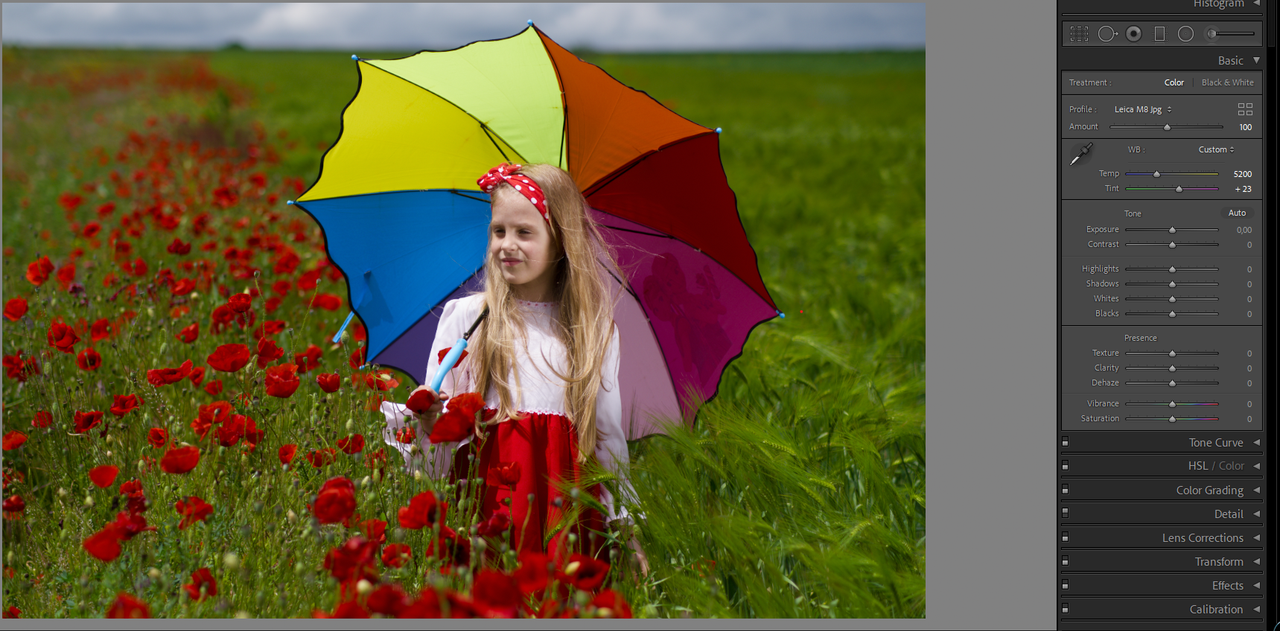
And then supposedly leica m8, according to cobalt-image.
It's even worse here - the flowers are generally blackened.
Do you really think that the m8 is so red?!
And they tell me that I didn't set the white balance correctly. They insist that this will save the flowers from blackening.
R.Vic wrote:
And then supposedly leica m8, according to cobalt-image.
It's even worse here - the flowers are generally blackened.
Do you really think that the m8 is so red?! https://i.postimg.cc/KYhH2vrF/m8.png
And they tell me that I didn't set the white balance correctly. They insist that this will save the flowers from blackening.
You strike me as someone that is looking for attention.
DaveFP wrote:
You strike me as someone that is looking for attention.
If you like the software use it.
If you don't then don't.
That sounds harsh to me. He has the right to say that he's disappointed, especially if he thinks that its complaints have not received a decent answer. After all, the founder of Cobalt communicates a lot on this forum, so I guess that people that are not happy have the right to say it publicly as well on the same forum. It works in both ways.
Real Fuji s5pro vs cobalt emulation- look at what it does with red, orange, look at the flowers, how the emulation darkens them unnaturally. And in general...: https://i.postimg.cc/KjpPvQ6B/1.gifimage share
Nothing can be seen through that horrible gif compression...
Ayoul wrote:
That sounds harsh to me. He has the right to say that he's disappointed, especially if he thinks that its complaints have not received a decent answer. After all, the founder of Cobalt communicates a lot on this forum, so I guess that people that are not happy have the right to say it publicly as well on the same forum. It works in both ways.
March 3rd
These profiles are not about accuracy. I don't even know what they are about.) Ambitious statements, but in the end a very low-quality product. Soon I will find time and show examples. Authors should redo their work, or change advertising slogans on the site.
March 5th
Curiosity got the better of me and I bought 4 packs of cobalt profiles. To say I'm disappointed is an understatement. I spent almost 200 euros on something that I will never use.
I have a favorite color camera for many years - fuji s5pro. There were and are different cameras from nikon, canon ... but the result with fuji s5pro still pleases me the most. I wanted to get a picture on my new fuji xt4 like on fuji s5pro, and cobalt-image promises it.� �https://www.cobalt-image.com/product/ccd-fever/
I was ready to get a non-perfect match, but in reality this does not look like emulation at all. Some other profiles, supposedly emulating, for example, leica, defy explanation at all, how can this be sold ?, it's so bad. All attempts to present dissatisfaction to the developer, they unreasonably interpret as the stupidity of the buyer.
I sincerely do not advise this to buy - an extremely poor quality product.
On the third of March, I already had these profiles, and I tried them enough. I just want to warn people not to waste money like me, because the loud statements of manufacturers have nothing to do with reality, and expectations will not come true.
R.Vic wrote:
On the third of March, I already had these profiles, and I tried them enough. I just want to warn people not to waste money like me, because the loud statements of manufacturers have nothing to do with reality, and expectations will not come true.
We get it.
R. Vic doesn't like the profiles.
Perhaps it's time to focus on the profiles that you do like...
In my understanding you should get the same colours and tone curve from images taken with your xt4 + cobalt-profiles than from your images taken with the s5pro (jpg?) if
- you match exposure and white balance (grey card) in Lightroom
- you use the same lens (lenses can render colors differently)
- the light (sun, clouds, etc.) don't change between the shots
If one of these conditions isn't met, it's hard to proof that the profile doesn't work as advertised.
I assume you used different lenses on both cameras? I'm also not sure if the other conditions are met in your example images. I agree although, that *if* all of these conditions are met and the images would look like yours, than this would not be a good result.
What I like to know from the creator of the cobalt-profiles is: what exactly is the reference for the emulations? I think for jpgs out of the (original) camera this is clear. But what about the original-raw files. These raw-files need to have a tone-curve and color interpretation where they are based on. Is the Lightroom-interpretation being used? Or the processing result from the manufactor-raw-applications?
What I like to know from the creator of the cobalt-profiles is: what exactly is the reference for the emulations? I think for jpgs out of the (original) camera this is clear. But what about the original-raw files. These raw-files need to have a tone-curve and color interpretation where they are based on. Is the Lightroom-interpretation being used? Or the processing result from the manufactor-raw-applications?
The basic procedure for the emulation of a camera is the calculation of a 3D Lut which has the Jpg OOC file as its destination and the Raw developed with our Modular profile (.dcp) as its source, which then becomes the basis for the graft modular profiles.
The concept is that within the technical limits all cameras in our database offer an aligned base through their specific Modular profile. From what point on the emulation delta is the xmp profile.
Obviously, particular care must be taken in the WB which is a part of the process that cannot be taken into account by the profile and remains an independent phase.
I was waiting for his promised first part of the "revenge".
This customer bought some emulations and started complaining in the rudest possible way you can read on a mail about his disappointment on the quality of the profiles.
We, as always, started our full support (even ready to go over our refund policy as we did many times) by asking for RAW and samples and we (we because we did the test on two different computers and twice to be sure) found why the customer was not happy about our products; not correct editing, bad wb. Once well edited the image are exactly in the range made by two different exposures with two different lenses and capture settings.
After our test the customer followed the behaviour being offended by our test, his experience tells him we cheated and... he went way off civil way to manage this conversation using a very offensive and threatening approach.
We took the conversation as proof for any legal action for blackmail and I think there is not more to add on these pages than our apologies for that off-topic.
Raamiel wrote:
The basic procedure for the emulation of a camera is the calculation of a 3D Lut which has the Jpg OOC file as its destination and the Raw developed with our Modular profile (.dcp) as its source, which then becomes the basis for the graft modular profiles.
The concept is that within the technical limits all cameras in our database offer an aligned base through their specific Modular profile. From what point on the emulation delta is the xmp profile.
Obviously, particular care must be taken in the WB which is a part of the process that cannot be taken into account by the profile and remains an independent phase. ...Show more →
Thanks for your answer, but part of my question was: what exactly do you use as a destination e.g. for your Leica M9 DNG-profile. This isn't OOC-jpg and the DNG-File as a reference must be processed somehow and with a specific profile.
Ulysseita
The rude dialogue took place only because of your strategy of making the client look like a fool, and a categorical rejection of your own mistakes. I have provided evidence that your emulations are not emulations at all. But you have standard responses to customer dissatisfaction - the lens is not the same, the white balance is not the same ... How do you fix unnaturally dark, spoiled red by setting a perfectly equal white balance? And the same lenses, the situation with a huge difference, in almost all shades will not be saved in any way!
I will re-provide the source - process it yourself and show the result here with the settings in lightroom. https://cloud.mail.ru/public/KXcr%2FqtmZZS28S
Ulff wrote:
Thanks for your answer, but part of my question was: what exactly do you use as a destination e.g. for your Leica M9 DNG-profile. This isn't OOC-jpg and the DNG-File as a reference must be processed somehow and with a specific profile.
And what's the difference if the result of emulations does not correspond to real cameras at all?

 Archive 2021 · Cobalt Profiles