This topic is in the 2021 archive. You can read it and like its posts here. It is read only.
Archive 2021Diffusion Filters! (or Effect Filters in general)
p.8 #1Diffusion Filters! (or Effect Filters in general)
Are there any examples of fixing it on the net? This sounds interesting (I mean the problem, starting from its root cause which is still unclear to the possible solution)...
Steve Spencer wrote:
Well, if the Q2M doesn't have the issue that is likely good news because you can bet the Q2M sensor is made in a similar way. it suggests the problem is a lot more fixable than having to make the sensor differently.Getting Leica to acknowledge it as a issue and be willing to correct it in firmware will be difficult enough. But my fear is this is hardware related since some M10M users report theirs do not show the issue even with massive adjustments to contrast/dehaze/clarity in post. The M10M/M10-R sensors are derived from the S3 medium format sensor design, but the Q2/Q2M/SL2 were designed directly for 35mm. But still — the fact that some M10M show the issue and some don’t — and that the manufacture dates between the good and bad ones are intermingled points more toward a lapse in quality control or inconsistency in the manufacturing process.If Leica stitches together two smaller sensors to make their 35mm sensors, then I would expect they do that with all their sensors. If you stitch the sensor in that way, sometimes the difference in the two halves will be bigger and sometimes it will be smaller. If that is how they intended to build the sensor, we are just going to have to live with this issue or buy from a company that doesn't build sensors in this way. It should be something that can be handled with post processing. Ideally that would be built in, but if not one ought to be able to handle it for each individual image.It’s extremely difficult to correct the issue manually in post since you have to have pixel perfect alignment of the mask on the vertical axis and then match the gradient correction perfectly as well. I’m also not sure if the gradient is uniform or ramped. If it’s ramped/non-uniform, then matching it exactly would be almost impossible. And any correction in post has to be done in PS versus LR/C1 due to the complexity of the the masking required. For most of us, an artifact like this when it shows up ruins the image. It’s not as much of an issue those who don’t increase contrast in post and/or don’t have large uniform areas near the top of the frame. But for landscapes with a lot of empty sky, it can be a huge issue.As long as it isn't ramped, it would actually be really easy to fix. I am not really all that good at post-processing and I am pretty sure I could do this in about a minute per image. Even if it is ramped the key is getting rid of the border, which should be easy to do. Regardless of if it is ramped I can't see why it couldn't be fixed in camera easily. I suspect Leica will have a firmware fix soon. It really is no more of serious issue that OSPDAF banding with Sony sensors or artifacts...Show more →
Steve Spencer wrote:
highdesertmesa wrote
Steve Spencer wrote
highdesertmesa wrote
Steve Spencer wrote
highdesertmesa wrote
Yes, and there is a thread on Leica Forum with others who have the issue. Some do not have the issue. Basically the minute I pushed contrast in post a vertical line would appear in the top center of the frame (fading out before reaching the center of the frame). The sensor is stitched together along that line in manufacturing, and something is getting screwed up along the way — maybe a voltage error, who knows. But the end result is a very slight difference in exposure from one side of the frame to the other that only shows at the top. Leica’s response to one person with the issue was it was normal if pushing the contrast in post (and gave the above manufacturing explanation) — which to me is BS because monochrome sensors need a lot to contrast added to emulate some popular high-contrast film/paper combinations. Not everyone intends to use a monochrome camera just for shooting low-contrast street photography! AND — the Q2M does not have the same issue, so clearly Leica needs to address the issue, IMO.Jul 04, 2021 at 01:17 PM

p.8 #2Diffusion Filters! (or Effect Filters in general)
j4nu wrote:
Are there any examples of fixing it on the net? This sounds interesting (I mean the problem, starting from its root cause which is still unclear to the possible solution)...
Also, I don't know much about sensor manufacturing process, but the stitching idea does not sound very convincing to me (the Leica guy theory seems more plausible to me on the other hand)... but maybe it's indeed how Leica produces these sensors...
Getting Leica to acknowledge it as a issue and be willing to correct it in firmware will be difficult enough. But my fear is this is hardware related since some M10M users report theirs do not show the issue even with massive adjustments to contrast/dehaze/clarity in post. The M10M/M10-R sensors are derived from the S3 medium format sensor design, but the Q2/Q2M/SL2 were designed directly for 35mm. But still — the fact that some M10M show the issue and some don’t — and that the manufacture dates between the good and bad ones are intermingled points more toward a lapse in quality control or inconsistency in the manufacturing process.If Leica stitches together two smaller sensors to make their 35mm sensors, then I would expect they do that with all their sensors. If you stitch the sensor in that way, sometimes the difference in the two halves will be bigger and sometimes it will be smaller. If that is how they intended to build the sensor, we are just going to have to live with this issue or buy from a company that doesn't build sensors in this way. It should be something that can be handled with post processing. Ideally that would be built in, but if not one ought to be able to handle it for each individual image.It’s extremely difficult to correct the issue manually in post since you have to have pixel perfect alignment of the mask on the vertical axis and then match the gradient correction perfectly as well. I’m also not sure if the gradient is uniform or ramped. If it’s ramped/non-uniform, then matching it exactly would be almost impossible. And any correction in post has to be done in PS versus LR/C1 due to the complexity of the the masking required. For most of us, an artifact like this when it shows up ruins the image. It’s not as much of an issue those who don’t increase contrast in post and/or don’t have large uniform areas near the top of the frame. But for landscapes with a lot of empty sky, it can be a huge issue.As long as it isn't ramped, it would actually be really easy to fix. I am not really all that good at post-processing and I am pretty sure I could do this in about a minute per image. Even if it is ramped the key is getting rid of the border, which should be easy to do. Regardless of if it is ramped I can't see why it couldn't be fixed in camera easily. I suspect Leica will have a firmware fix soon. It really is no more of serious issue that OSPDAF banding with Sony sensors or artifacts from Sony's lossy compression. The banding for OSPDAF could be mostly but not totally addressed with firmware and the solution to lossy compression was of course lossless compression. I don't see this issue as any more consequential or difficult to fix than these earlier issues.
I haven't looked into this much at all. I have just read what Lloyd had on his site for free--I don't subscribe. From looking at his images, they do not look hard to fix. This is one of Lloyd's specialties--finding issues like this--and I think he has a track record of finding real issues. I think those issues are usually mole hills, however, and he makes mountains out of them. This seems to follow that pattern. I have no idea about how whoever makes the sensors for Leica makes them. I don't know if they stitch them together or not, but whatever is causing that flaw in the image, it ought to be relatively easy to deal with.
Are there any examples of fixing it on the net? This sounds interesting (I mean the problem, starting from its root cause which is still unclear to the possible solution)...
Also, I don't know much about sensor manufacturing process, but the stitching idea does not sound very convincing to me (the Leica guy theory seems more plausible to me on the other hand)... but maybe it's indeed how Leica produces these sensors...
Steve Spencer wrote
highdesertmesa wrote
Steve Spencer wrote
highdesertmesa wrote
Steve Spencer wrote
Well, if the Q2M doesn't have the issue that is likely good news because you can bet the Q2M sensor is made in a similar way. it suggests the problem is a lot more fixable than having to make the sensor differently.I haven't looked into this much at all. I have just read what Lloyd had on his site for free--I don't subscribe. From looking at his images, they do not look hard to fix. This is one of Lloyd's specialties--finding issues like this--and I think he has a track record of finding real issues. I think those issues are usually mole hills, however, and he makes mountains out of them. This seems to follow that pattern. I have no idea about how whoever makes the sensors for Leica makes them. I don't know if they stitch them together or not, but whatever is causing that flaw in the image, it ought to be relatively easy to deal with.
Jul 04, 2021 at 01:23 PM
p.8 #3Diffusion Filters! (or Effect Filters in general)
Yeah, I've read now on diglloyd that it is an actual technique used to produce sensors in some foundries.
I also remember reading he disqualified one of recent cameras for landscape use because of AF stripes, so I guess that's his thing, but he has some point here too .
Anyways, like suggested by the Leica tech guy, it seems like something that is covered by the warranty...
Steve Spencer wrote:
Also, I don't know much about sensor manufacturing process, but the stitching idea does not sound very convincing to me (the Leica guy theory seems more plausible to me on the other hand)... but maybe it's indeed how Leica produces these sensors...
If Leica stitches together two smaller sensors to make their 35mm sensors, then I would expect they do that with all their sensors. If you stitch the sensor in that way, sometimes the difference in the two halves will be bigger and sometimes it will be smaller. If that is how they intended to build the sensor, we are just going to have to live with this issue or buy from a company that doesn't build sensors in this way. It should be something that can be handled with post processing. Ideally that would be built in, but if not one ought to be able to handle it for each individual image.It’s extremely difficult to correct the issue manually in post since you have to have pixel perfect alignment of the mask on the vertical axis and then match the gradient correction perfectly as well. I’m also not sure if the gradient is uniform or ramped. If it’s ramped/non-uniform, then matching it exactly would be almost impossible. And any correction in post has to be done in PS versus LR/C1 due to the complexity of the the masking required. For most of us, an artifact like this when it shows up ruins the image. It’s not as much of an issue those who don’t increase contrast in post and/or don’t have large uniform areas near the top of the frame. But for landscapes with a lot of empty sky, it can be a huge issue.As long as it isn't ramped, it would actually be really easy to fix. I am not really all that good at post-processing and I am pretty sure I could do this in about a minute per image. Even if it is ramped the key is getting rid of the border, which should be easy to do. Regardless of if it is ramped I can't see why it couldn't be fixed in camera easily. I suspect Leica will have a firmware fix soon. It really is no more of serious issue that OSPDAF banding with Sony sensors or artifacts from Sony's lossy compression. The banding for OSPDAF could be mostly but not totally addressed with firmware and the solution to lossy compression was of course lossless compression. I don't see this issue as any more consequential or difficult to fix than these earlier issues.I haven't looked into this much at all. I have just read what Lloyd had on his site for free--I don't subscribe. From looking at his images, they do not look hard to fix. This is one of Lloyd's specialties--finding issues like this--and I think he has a track record of finding real issues. I think those issues are usually mole hills, however, and he makes mountains out of them. This seems to follow that pattern. I have no idea about how whoever makes the sensors for Leica makes them. I don't know if they stitch them together or...Show more →
I also remember reading he disqualified one of recent cameras for landscape use because of AF stripes, so I guess that's his thing, but he has some point here too
.Anyways, like suggested by the Leica tech guy, it seems like something that is covered by the warranty...
Steve Spencer wrote:
j4nu wrote
Are there any examples of fixing it on the net? This sounds interesting (I mean the problem, starting from its root cause which is still unclear to the possible solution)...Also, I don't know much about sensor manufacturing process, but the stitching idea does not sound very convincing to me (the Leica guy theory seems more plausible to me on the other hand)... but maybe it's indeed how Leica produces these sensors...
Steve Spencer wrote
highdesertmesa wrote
Steve Spencer wrote
highdesertmesa wrote
Getting Leica to acknowledge it as a issue and be willing to correct it in firmware will be difficult enough. But my fear is this is hardware related since some M10M users report theirs do not show the issue even with massive adjustments to contrast/dehaze/clarity in post. The M10M/M10-R sensors are derived from the S3 medium format sensor design, but the Q2/Q2M/SL2 were designed directly for 35mm. But still — the fact that some M10M show the issue and some don’t — and that the manufacture dates between the good and bad ones are intermingled points more toward a lapse in quality control or inconsistency in the manufacturing process.Jul 04, 2021 at 01:37 PM
p.8 #4Diffusion Filters! (or Effect Filters in general)
Steve Spencer wrote:
Also, I don't know much about sensor manufacturing process, but the stitching idea does not sound very convincing to me (the Leica guy theory seems more plausible to me on the other hand)... but maybe it's indeed how Leica produces these sensors...
If Leica stitches together two smaller sensors to make their 35mm sensors, then I would expect they do that with all their sensors. If you stitch the sensor in that way, sometimes the difference in the two halves will be bigger and sometimes it will be smaller. If that is how they intended to build the sensor, we are just going to have to live with this issue or buy from a company that doesn't build sensors in this way. It should be something that can be handled with post processing. Ideally that would be built in, but if not one ought to be able to handle it for each individual image.It’s extremely difficult to correct the issue manually in post since you have to have pixel perfect alignment of the mask on the vertical axis and then match the gradient correction perfectly as well. I’m also not sure if the gradient is uniform or ramped. If it’s ramped/non-uniform, then matching it exactly would be almost impossible. And any correction in post has to be done in PS versus LR/C1 due to the complexity of the the masking required. For most of us, an artifact like this when it shows up ruins the image. It’s not as much of an issue those who don’t increase contrast in post and/or don’t have large uniform areas near the top of the frame. But for landscapes with a lot of empty sky, it can be a huge issue.As long as it isn't ramped, it would actually be really easy to fix. I am not really all that good at post-processing and I am pretty sure I could do this in about a minute per image. Even if it is ramped the key is getting rid of the border, which should be easy to do. Regardless of if it is ramped I can't see why it couldn't be fixed in camera easily. I suspect Leica will have a firmware fix soon. It really is no more of serious issue that OSPDAF banding with Sony sensors or artifacts from Sony's lossy compression. The banding for OSPDAF could be mostly but not totally addressed with firmware and the solution to lossy compression was of course lossless compression. I don't see this issue as any more consequential or difficult to fix than these earlier issues.I haven't looked into this much at all. I have just read what Lloyd had on his site for free--I don't subscribe. From looking at his images, they do not look hard to fix. This is one of Lloyd's specialties--finding issues like this--and I think he has a track record of finding real issues. I think those issues are usually mole hills, however, and he makes mountains out of them. This seems to follow that pattern. I have no idea about how whoever makes the sensors for Leica makes them. I don't know if they stitch them together or...Show more →
At $9K for an M10M body, it will be a mountain and not a molehill for me until Leica fixes it. If no one complained, these things would never get fixed. And seems strange to me to even think of accepting “it’s easy to fix in post” as a viable solution, even temporary. I’m just not going to take every photo I export from C1 into Photoshop and fix it — maybe if someone gave me the camera for free I would.
j4nu wrote
Are there any examples of fixing it on the net? This sounds interesting (I mean the problem, starting from its root cause which is still unclear to the possible solution)...Also, I don't know much about sensor manufacturing process, but the stitching idea does not sound very convincing to me (the Leica guy theory seems more plausible to me on the other hand)... but maybe it's indeed how Leica produces these sensors...
Steve Spencer wrote
highdesertmesa wrote
Steve Spencer wrote
highdesertmesa wrote
Getting Leica to acknowledge it as a issue and be willing to correct it in firmware will be difficult enough. But my fear is this is hardware related since some M10M users report theirs do not show the issue even with massive adjustments to contrast/dehaze/clarity in post. The M10M/M10-R sensors are derived from the S3 medium format sensor design, but the Q2/Q2M/SL2 were designed directly for 35mm. But still — the fact that some M10M show the issue and some don’t — and that the manufacture dates between the good and bad ones are intermingled points more toward a lapse in quality control or inconsistency in the manufacturing process.At $9K for an M10M body, it will be a mountain and not a molehill for me until Leica fixes it. If no one complained, these things would never get fixed. And seems strange to me to even think of accepting “it’s easy to fix in post” as a viable solution, even temporary. I’m just not going to take every photo I export from C1 into Photoshop and fix it — maybe if someone gave me the camera for free I would.
Jul 04, 2021 at 07:09 PM
p.8 #5Diffusion Filters! (or Effect Filters in general)
highdesertmesa wrote:
Also, I don't know much about sensor manufacturing process, but the stitching idea does not sound very convincing to me (the Leica guy theory seems more plausible to me on the other hand)... but maybe it's indeed how Leica produces these sensors...
It’s extremely difficult to correct the issue manually in post since you have to have pixel perfect alignment of the mask on the vertical axis and then match the gradient correction perfectly as well. I’m also not sure if the gradient is uniform or ramped. If it’s ramped/non-uniform, then matching it exactly would be almost impossible. And any correction in post has to be done in PS versus LR/C1 due to the complexity of the the masking required. For most of us, an artifact like this when it shows up ruins the image. It’s not as much of an issue those who don’t increase contrast in post and/or don’t have large uniform areas near the top of the frame. But for landscapes with a lot of empty sky, it can be a huge issue.As long as it isn't ramped, it would actually be really easy to fix. I am not really all that good at post-processing and I am pretty sure I could do this in about a minute per image. Even if it is ramped the key is getting rid of the border, which should be easy to do. Regardless of if it is ramped I can't see why it couldn't be fixed in camera easily. I suspect Leica will have a firmware fix soon. It really is no more of serious issue that OSPDAF banding with Sony sensors or artifacts from Sony's lossy compression. The banding for OSPDAF could be mostly but not totally addressed with firmware and the solution to lossy compression was of course lossless compression. I don't see this issue as any more consequential or difficult to fix than these earlier issues.I haven't looked into this much at all. I have just read what Lloyd had on his site for free--I don't subscribe. From looking at his images, they do not look hard to fix. This is one of Lloyd's specialties--finding issues like this--and I think he has a track record of finding real issues. I think those issues are usually mole hills, however, and he makes mountains out of them. This seems to follow that pattern. I have no idea about how whoever makes the sensors for Leica makes them. I don't know if they stitch them together or not, but whatever is causing that flaw in the image, it ought to be relatively easy to deal with.At $9K for an M10M body, it will be a mountain and not a molehill for me until Leica fixes it. If no one complained, these things would never get fixed. And seems strange to me to even think of accepting “it’s easy to fix in post” as a viable solution, even temporary. I’m just not going to take every photo I export from C1 into Photoshop and fix it — maybe if someone gave me the camera for free I would.
Oh, I'm not saying it shouldn't be fixed right away. It should be fixed as fast as Leica can. And I'm not saying that people shouldn't consider it when buying the camera. They should. I am just saying I think it is in the range of a number of other effects that happen with digital sensors that we have seen in the last few years.
Steve Spencer wrote
j4nu wrote
Are there any examples of fixing it on the net? This sounds interesting (I mean the problem, starting from its root cause which is still unclear to the possible solution)...Also, I don't know much about sensor manufacturing process, but the stitching idea does not sound very convincing to me (the Leica guy theory seems more plausible to me on the other hand)... but maybe it's indeed how Leica produces these sensors...
Steve Spencer wrote
highdesertmesa wrote
Steve Spencer wrote
If Leica stitches together two smaller sensors to make their 35mm sensors, then I would expect they do that with all their sensors. If you stitch the sensor in that way, sometimes the difference in the two halves will be bigger and sometimes it will be smaller. If that is how they intended to build the sensor, we are just going to have to live with this issue or buy from a company that doesn't build sensors in this way. It should be something that can be handled with post processing. Ideally that would be built in, but if not one ought to be able to handle it for each individual image.Oh, I'm not saying it shouldn't be fixed right away. It should be fixed as fast as Leica can. And I'm not saying that people shouldn't consider it when buying the camera. They should. I am just saying I think it is in the range of a number of other effects that happen with digital sensors that we have seen in the last few years.
Jul 04, 2021 at 07:45 PM
p.8 #6Diffusion Filters! (or Effect Filters in general)
highdesertmesa wrote:
... M10M sensor bifurcation issue ...
Thank you for bringing this to my attention! That's really disappointing to see from Leica.
... M10M sensor bifurcation issue ...
Thank you for bringing this to my attention! That's really disappointing to see from Leica.
Jul 04, 2021 at 08:13 PM
p.8 #7Diffusion Filters! (or Effect Filters in general)
highdesertmesa wrote:
No, and I've since traded the Q2M for an M10M, which was a mistake. The M10M sensor bifurcation issue reported by Lloyd Chambers is real, plus the IQ in my option was lesser than the Q2M, even with an APO lens on the M10M. The Q2M with the extra resolution plus a fixed-lens design is unparalleled. I exchanged the M10M for a 28 Summilux + refund, and I may get the Q2M again down the road.
I do have the regular Q2, and this evening I tried the BPM 1/4. I took a shot inside the house with and without it at close distance, and the change in bokeh was remarkable. It looked like I went from f/1.7 to f/1.2 with the filter added. I'm going to leave the filter on for a while and test it out.
SOOC jpegs using the Q2's in-camera Monochrome High Contrast setting:The BPM makes rendering quite pleasant imo, especially when there are light sources in the background. It does not really rob any resolution, just a bit of contrast.I find it softens and blends lights and highlights in a lovely way too—and it diffuses axial CA at times in an appreciable way.
@highdesertmesa@@@ What’s the issue with the M10m over the Q2M?I believe @highdesertmesa@@@ is referring to this as reported by diglloyd, probably and others also…. https://diglloyd.com/blog/2021/20210102_2200-LeicaM10M-SensorBifurcation.htmlYes, and there is a thread on Leica Forum with others who have the issue. Some do not have the issue. Basically the minute I pushed contrast in post a vertical line would appear in the top center of the frame (fading out before reaching the center of the frame). The sensor is stitched together along that line in manufacturing, and something is getting screwed up along the way — maybe a voltage error, who knows. But the end result is a very slight difference in exposure from one side of the frame to the other that only shows at...Show more →
By telling you that this problem was normal if you boost contrast, Leica appears to be telling you that this is not an issue that they would repair under warranty? is that your understanding. Can you post an image with the vertical line present?
robsonj wrote
nehemiahphoto wrote
Fred Miranda wrote
highdesertmesa wrote
robsonj wrote
Did you ever try this filter combo on the q2m ?I do have the regular Q2, and this evening I tried the BPM 1/4. I took a shot inside the house with and without it at close distance, and the change in bokeh was remarkable. It looked like I went from f/1.7 to f/1.2 with the filter added. I'm going to leave the filter on for a while and test it out.
SOOC jpegs using the Q2's in-camera Monochrome High Contrast setting:
@highdesertmesa@@@ What’s the issue with the M10m over the Q2M?
By telling you that this problem was normal if you boost contrast, Leica appears to be telling you that this is not an issue that they would repair under warranty? is that your understanding. Can you post an image with the vertical line present?
Jul 04, 2021 at 08:17 PM
p.8 #8Diffusion Filters! (or Effect Filters in general)
chiron wrote:
I do have the regular Q2, and this evening I tried the BPM 1/4. I took a shot inside the house with and without it at close distance, and the change in bokeh was remarkable. It looked like I went from f/1.7 to f/1.2 with the filter added. I'm going to leave the filter on for a while and test it out.
SOOC jpegs using the Q2's in-camera Monochrome High Contrast setting:The BPM makes rendering quite pleasant imo, especially when there are light sources in the background. It does not really rob any resolution, just a bit of contrast.I find it softens and blends lights and highlights in a lovely way too—and it diffuses axial CA at times in an appreciable way.
@highdesertmesa@@@@ What’s the issue with the M10m over the Q2M?I believe @highdesertmesa@@@@ is referring to this as reported by diglloyd, probably and others also…. https://diglloyd.com/blog/2021/20210102_2200-LeicaM10M-SensorBifurcation.htmlYes, and there is a thread on Leica Forum with others who have the issue. Some do not have the issue. Basically the minute I pushed contrast in post a vertical line would appear in the top center of the frame (fading out before reaching the center of the frame). The sensor is stitched together along that line in manufacturing, and something is getting screwed up along the way — maybe a voltage error, who knows. But the end result is a very slight difference in exposure from one side of the frame to the other that only shows at the top. Leica’s response to one person with the issue was it was normal if pushing the contrast in post (and gave the above manufacturing explanation) — which to me is BS because monochrome sensors need a lot to contrast added to emulate some popular high-contrast film/paper combinations. Not everyone intends to use a monochrome camera just for shooting low-contrast street photography! AND — the Q2M does not have the same issue, so clearly Leica needs to address the issue, IMO.By telling you that this problem was normal if you boost contrast, Leica appears to be telling you that this is not an issue that they would repair under warranty? is that your understanding. Can you post an image with the vertical line present?
Take a look at the top center of this image.
highdesertmesa wrote
robsonj wrote
nehemiahphoto wrote
Fred Miranda wrote
highdesertmesa wrote
No, and I've since traded the Q2M for an M10M, which was a mistake. The M10M sensor bifurcation issue reported by Lloyd Chambers is real, plus the IQ in my option was lesser than the Q2M, even with an APO lens on the M10M. The Q2M with the extra resolution plus a fixed-lens design is unparalleled. I exchanged the M10M for a 28 Summilux + refund, and I may get the Q2M again down the road.I do have the regular Q2, and this evening I tried the BPM 1/4. I took a shot inside the house with and without it at close distance, and the change in bokeh was remarkable. It looked like I went from f/1.7 to f/1.2 with the filter added. I'm going to leave the filter on for a while and test it out.
SOOC jpegs using the Q2's in-camera Monochrome High Contrast setting:
@highdesertmesa@@@@ What’s the issue with the M10m over the Q2M?
Take a look at the top center of this image.
Jul 04, 2021 at 08:20 PM
p.8 #9Diffusion Filters! (or Effect Filters in general)
chiron wrote:
I do have the regular Q2, and this evening I tried the BPM 1/4. I took a shot inside the house with and without it at close distance, and the change in bokeh was remarkable. It looked like I went from f/1.7 to f/1.2 with the filter added. I'm going to leave the filter on for a while and test it out.
SOOC jpegs using the Q2's in-camera Monochrome High Contrast setting:The BPM makes rendering quite pleasant imo, especially when there are light sources in the background. It does not really rob any resolution, just a bit of contrast.I find it softens and blends lights and highlights in a lovely way too—and it diffuses axial CA at times in an appreciable way.
@highdesertmesa@@@@ What’s the issue with the M10m over the Q2M?I believe @highdesertmesa@@@@ is referring to this as reported by diglloyd, probably and others also…. https://diglloyd.com/blog/2021/20210102_2200-LeicaM10M-SensorBifurcation.htmlYes, and there is a thread on Leica Forum with others who have the issue. Some do not have the issue. Basically the minute I pushed contrast in post a vertical line would appear in the top center of the frame (fading out before reaching the center of the frame). The sensor is stitched together along that line in manufacturing, and something is getting screwed up along the way — maybe a voltage error, who knows. But the end result is a very slight difference in exposure from one side of the frame to the other that only shows at the top. Leica’s response to one person with the issue was it was normal if pushing the contrast in post (and gave the above manufacturing explanation) — which to me is BS because monochrome sensors need a lot to contrast added to emulate some popular high-contrast film/paper combinations. Not everyone intends to use a monochrome camera just for shooting low-contrast street photography! AND — the Q2M does not have the same issue, so clearly Leica needs to address the issue, IMO.By telling you that this problem was normal if you boost contrast, Leica appears to be telling you that this is not an issue that they would repair under warranty? is that your understanding. Can you post an image with the vertical line present?
Leica didn’t tell me that, they told that to someone else in the thread about the issue on Leica Forum. Here’s my post over there showing an example.
Copy/paste into your browser if the link doesn’t work directly:
https://www.l-camera-forum.com/topic/316688-m10m-gate-coming/?do=findComment&comment=4221870
And it doesn’t always take as much post processing as that image. I have some indoor shots of a blank wall where I can start to see it with about +50 to the contrast slider in C1. With zero adjustments, sometimes it’s invisible, but sometimes I can see it if I move the image left and right on my screen to simulate how someone might walk by a large print in a gallery.
I bought my M10M from Leica Miami, and they have asked both Leica USA and Leica Germany for a response. Waiting to hear back, and I returned it in the meantime. They also told me out of the couple hundred they’ve sold, I’m only the second person to have the issue. Great customer service though, accepting my return and taking the issue to the source right away.
highdesertmesa wrote
robsonj wrote
nehemiahphoto wrote
Fred Miranda wrote
highdesertmesa wrote
No, and I've since traded the Q2M for an M10M, which was a mistake. The M10M sensor bifurcation issue reported by Lloyd Chambers is real, plus the IQ in my option was lesser than the Q2M, even with an APO lens on the M10M. The Q2M with the extra resolution plus a fixed-lens design is unparalleled. I exchanged the M10M for a 28 Summilux + refund, and I may get the Q2M again down the road.I do have the regular Q2, and this evening I tried the BPM 1/4. I took a shot inside the house with and without it at close distance, and the change in bokeh was remarkable. It looked like I went from f/1.7 to f/1.2 with the filter added. I'm going to leave the filter on for a while and test it out.
SOOC jpegs using the Q2's in-camera Monochrome High Contrast setting:
@highdesertmesa@@@@ What’s the issue with the M10m over the Q2M?
Leica didn’t tell me that, they told that to someone else in the thread about the issue on Leica Forum. Here’s my post over there showing an example.
Copy/paste into your browser if the link doesn’t work directly:
https://www.l-camera-forum.com/topic/316688-m10m-gate-coming/?do=findComment&comment=4221870
And it doesn’t always take as much post processing as that image. I have some indoor shots of a blank wall where I can start to see it with about +50 to the contrast slider in C1. With zero adjustments, sometimes it’s invisible, but sometimes I can see it if I move the image left and right on my screen to simulate how someone might walk by a large print in a gallery.
I bought my M10M from Leica Miami, and they have asked both Leica USA and Leica Germany for a response. Waiting to hear back, and I returned it in the meantime. They also told me out of the couple hundred they’ve sold, I’m only the second person to have the issue. Great customer service though, accepting my return and taking the issue to the source right away.
Jul 04, 2021 at 10:42 PM
p.8 #10Diffusion Filters! (or Effect Filters in general)
Since I have a strong interest in the Q2M, I was looking at some sample files with soft gradients and found this source image (!NOT! mine). With some really aggressive editing, I was able to get the vertical line to show.

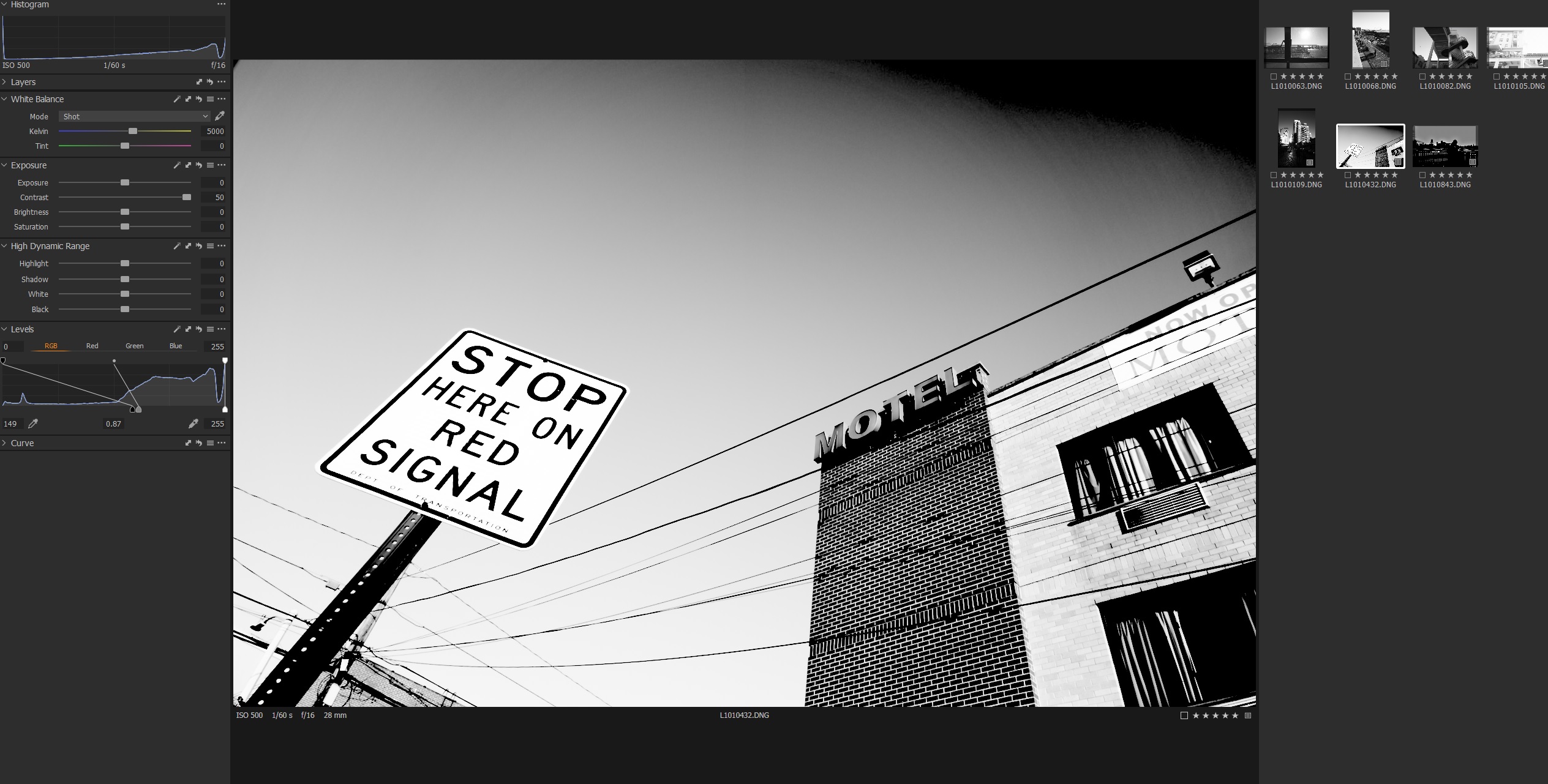
Jul 05, 2021 at 06:21 PM
p.8 #11Diffusion Filters! (or Effect Filters in general)
Tiffen pearlescent 1/2
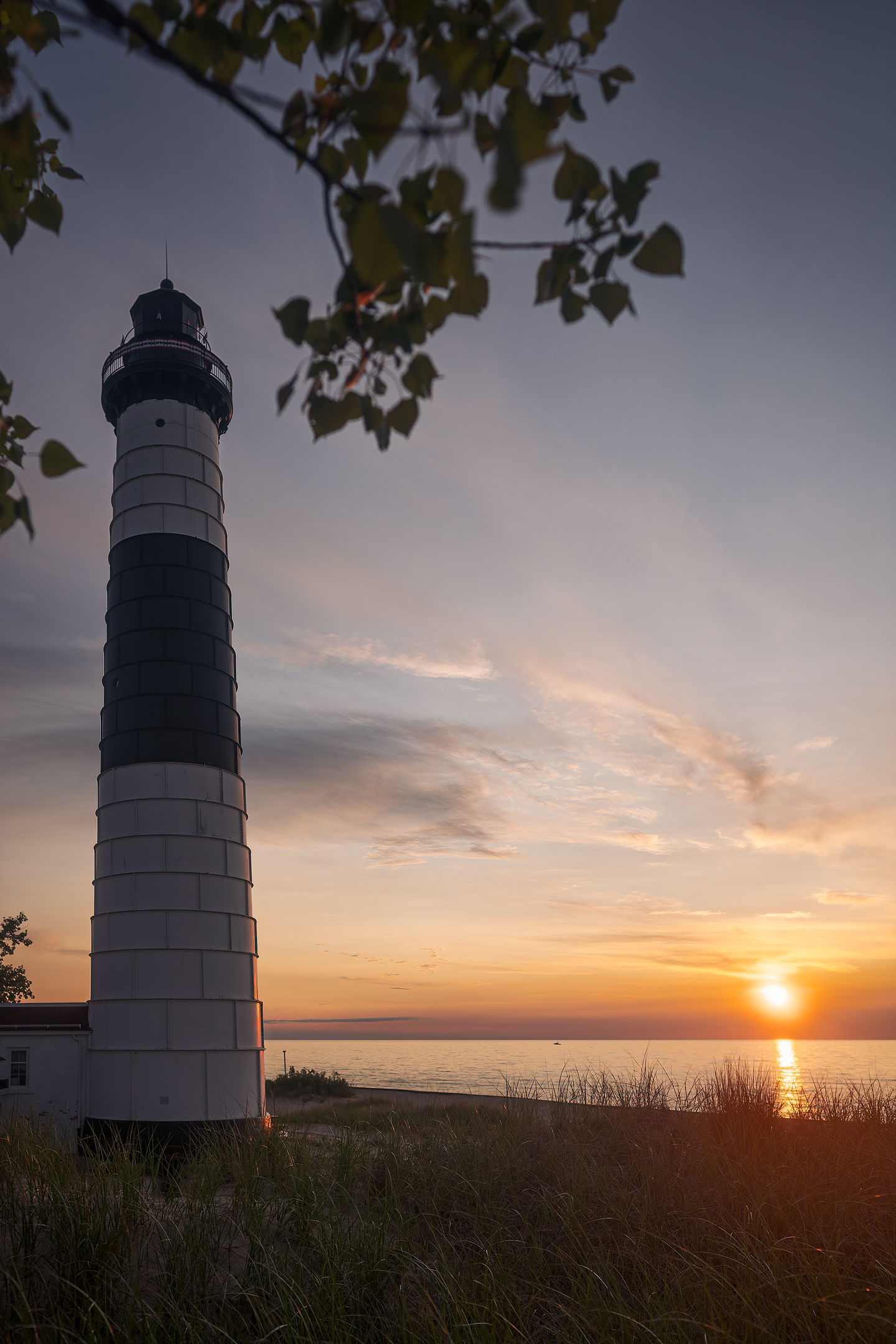
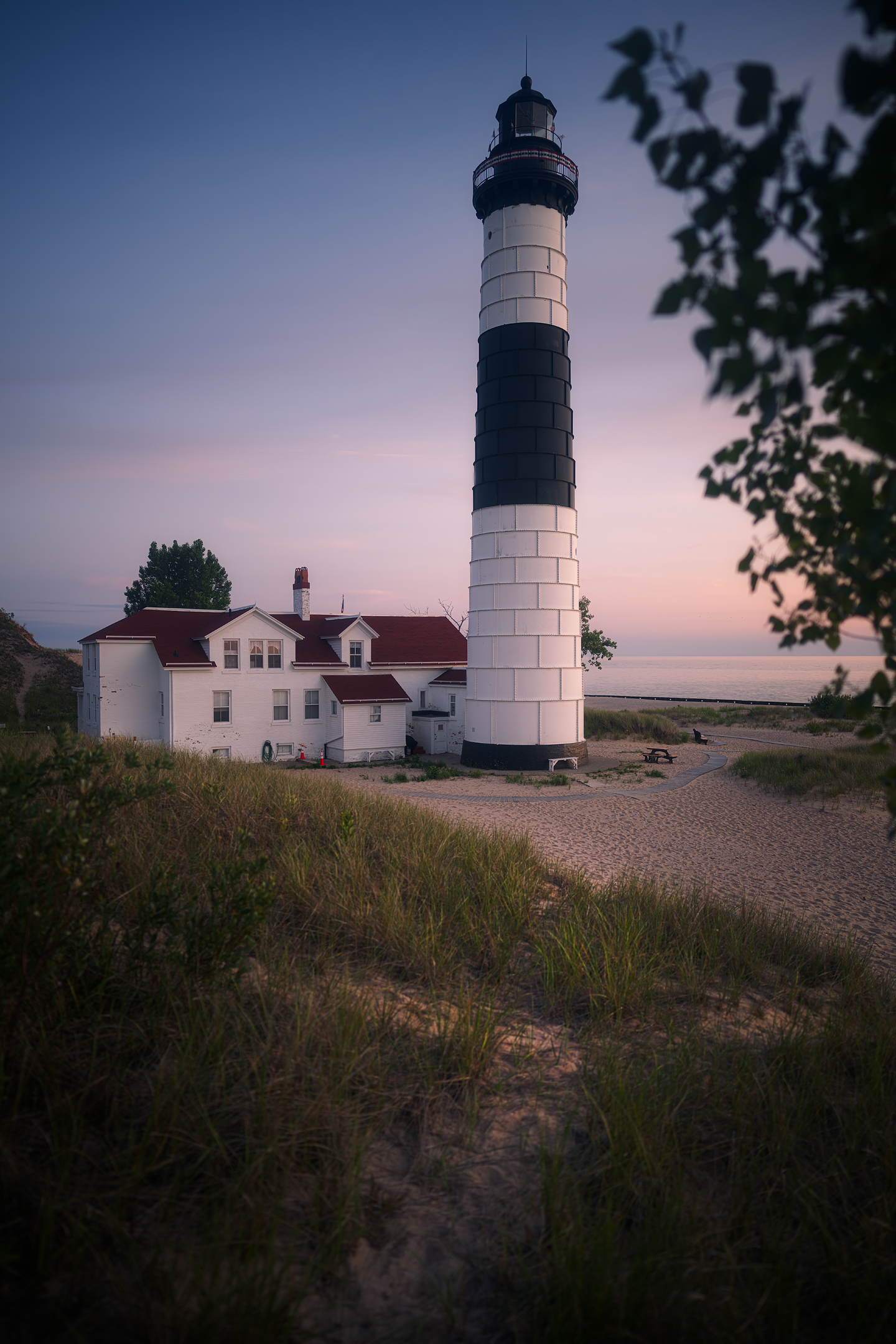
Jul 06, 2021 at 02:31 PM

p.8 #13Diffusion Filters! (or Effect Filters in general)
robsonj wrote:
I have been meaning to try the BPM 1/4 on the Q2M, but haven’t gotten around to it yet. I especially want to try it in combination with the red filter to see if it makes the images look even more like infrared film by adding a slight glow to the brightest tones.
The filter HelenaN is using is cool because it gives the effect of using a single-coated or uncoated lens. I think the Tiffen Black Pro Mist effect is a little different.Did you ever try this filter combo on the q2m ?No, and I've since traded the Q2M for an M10M, which was a mistake. The M10M sensor bifurcation issue reported by Lloyd Chambers is real, plus the IQ in my option was lesser than the Q2M, even with an APO lens on the M10M. The Q2M with the extra resolution plus a fixed-lens design is unparalleled. I exchanged the M10M for a 28 Summilux + refund, and I may get the Q2M again down the road.
I do have the regular Q2, and this evening I tried the BPM 1/4. I took a shot inside the house with and without it at close distance, and the change in bokeh was remarkable. It looked like I went from f/1.7 to f/1.2 with the filter added. I'm going to leave the filter on for a while and test it out.
SOOC jpegs using the Q2's in-camera Monochrome High Contrast setting:The BPM makes rendering quite pleasant imo, especially when there are light sources in the background. It does not really rob any resolution, just a bit of contrast.I find it softens and blends lights and highlights in a lovely way too—and it diffuses axial CA at times in an appreciable way.
@highdesertmesa@@ What’s the issue with the M10m over the Q2M?I believe @highdesertmesa@@ is referring to this as reported by diglloyd, probably and others also…. https://diglloyd.com/blog/2021/20210102_2200-LeicaM10M-SensorBifurcation.html
Follow-up to this issue. I decided to try another M10M (Leitz Wetzler), and this one does not have the issue, even with full + sliders on contrast, dehaze, and clarity in Capture One.
Leica Miami had asked Leica USA and Germany for a response to the issue back when I had my first M10M – no response has been given. I'm assuming that to mean Leica is not ready to or is unwilling to address the issue.
nehemiahphoto wrote
Fred Miranda wrote
highdesertmesa wrote
robsonj wrote
highdesertmesa wrote
If you take a lens that is near perfect wide open like the RF 50 1.2, the BPM 1/4 doesn’t make it look more vintage or even less sharp, IMO. The effect I like is the bokeh smoothing and general atmosphere change of the image. There is also something about it that seems to increase the perceived saturation of color when used in gold hour lighting.I have been meaning to try the BPM 1/4 on the Q2M, but haven’t gotten around to it yet. I especially want to try it in combination with the red filter to see if it makes the images look even more like infrared film by adding a slight glow to the brightest tones.
The filter HelenaN is using is cool because it gives the effect of using a single-coated or uncoated lens. I think the Tiffen Black Pro Mist effect is a little different.
I do have the regular Q2, and this evening I tried the BPM 1/4. I took a shot inside the house with and without it at close distance, and the change in bokeh was remarkable. It looked like I went from f/1.7 to f/1.2 with the filter added. I'm going to leave the filter on for a while and test it out.
SOOC jpegs using the Q2's in-camera Monochrome High Contrast setting:
@highdesertmesa@@ What’s the issue with the M10m over the Q2M?
Follow-up to this issue. I decided to try another M10M (Leitz Wetzler), and this one does not have the issue, even with full + sliders on contrast, dehaze, and clarity in Capture One.
Leica Miami had asked Leica USA and Germany for a response to the issue back when I had my first M10M – no response has been given. I'm assuming that to mean Leica is not ready to or is unwilling to address the issue.
Jul 13, 2021 at 03:12 PM
p.8 #14Diffusion Filters! (or Effect Filters in general)
After much reading I decided to buy a Tiffen Pearlescent 1/2 to complement my Haida NanoPro Mist Black 1/4. Haven't had time to really try it out yet, but the first impression is very positive. Compared to Haida it has less veiling flare and a little more shadow depth. Even though it keeps more contrast there is more highlight blooming. This is great, because I really like that effect. When I have something to share I'll post it here.
Thank you all for the comparisons, examples and info!
Thank you all for the comparisons, examples and info!
Aug 12, 2021 at 09:05 AM
p.8 #15Diffusion Filters! (or Effect Filters in general)
On the video side, software emulation of filters is making great strides; see https://videovillage.co/scatter/ for the most impressive example I'm aware of. This is more convincing than the built-in diffusion tool in DaVinci Resolve and it recreates the looks of most of the popular diffusion filters, in all the strengths. The benefit is that the diffusion isn't baked in and you can pick and choose which filters and strengths to apply in post.
I don't get the sense that diffusion is as popular among stills photographers as it is among cinematographers, but if there's enough demand maybe someone will create a diffusion emulation package for stills that's better than the limited solutions currently available.
I don't get the sense that diffusion is as popular among stills photographers as it is among cinematographers, but if there's enough demand maybe someone will create a diffusion emulation package for stills that's better than the limited solutions currently available.
Aug 12, 2021 at 09:23 AM
p.8 #16Diffusion Filters! (or Effect Filters in general)
HelenaN wrote:
After much reading I decided to buy a Tiffen Pearlescent 1/2 to complement my Haida NanoPro Mist Black 1/4. Haven't had time to really try it out yet, but the first impression is very positive. Compared to Haida it has less veiling flare and a little more shadow depth. Even though it keeps more contrast there is more highlight blooming. This is great, because I really like that effect. When I have something to share I'll post it here.
Thank you all for the comparisons, examples and info!
Please don't forget to share when you get a chance
Nov 11, 2021 at 10:10 PM
p.8 #17Diffusion Filters! (or Effect Filters in general)
Thank you for reminding me! I love the Tiffen Pearlescent filter and use it a lot. Lately we have had awful weather, so I have mostly done night shooting in town with it. Here is a bunch, all taken with A7RII and CV 75mm f/1.5 (last one was pure luck - it's not arranged):
https://helenasphotography.com/keep/2021/20211020_017_a7rll-cv75b.jpg
https://helenasphotography.com/keep/2021/20211020_006_a7rll-cv75b.jpg
https://helenasphotography.com/keep/2021/20211024_005_a7rll-cv75b.jpg
https://helenasphotography.com/keep/2021/20211024_009_a7rll-cv75b.jpg
https://helenasphotography.com/keep/2021/20210922_015_a7rll-cv75b.jpg
https://helenasphotography.com/keep/2021/20211103_026_a7rll-cv75b.jpg
https://helenasphotography.com/keep/2021/20211020_012_a7rll-cv75b.jpg
I love the Tiffen Pearlescent filter and use it a lot. Lately we have had awful weather, so I have mostly done night shooting in town with it. Here is a bunch, all taken with A7RII and CV 75mm f/1.5 (last one was pure luck - it's not arranged):https://helenasphotography.com/keep/2021/20211020_017_a7rll-cv75b.jpg
https://helenasphotography.com/keep/2021/20211020_006_a7rll-cv75b.jpg
https://helenasphotography.com/keep/2021/20211024_005_a7rll-cv75b.jpg
https://helenasphotography.com/keep/2021/20211024_009_a7rll-cv75b.jpg
https://helenasphotography.com/keep/2021/20210922_015_a7rll-cv75b.jpg
https://helenasphotography.com/keep/2021/20211103_026_a7rll-cv75b.jpg
https://helenasphotography.com/keep/2021/20211020_012_a7rll-cv75b.jpg
Nov 12, 2021 at 06:54 AM
p.8 #18Diffusion Filters! (or Effect Filters in general)
Very nice photos!!!! HelenaN wrote:
Thank you for reminding me!
I love the Tiffen Pearlescent filter and use it a lot. Lately we have had awful weather, so I have mostly done night shooting in town with it. Here is a bunch, all taken with A7RII and CV 75mm f/1.5 (last one was pure luck - it's not arranged):https://helenasphotography.com/keep/2021/20211020_017_a7rll-cv75b.jpg
https://helenasphotography.com/keep/2021/20211020_006_a7rll-cv75b.jpg
https://helenasphotography.com/keep/2021/20211024_005_a7rll-cv75b.jpg
https://helenasphotography.com/keep/2021/20211024_009_a7rll-cv75b.jpg
https://helenasphotography.com/keep/2021/20210922_015_a7rll-cv75b.jpg
https://helenasphotography.com/keep/2021/20211103_026_a7rll-cv75b.jpg
https://helenasphotography.com/keep/2021/20211020_012_a7rll-cv75b.jpg
Nov 13, 2021 at 05:58 AM
p.8 #19Diffusion Filters! (or Effect Filters in general)
Love this thread. I use the Moment Cinebloom 10% with the 35GM for night street shots and love the halation, what I call a "Blade Runner" effect. Will post some shots as soon as I can. Meanwhile I'm really wanting the Tiffen Pearlescent which is a different look.
Nov 13, 2021 at 02:24 PM
p.8 #20Diffusion Filters! (or Effect Filters in general)
HelenaN wrote:
Thank you for reminding me!
I love the Tiffen Pearlescent filter and use it a lot. Lately we have had awful weather, so I have mostly done night shooting in town with it. Here is a bunch, all taken with A7RII and CV 75mm f/1.5 (last one was pure luck - it's not arranged):https://helenasphotography.com/keep/2021/20211020_017_a7rll-cv75b.jpg
https://helenasphotography.com/keep/2021/20211020_006_a7rll-cv75b.jpg
https://helenasphotography.com/keep/2021/20211024_005_a7rll-cv75b.jpg
https://helenasphotography.com/keep/2021/20211024_009_a7rll-cv75b.jpg
https://helenasphotography.com/keep/2021/20210922_015_a7rll-cv75b.jpg
https://helenasphotography.com/keep/2021/20211103_026_a7rll-cv75b.jpg
https://helenasphotography.com/keep/2021/20211020_012_a7rll-cv75b.jpg
I don't like the 2nd photo at all, but the rest are great and the last one is magical. Nice set and beautiful demonstration of the filter.
Also, many points for the 7R2, my favourite Sony body.
Nov 13, 2021 at 05:20 PM