This topic is in the 2021 archive. You can read it and like its posts here. It is read only.
Archive 2021Sony A1 - Bird Photography Camera for Dummies
p.3 #1Sony A1 - Bird Photography Camera for Dummies
arbitrage wrote:
I'm interested to know how well BEAF works with RTT.
I tend not to use RTT on the A9II for several reasons. There is a delay during focus acquisition before the tracking box locks on and this is just too long for fast subjects. Also, I find there are usually more soft shots in a burst when using RTT than if I just used vanilla Zone or Wide. Finally, when I've tried to initiate tracking of the bird on the post ready for when the bird takes off (re Galer), invariably, the tracking sticks to the post while the bird flies off.
However, I could see the A1 potentially being able to overcome these problems.
Can its increased processing power make the initial RTT focus acquisition fast enough for speedy subjects?
Do the extra AF calculations make RTT accuracy better with fewer soft shots?
And most importantly, does BEAF make RTT more intelligent? Re the bird on the post, will it follow the bird? And when the bird is in flight, even if the BEAF is only active occasionally, is the RTT more likely to stay on the bird against a busy background because BEAF updates the tracking subject from time to time?
I appreciate it's early days but I would very much welcome your insights in due course.Hi Tony, on the A9/A9 II you have 2 cycles/groups of AF-Areas. If you start with the non-tracking version of the cycle, you can scroll down and you end up in the RTT version of the same set, like Wide, Zone, Selectable, etc. And you have to decide whether you want to use the RTT version or not before hand.
Well, that changed with the A1. You only have a single cycle of the AF-Areas and not 2 anymore. If you set the camera to Eye-AF, there 3 selections, Human, Bird and Animal. So far, I have used the BE-AF. Let’s say, I set the camera to Zone-AF, which is my favorite in my other Sony cameras. With that BE-AF mode on, it would pick up the eye of the bird immediately. You can move the camera around or the bird can move, the Eye-AF indicator will stick to the eye and it is sticky. In theory, even if the bird takes off and in flight. So far, so good. In other words, the camera does a great job in doing that. Now, you just have to make sure that you keep the target within the zone you first selected.
Writing this gives me an idea of probably better to use the Wide-AF mode rather than Zone-AF. As you can imagine, it is easier to get and keep the target in a larger rectangle than smaller. I doesn’t make sense to even use any other AF-Area, especially the smaller ones. I will have to try this out tomorrow and report my findings here.
Hope this helps,
JoshuaWell, this leaves me a bit puzzled.  I think you are implying that if you select Bird as the Eye-AF type, you can only use the ordinary AF areas? The manual - https://helpguide.sony.net/ilc/2040/v1/en/contents/TP0002911172.html - made me think is was roughly the same as the A9II so you could choose say Tracking Zone and have BEAF switched on.
It seems to me that losing the eye if the eye goes out of your AF area could be significant problem, particularly with Zone. As the bird flies closer, the head will naturally move outside of a centred Zone. I had hoped that Tracking Zone might fix that.
Thanks,
TonyI can now confirm how it works. Short answer is that Tracking:Zone does what you want it to.
BEAF works in any AF mode including Tracking modes.
If you are in a non-tracking mode then it only looks for eyes within the area of the AF mode you have chosen. If it finds and eye, lets say within the Zone AF mode, then it will track that eye as long as you keep it within the Zone AF area.
If you are in a Tracking AF mode then it first just looks for eyes within that Zone (same as above). However, once it...Show more →
Excellent! That's just how I had hoped Tracking Zone might work.
Also, reading the manual, I thought that having a Custom key for Eye-AF only worked for human eyes so it's good to see that it works for all. I might put that on my lens button when I manage to acquire an A1. (I asked an out-in-the-sticks store the other day when they might be able to supply one and they told me they had no stock yet and 23 pre-orders!).
Thanks.
somersettr wrote
AGeoJO wrote
somersettr wrote
Joshua/Geoff - congrats on the new camera.I'm interested to know how well BEAF works with RTT.
I tend not to use RTT on the A9II for several reasons. There is a delay during focus acquisition before the tracking box locks on and this is just too long for fast subjects. Also, I find there are usually more soft shots in a burst when using RTT than if I just used vanilla Zone or Wide. Finally, when I've tried to initiate tracking of the bird on the post ready for when the bird takes off (re Galer), invariably, the tracking sticks to the post while the bird flies off.
However, I could see the A1 potentially being able to overcome these problems.
Can its increased processing power make the initial RTT focus acquisition fast enough for speedy subjects?
Do the extra AF calculations make RTT accuracy better with fewer soft shots?
And most importantly, does BEAF make RTT more intelligent? Re the bird on the post, will it follow the bird? And when the bird is in flight, even if the BEAF is only active occasionally, is the RTT more likely to stay on the bird against a busy background because BEAF updates the tracking subject from time to time?
I appreciate it's early days but I would very much welcome your insights in due course.
Well, that changed with the A1. You only have a single cycle of the AF-Areas and not 2 anymore. If you set the camera to Eye-AF, there 3 selections, Human, Bird and Animal. So far, I have used the BE-AF. Let’s say, I set the camera to Zone-AF, which is my favorite in my other Sony cameras. With that BE-AF mode on, it would pick up the eye of the bird immediately. You can move the camera around or the bird can move, the Eye-AF indicator will stick to the eye and it is sticky. In theory, even if the bird takes off and in flight. So far, so good. In other words, the camera does a great job in doing that. Now, you just have to make sure that you keep the target within the zone you first selected.
Writing this gives me an idea of probably better to use the Wide-AF mode rather than Zone-AF. As you can imagine, it is easier to get and keep the target in a larger rectangle than smaller. I doesn’t make sense to even use any other AF-Area, especially the smaller ones. I will have to try this out tomorrow and report my findings here.
Hope this helps,
Joshua
I think you are implying that if you select Bird as the Eye-AF type, you can only use the ordinary AF areas? The manual - https://helpguide.sony.net/ilc/2040/v1/en/contents/TP0002911172.html - made me think is was roughly the same as the A9II so you could choose say Tracking Zone and have BEAF switched on.It seems to me that losing the eye if the eye goes out of your AF area could be significant problem, particularly with Zone. As the bird flies closer, the head will naturally move outside of a centred Zone. I had hoped that Tracking Zone might fix that.
Thanks,
Tony
BEAF works in any AF mode including Tracking modes.
If you are in a non-tracking mode then it only looks for eyes within the area of the AF mode you have chosen. If it finds and eye, lets say within the Zone AF mode, then it will track that eye as long as you keep it within the Zone AF area.
If you are in a Tracking AF mode then it first just looks for eyes within that Zone (same as above). However, once it...Show more →
Excellent! That's just how I had hoped Tracking Zone might work.
Also, reading the manual, I thought that having a Custom key for Eye-AF only worked for human eyes so it's good to see that it works for all. I might put that on my lens button when I manage to acquire an A1. (I asked an out-in-the-sticks store the other day when they might be able to supply one and they told me they had no stock yet and 23 pre-orders!).
Thanks.
Mar 12, 2021 at 05:51 AM
p.3 #2Sony A1 - Bird Photography Camera for Dummies
My first day out I filled 2 128GB in less than 3 hrs. The good news is that the buffer never filled while shooting a long burst at 20 fps I found that Tracking: Zone with BEAF was amazingly accurate in focusing on fast-flying ducks against a busy background.
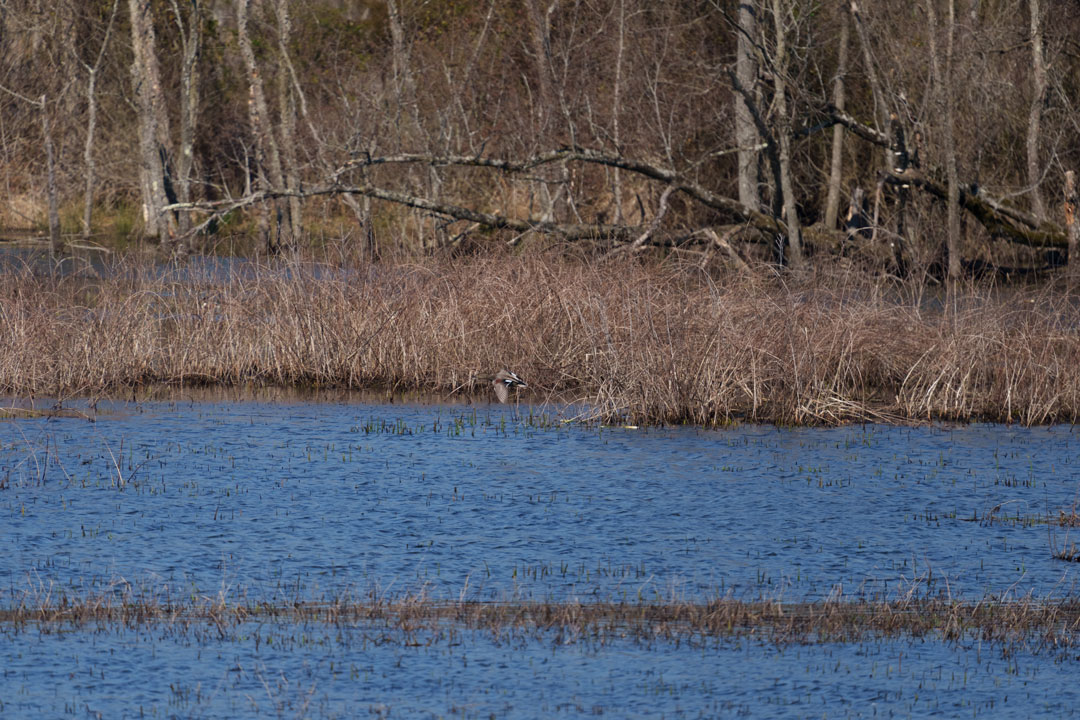
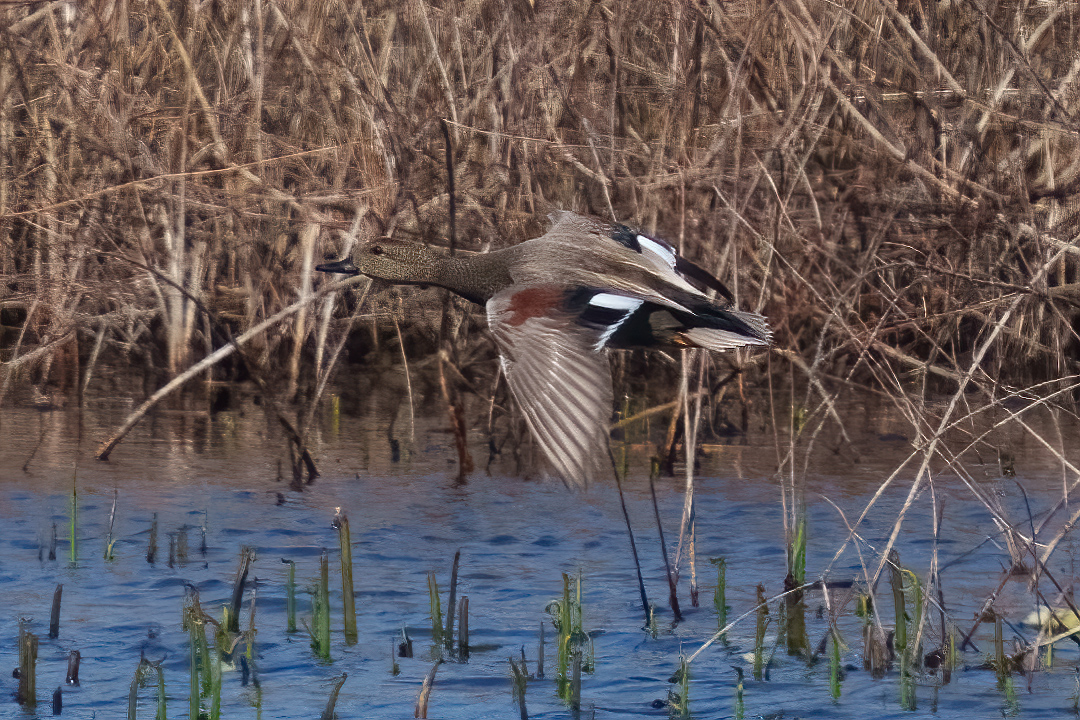
The good news is that the buffer never filled while shooting a long burst at 20 fps I found that Tracking: Zone with BEAF was amazingly accurate in focusing on fast-flying ducks against a busy background.Mar 12, 2021 at 06:11 AM
p.3 #3Sony A1 - Bird Photography Camera for Dummies
somersettr wrote:
I'm interested to know how well BEAF works with RTT.
I tend not to use RTT on the A9II for several reasons. There is a delay during focus acquisition before the tracking box locks on and this is just too long for fast subjects. Also, I find there are usually more soft shots in a burst when using RTT than if I just used vanilla Zone or Wide. Finally, when I've tried to initiate tracking of the bird on the post ready for when the bird takes off (re Galer), invariably, the tracking sticks to the post while the bird flies off.
However, I could see the A1 potentially being able to overcome these problems.
Can its increased processing power make the initial RTT focus acquisition fast enough for speedy subjects?
Do the extra AF calculations make RTT accuracy better with fewer soft shots?
And most importantly, does BEAF make RTT more intelligent? Re the bird on the post, will it follow the bird? And when the bird is in flight, even if the BEAF is only active occasionally, is the RTT more likely to stay on the bird against a busy background because BEAF updates the tracking subject from time to time?
I appreciate it's early days but I would very much welcome your insights in due course.Hi Tony, on the A9/A9 II you have 2 cycles/groups of AF-Areas. If you start with the non-tracking version of the cycle, you can scroll down and you end up in the RTT version of the same set, like Wide, Zone, Selectable, etc. And you have to decide whether you want to use the RTT version or not before hand.
Well, that changed with the A1. You only have a single cycle of the AF-Areas and not 2 anymore. If you set the camera to Eye-AF, there 3 selections, Human, Bird and Animal. So far, I have used the BE-AF. Let’s say, I set the camera to Zone-AF, which is my favorite in my other Sony cameras. With that BE-AF mode on, it would pick up the eye of the bird immediately. You can move the camera around or the bird can move, the Eye-AF indicator will stick to the eye and it is sticky. In theory, even if the bird takes off and in flight. So far, so good. In other words, the camera does a great job in doing that. Now, you just have to make sure that you keep the target within the zone you first selected.
Writing this gives me an idea of probably better to use the Wide-AF mode rather than Zone-AF. As you can imagine, it is easier to get and keep the target in a larger rectangle than smaller. I doesn’t make sense to even use any other AF-Area, especially the smaller ones. I will have to try this out tomorrow and report my findings here.
Hope this helps,
JoshuaWell, this leaves me a bit puzzled. I think you are implying that if you select Bird as the Eye-AF type, you can only use the ordinary AF areas? The manual - https://helpguide.sony.net/ilc/2040/v1/en/contents/TP0002911172.html - made me think is was roughly the same as the A9II so you could choose say Tracking Zone and have BEAF switched on.
It seems to me that losing the eye if the eye goes out of your AF area could be significant problem, particularly with Zone. As the bird flies closer, the head will naturally move outside of a centred Zone. I had hoped that Tracking Zone might fix that.
Thanks,
TonyI can now confirm how it works. Short answer is that Tracking:Zone does what you want it to.
BEAF works in any AF mode including Tracking modes.
If you are in a non-tracking mode then it only looks for eyes within the area of the AF mode you have chosen. If it finds and eye, lets say within the Zone AF mode, then it will track that eye as long as you keep it within the Zone AF area.
If you are in a Tracking AF mode then it first just looks for eyes within that Zone (same as above). However, once it starts tracking the eye you can move the bird outside of the AF Area and it continues to track the eye. If the bird turns away it switches on the Tracking icon (square with a vertical line left and right of the square) and continues to track, it will reacquire the eye if the bird turns back towards you. All that happens as long as you continue to activate AF. If you stop doing AF then you have to get the bird back under the AF Area to start again.
If you want it to search over the entire frame then you can use Wide or Wide Tracking or the Custom Key for "Eye-AF" which overrides whatever you are set to and just searches for eyes over the entire sensor (ie the legacy way from the pre-RTT cameras).
This seems to be a good way and gives one options to sort of control how things work. Contrast this to the R5 where you only have two options to acquire eye-AF....either have it look over the entire sensor or aim a single AF point at a bird (where it does then track it over the entire sensor as you recompose or the bird moves). The A1 just gives the user more flexibility and control by letting you choose how small/large of a detection area you want and wether you want it to track outside of the detection area (using a Tracking AF mode) or not (with a non-tracking AF mode).Excellent! That's just how I had hoped Tracking Zone might work.
Also, reading the manual, I thought that having a Custom key for Eye-AF only worked for human eyes so it's good to see that it works for all. I might put that on my lens button when I manage to acquire an A1. (I asked an out-in-the-sticks store the other day when they might be able to supply one and they told me they had no stock yet and 23 pre-orders!).
Thanks.
You may be correct. I actually didn't test the Eye-AF custom key so I will test that today. Maybe it is only for Humans as I see in the Help Guide it is only listed under the Human Eye-AF page.
EDIT; I just tested on some stuffed bird and a stuffed panda. The Eye-AF custom Key does work in Animal and Bird mode. I moved my Zone off to the left, had the stuffy on the right and activated the Eye-AF key. It picked up the eye way away from my Zone each time.
Edited on Mar 12, 2021 at 06:39 AM · View previous versions
arbitrage wrote
somersettr wrote
AGeoJO wrote
somersettr wrote
Joshua/Geoff - congrats on the new camera.I'm interested to know how well BEAF works with RTT.
I tend not to use RTT on the A9II for several reasons. There is a delay during focus acquisition before the tracking box locks on and this is just too long for fast subjects. Also, I find there are usually more soft shots in a burst when using RTT than if I just used vanilla Zone or Wide. Finally, when I've tried to initiate tracking of the bird on the post ready for when the bird takes off (re Galer), invariably, the tracking sticks to the post while the bird flies off.
However, I could see the A1 potentially being able to overcome these problems.
Can its increased processing power make the initial RTT focus acquisition fast enough for speedy subjects?
Do the extra AF calculations make RTT accuracy better with fewer soft shots?
And most importantly, does BEAF make RTT more intelligent? Re the bird on the post, will it follow the bird? And when the bird is in flight, even if the BEAF is only active occasionally, is the RTT more likely to stay on the bird against a busy background because BEAF updates the tracking subject from time to time?
I appreciate it's early days but I would very much welcome your insights in due course.
Well, that changed with the A1. You only have a single cycle of the AF-Areas and not 2 anymore. If you set the camera to Eye-AF, there 3 selections, Human, Bird and Animal. So far, I have used the BE-AF. Let’s say, I set the camera to Zone-AF, which is my favorite in my other Sony cameras. With that BE-AF mode on, it would pick up the eye of the bird immediately. You can move the camera around or the bird can move, the Eye-AF indicator will stick to the eye and it is sticky. In theory, even if the bird takes off and in flight. So far, so good. In other words, the camera does a great job in doing that. Now, you just have to make sure that you keep the target within the zone you first selected.
Writing this gives me an idea of probably better to use the Wide-AF mode rather than Zone-AF. As you can imagine, it is easier to get and keep the target in a larger rectangle than smaller. I doesn’t make sense to even use any other AF-Area, especially the smaller ones. I will have to try this out tomorrow and report my findings here.
Hope this helps,
Joshua
I think you are implying that if you select Bird as the Eye-AF type, you can only use the ordinary AF areas? The manual - https://helpguide.sony.net/ilc/2040/v1/en/contents/TP0002911172.html - made me think is was roughly the same as the A9II so you could choose say Tracking Zone and have BEAF switched on.It seems to me that losing the eye if the eye goes out of your AF area could be significant problem, particularly with Zone. As the bird flies closer, the head will naturally move outside of a centred Zone. I had hoped that Tracking Zone might fix that.
Thanks,
Tony
BEAF works in any AF mode including Tracking modes.
If you are in a non-tracking mode then it only looks for eyes within the area of the AF mode you have chosen. If it finds and eye, lets say within the Zone AF mode, then it will track that eye as long as you keep it within the Zone AF area.
If you are in a Tracking AF mode then it first just looks for eyes within that Zone (same as above). However, once it starts tracking the eye you can move the bird outside of the AF Area and it continues to track the eye. If the bird turns away it switches on the Tracking icon (square with a vertical line left and right of the square) and continues to track, it will reacquire the eye if the bird turns back towards you. All that happens as long as you continue to activate AF. If you stop doing AF then you have to get the bird back under the AF Area to start again.
If you want it to search over the entire frame then you can use Wide or Wide Tracking or the Custom Key for "Eye-AF" which overrides whatever you are set to and just searches for eyes over the entire sensor (ie the legacy way from the pre-RTT cameras).
This seems to be a good way and gives one options to sort of control how things work. Contrast this to the R5 where you only have two options to acquire eye-AF....either have it look over the entire sensor or aim a single AF point at a bird (where it does then track it over the entire sensor as you recompose or the bird moves). The A1 just gives the user more flexibility and control by letting you choose how small/large of a detection area you want and wether you want it to track outside of the detection area (using a Tracking AF mode) or not (with a non-tracking AF mode).
Also, reading the manual, I thought that having a Custom key for Eye-AF only worked for human eyes so it's good to see that it works for all. I might put that on my lens button when I manage to acquire an A1. (I asked an out-in-the-sticks store the other day when they might be able to supply one and they told me they had no stock yet and 23 pre-orders!).
Thanks.
You may be correct. I actually didn't test the Eye-AF custom key so I will test that today. Maybe it is only for Humans as I see in the Help Guide it is only listed under the Human Eye-AF page.
EDIT; I just tested on some stuffed bird and a stuffed panda. The Eye-AF custom Key does work in Animal and Bird mode. I moved my Zone off to the left, had the stuffy on the right and activated the Eye-AF key. It picked up the eye way away from my Zone each time.
Edited on Mar 12, 2021 at 06:39 AM · View previous versions
Mar 12, 2021 at 06:28 AM
p.3 #4Sony A1 - Bird Photography Camera for Dummies
coderunner01 wrote:
My first day out I filled 2 128GB in less than 3 hrs. The good news is that the buffer never filled while shooting a long burst at 20 fps I found that Tracking: Zone with BEAF was amazingly accurate in focusing on fast-flying ducks against a busy background.
Damn! Now that looks very promising!
My first day out I filled 2 128GB in less than 3 hrs.
The good news is that the buffer never filled while shooting a long burst at 20 fps I found that Tracking: Zone with BEAF was amazingly accurate in focusing on fast-flying ducks against a busy background.Damn! Now that looks very promising!
Mar 12, 2021 at 06:32 AM

p.3 #5Sony A1 - Bird Photography Camera for Dummies
somersettr wrote:
I'm interested to know how well BEAF works with RTT.
I tend not to use RTT on the A9II for several reasons. There is a delay during focus acquisition before the tracking box locks on and this is just too long for fast subjects. Also, I find there are usually more soft shots in a burst when using RTT than if I just used vanilla Zone or Wide. Finally, when I've tried to initiate tracking of the bird on the post ready for when the bird takes off (re Galer), invariably, the tracking sticks to the post while the bird flies off.
However, I could see the A1 potentially being able to overcome these problems.
Can its increased processing power make the initial RTT focus acquisition fast enough for speedy subjects?
Do the extra AF calculations make RTT accuracy better with fewer soft shots?
And most importantly, does BEAF make RTT more intelligent? Re the bird on the post, will it follow the bird? And when the bird is in flight, even if the BEAF is only active occasionally, is the RTT more likely to stay on the bird against a busy background because BEAF updates the tracking subject from time to time?
I appreciate it's early days but I would very much welcome your insights in due course.Hi Tony, on the A9/A9 II you have 2 cycles/groups of AF-Areas. If you start with the non-tracking version of the cycle, you can scroll down and you end up in the RTT version of the same set, like Wide, Zone, Selectable, etc. And you have to decide whether you want to use the RTT version or not before hand.
Well, that changed with the A1. You only have a single cycle of the AF-Areas and not 2 anymore. If you set the camera to Eye-AF, there 3 selections, Human, Bird and Animal. So far, I have used the BE-AF. Let’s say, I set the camera to Zone-AF, which is my favorite in my other Sony cameras. With that BE-AF mode on, it would pick up the eye of the bird immediately. You can move the camera around or the bird can move, the Eye-AF indicator will stick to the eye and it is sticky. In theory, even if the bird takes off and in flight. So far, so good. In other words, the camera does a great job in doing that. Now, you just have to make sure that you keep the target within the zone you first selected.
Writing this gives me an idea of probably better to use the Wide-AF mode rather than Zone-AF. As you can imagine, it is easier to get and keep the target in a larger rectangle than smaller. I doesn’t make sense to even use any other AF-Area, especially the smaller ones. I will have to try this out tomorrow and report my findings here.
Hope this helps,
JoshuaWell, this leaves me a bit puzzled. I think you are implying that if you select Bird as the Eye-AF type, you can only use the ordinary AF areas? The manual - https://helpguide.sony.net/ilc/2040/v1/en/contents/TP0002911172.html - made me think is was roughly the same as the A9II so you could choose say Tracking Zone and have BEAF switched on.
It seems to me that losing the eye if the eye goes out of your AF area could be significant problem, particularly with Zone. As the bird flies closer, the head will naturally move outside of a centred Zone. I had hoped that...Show more →
Tony, the Menu is different than any previous Sony cameras, except fo the A7s III. As it turns out, the 2 cycles of AF-Areas are there but it displays only one set and that made me say that there was only a single set/cycle. As you scroll down, it displays only a single AF-Area in the Tracking version but there are two arrows now, one left and one right. If you go to either direction, it displays the complete Tracking cycle. I know it is confusing in the beginning and it is still is. I am exploring my way through the setting/menu and we are getting more and more familiar with this new and complex camera. For sure it can do a wealth of customization and for sure, it works as intended for me: at least the same AF performance as the A9 II with a higher MP sensor. If the AF performance is better and all indications tell me so, then I take it! Hope this helps.
I will be out to evaluate some more this morning...
AGeoJO wrote
somersettr wrote
Joshua/Geoff - congrats on the new camera.I'm interested to know how well BEAF works with RTT.
I tend not to use RTT on the A9II for several reasons. There is a delay during focus acquisition before the tracking box locks on and this is just too long for fast subjects. Also, I find there are usually more soft shots in a burst when using RTT than if I just used vanilla Zone or Wide. Finally, when I've tried to initiate tracking of the bird on the post ready for when the bird takes off (re Galer), invariably, the tracking sticks to the post while the bird flies off.
However, I could see the A1 potentially being able to overcome these problems.
Can its increased processing power make the initial RTT focus acquisition fast enough for speedy subjects?
Do the extra AF calculations make RTT accuracy better with fewer soft shots?
And most importantly, does BEAF make RTT more intelligent? Re the bird on the post, will it follow the bird? And when the bird is in flight, even if the BEAF is only active occasionally, is the RTT more likely to stay on the bird against a busy background because BEAF updates the tracking subject from time to time?
I appreciate it's early days but I would very much welcome your insights in due course.
Well, that changed with the A1. You only have a single cycle of the AF-Areas and not 2 anymore. If you set the camera to Eye-AF, there 3 selections, Human, Bird and Animal. So far, I have used the BE-AF. Let’s say, I set the camera to Zone-AF, which is my favorite in my other Sony cameras. With that BE-AF mode on, it would pick up the eye of the bird immediately. You can move the camera around or the bird can move, the Eye-AF indicator will stick to the eye and it is sticky. In theory, even if the bird takes off and in flight. So far, so good. In other words, the camera does a great job in doing that. Now, you just have to make sure that you keep the target within the zone you first selected.
Writing this gives me an idea of probably better to use the Wide-AF mode rather than Zone-AF. As you can imagine, it is easier to get and keep the target in a larger rectangle than smaller. I doesn’t make sense to even use any other AF-Area, especially the smaller ones. I will have to try this out tomorrow and report my findings here.
Hope this helps,
Joshua
I think you are implying that if you select Bird as the Eye-AF type, you can only use the ordinary AF areas? The manual - https://helpguide.sony.net/ilc/2040/v1/en/contents/TP0002911172.html - made me think is was roughly the same as the A9II so you could choose say Tracking Zone and have BEAF switched on.It seems to me that losing the eye if the eye goes out of your AF area could be significant problem, particularly with Zone. As the bird flies closer, the head will naturally move outside of a centred Zone. I had hoped that...Show more →
Tony, the Menu is different than any previous Sony cameras, except fo the A7s III. As it turns out, the 2 cycles of AF-Areas are there but it displays only one set and that made me say that there was only a single set/cycle. As you scroll down, it displays only a single AF-Area in the Tracking version but there are two arrows now, one left and one right. If you go to either direction, it displays the complete Tracking cycle. I know it is confusing in the beginning and it is still is. I am exploring my way through the setting/menu and we are getting more and more familiar with this new and complex camera. For sure it can do a wealth of customization and for sure, it works as intended for me: at least the same AF performance as the A9 II with a higher MP sensor. If the AF performance is better and all indications tell me so, then I take it! Hope this helps.
I will be out to evaluate some more this morning...
Mar 12, 2021 at 07:06 AM
p.3 #6Sony A1 - Bird Photography Camera for Dummies
coderunner01 wrote:
My first day out I filled 2 128GB in less than 3 hrs. The good news is that the buffer never filled while shooting a long burst at 20 fps I found that Tracking: Zone with BEAF was amazingly accurate in focusing on fast-flying ducks against a busy background.
Wow! That's some crop. I assume you are talking about SD cards (because there's no 128GB CFE A card). Do you think we can live with fastest SD cards? Then I'd get couple of 256gb SD cards for the price of single 160gb CFE A
My first day out I filled 2 128GB in less than 3 hrs.
The good news is that the buffer never filled while shooting a long burst at 20 fps I found that Tracking: Zone with BEAF was amazingly accurate in focusing on fast-flying ducks against a busy background.Wow! That's some crop. I assume you are talking about SD cards (because there's no 128GB CFE A card). Do you think we can live with fastest SD cards? Then I'd get couple of 256gb SD cards for the price of single 160gb CFE A
Mar 12, 2021 at 08:43 AM
p.3 #7Sony A1 - Bird Photography Camera for Dummies
AGeoJO wrote:
I'm interested to know how well BEAF works with RTT.
I tend not to use RTT on the A9II for several reasons. There is a delay during focus acquisition before the tracking box locks on and this is just too long for fast subjects. Also, I find there are usually more soft shots in a burst when using RTT than if I just used vanilla Zone or Wide. Finally, when I've tried to initiate tracking of the bird on the post ready for when the bird takes off (re Galer), invariably, the tracking sticks to the post while the bird flies off.
However, I could see the A1 potentially being able to overcome these problems.
Can its increased processing power make the initial RTT focus acquisition fast enough for speedy subjects?
Do the extra AF calculations make RTT accuracy better with fewer soft shots?
And most importantly, does BEAF make RTT more intelligent? Re the bird on the post, will it follow the bird? And when the bird is in flight, even if the BEAF is only active occasionally, is the RTT more likely to stay on the bird against a busy background because BEAF updates the tracking subject from time to time?
I appreciate it's early days but I would very much welcome your insights in due course.Hi Tony, on the A9/A9 II you have 2 cycles/groups of AF-Areas. If you start with the non-tracking version of the cycle, you can scroll down and you end up in the RTT version of the same set, like Wide, Zone, Selectable, etc. And you have to decide whether you want to use the RTT version or not before hand.
Well, that changed with the A1. You only have a single cycle of the AF-Areas and not 2 anymore. If you set the camera to Eye-AF, there 3 selections, Human, Bird and Animal. So far, I have used the BE-AF. Let’s say, I set the camera to Zone-AF, which is my favorite in my other Sony cameras. With that BE-AF mode on, it would pick up the eye of the bird immediately. You can move the camera around or the bird can move, the Eye-AF indicator will stick to the eye and it is sticky. In theory, even if the bird takes off and in flight. So far, so good. In other words, the camera does a great job in doing that. Now, you just have to make sure that you keep the target within the zone you first selected.
Writing this gives me an idea of probably better to use the Wide-AF mode rather than Zone-AF. As you can imagine, it is easier to get and keep the target in a larger rectangle than smaller. I doesn’t make sense to even use any other AF-Area, especially the smaller ones. I will have to try this out tomorrow and report my findings here.
Hope this helps,
JoshuaWell, this leaves me a bit puzzled. I think you are implying that if you select Bird as the Eye-AF type, you can only use the ordinary AF areas? The manual - https://helpguide.sony.net/ilc/2040/v1/en/contents/TP0002911172.html - made me think is was roughly the same as the A9II so you could choose say Tracking Zone and have BEAF switched on.
It seems to me that losing the eye if the eye goes out of your AF area could be significant problem, particularly with Zone. As the bird flies closer, the head will naturally move outside of a centred Zone. I had hoped that Tracking Zone might fix that.
Thanks,
TonyTony, the Menu is different than any previous Sony cameras, except fo the A7s III. As it turns out, the 2 cycles of AF-Areas are there but it displays only one set and that made me say that there was only a single set/cycle. As you scroll down, it displays only a single AF-Area in the Tracking version but there are two arrows now, one left and one right. If you go to either direction, it displays the complete Tracking cycle. I know it is confusing in the beginning and it is still is. I am exploring my way through...Show more →
Ah good. Thanks.
somersettr wrote
AGeoJO wrote
somersettr wrote
Joshua/Geoff - congrats on the new camera.I'm interested to know how well BEAF works with RTT.
I tend not to use RTT on the A9II for several reasons. There is a delay during focus acquisition before the tracking box locks on and this is just too long for fast subjects. Also, I find there are usually more soft shots in a burst when using RTT than if I just used vanilla Zone or Wide. Finally, when I've tried to initiate tracking of the bird on the post ready for when the bird takes off (re Galer), invariably, the tracking sticks to the post while the bird flies off.
However, I could see the A1 potentially being able to overcome these problems.
Can its increased processing power make the initial RTT focus acquisition fast enough for speedy subjects?
Do the extra AF calculations make RTT accuracy better with fewer soft shots?
And most importantly, does BEAF make RTT more intelligent? Re the bird on the post, will it follow the bird? And when the bird is in flight, even if the BEAF is only active occasionally, is the RTT more likely to stay on the bird against a busy background because BEAF updates the tracking subject from time to time?
I appreciate it's early days but I would very much welcome your insights in due course.
Well, that changed with the A1. You only have a single cycle of the AF-Areas and not 2 anymore. If you set the camera to Eye-AF, there 3 selections, Human, Bird and Animal. So far, I have used the BE-AF. Let’s say, I set the camera to Zone-AF, which is my favorite in my other Sony cameras. With that BE-AF mode on, it would pick up the eye of the bird immediately. You can move the camera around or the bird can move, the Eye-AF indicator will stick to the eye and it is sticky. In theory, even if the bird takes off and in flight. So far, so good. In other words, the camera does a great job in doing that. Now, you just have to make sure that you keep the target within the zone you first selected.
Writing this gives me an idea of probably better to use the Wide-AF mode rather than Zone-AF. As you can imagine, it is easier to get and keep the target in a larger rectangle than smaller. I doesn’t make sense to even use any other AF-Area, especially the smaller ones. I will have to try this out tomorrow and report my findings here.
Hope this helps,
Joshua
I think you are implying that if you select Bird as the Eye-AF type, you can only use the ordinary AF areas? The manual - https://helpguide.sony.net/ilc/2040/v1/en/contents/TP0002911172.html - made me think is was roughly the same as the A9II so you could choose say Tracking Zone and have BEAF switched on.It seems to me that losing the eye if the eye goes out of your AF area could be significant problem, particularly with Zone. As the bird flies closer, the head will naturally move outside of a centred Zone. I had hoped that Tracking Zone might fix that.
Thanks,
Tony
Ah good. Thanks.
Mar 12, 2021 at 09:30 AM
p.3 #8Sony A1 - Bird Photography Camera for Dummies
Jemini wrote:
Wow! That's some crop. I assume you are talking about SD cards (because there's no 128GB CFE A card). Do you think we can live with fastest SD cards? Then I'd get a couple of 256gb SD cards for the price of single 160gb CFE A
I think SD cards will do fine if you are shooting compressed raw or jpeg. I just ordered 2 256 GB ProGrade SD cards
Wow! That's some crop. I assume you are talking about SD cards (because there's no 128GB CFE A card). Do you think we can live with fastest SD cards? Then I'd get a couple of 256gb SD cards for the price of single 160gb CFE A
I think SD cards will do fine if you are shooting compressed raw or jpeg. I just ordered 2 256 GB ProGrade SD cards
Mar 12, 2021 at 09:52 AM
p.3 #9Sony A1 - Bird Photography Camera for Dummies
coderunner01 wrote:
I think SD cards will do fine if you are shooting compressed raw or jpeg. I just ordered 2 256 GB ProGrade SD cards
Thank you. I usually shoot raw+jpg. With the file size I may have to avoid jog for wildlife to save some space. I will be shooting lossless compressed if I get A1. The price per GB for CFE is too much right now. I will try to live with SD for a while..
Jemini wrote
Wow! That's some crop. I assume you are talking about SD cards (because there's no 128GB CFE A card). Do you think we can live with fastest SD cards? Then I'd get a couple of 256gb SD cards for the price of single 160gb CFE AThank you. I usually shoot raw+jpg. With the file size I may have to avoid jog for wildlife to save some space. I will be shooting lossless compressed if I get A1. The price per GB for CFE is too much right now. I will try to live with SD for a while..
Mar 12, 2021 at 10:11 AM
p.3 #10Sony A1 - Bird Photography Camera for Dummies
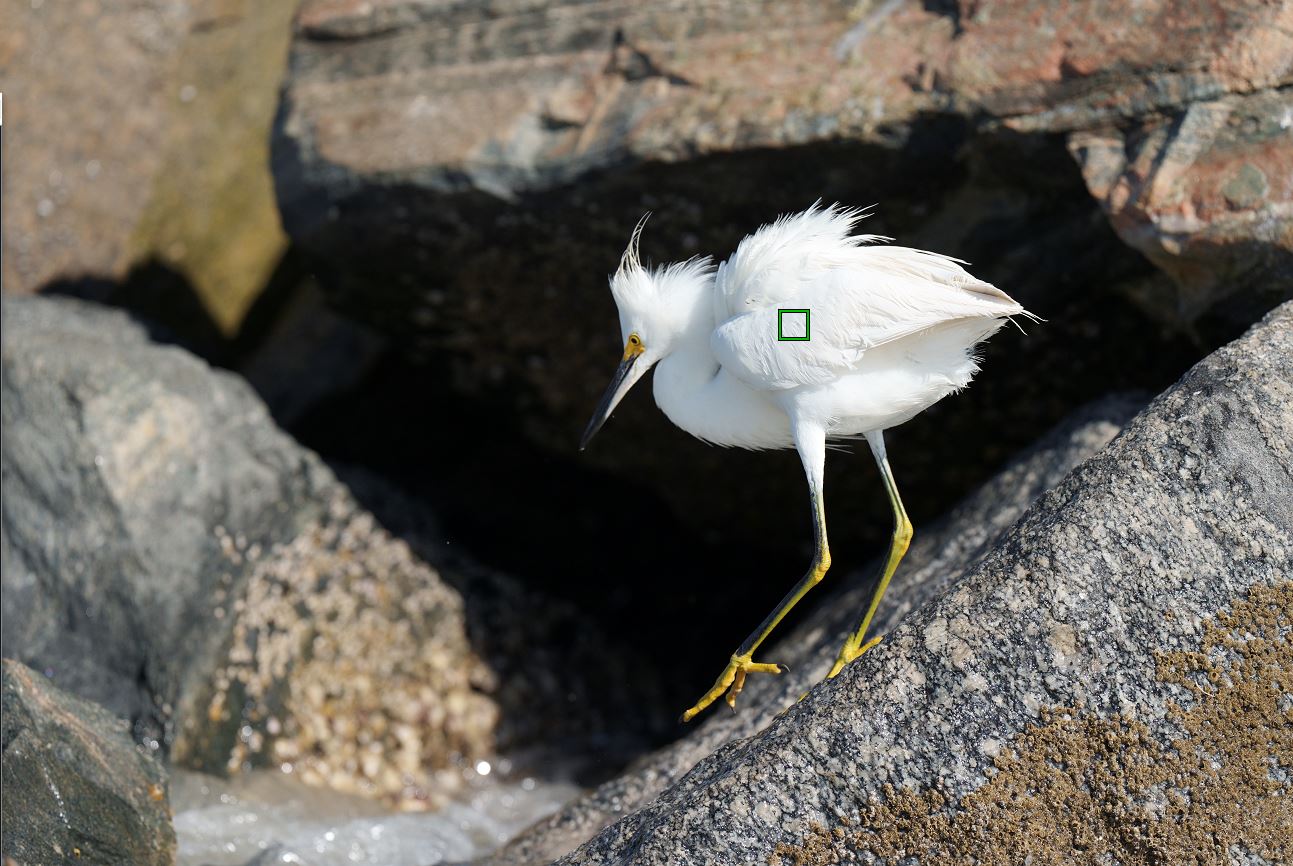
While photographing some Snowy Egrets this morning, I found some interesting results with BEAF. Using tracking mode, zone, I found that it had a hard time finding the eye if that part of the bird was in shadow, even light shadow if the rest of the body was bright. As soon as the bird would turn its face toward the sun, BEAF came up. When it turned so that side was in slight shadow, the white body immediately became the focal point. You can see with this example the bird's eye is available, but it focused on the body instead.
This is a crop; the eye was well within the zone.
Don't get critical of the brightness, I left the image at full brightness, but the body is not blown out. I can bring it in nicely with the Highlights slider.
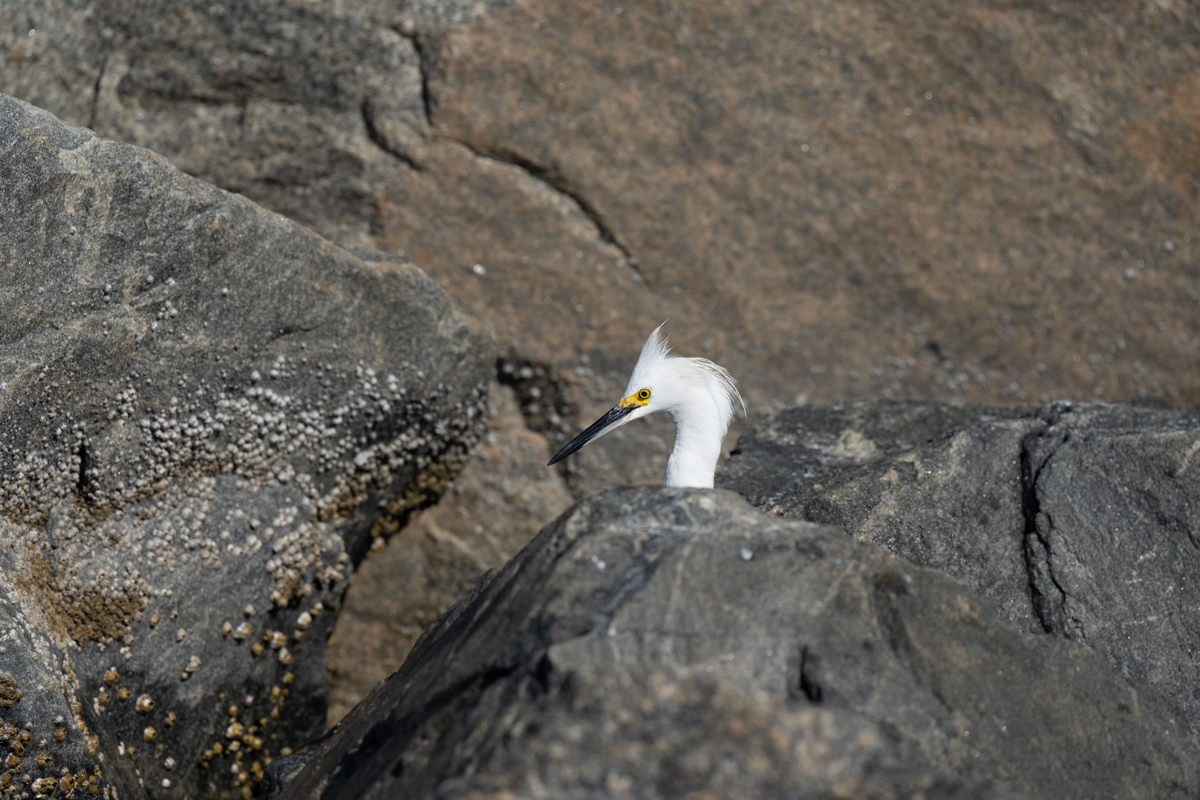
The second image shows what I am hoping I will get often with BEAF. This would have been tough to quickly get with my A7Riv. Without BEAF, unless I carefully used point focus, the front rock, or back rock would have been nicely in focus and the bird would have been out of focus. With the BEAF, the shot ended up great, with bird tack sharp!!
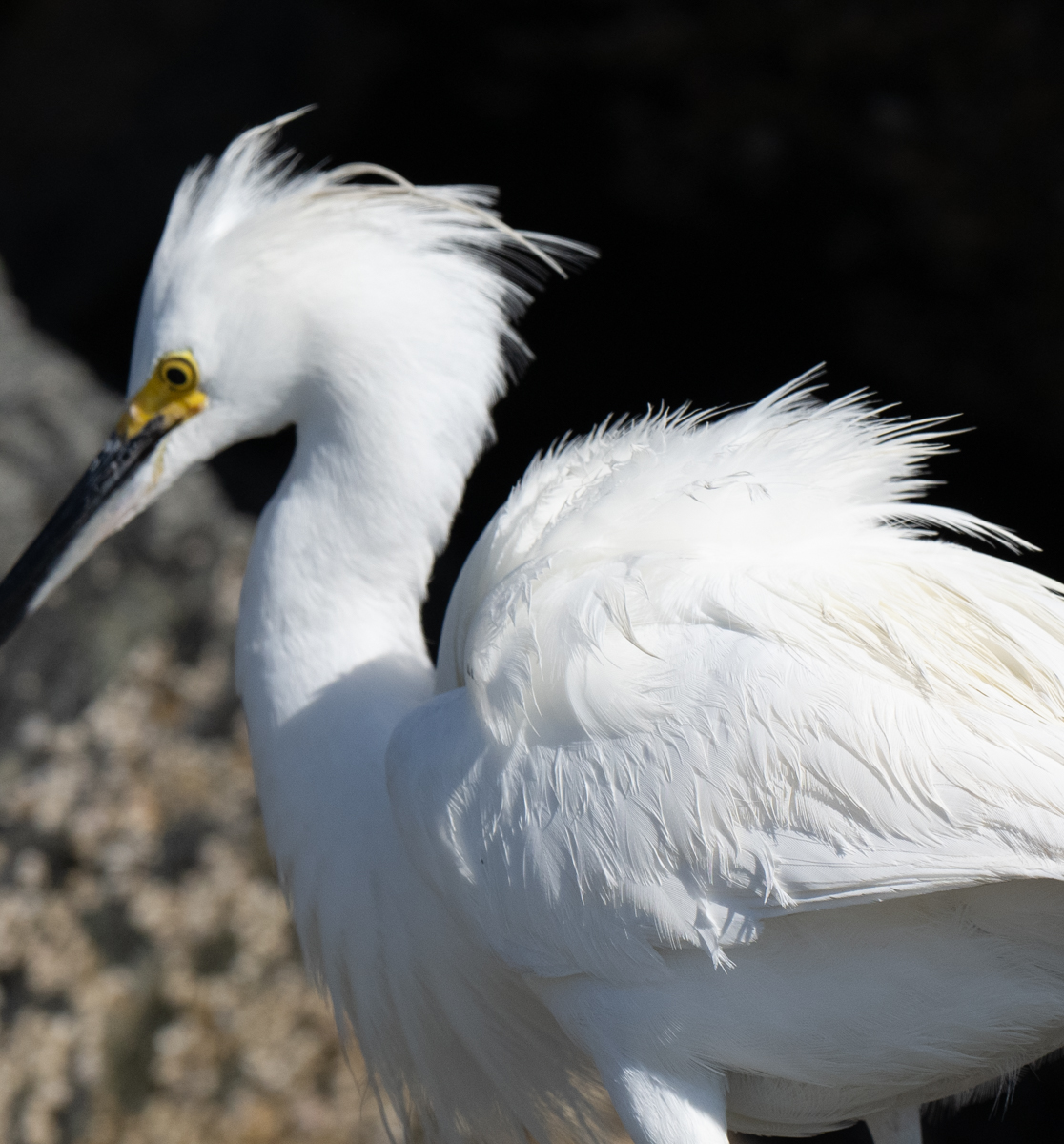
This is a crop; the eye was well within the zone.
Don't get critical of the brightness, I left the image at full brightness, but the body is not blown out. I can bring it in nicely with the Highlights slider.
The second image shows what I am hoping I will get often with BEAF. This would have been tough to quickly get with my A7Riv. Without BEAF, unless I carefully used point focus, the front rock, or back rock would have been nicely in focus and the bird would have been out of focus. With the BEAF, the shot ended up great, with bird tack sharp!!
© Maynard Knapp 2021
© Maynard Knapp 2021
Mar 12, 2021 at 01:41 PM
p.3 #11Sony A1 - Bird Photography Camera for Dummies
Its going to take some time to figure out what it will do and what it won't do. I've had it pick out the eye when I can't even see it myself, and I've had it miss the eye when I figured it should be hitting it on a broadside duck. I'm not too concerned as it will only get better and its kind of a bonus feature for me....except, I like to trigger it from zone so far, and if it doesn't catch, as you showed, it then behaves like zone. If I knew it was going to miss I'd have moved my spot point to the head :-)
kimknapp wrote:
While photographing some Snowy Egrets this morning, I found some interesting results with BEAF. Using tracking mode, zone, I found that it had a hard time finding the eye if that part of the bird was in shadow, even light shadow if the rest of the body was bright. As soon as the bird would turn its face toward the sun, BEAF came up. When it turned so that side was in slight shadow, the white body immediately became the focal point. You can see with this example the bird's eye is available, but it focused on the body instead.
This...Show more →
kimknapp wrote:
While photographing some Snowy Egrets this morning, I found some interesting results with BEAF. Using tracking mode, zone, I found that it had a hard time finding the eye if that part of the bird was in shadow, even light shadow if the rest of the body was bright. As soon as the bird would turn its face toward the sun, BEAF came up. When it turned so that side was in slight shadow, the white body immediately became the focal point. You can see with this example the bird's eye is available, but it focused on the body instead.
This...Show more →
Mar 12, 2021 at 01:48 PM
p.3 #12Sony A1 - Bird Photography Camera for Dummies
kimknapp wrote:
While photographing some Snowy Egrets this morning, I found some interesting results with BEAF. Using tracking mode, zone, I found that it had a hard time finding the eye if that part of the bird was in shadow, even light shadow if the rest of the body was bright. As soon as the bird would turn its face toward the sun, BEAF came up. When it turned so that side was in slight shadow, the white body immediately became the focal point. You can see with this example the bird's eye is available, but it focused on the body instead.
This...Show more →
Kim, what AF-Area did you use to begin with when it didn’t trigger the BE-AF? Were you in the RTT mode of that AF-Area? It looks like BE-AF got fooled by the very. bright body of the egret.
I just came back from another evaluation outing and I am very excited about my findings but it would be a while before I can post them and the supporting images.
While photographing some Snowy Egrets this morning, I found some interesting results with BEAF. Using tracking mode, zone, I found that it had a hard time finding the eye if that part of the bird was in shadow, even light shadow if the rest of the body was bright. As soon as the bird would turn its face toward the sun, BEAF came up. When it turned so that side was in slight shadow, the white body immediately became the focal point. You can see with this example the bird's eye is available, but it focused on the body instead.
This...Show more →
Kim, what AF-Area did you use to begin with when it didn’t trigger the BE-AF? Were you in the RTT mode of that AF-Area? It looks like BE-AF got fooled by the very. bright body of the egret.
I just came back from another evaluation outing and I am very excited about my findings but it would be a while before I can post them and the supporting images.
Mar 12, 2021 at 01:54 PM
p.3 #13Sony A1 - Bird Photography Camera for Dummies
AGeoJO wrote:
Kim, what AF-Area did you use to begin with when it didn’t trigger the BE-AF? Were you in the RTT mode of that AF-Area? It looks like BE-AF got fooled by the very. bright body of the egret.
I just came back from another evaluation outing and I am very excited about my findings but it would be a while before I can post them and the supporting images.
TBH, I don't remember if I was in Zone or Full, RTT. But, I do distinctly remember that the bird's eye was inside the range and I was using RTT. Those guys are close by so I will double check in the next couple days. Really want to get to a NWR with small birds to test in foliage, maybe Sunday.
Kim, what AF-Area did you use to begin with when it didn’t trigger the BE-AF? Were you in the RTT mode of that AF-Area? It looks like BE-AF got fooled by the very. bright body of the egret.
I just came back from another evaluation outing and I am very excited about my findings but it would be a while before I can post them and the supporting images.
TBH, I don't remember if I was in Zone or Full, RTT. But, I do distinctly remember that the bird's eye was inside the range and I was using RTT. Those guys are close by so I will double check in the next couple days. Really want to get to a NWR with small birds to test in foliage, maybe Sunday.
Mar 12, 2021 at 02:15 PM
p.3 #14Sony A1 - Bird Photography Camera for Dummies
OK, I went back through all my Snowy photos inside Imaging Edge to check the focus point.
The ones of the Snowy in the photo above definitely were being fooled by the bright body and none of them focused on the eye.
I could not find images of one bird where the BEAF came and went, so I must have seen it in the EVF and not taken any images, so I will definitely try to capture that sometime in the next couple days.
Here is a screen shot of one of the images viewed in Imaging Edge.
Edit; I took about 10 shots like that, in short 2 shot or so bursts. All of them the eye was OOF.
Edited on Mar 12, 2021 at 02:33 PM · View previous versions
The ones of the Snowy in the photo above definitely were being fooled by the bright body and none of them focused on the eye.
I could not find images of one bird where the BEAF came and went, so I must have seen it in the EVF and not taken any images, so I will definitely try to capture that sometime in the next couple days.
Here is a screen shot of one of the images viewed in Imaging Edge.
Edit; I took about 10 shots like that, in short 2 shot or so bursts. All of them the eye was OOF.
© Maynard Knapp 2021
Edited on Mar 12, 2021 at 02:33 PM · View previous versions
Mar 12, 2021 at 02:30 PM
p.3 #15Sony A1 - Bird Photography Camera for Dummies
Curious, would exiftool or a7info show what focus mode you're shooting in?
Asking as I have yet to take a single photo with mine yet because of the "9-5" being 12 hour workday this week haha
Asking as I have yet to take a single photo with mine yet because of the "9-5" being 12 hour workday this week haha
Mar 12, 2021 at 02:30 PM
p.3 #16Sony A1 - Bird Photography Camera for Dummies
Jemini wrote:
I think SD cards will do fine if you are shooting compressed raw or jpeg. I just ordered 2 256 GB ProGrade SD cardsThank you. I usually shoot raw+jpg. With the file size I may have to avoid jog for wildlife to save some space. I will be shooting lossless compressed if I get A1. The price per GB for CFE is too much right now. I will try to live with SD for a while..
You can extract a full sized jpeg out of the raw file for what it's worth. It's standard quality though I think.
UHS-II cards seem plenty fast to me, I'm contemplating buying a 256 gb one as A1 raws take up the space quite quickly .
coderunner01 wrote
Jemini wrote
Wow! That's some crop. I assume you are talking about SD cards (because there's no 128GB CFE A card). Do you think we can live with fastest SD cards? Then I'd get a couple of 256gb SD cards for the price of single 160gb CFE AYou can extract a full sized jpeg out of the raw file for what it's worth. It's standard quality though I think.
UHS-II cards seem plenty fast to me, I'm contemplating buying a 256 gb one as A1 raws take up the space quite quickly
.Mar 12, 2021 at 02:51 PM
p.3 #17Sony A1 - Bird Photography Camera for Dummies
Unfortunately, Imaging Edge does not. But, the latest A7info (should be AlphaInfo now?) does. Just gave him another donation.
AF-C
Zone
Animal Eye Tracking
ZoneSelection: Center [which would definitely include the Snowy's eye]
Tracking: Face Tracking
It is telling me that this particular time I did take a sequence of shots, so I did not try to stop and start taking shots, apparently. Would the AF not try to get the eye during a sequence of shots?
That is really the only set of images where this happened, so maybe a false alarm.
AF-C
Zone
Animal Eye Tracking
ZoneSelection: Center [which would definitely include the Snowy's eye]
Tracking: Face Tracking
It is telling me that this particular time I did take a sequence of shots, so I did not try to stop and start taking shots, apparently. Would the AF not try to get the eye during a sequence of shots?
That is really the only set of images where this happened, so maybe a false alarm.
Mar 12, 2021 at 02:58 PM
p.3 #18Sony A1 - Bird Photography Camera for Dummies
kimknapp wrote:
OK, I went back through all my Snowy photos inside Imaging Edge to check the focus point.
The ones of the Snowy in the photo above definitely were being fooled by the bright body and none of them focused on the eye.
I could not find images of one bird where the BEAF came and went, so I must have seen it in the EVF and not taken any images, so I will definitely try to capture that sometime in the next couple days.
Here is a screen shot of one of the images viewed in Imaging Edge.
Edit; I took about...Show more →
Sony says the BEAF is primarily designed for "small birds or eagles/hawks". The egret is somewhat unlike those, so some difficulty is to be expected. See https://support.d-imaging.sony.co.jp/support/ilc/autofocus/ilce1/en/animaleyeaf.html. For some large bird types animal eye AF (designed for dogs & cats) supposedly works better.
OK, I went back through all my Snowy photos inside Imaging Edge to check the focus point.
The ones of the Snowy in the photo above definitely were being fooled by the bright body and none of them focused on the eye.
I could not find images of one bird where the BEAF came and went, so I must have seen it in the EVF and not taken any images, so I will definitely try to capture that sometime in the next couple days.
Here is a screen shot of one of the images viewed in Imaging Edge.
Edit; I took about...Show more →
Sony says the BEAF is primarily designed for "small birds or eagles/hawks". The egret is somewhat unlike those, so some difficulty is to be expected. See https://support.d-imaging.sony.co.jp/support/ilc/autofocus/ilce1/en/animaleyeaf.html. For some large bird types animal eye AF (designed for dogs & cats) supposedly works better.
Mar 12, 2021 at 04:41 PM
p.3 #19Sony A1 - Bird Photography Camera for Dummies
photonoclast wrote:
Thanks for the interesting post, Joshua.
I'm interested in your comment about "feels like cheating," which is something I've felt at every stage of the advance of digital photography. Each stage makes it easier (and easier for non-pros) to get high quality versions of the images you could, with sufficient skill and thought, get before. Hence the proliferation of high quality images on forums that, 10 years ago, you would only see in Audubon or National Geographic.
What I have hopes to see from the experts here, eventually, is images you actually couldn't have gotten before. That is the challenge!!
One thing that...Show more →
That's true in every genre in photography.
What was once rare is now common (and becoming increasingly "commoner").
That's why you have to shoot for yourself rather than try to "wow" the crowd.
God help the pros.
Thanks for the interesting post, Joshua.
I'm interested in your comment about "feels like cheating," which is something I've felt at every stage of the advance of digital photography. Each stage makes it easier (and easier for non-pros) to get high quality versions of the images you could, with sufficient skill and thought, get before. Hence the proliferation of high quality images on forums that, 10 years ago, you would only see in Audubon or National Geographic.
What I have hopes to see from the experts here, eventually, is images you actually couldn't have gotten before. That is the challenge!!
One thing that...Show more →
That's true in every genre in photography.
What was once rare is now common (and becoming increasingly "commoner").
That's why you have to shoot for yourself rather than try to "wow" the crowd.
God help the pros.
Mar 12, 2021 at 04:50 PM
p.3 #20Sony A1 - Bird Photography Camera for Dummies
JeyB wrote:
Hi Joshua. Did you have the oportunity to mount the 200-600? Any issue related to fron/back focus?
Thanks a lot
JeyB, I used the G 200-600mm lens exclusively this morning and I left my GM 600mm in the trunk of my car. I was curious myself since generally, the GM lens is reputed to be a better lens for tracking due to the "dual motors" (the name escapes me now) Sony incorporated into the GM lens. Focusing-wise, there was no issue whatsoever on the A1. I couldn't tell the difference between the G and the GM lenses. Maybe there was but it wasn't perceptible to me. The same goes for the tracking.
Furthermore, I am also impressed with the optical performance of the G lens. Of course, it is slower and under the same lighting conditions, you need a faster shutter speed or a higher ISO setting but it really performs. I would say that at the price Sony offers this lens for, it is a steal!
I will post the images I took this morning further down since there was another finding that I would like to bring up. And I would post some images there.
Hi Joshua. Did you have the oportunity to mount the 200-600? Any issue related to fron/back focus?
Thanks a lot
JeyB, I used the G 200-600mm lens exclusively this morning and I left my GM 600mm in the trunk of my car. I was curious myself since generally, the GM lens is reputed to be a better lens for tracking due to the "dual motors" (the name escapes me now) Sony incorporated into the GM lens. Focusing-wise, there was no issue whatsoever on the A1. I couldn't tell the difference between the G and the GM lenses. Maybe there was but it wasn't perceptible to me. The same goes for the tracking.
Furthermore, I am also impressed with the optical performance of the G lens. Of course, it is slower and under the same lighting conditions, you need a faster shutter speed or a higher ISO setting but it really performs. I would say that at the price Sony offers this lens for, it is a steal!
I will post the images I took this morning further down since there was another finding that I would like to bring up. And I would post some images there.
Mar 12, 2021 at 05:50 PM