brafman wrote:
I don't think this is correct. It isn't a question of nailing exposure. Instead it is a question of whether you need ISO 500 or higher, or lower. So:
Shoot at 100 instead of 100-400. Shoot at 500 instead of anything higher.
Either way, expose to preserve highlights. Raise exposure in post.
Basically if you shoot ISO 100 don't push it past ISO 400. No point shooting ISO 320 nor ISO 400, you are worse than ISO 500 then. My A1 will never be shot below ISO 500. For the stuff I shoot there is just no reason or opportunity to do so. I'd much rather push up my SS than drop to ISO 250 or lower.
Can anyone confirm what Mark Galer says in his latest A1 review/setup video about the A1 looking outside of the selected AF area for eyes in all modes (human, animal, bird)?
I actually don't like that change if it is true. I want to control where it looks for eyes by using a smaller AF area when appropriate. I think this is a disappointing new feature if true.
Although I would like it to keep tracking an eye outside of my initial AF mode once it has found it.
Hmmmm...going to have to figure this out for myself this weekend...
arbitrage wrote:
Can anyone confirm what Mark Galer says in his latest A1 review/setup video about the A1 looking outside of the selected AF area for eyes in all modes (human, animal, bird)?
I actually don't like that change if it is true. I want to control where it looks for eyes by using a smaller AF area when appropriate. I think this is a disappointing new feature if true.
Although I would like it to keep tracking an eye outside of my initial AF mode once it has found it.
Hmmmm...going to have to figure this out for myself this weekend...
I wasn’t specifically trying it but I found when using zone it would loose the eye if it left the zone area, need to do a bit more controlled tests but I didn’t notice anything wild (I was also using mostly default settings today, so maybe there is something in there that would impact it).
palmor wrote:
I wasn’t specifically trying it but I found when using zone it would loose the eye if it left the zone area, need to do a bit more controlled tests but I didn’t notice anything wild (I was also using mostly default settings today, so maybe there is something in there that would impact it).
All the videos I've seen seem to show it only finding eyes when the AF area (like Zone) is over a potential eye. So that is why I was surprised at Galer's comments when I watched his video today.
I wonder if it differs depending if you are in a Tracking version of the AF mode or not?
arbitrage wrote:
All the videos I've seen seem to show it only finding eyes when the AF area (like Zone) is over a potential eye. So that is why I was surprised at Galer's comments when I watched his video today.
I wonder if it differs depending if you are in a Tracking version of the AF mode or not?
Yep it is tracking modes which do that. Static areas loose eye af as soon as eye moves outside of the box.
arbitrage wrote:
Can anyone confirm what Mark Galer says in his latest A1 review/setup video about the A1 looking outside of the selected AF area for eyes in all modes (human, animal, bird)?
I actually don't like that change if it is true. I want to control where it looks for eyes by using a smaller AF area when appropriate. I think this is a disappointing new feature if true.
Although I would like it to keep tracking an eye outside of my initial AF mode once it has found it.
Hmmmm...going to have to figure this out for myself this weekend...
Not true when I used it for humans. Didn't check all modes, but the ones relevant for me the eye was tracked only in connection to the mode (I didn't try zone).
arbitrage wrote:
Basically if you shoot ISO 100 don't push it past ISO 400. No point shooting ISO 320 nor ISO 400, you are worse than ISO 500 then. My A1 will never be shot below ISO 500. For the stuff I shoot there is just no reason or opportunity to do so. I'd much rather push up my SS than drop to ISO 250 or lower.
I wonder how much you can reasonably underexpose with the a1. In the past I’ve dialed in -2.0 EV in low light to keep my shutter speed up and ISO lower when shooting moving subjects.
saxguy wrote:
I wonder how much you can reasonably underexpose with the a1. In the past I’ve dialed in -2.0 EV in low light to keep my shutter speed up and ISO lower when shooting moving subjects.
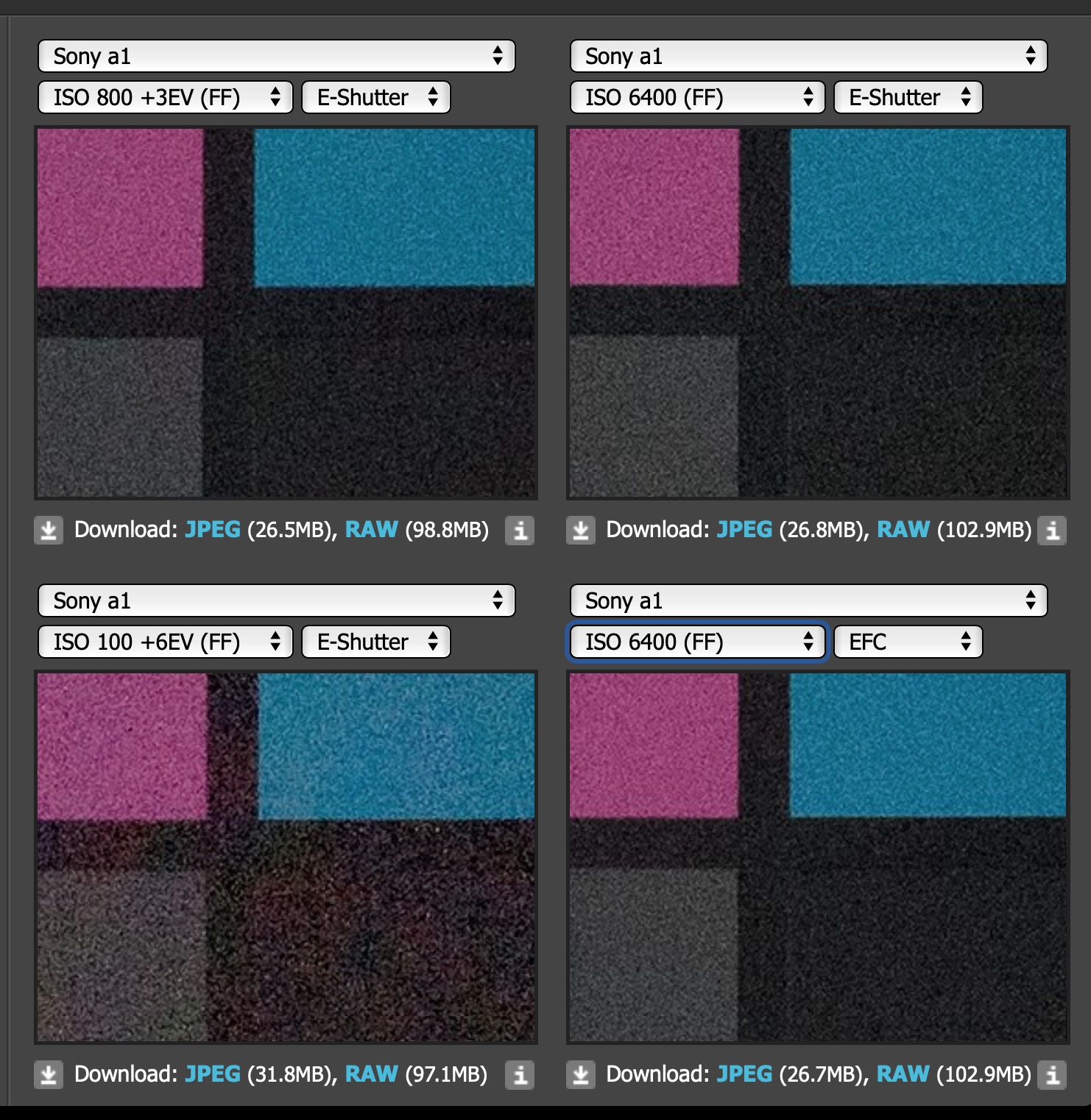
You can get a bit of an idea from the DPReview ISO invariance studio scene. If you select ISO 800+3stops and compare it to the ISO 6400 you can see that the images look almost identical. So 3 stops seems reasonable. Unfortunately because the +4 push is at ISO 400 you can't really compare as it starts below the dual-gain ISO 500 level and therefore looks terrible compared to native ISO 6400. DPR would need to include a native ISO 12800 and ISO 25600 in the comparison and ISO 800 +4 and +5 to see what +4 and +5 stops is like.
Just remember though that the only reason to dial in -2EV to get higher SS is to protect some really bright highlights in the scene. Having a higher SS can be achieved with a higher ISO. Once you push the underexposed lower ISO image you aren't any better off than having selected the correct ISO in camera. Back in the day doing so was a bad idea as native ISO was always better than pushed (especially in older Canon sensors). The A1 and most newer sensors have the ISO Invariance property so we can underexpose now without penalty. But you aren't better off than just upping your ISO in camera, just not worse off.
And on the A1 if you shoot under ISO 500 you have to make sure you don't push past ISO 500 or you are going to be worse off than selecting ISO 500 or higher.
Has anyone figured out what is happening between the relationship of Finder Frame Rate, Display Quality and EVF resolution?
According to the online help guide it says that there are two settings for Display Quality: Standard or High.
It says that if you set finder Frame Rate to High (120Hz) or Higher(240Hz) you are fixed into Standard Display Quality.
It also says that if you set finder Frame Rate to Higher that the resolution becomes lower and the display magnification becomes smaller.
My understanding is that with Finder Frame Rate at Higher the resolution drops from 9.44M to 5.75M (as per DPR review).
But what does Display Quality do? Is that also a setting controlling the 9.44 vs 5.75 or is it something else??
And of course setting the Cont. Shooting Speed to H+ (30FPS) (given that you set RAW to Compressed (Lossy)) also drops the resolution and magnification. I assume to the same values as Higher Frame Rate setting does (ie 5.75M dots and 0.7x mag).
Seems all very convoluted.
I'm assuming that you can still select Frame Rate Higher (240hz) and H+ (30FPS) because it seems subjects you'd want to shoot at 30FPS would also be subjects you'd value 240Hz for. And it seems like both Higher Frame Rate and 30FPS Cont Shooting Rate come along with the same caveats to EVF resolution and magnification.
What have people found in practice so far? If I'm reading this correctly it seems like for any fast shooting we won't ever be seeing 9.44M dots in the EVF??
There is noticeably more noise and aliasing in the picture when you choose standard quality (I view a dark scene at 50k ISO to reveal the noise). I can't visibly see a drop in EVF resolution though. So I think the difference is how many pixels from the sensor the camera reads out to display each frame in the live view feed in the EVF, when it oversamples you get less aliasing and noise. But in either case I believe you get all 9.44m dots as long as you don't reduce the magnification to 0.7x, either directly or by going to the higher frame rate setting.
arbitrage wrote:
Has anyone figured out what is happening between the relationship of Finder Frame Rate, Display Quality and EVF resolution?
According to the online help guide it says that there are two settings for Display Quality: Standard or High.
It says that if you set finder Frame Rate to High (120Hz) or Higher(240Hz) you are fixed into Standard Display Quality.
It also says that if you set finder Frame Rate to Higher that the resolution becomes lower and the display magnification becomes smaller.
My understanding is that with Finder Frame Rate at Higher the resolution drops from 9.44M to 5.75M (as per DPR review).
But what does Display Quality do? Is that also a setting controlling the 9.44 vs 5.75 or is it something else??
And of course setting the Cont. Shooting Speed to H+ (30FPS) (given that you set RAW to Compressed (Lossy)) also drops the resolution and magnification. I assume to the same values as Higher Frame Rate setting does (ie 5.75M dots and 0.7x mag).
Seems all very convoluted.
I'm assuming that you can still select Frame Rate Higher (240hz) and H+ (30FPS) because it seems subjects you'd want to shoot at 30FPS would also be subjects you'd value 240Hz for. And it seems like both Higher Frame Rate and 30FPS Cont Shooting Rate come along with the same caveats to EVF resolution and magnification.
What have people found in practice so far? If I'm reading this correctly it seems like for any fast shooting we won't ever be seeing 9.44M dots in the EVF??...Show more →
Display Quality
One of the best new additions to the Sony a1 is the incredible Viewfinder with its lifelike resolution of 9,437,184. This thing is a joy to look through straight out of the box, but with a little hidden setting, you can make it look even better. By adjusting the “Display Quality” setting from standard to High, you will max out the resolution of both the rear LCD and the viewfinder, giving you the best viewing experience possible with the camera. That said, Sony does note that this will be at the cost of some battery life, but in my experience, it has been a pretty small trade-off in that department.
the menu.
Finder Frame Rate
One of the settings that you should be aware of is the “Finder Frame Rate”, where you can manually adjust the FPS found in the viewfinder from Standard to High to Higher. Each setting will increase the FPS of the viewfinder by slightly lowering the resolution at each step. This can be handy when shooting fast-moving subjects as you will be able to view the subject more smoothly at a higher FPS as they move across the frame of the image. Do note however that the frame rate of the viewfinder is limited in the following situations: During playback, During an HDMI connection, when the temperature inside the camera is too high or when the Shutter Type is set to Electronic Shutter or Auto and continuous shooting is performed. Additionally, selecting any option besides “Standard” will automatically lock the “Display Quality” to standard as well. Most of the time I leave this is at “Standard” but you should experiment to see what kind of results you get.
Holger wrote:
Display Quality
One of the best new additions to the Sony a1 is the incredible Viewfinder with its lifelike resolution of 9,437,184. This thing is a joy to look through straight out of the box, but with a little hidden setting, you can make it look even better. By adjusting the “Display Quality” setting from standard to High, you will max out the resolution of both the rear LCD and the viewfinder, giving you the best viewing experience possible with the camera. That said, Sony does note that this will be at the cost of some battery life, but in my experience, it has been a pretty small trade-off in that department.
the menu.
Finder Frame Rate
One of the settings that you should be aware of is the “Finder Frame Rate”, where you can manually adjust the FPS found in the viewfinder from Standard to High to Higher. Each setting will increase the FPS of the viewfinder by slightly lowering the resolution at each step. This can be handy when shooting fast-moving subjects as you will be able to view the subject more smoothly at a higher FPS as they move across the frame of the image. Do note however that the frame rate of the viewfinder is limited in the following situations: During playback, During an HDMI connection, when the temperature inside the camera is too high or when the Shutter Type is set to Electronic Shutter or Auto and continuous shooting is performed. Additionally, selecting any option besides “Standard” will automatically lock the “Display Quality” to standard as well. Most of the time I leave this is at “Standard” but you should experiment to see what kind of results you get.
So even just shooting in ES with Continuous shooting the finder frame rate drops?? Seems like a stupid feature then. Why would you need 240Hz to shoot slow subjects in MS? Hopefully it can still do 120Hz in ES with Continuous shooting. I guess 240Hz was just for the spec sheet headline because it seems useless for situations you might find it valuable.
I actually tested this as one of the first things as I was super excited about the new EVF.
My take on it is that basically you have 3 "forced" choices:
1) High Display quality + standard Finder Frame Rate. This is top IQ but drops down in resolution when you acquire focus (so all the time in AF-C and briefly in AF-S).
2) Standard Display quality + standard/high Finder Frame Rate. This is imho the same or at least very close to the dropped quality from option 1). I don't really see any drop in resolution when focusing in this combination.
3) Standard Display quality + higher Finder Frame Rate + Zoom out Viewfinder Magnification. This is the only option available for hi+ (higher) Finder Frame Rate. I don't really see any drop in quality when focusing. Please note that because the effective Viewfinder Area is now smaller than in option 2) it actually appears sharper (I think it's the same/close enough resolution).
You can also set the Zoom out Viewfinder Magnification in option 1) and 2) if you like it so .
*Ach, this is about resolution - I didn't check if the framerate drops from the set Finder Frame Rate in any case when focusing*.
arbitrage wrote:
Can anyone confirm what Mark Galer says in his latest A1 review/setup video about the A1 looking outside of the selected AF area for eyes in all modes (human, animal, bird)?
I actually don't like that change if it is true. I want to control where it looks for eyes by using a smaller AF area when appropriate. I think this is a disappointing new feature if true.
Although I would like it to keep tracking an eye outside of my initial AF mode once it has found it.
Hmmmm...going to have to figure this out for myself this weekend...
I am unable to reproduce what Mark Galer says. If using small AF area with tracking, it momentarily follows the eye outside the focus zone and then let’s go of it. If the eye is always outside the focus area, it does not get the eye. I tried for humans, dog and birds.
Animal and bird eye AF tracking is lot better than I expected. I get at least 50% of the shots with the eyes in sharp focus with birds flying erratic. For bird and animals, this is a significant jump from Sony A9II.
svenjosh wrote:
I am unable to reproduce what Mark Galer says. If using small AF area with tracking, it momentarily follows the eye outside the focus zone and then let’s go of it. If the eye is always outside the focus area, it does not get the eye. I tried for humans, dog and birds.
Animal and bird eye AF tracking is lot better than I expected. I get at least 50% of the shots with the eyes in sharp focus with birds flying erratic. For bird and animals, this is a significant jump from Sony A9II.
I got to try it myself now and I also can't replicate what Galer is saying. If I don't have my Zone over the bird it doesn't detect any eyes.
If I am in a non-tracking AF mode and engage AF but then move my Zone off of the bird it drops the Eye-AF. If I am in a Zone: Tracking AF mode and engage AF but then move my Zone off of the bird it continues to do Eye-AF all over the frame.
That is a good thing in my book. I'm glad Galer was wrong. Unless he was just referring to the behaviour of the Zone:Tracking tracking the eye outside of the Zone? But the older cameras did that already?
Maybe what I missed in my testing (I will re-test tomorrow) is if you are in Tracking:Zone that it will find the eye outside of the Zone??


 .
.