This topic is in the 2020 archive. You can read it and like its posts here. It is read only.
Archive 2020Where is My Computer's Weak Link?
p.1 #1Where is My Computer's Weak Link?
About 10 years ago I decided to build a computer which was a lot of fun. As I get older I'm becoming more impatient and think it takes to long for Photoshop/LR to open and is slow importing images ass well as some editing. Below is what I have and would appreciate comments as to what might help. Had thought about building a new computer and using some of the components I already have, but not sure if it's easier to just buy one computer.
Just for reference PS & LR take about 23 seconds to open and if I want to take an image from LR to PS that takes around 39 seconds.
Gigabyte motherboard
i5-750 CPU
16GB G. Skill Ripjaws RAM
XFX Radeon HD5770 video card
Samsung SSD drive for startup and a few files and rest on a WD internal drive
Images are stored on a WD Blue SATA 4GB drive which is in an enclosed external case that I just power up when needed when working in LR or PS.
Edited on Dec 15, 2020 at 04:10 PM · View previous versions
Dec 15, 2020 at 03:49 PM
p.1 #2Where is My Computer's Weak Link?
In all honesty, there is very little you can keep from that in a new build, and i don't think there is a lot you can do to make it much faster either.
If it is a standard ATX or mATX format you can keep the case. And the samsung SSD would make a good scratch drive in a new build. You can obviously keep the WD Blue as is. Otherwise i think you're in for either a full new build or a new PC.
If it is a standard ATX or mATX format you can keep the case. And the samsung SSD would make a good scratch drive in a new build. You can obviously keep the WD Blue as is. Otherwise i think you're in for either a full new build or a new PC.
Dec 15, 2020 at 03:57 PM
p.1 #3Where is My Computer's Weak Link?
It depends how much you want to throw at it but the Problem is at the moment although there are some really great fast components on the market the important stuff like CPU’s (latest AMD rizen for example ) and just about any half decent GPU are next to impossible to get hold of .
Now is really not the time to be thinking about building a new pc .
Now if it’s just for images using LR/ps then I’d be seriously tempted to lump 700 bucks at the base model new Mac mini . You could connect your external hard drive to it and maybe even re purpose your current SSD into a cheap external enclosure and use it as a moderatly fast external drive for temporary files etc
Just a thought
Dec 15, 2020 at 04:27 PM
p.1 #4Where is My Computer's Weak Link?
Well those are definitely slow times. As 15bit notes, more takes money. Depends on what you want to spend, but it's an undeniable fact that write/read from an old HD is slow. I keep everything on a 2TB SSD and back up to an external HD. It's also interesting to note that the i5 is several gens back. How much difference new/faster would make thing I can't say. Both of your data points are for I/O not for processing. I'd suggest working that first. (And just from my viewpoint: we used to say, "You can't be too rich, too good looking, or have too much RAM. I still consider that to be true.)
Dec 15, 2020 at 05:15 PM
p.1 #5Where is My Computer's Weak Link?
FWIW, when my 3770K based system was on a spinner, it would open PS and LR faster than that. According to my notes, the initial PS launch took 17.6 seconds. Subsequent (cached) launches took 5.4 sec. Letting your computer sleep instead of shutting it down will make the OS cache work for you, assuming your RAM is sufficient. Keeping images on an external is also a good way to get stuck in the mud, depending on what kind of connection you have to your machine.
Dec 15, 2020 at 05:51 PM
p.1 #6Where is My Computer's Weak Link?
Your CPU is super slow. You can get any Dell computer cheaper than what you can build one for and there's not much except for maybe the case and power supply you can save from your old build. Here's a cheap dell that would work. If you want one with a video card then spend a bit more.
https://deals.dell.com/en-us/productdetail/6se1?AID=404255&cjevent=cae310df3f9511eb81dd01620a24060b&gacd=9694607-23736398-5750457-266319267-127795103&dgc=af&VEN1=12578053-404255-fe2.4.331Q.0.1KPvqm.1NiWe2.2jq.2jr.3&dclid=CMDo55K50u0CFQlPhgoddQoMlg
https://deals.dell.com/en-us/productdetail/6se1?AID=404255&cjevent=cae310df3f9511eb81dd01620a24060b&gacd=9694607-23736398-5750457-266319267-127795103&dgc=af&VEN1=12578053-404255-fe2.4.331Q.0.1KPvqm.1NiWe2.2jq.2jr.3&dclid=CMDo55K50u0CFQlPhgoddQoMlg
Dec 16, 2020 at 06:00 AM
p.1 #7Where is My Computer's Weak Link?
Steve, yup your system is pretty long in the tooth and I personally wouldn't want to use much of it in a new build. You might be at a crossroad in regards to your next system in regards to both OS selection and performance especially if you've been following the news. The performance of the newly introduced M1 chip from Apple is blowing away it's competition and by a large amount. Adobe has already introduced native LR support for it and PS support should be imminent. While the M1 was recently introduced in only a few base models, most are expecting the next round to occur in the upcoming months which should include a high end MBP and iMac. @ian's comment on the new mac mini w/M1 chip is a good toe in the water approach if you'd like to limit expenses for a period of time yet gain the significant performance increase. JMTC 
Dec 16, 2020 at 06:58 AM
p.1 #8Where is My Computer's Weak Link?
Thanks everyone for the comments. It's much appreciated. Have a Merry Christmas.
Dec 18, 2020 at 02:46 PM
p.1 #9Where is My Computer's Weak Link?
Sad to say, but I've recycled a couple of systems newer than that.
The oldest part I still use is an 8-port SAS controller from about 10 years ago that is still somehow supported in Windows 10.
Some of the old cases were pretty good, but you'd have to add a USB 3/USB C/TB panel for modern ports. Of course you can use the storage for something.
EBH
The oldest part I still use is an 8-port SAS controller from about 10 years ago that is still somehow supported in Windows 10.
Some of the old cases were pretty good, but you'd have to add a USB 3/USB C/TB panel for modern ports. Of course you can use the storage for something.
EBH
Dec 18, 2020 at 03:19 PM
p.1 #10Where is My Computer's Weak Link?
You'll be able to use the same power cable, keyboard and mouse. The rest is not worth keeping. I have an 11 years old PC to replace too. Waiting for a deal on Ryzen 5 or 7.
Dec 18, 2020 at 06:13 PM
p.1 #11Where is My Computer's Weak Link?
I got my box in 2012. Along the way I've added modern drives and a video card. I see no need to do any further upgrades. Maybe in a couple of years...
Dec 18, 2020 at 06:30 PM

p.1 #12Where is My Computer's Weak Link?
RayinNY wrote:
Your CPU is super slow.
+1
Time for a new cpu.
Sometimes a picture tells the story a little better.
Something else to consider, that when your cpu came out, here were some popular cameras at the time.
Nikon D90
Canon Rebel 1Ti
4 years still to wait for the Sony A7 launch
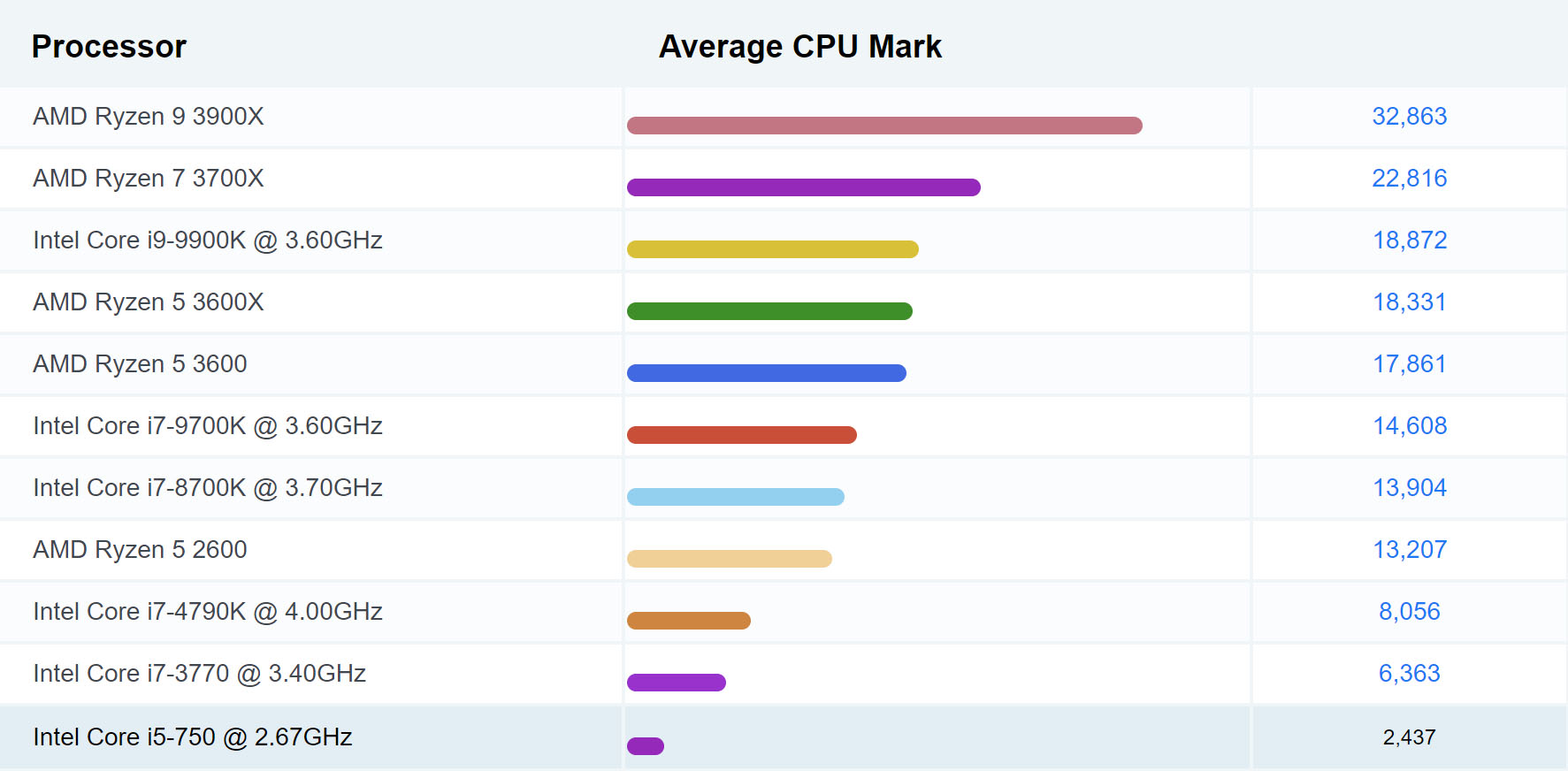
Your CPU is super slow.
+1
Time for a new cpu.
Sometimes a picture tells the story a little better.
Something else to consider, that when your cpu came out, here were some popular cameras at the time.
Nikon D90
Canon Rebel 1Ti
4 years still to wait for the Sony A7 launch
Dec 19, 2020 at 06:23 AM
p.1 #13Where is My Computer's Weak Link?
Rusty, according to your chart, my CPU is the second slowest of the bunch, although it might place a little higher given it's a K and overclocked. Novabench still gives my overall system a better than average score (2354 vs 2068), even when focusing the comparison to results from the past month where the averages run higher. Admittedly the top score over the past 30 days blows me out of the water... 7455!
The bottom line is that since 2012 I've never used any other computer for my work, which gives me no basis for a real-world comparison. This tends to be a net benefit since I can't miss what I've never had so, unlike the OP, I am not feeling victimized by a slow machine. I just launched Photoshop before I typed this sentence and it took 6 seconds; a LR export to PS took 2.5. So, for now. I'm good.
But I do endorse the suggestions for SSISteve to start thinking about new hardware if he has any kind of a workload at all. Even if he only dabbles, a faster responding machine allows the freedom to explore more creative options without being penalized by waiting an inordinate amount of time to see a result.
Dec 19, 2020 at 09:14 AM
p.1 #14Where is My Computer's Weak Link?
Ho1972 wrote:
Rusty, according to your chart, my CPU is the second slowest of the bunch, although it might place a little higher given it's a K and overclocked. Novabench still gives my overall system a better than average score (2354 vs 2068), even when focusing the comparison to results from the past month where the averages run higher. Admittedly the top score over the past 30 days blows me out of the water... 7455!
The bottom line is that since 2012 I've never used any other computer for my work, which gives me no basis for a real-world comparison. This tends to...Show more →
It just depends what you are doing with your machine. My work would crash your computer most of the time. I know this because I have an I7 chip from your era in an older machine.
Rusty, according to your chart, my CPU is the second slowest of the bunch, although it might place a little higher given it's a K and overclocked. Novabench still gives my overall system a better than average score (2354 vs 2068), even when focusing the comparison to results from the past month where the averages run higher. Admittedly the top score over the past 30 days blows me out of the water... 7455!
The bottom line is that since 2012 I've never used any other computer for my work, which gives me no basis for a real-world comparison. This tends to...Show more →
It just depends what you are doing with your machine. My work would crash your computer most of the time
. I know this because I have an I7 chip from your era in an older machine.Dec 20, 2020 at 08:14 AM
p.1 #15Where is My Computer's Weak Link?
RayinNY wrote:
It just depends what you are doing with your machine. My work would crash your computer most of the time. I know this because I have an I7 chip from your era in an older machine.
Interesting. What is your work and please define "crash".
It just depends what you are doing with your machine. My work would crash your computer most of the time
. I know this because I have an I7 chip from your era in an older machine.Interesting. What is your work and please define "crash".
Dec 20, 2020 at 09:12 AM
p.1 #16Where is My Computer's Weak Link?
The question is how big a dump truck do you need to get groceries. Sometimes a Camry will do just fine.
My point was that from 2009 is quite a long time ago, and if the OP is looking to do a new build ... I wouldn't consider using his current CPU.
Primarily, the tasks (as I consider them, others may dissent) falls into two broad categories, where it comes to speed:
Processing
Data Transfer
CPU - Processing
SSD / RAM - Transfer
So, if the nature of the work is heavy processing, then the CPU can be the weaker link. Conversely, if the slowdown is being experienced in the transfer (non-processing), the SSD / HDD can be the issue. The "tricky part" is when you are talking about combining both processing and transfer functions. To which, more of each is better.
But, if one has a known demand / limit for which there needs are .. then, they may lean their build one way or the other. Imo, the heart of the issue revolves around the CPU (Central Processing Unit) ... so, start there (central) and build out.
How big of a CPU do you need ... well, that's variable to your demands (dump truck vs. Camry). But, going forward I wouldn't be looking to use a 1972 Toyota. Even if I did feel only a moderate CPU was appropriate for my needs (true for some), I think it's time to have a 2020 mid-range CPU, rather than a 2009 CPU. Bearing in mind, that in 2025, you'll either have a 5 year old CPU or a 16 year old CPU.
The point of the graph is to show how much the advances have become over the last 11 years. Even more so if we project 2009 against 2025. Software is starting to advance as well, who knows what the software will be like in another 5 years. But, I'm pretty sure it won't be like it is today, or was in 2009.
Dec 20, 2020 at 10:06 AM
p.1 #17Where is My Computer's Weak Link?
Ho1972 wrote:
. I know this because I have an I7 chip from your era in an older machine.Interesting. What is your work and please define "crash".
Processing my A7RIV files. I do a lot of composites and videos. Heavy photoshop work and almost any kind of color grading in Davinci Resolve will just about kill it.
RayinNY wrote
It just depends what you are doing with your machine. My work would crash your computer most of the time. I know this because I have an I7 chip from your era in an older machine.Processing my A7RIV files. I do a lot of composites and videos. Heavy photoshop work and almost any kind of color grading in Davinci Resolve will just about kill it.
Dec 20, 2020 at 10:39 AM
p.1 #18Where is My Computer's Weak Link?
RayinNY wrote:
. I know this because I have an I7 chip from your era in an older machine.Interesting. What is your work and please define "crash".Processing my A7RIV files. I do a lot of composites and videos. Heavy photoshop work and almost any kind of color grading in Davinci Resolve will just about kill it.
Ah, ok. I've done large pano composites which didn't phase my system at all, as well as a range of other large, multi-GB files for print with D810 and D850 images. I honestly don't think any type of still image editing would cause me a problem (maybe in terms of time to process), but my video work has been pretty minimal using ShotCut.
So when your older system chokes, does it actually crash, lock up or just slow down? There's more to capability and stability than the CPU.
Ho1972 wrote
RayinNY wrote
It just depends what you are doing with your machine. My work would crash your computer most of the time. I know this because I have an I7 chip from your era in an older machine.Ah, ok. I've done large pano composites which didn't phase my system at all, as well as a range of other large, multi-GB files for print with D810 and D850 images. I honestly don't think any type of still image editing would cause me a problem (maybe in terms of time to process), but my video work has been pretty minimal using ShotCut.
So when your older system chokes, does it actually crash, lock up or just slow down? There's more to capability and stability than the CPU.
Dec 20, 2020 at 11:59 AM
p.1 #19Where is My Computer's Weak Link?
Ho1972 wrote:
. I know this because I have an I7 chip from your era in an older machine.Interesting. What is your work and please define "crash".Processing my A7RIV files. I do a lot of composites and videos. Heavy photoshop work and almost any kind of color grading in Davinci Resolve will just about kill it.Ah, ok. I've done large pano composites which didn't phase my system at all, as well as a range of other large, multi-GB files for print with D810 and D850 images. I honestly don't think any type of still image editing would cause me a problem (maybe in terms of time to process), but my video work has been pretty minimal using ShotCut.
So when your older system chokes, does it actually crash, lock up or just slow down? There's more to capability and stability than the CPU.
It's a very stable system, still works just fine if it runs normal everyday stuff. It was the last computer I bought before I started building my own. It's a Lenovo from 2010 and I still use it to do lighter work.
RayinNY wrote
Ho1972 wrote
RayinNY wrote
It just depends what you are doing with your machine. My work would crash your computer most of the time. I know this because I have an I7 chip from your era in an older machine.So when your older system chokes, does it actually crash, lock up or just slow down? There's more to capability and stability than the CPU.
It's a very stable system, still works just fine if it runs normal everyday stuff. It was the last computer I bought before I started building my own. It's a Lenovo from 2010 and I still use it to do lighter work.
Dec 20, 2020 at 12:19 PM
p.1 #20Where is My Computer's Weak Link?
For most of the tech support work I do on the side, I usually recommend budgeting for a computer replacement every 3-5 years. So often, we don't even notice that our computer gets slower and develops issues that we just grow accustomed to.
I've built Photoshop and Lightroom computers for ~$800. Ryzen 5, $50 GPU off of Craigslist, m.2 NVMe, and 16-32GB of RAM. That gets most people 85% of the way there. Sad thing is it costs 2-3x that much to get the last 10-15%.
I've built Photoshop and Lightroom computers for ~$800. Ryzen 5, $50 GPU off of Craigslist, m.2 NVMe, and 16-32GB of RAM. That gets most people 85% of the way there. Sad thing is it costs 2-3x that much to get the last 10-15%.
Dec 21, 2020 at 08:23 AM