This topic is in the 2020 archive. You can read it and like its posts here. It is read only.
Archive 2020Help Understanding what I am seeing
p.1 #1Help Understanding what I am seeing
I shoot swimming at one of the largest aquatic centers on the east coast.
In the spring during covid, they built an extended "wait room" and basically killed all the natural light coming from the. Prior to building that, I had times where I exposure could get really tricky, but was able to work through it.
With no natural light, I've had to up my ISO to around 20k to stay at 2.8 and 1/1000-1/1250 as all the light is reflected from the ceiling down or from the scoreboard (blue with white lettering).
One side of the pool is without issue, colors are good and natural looking. However, in lanes 1-3, where they are close to the scoreboard, I am now getting purple tinting and some deep orange shadows on my swimmers. There's nothing purple in the center, so I am assuming what I am seeing is some sort reflection of the scoreboard onto the water and then onto the swimmer and then maybe their head creating a very long shadow on the off arm.
Is this correct, and, if so, anyone have a way to fix it? We're talking a lot of images, so importing them into PS and handfixing each one is not an option. The HSL sliders in LR aren't really helping either. I have thought about a custom WB, but it changes from one side to the other, so that's not a realistic option.
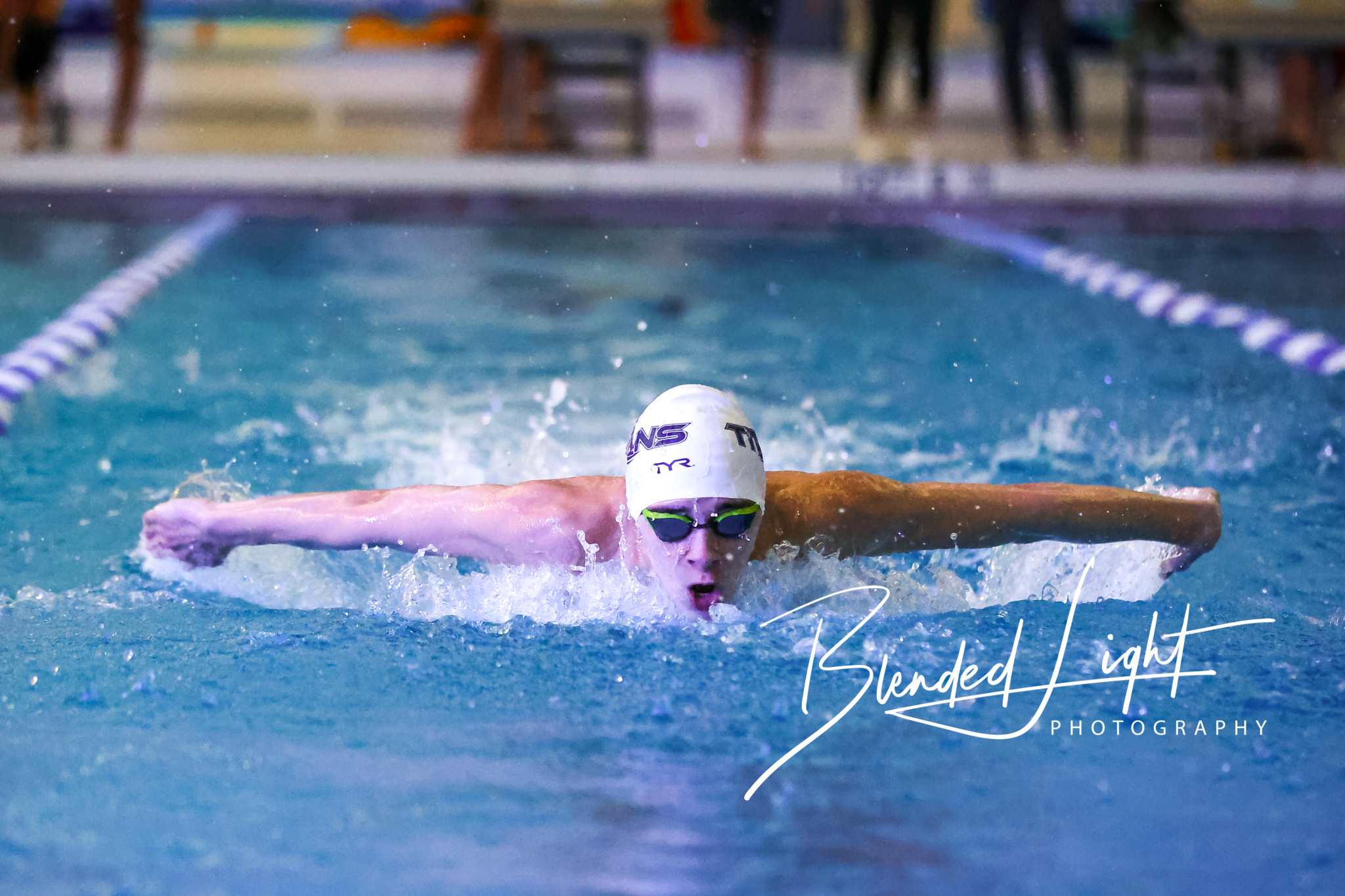
In the spring during covid, they built an extended "wait room" and basically killed all the natural light coming from the. Prior to building that, I had times where I exposure could get really tricky, but was able to work through it.
With no natural light, I've had to up my ISO to around 20k to stay at 2.8 and 1/1000-1/1250 as all the light is reflected from the ceiling down or from the scoreboard (blue with white lettering).
One side of the pool is without issue, colors are good and natural looking. However, in lanes 1-3, where they are close to the scoreboard, I am now getting purple tinting and some deep orange shadows on my swimmers. There's nothing purple in the center, so I am assuming what I am seeing is some sort reflection of the scoreboard onto the water and then onto the swimmer and then maybe their head creating a very long shadow on the off arm.
Is this correct, and, if so, anyone have a way to fix it? We're talking a lot of images, so importing them into PS and handfixing each one is not an option. The HSL sliders in LR aren't really helping either. I have thought about a custom WB, but it changes from one side to the other, so that's not a realistic option.
Nov 16, 2020 at 10:46 AM
p.1 #2Help Understanding what I am seeing
I get this off of LED boards on the side of basketball. I've found no good answer but hand fixing it with some kind of gradient. I've decided to adopt the idea it reflects reality. 
In this case where it's only where the arm is covered in a sheet of water, not uniform, a gradient is not going to work well.
Color substitution in photoshop? (But that's by hand of course).
Is the color always the same, some kind of LUT creative profile in lightroom? (I have no idea how to create those, but they can do color substitutions on the fly).
Partly I wrote this to express sympathy, and partly to get notified when someone posts a wonderful solution I can use for basketball. Well, you know... if I ever shoot basketball again.
Nov 16, 2020 at 04:55 PM
p.1 #3Help Understanding what I am seeing
Yes, the color's pretty consistent - on occasion a little more intense. Oddly enough, it doesn't get more intense the closer they get to the board, which I would expect, meaning it doesn't go from a lavender to a dark purple.
Nov 16, 2020 at 07:51 PM
p.1 #4Help Understanding what I am seeing
"If" the issue is consistent photo to photo for a set, you could mask those in PS and fix the bad part (or both independently), then apply the same to all in the set which gets around your lots of photos issue. It might take some work to get the masking right for each side but once you do you could script it to do the same for a set of photos. Some wildlife photographers on FM do this all the time, in your case given a more static environment I'd think it would be much easier to do.
for example the one above, it appears to be left side of the photo and mostly to just past center, so you could mask that part and fix it, then blend the two parts for the final photo. Obviously this would work for the shots from the two ends of the pool, just need two different actions as the sides will be swapped.
for example the one above, it appears to be left side of the photo and mostly to just past center, so you could mask that part and fix it, then blend the two parts for the final photo. Obviously this would work for the shots from the two ends of the pool, just need two different actions as the sides will be swapped.
Nov 18, 2020 at 03:01 PM
p.1 #5Help Understanding what I am seeing
I think your theory on where the color is coming from (reflection from the scoreboard) seems reasonable.
I don't know of a bulk "fix" to correct the color, but I opened the photo in adobe raw and put the white balance eyedropper tool on the white in the lane lines. Pretty quick fix, if you could make that into an action. With some fine tuning, it should come out better.
Good Luck!
P.S. I seem to remember back in the days of the Sony DSC 828 camera, which was notorious for creating "purple fringing", someone, (I believe Andy Williams,) came up with an "action" that did correct the phenomenon. So, perhaps it is possible.
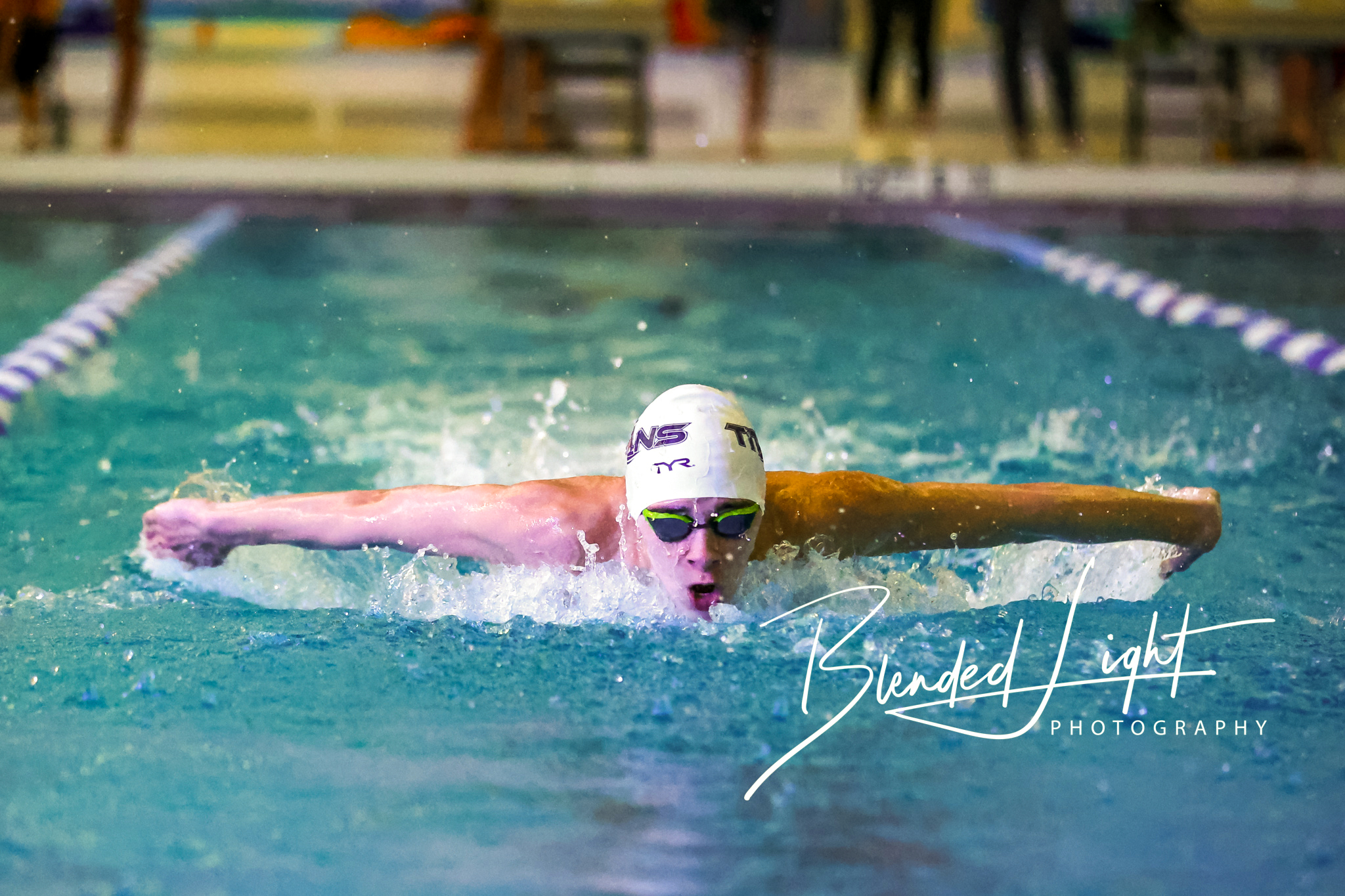
I don't know of a bulk "fix" to correct the color, but I opened the photo in adobe raw and put the white balance eyedropper tool on the white in the lane lines. Pretty quick fix, if you could make that into an action. With some fine tuning, it should come out better.
Good Luck!
P.S. I seem to remember back in the days of the Sony DSC 828 camera, which was notorious for creating "purple fringing", someone, (I believe Andy Williams,) came up with an "action" that did correct the phenomenon. So, perhaps it is possible.
Nov 18, 2020 at 06:42 PM
p.1 #7Help Understanding what I am seeing
In Capture One I'd go into the advanced color editor, select an area of that purple on the arm and change the hue of it. Super easy.
Jan 22, 2021 at 03:25 PM
p.1 #8Help Understanding what I am seeing
Can you present in black & white? Sometimes no color is the best color.
Mixed lighting like this is tough to deal with consistently. If you essentially have a different WB in each lane your post-process correction choices will be arduous.
Mixed lighting like this is tough to deal with consistently. If you essentially have a different WB in each lane your post-process correction choices will be arduous.
Mar 22, 2021 at 11:25 AM
p.1 #9Help Understanding what I am seeing
What camera are you using? I have had a similar experience with my EOS R and neon lights
Mar 28, 2021 at 11:55 AM
p.1 #10Help Understanding what I am seeing
I had a little of that problem with my R5 and fixed it by turning on the anti-flicker. I had color shits and a little banding as well.
With no natural light you are 100% at the mercy of the lighting.
With no natural light you are 100% at the mercy of the lighting.
Mar 30, 2021 at 01:57 PM