This topic is in the 2020 archive. You can read it and like its posts here. It is read only.
Archive 2020DxO Photolab 4
p.2 #1DxO Photolab 4
i was previously on DXO3. DxO and i go back a ways. they did a little furniture moving in the interface. you know, you get used to a particular config and then someone has to go and change things. this week photoshop just did its yearly update to v22. looks identical but just some bits and pieces were modded to entertain.
Oct 25, 2020 at 05:00 AM
p.2 #2DxO Photolab 4
From DXO PL3 to DXO PL4 since Friday . I find DeepPRIME absolutely astonishing! Better than Prime and also faster. For me, DeepPRIME could become a standard setting for anything above iso800 (maybe even lower), or iso1600. Files look clean and not over-processed "plasticy" at all. I think it might also bring me to shoot at higher iso's with confidence. I find this feature alone enough to upgrade to V4. Not (yet) interested in watermarking.
Well done DXO!
Well done DXO!
Oct 25, 2020 at 05:34 AM
p.2 #3DxO Photolab 4
i don't even touch PRIME below 16000 and then its needs to be looked at real well.
Oct 25, 2020 at 09:11 AM
p.2 #4DxO Photolab 4
To each its own I guess. Only used it on a number of files. Maybe I' ll change my mind after some time (and on more lower iso files). For now...I' ll stick with DeepPRIME, like I said.
Agree. Needs to be looked at really well anyway.
Agree. Needs to be looked at really well anyway.
Oct 25, 2020 at 09:41 AM
p.2 #5DxO Photolab 4
The new changes for DXO PhotoLab 4 are nice
I find the DeepPrime to be very useful.
- results from some of my older RAW images are better than I ever achieved with the images in the past for noise reduction
- deep prime is fast on Windows 10, I9 3.6 Ghz, 64 GB
history is quite useful
renaming tool is very useful
Overall, I am finding it easier to get the results I desire converting RAW files
Oct 26, 2020 at 05:41 PM

p.2 #6DxO Photolab 4
Wilbus wrote:
Compared to Capture One Pro, the "HQ" noise reduction of DXO suppresses the noise better IMO, but at the cost of detail. Capture One retains the detail better in the brick wall behind the car, also, the bike handlebar doesn't look as blotchy. But none of them stand a chance against Deep Prime which both enhance detail and suppress the noise.
+1 and thanks.
Although, to my eye, the Deep Prime still has a little hint of blotchy (see circled areas below) ... albeit, much less than HQ though.
With the HQ vs. C1, I'd prefer the detail of C1
With the Deep Prime vs. C1 ... close call, depending on pref for detail vs. pref for NR. Also, depends on the image structure, as to which one might be preferred.
I think either one of these (Deep Prime or C1) in full view / print would be splittin' hairs for a lot of folks without pixel peeping.
At that point (C1 vs. Deep Prime), I'd think that the overall program, UI, workflow, etc. would tip scales. If these crops are to make the call for C1 vs. Deep Prime ... hmmm, sleep on it.
That said, with C1 v.21 on the horizon ... it'll be interesting to see how it compares with Deep Prime. Always a game of "raise the bar" as folks leapfrog about. Recent ACR seems to have closed the gap on C1 a bit, but now it's C1's turn to see if they re-establish additional gains.
I'm in waiting for v.21 mode ... but, you've shown Deep Prime as something to not "overlook" along the way. Particularly if it plays nice as part of a pre- editing (C1 or PS) approach.
I'm mostly a PS editor, and began looking to C1 as a replacement to ACR as the converter (and maybe less PS), prior to PS. Looks like I now have two (three) considerations:
Newer ACR seems better > PS
C1 v.21 > PS
Deep Prime > PS
That seems the top contenders for me (not in order) ... looking to see what the C1 v.21 brings to the table before heralding the champ.
Darn, I just made comps of DXO 3 and decided I preferred the C1 v.20 (demo), then ACR upped their game, now I need to look at DXO 4 Deep Prime (while waiting for C1 v.21). For me, I think I'm expecting C1 v.21 to be the "one to beat" ... but, the Deep Prime looks like it makes for a nice bar for them to try and top, too.
Thanks again for the comps / crops.
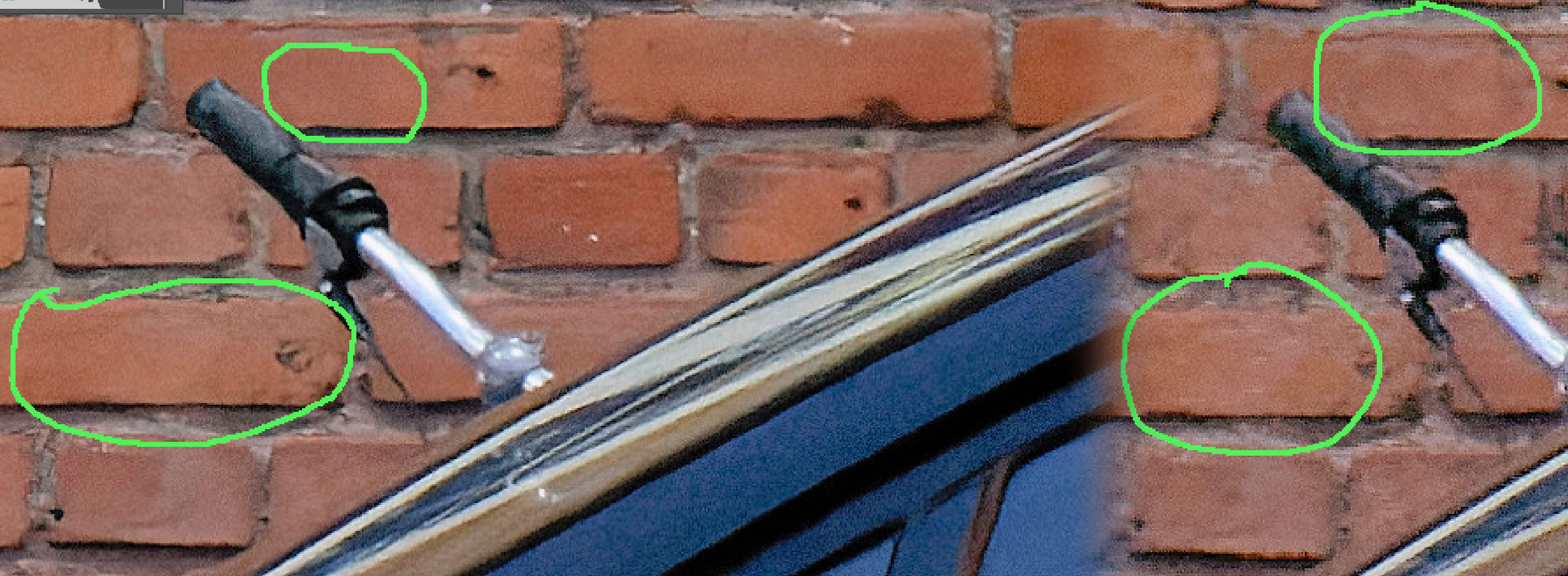
Compared to Capture One Pro, the "HQ" noise reduction of DXO suppresses the noise better IMO, but at the cost of detail. Capture One retains the detail better in the brick wall behind the car, also, the bike handlebar doesn't look as blotchy. But none of them stand a chance against Deep Prime which both enhance detail and suppress the noise.
+1 and thanks.
Although, to my eye, the Deep Prime still has a little hint of blotchy (see circled areas below) ... albeit, much less than HQ though.
With the HQ vs. C1, I'd prefer the detail of C1
With the Deep Prime vs. C1 ... close call, depending on pref for detail vs. pref for NR. Also, depends on the image structure, as to which one might be preferred.
I think either one of these (Deep Prime or C1) in full view / print would be splittin' hairs for a lot of folks without pixel peeping.
At that point (C1 vs. Deep Prime), I'd think that the overall program, UI, workflow, etc. would tip scales. If these crops are to make the call for C1 vs. Deep Prime ... hmmm, sleep on it.
That said, with C1 v.21 on the horizon ... it'll be interesting to see how it compares with Deep Prime. Always a game of "raise the bar" as folks leapfrog about. Recent ACR seems to have closed the gap on C1 a bit, but now it's C1's turn to see if they re-establish additional gains.
I'm in waiting for v.21 mode ... but, you've shown Deep Prime as something to not "overlook" along the way. Particularly if it plays nice as part of a pre- editing (C1 or PS) approach.
I'm mostly a PS editor, and began looking to C1 as a replacement to ACR as the converter (and maybe less PS), prior to PS. Looks like I now have two (three) considerations:
Newer ACR seems better > PS
C1 v.21 > PS
Deep Prime > PS
That seems the top contenders for me (not in order) ... looking to see what the C1 v.21 brings to the table before heralding the champ.
Darn, I just made comps of DXO 3 and decided I preferred the C1 v.20 (demo), then ACR upped their game, now I need to look at DXO 4 Deep Prime (while waiting for C1 v.21). For me, I think I'm expecting C1 v.21 to be the "one to beat" ... but, the Deep Prime looks like it makes for a nice bar for them to try and top, too.
Thanks again for the comps / crops.
Oct 27, 2020 at 08:02 AM
p.2 #7DxO Photolab 4
Caved and purchased it.
The deciding factor for me is that it is able to use my GPU more, and runs faster as a result. Both for exports and making adjustments on the sliders. (On normal sized photos you can't tell the difference, but on 80mp shots, you can.)
I managed to get this dang RTX 3080 so I want to get some mileage out of it, dang it!
Oct 27, 2020 at 12:55 PM
p.2 #10DxO Photolab 4
I meant better utilization of GPU ... not necessarily more powerful GPU.
Oct 27, 2020 at 02:43 PM
p.2 #11DxO Photolab 4
PL3 made good use of the GPU.
the 3080 is a great gaming GPU. next machine possibly the 3070 as it out performs the 2080
Edited on Oct 27, 2020 at 03:47 PM · View previous versions
the 3080 is a great gaming GPU. next machine possibly the 3070 as it out performs the 2080
Edited on Oct 27, 2020 at 03:47 PM · View previous versions
Oct 27, 2020 at 03:44 PM
p.2 #12DxO Photolab 4
Yeah, that's what I noticed. I was doing a side by side comparison between Photolab 3 and 4 and 4 was a noticeable step faster.
If you're processing normal sized photos you probably won't notice much, but with larger ones, at least mine, it helps.
If you're processing normal sized photos you probably won't notice much, but with larger ones, at least mine, it helps.
Oct 27, 2020 at 03:46 PM
p.2 #14DxO Photolab 4
sjms wrote:
what body are you using? how large is large?
Pixel shift 4X / 8X resolution files
what body are you using? how large is large?
Pixel shift 4X / 8X resolution files
Oct 27, 2020 at 03:58 PM
p.2 #16DxO Photolab 4
sjms wrote:
what body are you using? how large is large?
Olympus EM1 Mk2 hi-res mode, which puts out 80mp shots.
what body are you using? how large is large?
Olympus EM1 Mk2 hi-res mode, which puts out 80mp shots.
Oct 27, 2020 at 04:12 PM
p.2 #18DxO Photolab 4
80mp raw files, not sure what you mean about compressed or open. The pixel dimensions are 10368x7776, and the file size is usually 60-64mb.
Oct 27, 2020 at 04:26 PM
p.2 #19DxO Photolab 4
my D850 has compressed raw images. when opened in these programs it grows just a little to an average of 130MB.
now my images are also an average of 82xx by 55xx.
interesting.
now my images are also an average of 82xx by 55xx.
interesting.
Oct 27, 2020 at 04:30 PM
p.2 #20DxO Photolab 4
it seems i don't need a equivalent to a GE90-115 to process these. now for playing games like call of duty with all the sliders firewalled for graphics and a smattering of RTX (unusable for photo) it works well. and i'm running a 5+ year old machine.
Oct 27, 2020 at 04:53 PM