This topic is in the 2020 archive. You can read it and like its posts here. It is read only.
Archive 2020R5 members review thread

p.5 #1R5 members review thread
Can you confirm the file size in the crop mode please? Thanx!
Gust wrote:
The crop mode is so nice, it was the main reason I wanted the camera. I have mine setup to be full frame then I hit C1 and it is in crop mode, really quick. Using the 400mm f2.8 + 2x in crop mode made for a really nice close up lens yesterday.
What do you mean with: The crop mode?
is that Craw, you use?
very nice pict
Aug 02, 2020 at 03:53 AM
p.5 #2R5 members review thread
Gust wrote:
The crop mode is so nice, it was the main reason I wanted the camera. I have mine setup to be full frame then I hit C1 and it is in crop mode, really quick. Using the 400mm f2.8 + 2x in crop mode made for a really nice close up lens yesterday.
What do you mean with: The crop mode?
is that Craw, you use?
very nice pict
crop mode - the camera acts like a cropped sensor like APS-C
craw - compressed raw, a more efficient raw format at the potential expense of some data
Aug 02, 2020 at 04:04 AM
p.5 #3R5 members review thread
arbitrage wrote:
evertdoorn wrote
of course, you can add battery info to a MyMenu tab, and from there check the level in percentagesYep there is.
Aug 02, 2020 at 04:50 AM
p.5 #4R5 members review thread
TeamSpeed wrote:
What do you mean with: The crop mode?
is that Craw, you use?
very nice pict crop mode - the camera acts like a cropped sensor like APS-C
craw - compressed raw, a more efficient raw format at the potential expense of some data
Thnx, I own the R5 and I cannot find how and where to set?
Gust wrote
The crop mode is so nice, it was the main reason I wanted the camera. I have mine setup to be full frame then I hit C1 and it is in crop mode, really quick. Using the 400mm f2.8 + 2x in crop mode made for a really nice close up lens yesterday.What do you mean with: The crop mode?
is that Craw, you use?
very nice pict
craw - compressed raw, a more efficient raw format at the potential expense of some data
Thnx, I own the R5 and I cannot find how and where to set?
Aug 02, 2020 at 04:52 AM
p.5 #5R5 members review thread
therealthings wrote:
 Does this also work with dragonfly or damselfly eyes? Just wondering because they are so unusual compared to mammal or bird eyes ...
I think this is a dream camera for you. But i still think the dragonfly has to hover idle for a moment. My brief experience with fast moving animals did not result in a great keeper rate yet, despite the blue box showing it is tracking the subject. What most people, including me expected is that the blue box is a confirmation that the tracking of the subject is 100% accurate with the focal plane of the lens, which in my eyes now seems more like a confirmation that the camera found what to track, but sometimes the lens AF...Show more →
This is what I need to hear more about....how often is the focus actually correct regardless of how accurate the blue box/boxes look to be. Please keep us updated as you shoot more and more.
This to me is like the difference between the A7RIV and the A9II...both cameras look like they dance the dots in the exact same way when tracking faster subjects. I can't tell a difference in the EVF while shooting (its not like the A7RIV is falling off the subject). BUT, back on the computer the hit rate of actually critically focused sharp shots is significantly higher with the A9II results even if it is shooting twice as fast (20 vs 10 FPS). The only difference I sometimes can see between the two cameras is if I use the Real-Time Tracking mode the RIV is more likely to revert back to the dancing dots from the Tracking square/two lines icon. But I don't use RTT much for flight and again with the dancing dots things look the same in how they stick to the subjects. Now with the Sony cameras we sort of know the answer as Sony reports the AF calculations per second and the A9/A9II does 60/s where as all the A7 cameras only do 20/s.
The R5/6 AF looks so impressive when I see the Atmos recordings of the EVF but in the end that is meaningless unless the pictures show a high hit rate. The one thing I've been worried about with Canon compared to Sony is that Sony has made focus motors designed for 20FPS (and they claim even faster for the future) and with Canon we are really relying on EF glass for now for my type of photography until the 100-500 comes out and even then I would be relying on EF glass for faster/longer primes. Also I'm not sure if the RF glass has even taken focus motors into account or not. Of course I don't know for sure if Sony's claims about these new dual-linear motors is just blowing smoke or there is truth to it. That is hard to say because there is nothing reliable to compare to...I've compared to adapting EF glass but there are too many other variables with that to come to any real conclusion.
technic wrote
RobAmy wrote
The Animal Eye is sweet, I know I already mentioned it but it is worth mentioning againI think this is a dream camera for you. But i still think the dragonfly has to hover idle for a moment. My brief experience with fast moving animals did not result in a great keeper rate yet, despite the blue box showing it is tracking the subject. What most people, including me expected is that the blue box is a confirmation that the tracking of the subject is 100% accurate with the focal plane of the lens, which in my eyes now seems more like a confirmation that the camera found what to track, but sometimes the lens AF...Show more →
This is what I need to hear more about....how often is the focus actually correct regardless of how accurate the blue box/boxes look to be. Please keep us updated as you shoot more and more.
This to me is like the difference between the A7RIV and the A9II...both cameras look like they dance the dots in the exact same way when tracking faster subjects. I can't tell a difference in the EVF while shooting (its not like the A7RIV is falling off the subject). BUT, back on the computer the hit rate of actually critically focused sharp shots is significantly higher with the A9II results even if it is shooting twice as fast (20 vs 10 FPS). The only difference I sometimes can see between the two cameras is if I use the Real-Time Tracking mode the RIV is more likely to revert back to the dancing dots from the Tracking square/two lines icon. But I don't use RTT much for flight and again with the dancing dots things look the same in how they stick to the subjects. Now with the Sony cameras we sort of know the answer as Sony reports the AF calculations per second and the A9/A9II does 60/s where as all the A7 cameras only do 20/s.
The R5/6 AF looks so impressive when I see the Atmos recordings of the EVF but in the end that is meaningless unless the pictures show a high hit rate. The one thing I've been worried about with Canon compared to Sony is that Sony has made focus motors designed for 20FPS (and they claim even faster for the future) and with Canon we are really relying on EF glass for now for my type of photography until the 100-500 comes out and even then I would be relying on EF glass for faster/longer primes. Also I'm not sure if the RF glass has even taken focus motors into account or not. Of course I don't know for sure if Sony's claims about these new dual-linear motors is just blowing smoke or there is truth to it. That is hard to say because there is nothing reliable to compare to...I've compared to adapting EF glass but there are too many other variables with that to come to any real conclusion.
Aug 02, 2020 at 05:35 AM
p.5 #6R5 members review thread
Ziffl3 wrote:

1) Is there a way to setup EVF/LCD behaviour so that the EVF is primary and it only switches to LCD if you hit Playback or Menu? Basically this is mimicking how a DSLR works. Nikon Z6/7 have this and Fuji also. Sony has some other workarounds that I've found to basically do this but not totally seamless.(1) So you want to see an image in the EVF that you just took?
Or (2) no image review [EVF] and only a review when you want it on the back screen.
if #2... then yes. as an EOS r shooter.... this is how i use the camera.
i am pretty confident the R5/R6 can do the same.
The EVF turns on when looking through it... and a sensor kicks the lcd screen on when you move your face away.
You can also turn that feature off.
What I'm looking for is no automatic image review after a shot in the EVF or LCD. I know I can turn that off easy enough.
What I want is that if I take my eye away from the EVF, the EVF shuts off and the LCD stays off. Then if I push the Play button or the Menu button the LCD turns on. If I have my eye up to the EVF and push the Play or Menu button it would show in the EVF. It is basically mimicking how a DSLR works except of course with a DSLR you have no option to view Play or Menu in the OVF.
With my Sony camera I can do this with a workaround my friend found in the LCD settings. With my Nikon Z50 I can't do this. I only have the choice of EVF only, LCD only or Auto switching between the two. That means if I have EVF only I can't bring up the LCD just by hitting Play or Menu. If I have it set to Auto then the LCD comes on as soon as I move away from the EVF (I don't want this). Now with the Z6/Z7 Nikon has a 4th EVF/LCD display mode that does exactly as I want. I remember the day Fuji first put this type of mode into their mirrorless line (I think with X-T2?) as it had been requested for a while and we all know Fuji is the king of listening to customers and improving cameras via FW without trying to sell you another $3K camera to do a simple UI improvement.
arbitrage wrote
My questions for the new R5 owners. Thanks in advance for any or all answers you can provide.1) Is there a way to setup EVF/LCD behaviour so that the EVF is primary and it only switches to LCD if you hit Playback or Menu? Basically this is mimicking how a DSLR works. Nikon Z6/7 have this and Fuji also. Sony has some other workarounds that I've found to basically do this but not totally seamless.
Or (2) no image review [EVF] and only a review when you want it on the back screen.
if #2... then yes. as an EOS r shooter.... this is how i use the camera.
i am pretty confident the R5/R6 can do the same.
The EVF turns on when looking through it... and a sensor kicks the lcd screen on when you move your face away.
You can also turn that feature off.
What I'm looking for is no automatic image review after a shot in the EVF or LCD. I know I can turn that off easy enough.
What I want is that if I take my eye away from the EVF, the EVF shuts off and the LCD stays off. Then if I push the Play button or the Menu button the LCD turns on. If I have my eye up to the EVF and push the Play or Menu button it would show in the EVF. It is basically mimicking how a DSLR works except of course with a DSLR you have no option to view Play or Menu in the OVF.
With my Sony camera I can do this with a workaround my friend found in the LCD settings. With my Nikon Z50 I can't do this. I only have the choice of EVF only, LCD only or Auto switching between the two. That means if I have EVF only I can't bring up the LCD just by hitting Play or Menu. If I have it set to Auto then the LCD comes on as soon as I move away from the EVF (I don't want this). Now with the Z6/Z7 Nikon has a 4th EVF/LCD display mode that does exactly as I want. I remember the day Fuji first put this type of mode into their mirrorless line (I think with X-T2?) as it had been requested for a while and we all know Fuji is the king of listening to customers and improving cameras via FW without trying to sell you another $3K camera to do a simple UI improvement.
Aug 02, 2020 at 05:46 AM
p.5 #7R5 members review thread
Gust wrote:
What do you mean with: The crop mode?
is that Craw, you use?
very nice pict crop mode - the camera acts like a cropped sensor like APS-C
craw - compressed raw, a more efficient raw format at the potential expense of some dataThnx, I own the R5 and I cannot find how and where to set?
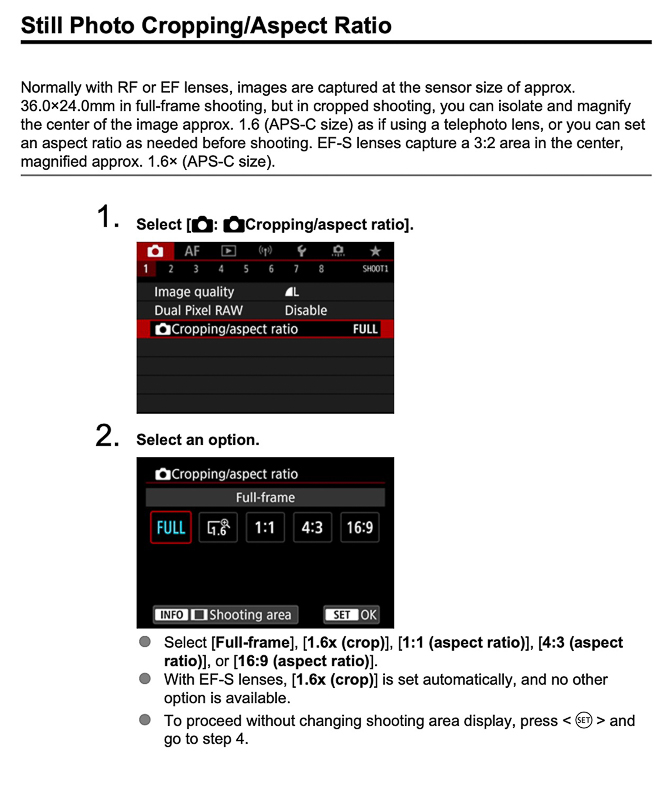
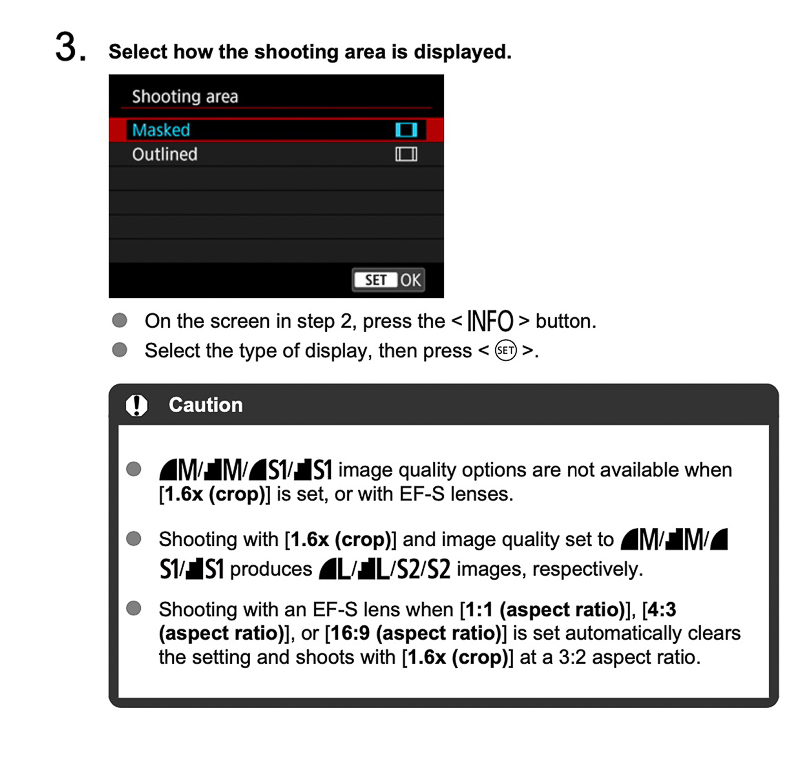
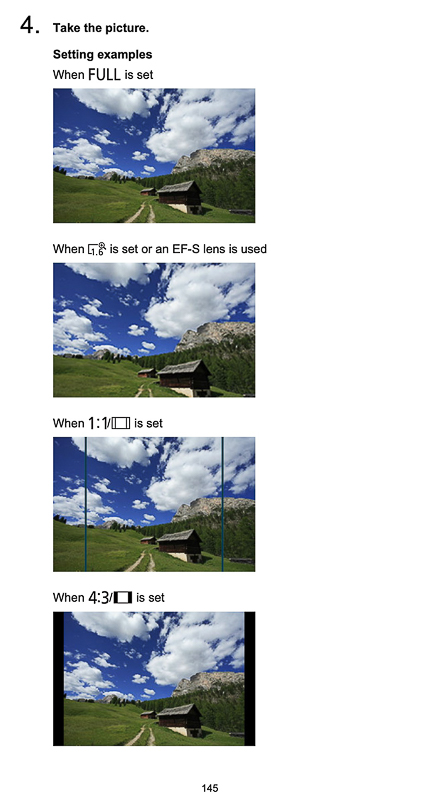
APS-C mode is set here on page 143 of the PDF manual...
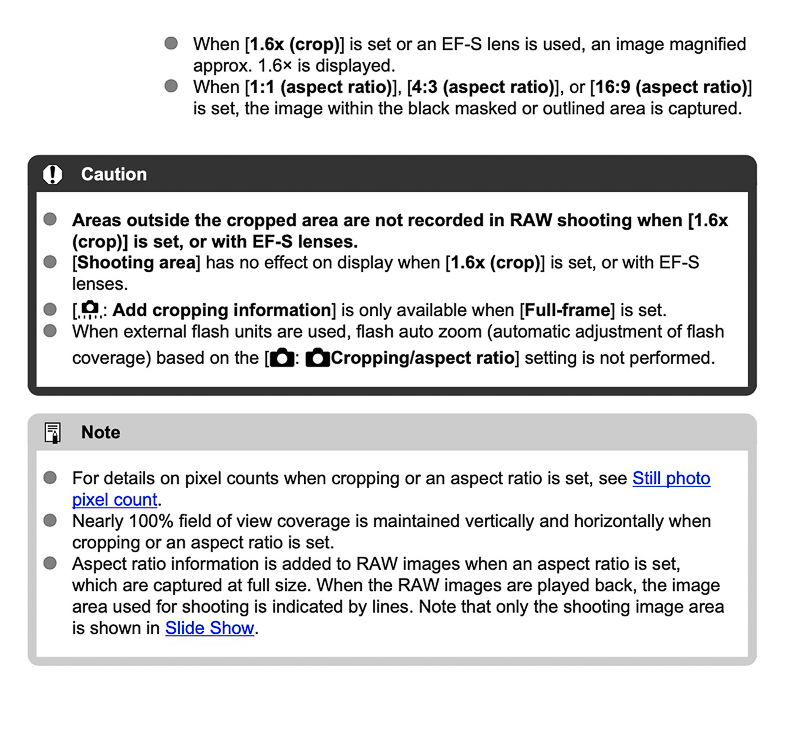
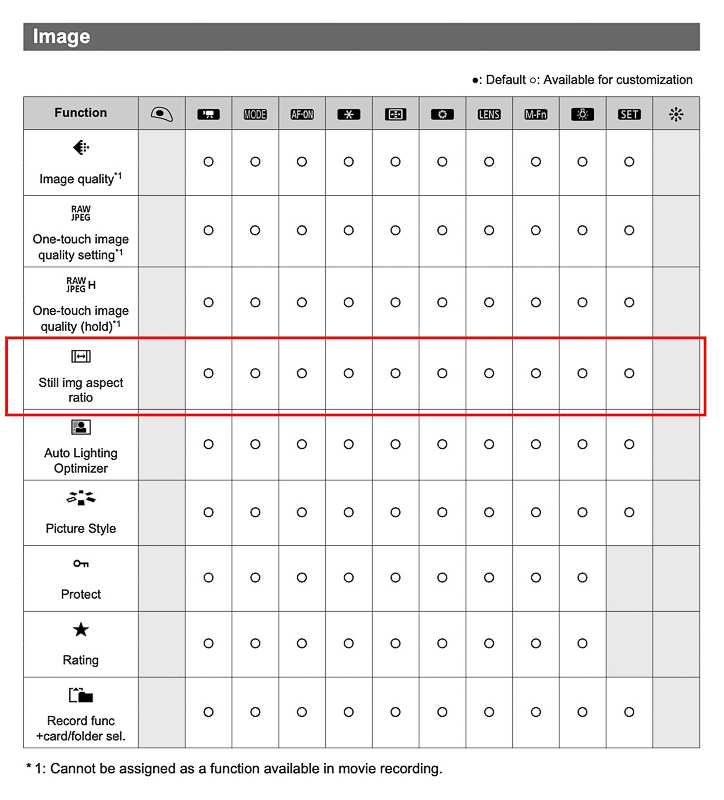
Of note: In 1.6x crop mode (APS-C mode) the RAW file does throw away the data and the EVF/LCD view is magnified to fill the screen with the 1.6x FOV. In the other aspect ratio modes like 16:9 and 1:1, the full sensor is shown in the EVF/LCD and the RAW file is still full size with the crop applied automatically on import to DPP (and maybe to LR) but can be changed back to the full image if you change your mind. With APS-C mode the data is gone forever but it gives one a smaller RAW and faster culling and less storage needed per file. In using other MILCs, I find using APS-C mode when you know you don't need a wider FOV is a great tool because you get the magnified EVF view and can use that to place an AF point more accurately. What I don't know with Canon is if the single AF point grows in size in the EVF to cover the same area of subject or if like on Sony it stays the same size in the VF and therefore can be placed more precisely on an eye or between branches. The Sony way is preferred. I also use crop mode to see more distant subjects for ID purposes in the field while birding.
Also as noted by Rob you can set a button to change between the crop modes and I assume you can deselect the other aspects so it just toggles between the two?? Shown in the last image, page 818 of PDF manual
TeamSpeed wrote
Gust wrote
The crop mode is so nice, it was the main reason I wanted the camera. I have mine setup to be full frame then I hit C1 and it is in crop mode, really quick. Using the 400mm f2.8 + 2x in crop mode made for a really nice close up lens yesterday.What do you mean with: The crop mode?
is that Craw, you use?
very nice pict
craw - compressed raw, a more efficient raw format at the potential expense of some data
APS-C mode is set here on page 143 of the PDF manual...
Of note: In 1.6x crop mode (APS-C mode) the RAW file does throw away the data and the EVF/LCD view is magnified to fill the screen with the 1.6x FOV. In the other aspect ratio modes like 16:9 and 1:1, the full sensor is shown in the EVF/LCD and the RAW file is still full size with the crop applied automatically on import to DPP (and maybe to LR) but can be changed back to the full image if you change your mind. With APS-C mode the data is gone forever but it gives one a smaller RAW and faster culling and less storage needed per file. In using other MILCs, I find using APS-C mode when you know you don't need a wider FOV is a great tool because you get the magnified EVF view and can use that to place an AF point more accurately. What I don't know with Canon is if the single AF point grows in size in the EVF to cover the same area of subject or if like on Sony it stays the same size in the VF and therefore can be placed more precisely on an eye or between branches. The Sony way is preferred. I also use crop mode to see more distant subjects for ID purposes in the field while birding.
Also as noted by Rob you can set a button to change between the crop modes and I assume you can deselect the other aspects so it just toggles between the two?? Shown in the last image, page 818 of PDF manual
Aug 02, 2020 at 05:51 AM
p.5 #8R5 members review thread
I wish Canon would introduce an APS-H crop mode.
Aug 02, 2020 at 06:12 AM
p.5 #9R5 members review thread
Gust wrote:
The crop mode is so nice, it was the main reason I wanted the camera. I have mine setup to be full frame then I hit C1 and it is in crop mode, really quick. Using the 400mm f2.8 + 2x in crop mode made for a really nice close up lens yesterday.
What do you mean with: The crop mode?
is that Craw, you use?
very nice pict
Thanks. I use raw not Craw. Crop mode is a 1.6x crop which is 17mp vs the 45mp full frame. You select it with the camera.
Aug 02, 2020 at 06:22 AM
p.5 #10R5 members review thread
I apologize if this has been previously answered----Lots of info on this thread;
What is the typical/average RAW file size?
DP review state's 35-40 MP in uncompressed Raw, which seems remarkable as some other brand 45MP camera's are getting 70-80 MP RAW files.
https://www.dpreview.com/reviews/canon-eos-r5-initial-review/2#:~:text=The%20camera%20uses%20the%20CR3,the%20EOS%205D%20Mark%20IV.
Aug 02, 2020 at 07:35 AM
p.5 #11R5 members review thread
I don't own the camera (yet!) but I've read 50-55 MP raw files are typical.
Aug 02, 2020 at 07:47 AM
p.5 #12R5 members review thread
arbitrage wrote:
1) Is there a way to setup EVF/LCD behaviour so that the EVF is primary and it only switches to LCD if you hit Playback or Menu? Basically this is mimicking how a DSLR works. Nikon Z6/7 have this and Fuji also. Sony has some other workarounds that I've found to basically do this but not totally seamless.(1) So you want to see an image in the EVF that you just took?
Or (2) no image review [EVF] and only a review when you want it on the back screen.
if #2... then yes. as an EOS r shooter.... this is how i use the camera.
i am pretty confident the R5/R6 can do the same.
The EVF turns on when looking through it... and a sensor kicks the lcd screen on when you move your face away.
You can also turn that feature off.What I'm looking for is no automatic image review after a shot in the EVF or LCD. I know I can turn that off easy enough.
What I want is that if I take my eye away from the EVF, the EVF shuts off and the LCD stays off. Then if I push the Play button or the Menu button the LCD turns on. If I have my eye up to the EVF and push the Play or Menu button it would show in the EVF. It is basically mimicking how a DSLR works except of course with a DSLR...Show more →
Not sure if this is what you are looking for. Page 768. Always use the viewfinder for display. Aside from turning it off this is the only other thing I have found that controls the displays.
Ziffl3 wrote
arbitrage wrote
My questions for the new R5 owners. Thanks in advance for any or all answers you can provide.1) Is there a way to setup EVF/LCD behaviour so that the EVF is primary and it only switches to LCD if you hit Playback or Menu? Basically this is mimicking how a DSLR works. Nikon Z6/7 have this and Fuji also. Sony has some other workarounds that I've found to basically do this but not totally seamless.
Or (2) no image review [EVF] and only a review when you want it on the back screen.
if #2... then yes. as an EOS r shooter.... this is how i use the camera.
i am pretty confident the R5/R6 can do the same.
The EVF turns on when looking through it... and a sensor kicks the lcd screen on when you move your face away.
You can also turn that feature off.
What I want is that if I take my eye away from the EVF, the EVF shuts off and the LCD stays off. Then if I push the Play button or the Menu button the LCD turns on. If I have my eye up to the EVF and push the Play or Menu button it would show in the EVF. It is basically mimicking how a DSLR works except of course with a DSLR...Show more →
Not sure if this is what you are looking for. Page 768. Always use the viewfinder for display. Aside from turning it off this is the only other thing I have found that controls the displays.
Aug 02, 2020 at 08:01 AM
p.5 #13R5 members review thread
RobAmy wrote:
What do you mean with: The crop mode?
is that Craw, you use?
very nice pict Thanks. I use raw not Craw. Crop mode is a 1.6x crop which is 17mp vs the 45mp full frame. You select it with the camera.
solved, thnxx
Gust wrote
The crop mode is so nice, it was the main reason I wanted the camera. I have mine setup to be full frame then I hit C1 and it is in crop mode, really quick. Using the 400mm f2.8 + 2x in crop mode made for a really nice close up lens yesterday.What do you mean with: The crop mode?
is that Craw, you use?
very nice pict
solved, thnxx
Aug 02, 2020 at 08:11 AM
p.5 #14R5 members review thread
arbitrage wrote:
What do you mean with: The crop mode?
is that Craw, you use?
very nice pict crop mode - the camera acts like a cropped sensor like APS-C
craw - compressed raw, a more efficient raw format at the potential expense of some dataThnx, I own the R5 and I cannot find how and where to set?APS-C mode is set here on page 143 of the PDF manual...
Of note: In 1.6x crop mode (APS-C mode) the RAW file does throw away the data and the EVF/LCD view is magnified to fill the screen with the 1.6x FOV. In the other aspect ratio modes like 16:9 and 1:1, the full sensor is shown in the EVF/LCD and the RAW file is still full size with the crop applied automatically on import to DPP (and maybe to LR) but can be changed back to the full image if you change your mind. With APS-C mode the data is...Show more →
tnxxxxx so much
Gust wrote
TeamSpeed wrote
Gust wrote
The crop mode is so nice, it was the main reason I wanted the camera. I have mine setup to be full frame then I hit C1 and it is in crop mode, really quick. Using the 400mm f2.8 + 2x in crop mode made for a really nice close up lens yesterday.What do you mean with: The crop mode?
is that Craw, you use?
very nice pict
craw - compressed raw, a more efficient raw format at the potential expense of some data
Of note: In 1.6x crop mode (APS-C mode) the RAW file does throw away the data and the EVF/LCD view is magnified to fill the screen with the 1.6x FOV. In the other aspect ratio modes like 16:9 and 1:1, the full sensor is shown in the EVF/LCD and the RAW file is still full size with the crop applied automatically on import to DPP (and maybe to LR) but can be changed back to the full image if you change your mind. With APS-C mode the data is...Show more →
tnxxxxx so much
Aug 02, 2020 at 08:18 AM
p.5 #15R5 members review thread
Review after having it a few days ... I LOVE IT. I'm shooting way more photos than I normally do, a LOT more, and am experimenting more outside of my comfort zone and trying different parts of the camera. Couple of things contribute to this - the quiet shutter is more comfortable so I take more shots, and despite having less controls, since they can be change in the EVF with the Q button I'm using more settings. Also with the control ring, I have ISO on that and and it's so much easier to change if I need to.
Yes the camera feels flimsier, I still with it had the full solidity of the DSLR range, but the enhanced features make it worth it. I'm still startled sometimes when I put my eye up to the EVF and it's blank but that's OK. I absolutely love getting to see what the shot will look like while composing (including exposure, this is amazing).
I'll keep taking my 5DSR on the hikes, I wouldn't trust the R5 in those circumstances, it's more of a urban camera.
Aug 02, 2020 at 08:41 AM
p.5 #16R5 members review thread
Great setup guide for the R5
42 Steps to the Ultimate Canon EOS R5 and EOS R6 Setup
Great starting point at least, and it's taught me about the features you need to dig into the menus to find.
42 Steps to the Ultimate Canon EOS R5 and EOS R6 Setup
Great starting point at least, and it's taught me about the features you need to dig into the menus to find.
Aug 02, 2020 at 08:43 AM
p.5 #17R5 members review thread
I'm not sure about your experience in regards to the battery life of this camera, but I just shot 1822 frames from 5:10am to 7:38am and my battery went down to 62%. To me, that's plenty!
Aug 02, 2020 at 11:13 AM
p.5 #18R5 members review thread
My experience these past few days regarding dragonflies and bees shows the R5 with the RF 70-200 easily picks up on the bodies but at no point did the camera zero in on the eyes. I held the focus button down and waited to see if it would, it did not. The bodies had the box or even boxes but not the eye alone. Once the box was on the body I could easily compose, no matter where i shifted the image in the EVF the box stayed on the insect. I'm thinking it's the lack of color difference between their eyes and bodies?? Many of you are more experienced than I am with photographing insects and would probably know better.
Aug 02, 2020 at 12:08 PM
p.5 #19R5 members review thread
I don't think you are doing anything wrong. Canon stated that animal eye AF works on cats, dogs, and birds, with caveats. It never stated insects but some people using the camera say that it does. Maybe if there are enough insect photographers, Canon can add that to their next AF design. Not sure if a firmware can do that.
It's almost like when people complain the camera overheats, when Canon stated that the 8K is 20 min max at ideal conditions before they even took preorders.
jtford9 wrote:
My experience these past few days regarding dragonflies and bees shows the R5 with the RF 70-200 easily picks up on the bodies but at no point did the camera zero in on the eyes. I held the focus button down and waited to see if it would, it did not. The bodies had the box or even boxes but not the eye alone. Once the box was on the body I could easily compose, no matter where i shifted the image in the EVF the box stayed on the insect. I'm thinking it's the lack of color difference between...Show more →
Aug 02, 2020 at 12:20 PM
p.5 #20R5 members review thread
photoin.nyc wrote:
I'm not sure about your experience in regards to the battery life of this camera, but I just shot 1822 frames from 5:10am to 7:38am and my battery went down to 62%. To me, that's plenty!
That sounds pretty good actually.
I'm not sure about your experience in regards to the battery life of this camera, but I just shot 1822 frames from 5:10am to 7:38am and my battery went down to 62%. To me, that's plenty!
That sounds pretty good actually.
Aug 02, 2020 at 01:42 PM