telyt wrote:
After a few years using Sony a7-series cameras the SL2's UI is very appealing however the selection of native L-mount lenses doesn't meet my needs at this time, and the SL's considerable mass isn't appealing at all. In theory I can adapt my remaining R lenses to either E-mount or L-mount cameras but in practical use the R lenses haven't seen much daylight in the last two years, using the 100-400 GM instead.
Yes. The Leica SL system ( camera and lenses) are Large. I've never shot the SL system, but I've seen it out on the street SL + 24-90 in the hands of a tourist and it's a bazooka. No chance of blending into the Street with this kit. Probably better suited to the studio size wise. But seems plenty are up to traveling with the same.I think Sean Reid offered up the SL2 + Sigma 45/2.8 as a smallish approach with some nice sample images.
IMO tough to compare all of Sony's hard won accomplishments of the A7r3/ r4 and FE lens library to the Leica SL. But it makes sense to compare two modern mirrorless systems. My personal surprise comes in that the SL2 presents a very competitive spec sheet even better than the competition in some specs, less in others. Erwin Puts apparently doesn't appreciate Leica's current direction and accomplishments, but I think Leica has embraced the current and the future as proof in the Q2 and SL2. I was not really impressed with the initial L-Mount alliance myself. But now that I see the SL2..I think I am starting to see where this alliance might go.
snapsy wrote:
Dpreview just posted a sample gallery from the SL2 including low-light base ISO raws. I processed one with +5EV in PS and the DR looks excellent. Here's a link if you'd like to process one yourself:
The SL2 has better DR than the α7R III because it produces very clean files with no pushed shadows banding. The α7R III easily shows banding in pushed shadows and limits therefore one in one's ability to decrease exposure so as to not blow highlights in high contrast scenes, because one will be limited in one's ability to correct (brighten) dark tones in post-processing.
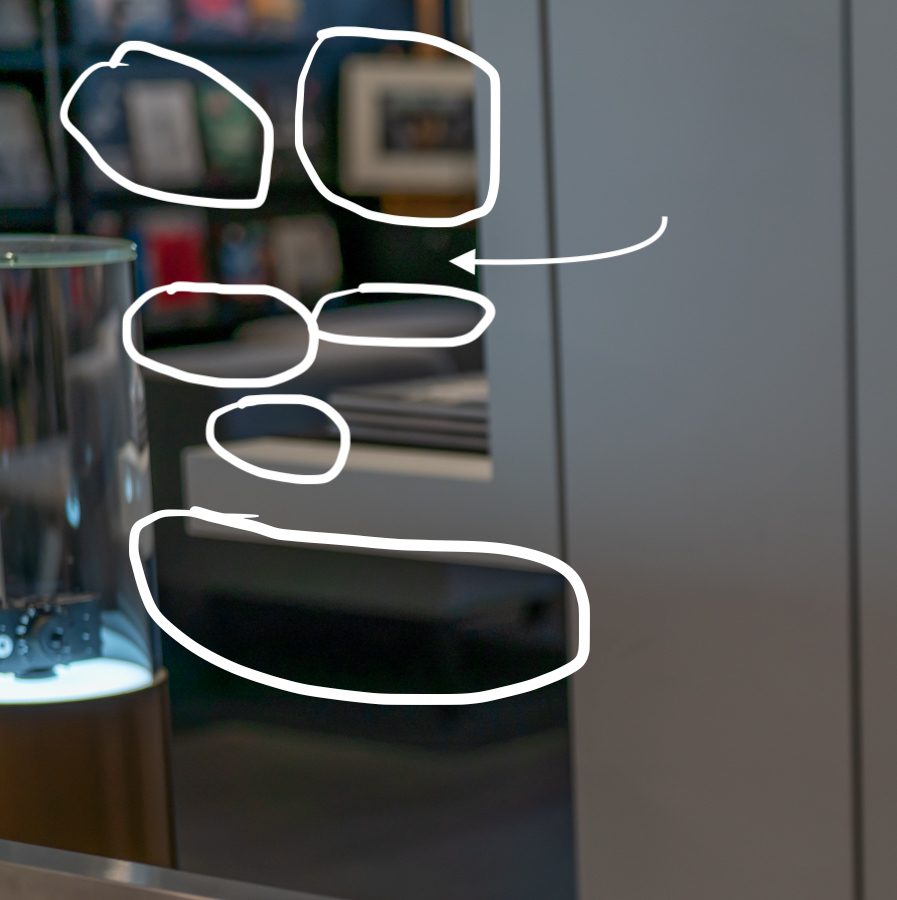
These here were inadvertently not framed equally but exposed equally. The tonal adjustments in LR are Exposure +2, Highlights -64, Shadows +100 for both. See the pushed shadows banding in the upper left corner in the Sony picture? Also, see this thread here: https://www.l-camera-forum.com/topic/303206-sl2-vs-s1r-difference-in-iq-image-thread-or-is-the-s1r-a-good-back-up-for-the-sl2-iq-wise/#comments. It includes links to download the RAW files.
Chaemono wrote:
The SL2 has better DR than the α7R III because it produces very clean files with no pushed shadows banding. The α7R III easily shows banding in pushed shadows and limits therefore one in one's ability to decrease exposure so as to not blow highlights in high contrast scenes, because one will be limited in one's ability to correct (brighten) dark tones in post-processing.
These here were inadvertently not framed equally but exposed equally. The tonal adjustments in LR are Exposure +2, Highlights -64, Shadows +100 for both. See the pushed shadows banding in the upper left corner in the Sony picture? Also, see this thread here: https://www.l-camera-forum.com/topic/303206-sl2-vs-s1r-difference-in-iq-image-thread-or-is-the-s1r-a-good-back-up-for-the-sl2-iq-wise/#comments. It includes links to download the RAW files. ...Show more →
Can you point me to where I should look for the banding in the upper-left portion of the A7rIII image? I'm not seeing it at first glance.
snapsy wrote:
Can you point me to where I should look for the banding in the upper-left portion of the A7rIII image? I'm not seeing it at first glance.
I've already downloaded the raws. What I need is to know what part of the image you're seeing the banding on in the A7rIII files and please be specific.
snapsy wrote:
I've already downloaded the raws. What I need is to know what part of the image you're seeing the banding on in the A7rIII files and please be specific.
That's not banding. And whatever it is I don't see it when I process the A7R3 raw in ACR/PS. Those green outlines look like improper application of CA correction in how the file was processed. Or some alternate color PP.
snapsy wrote:
That's not banding. And whatever it is I don't see it when I process the A7R3 raw in ACR/PS. Those green outlines look like improper application of CA correction in how the file was processed. Or some alternate color PP.
A7R3 raw I processed on left, your marked-up image on the right: https://photos.smugmug.com/photos/i-TfBZpq9/0/32ebbce3/O/i-TfBZpq9.jpg
Sony should talk Adobe to fix the issue in LR then. I'm not going to learn another workflow because they haven't done so, yet. The SL2 files look much cleaner and nicer when shadows are pushed, exposure is lifted, and highlights are pulled back. I'll do more comparisons, also with the Z7. From what I've seen so far in LR, in high contrast scenes the SL2 will beat the other two by a mile.
Nov 10, 2019 at 09:51 PM
imagesfromobjects Offline • • • • Upload & Sell: Off
I haven't seen it mentioned anywhere whether or not there's pixel binning / line skipping in the SL2 for video. The video specs look good (maybe a little bit TOO good) on paper, so I'm really curious about this.
Chaemono wrote:
Sony should talk Adobe to fix the issue in LR then. I'm not going to learn another workflow because they haven't done so, yet. The SL2 files look much cleaner and nicer when shadows are pushed, exposure is lifted, and highlights are pulled back. I'll do more comparisons, also with the Z7. From what I've seen so far in LR, in high contrast scenes the SL2 will beat the other two by a mile.
ACR/PS and LR share the same raw processing unit. I went back and was able to reproduce the green outlining you highlighted in your image. I originally adjusted the exposure via the exposure slider and some shadows but can reproduce the green outlines by maxing out the shadow slider to +100 as you did. The areas of blotchy green are green due to ACR/LR's default color NR (noise reduction) value - if you reduce the color NR slider to zero then those green areas become multi-colored, so the color noise in the green channel is being treated differently by ACR/LR's color NR. As for the green outlines around the furniture/fixtures, I'm not quite sure what that is - it almost appears as CA but that seems unlikely at these luminance levels. I processed the raw in RawTherapee for comparison and don't see the same green outlines, although I can't match the shadow exposure changes exactly since the tool works differently. I'll take another look at this tomorrow.
imagesfromobjects wrote:
I haven't seen it mentioned anywhere whether or not there's pixel binning / line skipping in the SL2 for video. The video specs look good (maybe a little bit TOO good) on paper, so I'm really curious about this.
There pretty much has to be because there's no FF sensor at this resolution with fast enough readouts for 4K video without binning or line skipping.
Nov 10, 2019 at 11:24 PM
imagesfromobjects Offline • • • • Upload & Sell: Off
snapsy wrote:
There pretty much has to be because there's no FF sensor at this resolution with fast enough readouts for 4K video without binning or line skipping.
That's what I was thinking, but a lot of the reviewers keep saying it uses "the full sensor at 4k" and that sort of thing. Which is... sorta true because it's not cropping it, but it's really not the FULL sensor, if we're being technical.
Chaemono wrote:
Sony should talk Adobe to fix the issue in LR then. I'm not going to learn another workflow because they haven't done so, yet. The SL2 files look much cleaner and nicer when shadows are pushed, exposure is lifted, and highlights are pulled back. I'll do more comparisons, also with the Z7. From what I've seen so far in LR, in high contrast scenes the SL2 will beat the other two by a mile.
Glad you two went through the followup scrutiny/further analysis. I didn't see any banding in your original test images either. What do you think caused the aberrations in your original images? I see the settings and lenses you used as posted in the other Leica Forum? BTW, What version of LR did you use?
"And now the crops of the upper right corner. Again, the adjustments are Exposure +2.8, Shadows +100, Highlights -100, Sharpening +40, NR +60. :α7R III + Planar FE 50/1.4 crop from the above 😂"
snapsy wrote:
Dpreview just posted a sample gallery from the SL2 including low-light base ISO raws. I processed one with +5EV in PS and the DR looks excellent. Here's a link if you'd like to process one yourself:
LBJ2 wrote:
Glad you two went through the followup scrutiny/further analysis. I didn't see any banding in your original test images either. What do you think caused the aberrations in your original images?
Let me clarify because I think you misunderstood. My approach is the following, after exposing equally to protect highlights at base ISO, I push the Shadows slider to +100 for shadow detail recovery, and then adjust exposure to get a bright enough picture. The α7R III and the Z7 files, for sure, show pushed shadows banding, the SL2 files with the exact same adjustments in LR do not. Your approach seems to be not to push the files so hard.
If you read the DPR review of the original SL four years ago here: https://www.dpreview.com/reviews/leica-sl-typ601-in-depth-camera-review/3, they concluded that “The Raw dynamic range of the Leica SL shows some significant limitations. It falls well behind class-leaders like the Nikon D750, D810, or Sony a7R II. [...] What this ultimately means is that you'll be limited in your ability to decrease exposure to expose so as to not blow highlights in high contrast scenes, because you'll be limited in your ability to correct (brighten) dark tones in post-processing.” I, therefore, will be doing a long series of comparisons to see which camera produces files with more DR at base ISO. Basically, I will be looking for ISO invariance. I'll post the results in the LUF. From what I've seen so far, the SL2 will beat the Sony and the Nikon in high contrast scenes by a mile. I don't subscribe to the approach 'please, don't push the files so hard, they can't take it.'
Chaemono wrote:
Let me clarify because I think you misunderstood. My approach is the following, after exposing equally to protect highlights at base ISO, I push the Shadows slider to +100 for shadow detail recovery, and then adjust exposure to get a bright enough picture. The α7R III and the Z7 files, for sure, show pushed shadows banding, the SL2 files with the exact same adjustments in LR do not. Your approach seems to be not to push the files so hard.
If you read the DPR review of the original SL four years ago here: https://www.dpreview.com/reviews/leica-sl-typ601-in-depth-camera-review/3, they concluded that “The Raw dynamic range of the Leica SL shows some significant limitations. It falls well behind class-leaders like the Nikon D750, D810, or Sony a7R II. [...] What this ultimately means is that you'll be limited in your ability to decrease exposure to expose so as to not blow highlights in high contrast scenes, because you'll be limited in your ability to correct (brighten) dark tones in post-processing.” I, therefore, will be doing a long series of comparisons to see which camera produces files with more DR at base ISO. Basically, I will be looking for ISO invariance. I'll post the results in the LUF. From what I've seen so far, the SL2 will beat the Sony and the Nikon in high contrast scenes by a mile. I don't subscribe to the approach 'please, don't push the files so hard, they can't take it.' ...Show more →
I think you didn't prove what you wrote here. As snapsy posted, I can't see any banding in the shadows.
"SL2 will beat the Sony and the Nikon in high contrast scenes by a mile"
I can't see that either.
Chaemono wrote:
Let me clarify because I think you misunderstood. My approach is the following, after exposing equally to protect highlights at base ISO, I push the Shadows slider to +100 for shadow detail recovery, and then adjust exposure to get a bright enough picture. The α7R III and the Z7 files, for sure, show pushed shadows banding, the SL2 files with the exact same adjustments in LR do not. Your approach seems to be not to push the files so hard.
If you read the DPR review of the original SL four years ago here: https://www.dpreview.com/reviews/leica-sl-typ601-in-depth-camera-review/3, they concluded that “The Raw dynamic range of the Leica SL shows some significant limitations. It falls well behind class-leaders like the Nikon D750, D810, or Sony a7R II. [...] What this ultimately means is that you'll be limited in your ability to decrease exposure to expose so as to not blow highlights in high contrast scenes, because you'll be limited in your ability to correct (brighten) dark tones in post-processing.” I, therefore, will be doing a long series of comparisons to see which camera produces files with more DR at base ISO. Basically, I will be looking for ISO invariance. I'll post the results in the LUF. From what I've seen so far, the SL2 will beat the Sony and the Nikon in high contrast scenes by a mile. I don't subscribe to the approach 'please, don't push the files so hard, they can't take it.' ...Show more →
I was wondering if the green fringing you highlighted had something to do with the lens used. But curious that user snapsy was not able to replicate with the same file. My guess is there is some settings askew somewhere. Either way thanks for posting the RAWs which I will take a look at later today.
BTW. How did the SL2 DFD +SL 50/Lux AF compare to the A7rIII + FE 50 F1.4 AF when taking these test images?
Nov 11, 2019 at 08:14 AM
imagesfromobjects Offline • • • • Upload & Sell: Off
Chaemono wrote:
Sony should talk Adobe to fix the issue in LR then. I'm not going to learn another workflow because they haven't done so, yet.
My uncle swore by his rotary phone, we couldn't convince him to use a cordless one as he couldn't be bothered to learn how to use a keypad. He ran a 20 feet long cord instead. A workflow issue too I guess.