Interesting that someone mentioned LV eye tracking smoked their EOS R. Normally Canon holds back a little more performance. Of course that might just be the "new camera high" speaking.
Gochugogi wrote:
Interesting that someone mentioned LV eye tracking smoked their EOS R. Normally Canon holds back a little more performance. Of course that might just be the "new camera high" speaking.
The R and RP are about to get a firmware update which appears to greatly improve eye AF and subject acquisition. It should be available on Sep 26. Most likely the 90D and the M6 II come with similar improvements built in.
Dang, those shots are looking very nice. Wish some of our folks would post up some pics and first impressions. Looking good so far!
I got a chance to play with one today very briefly mounted on a 400 DO II. Even though I didn't have a chance to click on any BIF, I did notice the AF seemed to lock and track much snappier than my 6DII does. I like the smaller size compared to my 6DII as well. It felt like putting on a molded glove the way it felt in hand and noticed the BB AF button is right there where you want it with no extra hand/finger movement needed.
Looking forward to hearing others thoughts on this little beast.
I posted my first impressions on the 90D shipping thread. I'll post this here.
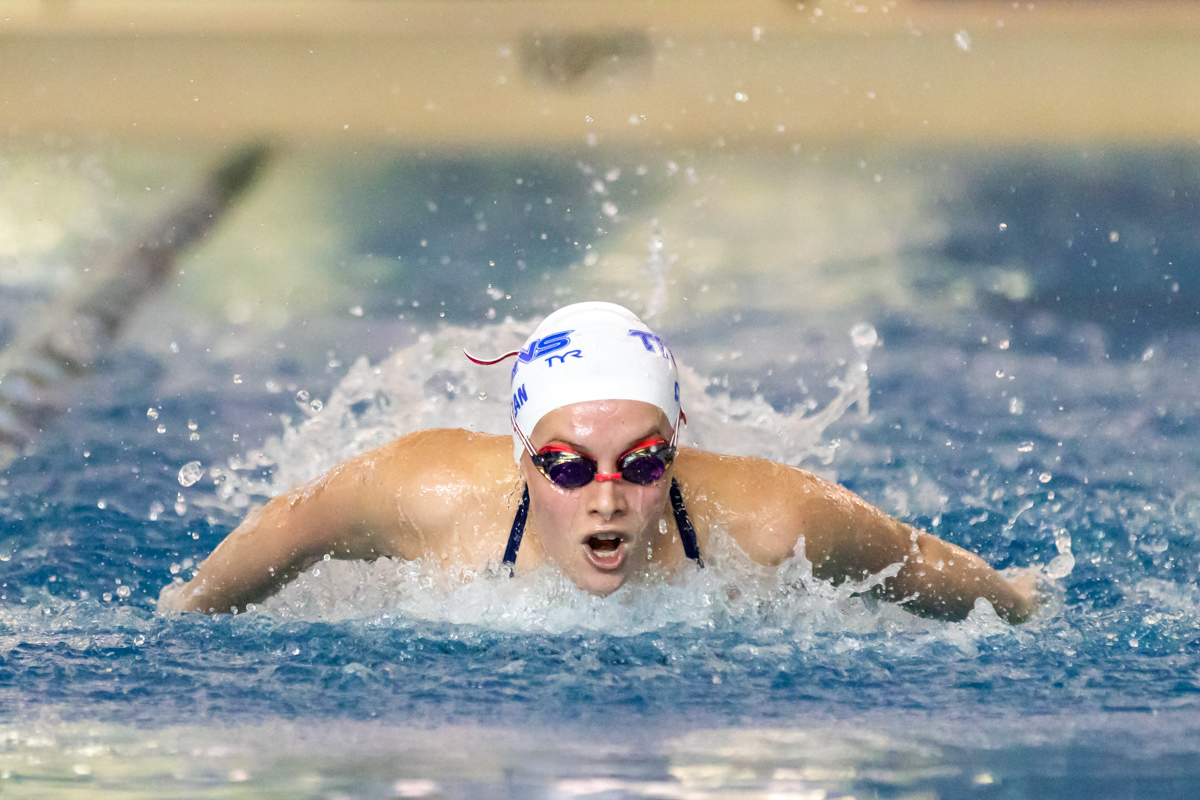
My intent for this camera was hopes that it would assist/replace my 1DxII for indoor swimming. That's a tall order to ask of a crop body I know, but the resolution increase along with 10fps made it worthwhile to give it a try and see the possibilities.
So, after my sessions this afternoon, there was some swim practice going on and I decided to give it a run.
My typical settings for a indoor swimming are 1/1000, 2.8, ISO 10K. This has been very consistent across almost 20 swim meets this past season and I expect no different this year.
The first thing I noticed was the shutter speed got a welcomed bump up to 1/1250, possibly 1/1600, over my 1DxII. This is something I noticed when I tested the A9, A73 and my EOS R (which can in no way do swimming even on it's best day). I've asked but have yet to get a good reasoning behind why I would see something along these lines.
High ISO (above 6400) is extremely grainy. That's the bad part. The good part is that it pretty easily cleans up in post, as you can see below. I normally shoot these meets in jpeg at standard noise reduction as I have always found that the camera can simply do a better job of NR than I can. Additionally, I have a custom preset in camera for the swim images that I haven't transferred over yet.
AF was noticeably slower than my 1DxII in initial acquisition. It handled the tracking pretty well once locked on. But not as good as my 1DxII. It will be tested again later this week when I have a little more time.
Much to my disappointment, I never saw the 10FPS burst. As in it simply didn't burst that high judging by the time stamp metadata. The most I got was about 7 in 1.5 seconds. That is disappointing, but again needs to be tested again. LV, on the other hand, sounds like it is definitely hitting 10-11 FPS.
I did use it for some portraits today and the Eye AF and tracking definitely smokes the my R in LV. As in, it's not close.
Good feeling camera in hand, definitely a solid release. Not sure it's the right one, but given the other options at this point, it's the best option I see out there.
EDIT to ADD: This image is substantially sharper on my desktop than it is here.
I have been shooting mine since Friday afternoon and can add some comments and impressions.
Image Quality - Years ago the jump from 12 to 18 mp was noticeable. The jump from 18 to 24 seemed pretty minimal. That is not the case with the jump from 24 to 32.5. It is a very noticeable improvement, way more than I expected. I believe the difference is not just the pixels but the software. BTW, I am using C-raw + jpeg.
AF - The AF seems good but I shoot very little action, bif or sports. I am not the person to make an assessment. I have not had any issues with the AF. I did some testing and was really impressed with the consistency. I do a lot of macro work and the AF on my previous cameras has been a major disappointment and source of frustration. The AF for the 90D seems to work much better at macro distances.
High ISO Noise and DR - Very impressive!!. I have no idea what the DXO and other analytics will eventually show. I don't care whether it is the sensor or the software. The results are impressive. In camera processing works produces very good images at 3200, 6400 and up to 12800. Even ISO 25600 is useable for informal, family type snapshots. I have been using DPP for processing raw files. DPP knocks out noise while retaining details.
DPP - I have used old versions of DPP with my older cameras. I had to download the newest version for using the C-raw on the 90D. I am really glad I did. As I mentioned it does an impressive job with noise reduction. The software automatically sets the sliders to the appropriate settings. You can still tinker with the sliders but I have not been able to improve on the auto settings. Next I was really impressed with DLO and the diffraction correction software. You do need to download the lens info in advance. I really do not understand how this works but the improvement is very noticeable at high f stops. In the past I have used f/20 for macro work where I just must have the DOF. I always had to tinker with sharpness and I even used some extra special procedures to get back some of the details lost to diffraction. The DPP software does a remarkable job. I even tried f/29 and f/32 with very decent results. There is a downside. If a file requires substantial noise reduction and diffraction correction, processing is slow. It can take a full minute with my 6 year old desktop.
Sorry I don't have the time it would take to try to assemble and upload my comparison images which I have used to draw these conclusions. Anyway, you can tell that so far I am very pleased with this camera. It is clearly a noticeable improvement over Canon's previous APS-C cameras.
TeamSpeed wrote:
DPP honors your camera settings, so whatever you have set for high ISO NR, that is what DPP will give you.
There are 3 choices: low, standard, high. I am using the default, standard, setting. The camera also has an option for multi-shot noise reduction. Four images are taken and merged. I have not tried that function.
When using DPP and the camera's standard noise reduction setting, the DPP sliders will adjust automatically for each image depending on the amount of noise present. I don't know if the software analyzes the noise or adjusts based on ISO settings. Regardless, it works well without the need for intervention or other software.
Camperjim wrote:
When using DPP and the camera's standard noise reduction setting, the DPP sliders will adjust automatically for each image depending on the amount of noise present. I don't know if the software analyzes the noise or adjusts based on ISO settings. Regardless, it works well without the need for intervention or other software.
The camera calculates NR parameters for a photo based on ISO, user settings, and possibly some more in-depth image analysis. It needs to be able to do this in order to render JPEGs. For RAWs, it appends the computed values to file metadata, and DPP reads those in turn and uses them as the default NR parameters.
TeamSpeed wrote:
DPP honors your camera settings, so whatever you have set for high ISO NR, that is what DPP will give you.
Camperjim wrote:
There are 3 choices: low, standard, high. I am using the default, standard, setting. The camera also has an option for multi-shot noise reduction. Four images are taken and merged. I have not tried that function.
When using DPP and the camera's standard noise reduction setting, the DPP sliders will adjust automatically for each image depending on the amount of noise present. I don't know if the software analyzes the noise or adjusts based on ISO settings. Regardless, it works well without the need for intervention or other software.
The default NR setting may be useful at really high ISOs. However, I always reduce the luminance NR at ISO 1600 or less where the sensor still looks good since the luminance NR robs too many details. Maybe some people like the plastic look, but I'd rather use a low-res body with fewer MP and less noise than excessive luminance NR. OTOH the default chroma NR is usually quite accurate.
I figured out the frame rate issue. Guess it helps if I read information rather than seeing a stated "burst rate" number and assuming that's the burst.
EDIT: I actually had to call CPS about it. As Canon did with the EOS R, they are stating the maximum FPS achievable in any mode. When using the OVF and using Servo, the frame rate is limited to a maximum of 7FPS. This is shown in the manual around page 150. LV is completely different as is OVF in One Shot.
For those wondering, I did a good bit of research before getting this body, watching several videos on it. Not one of them mentioned that in OVF you are limited to 7FPS, but it is definitely in the manual. Of course, the downside there is to have the manual, you have to have bought the camera, so you wouldn't know beforehand. Truthfully, the only way I noticed it is that I shoot a 1DxII at 10fps and the 90d just didn't sound right.
Camperjim wrote:
There are 3 choices: low, standard, high. I am using the default, standard, setting. The camera also has an option for multi-shot noise reduction. Four images are taken and merged. I have not tried that function.
When using DPP and the camera's standard noise reduction setting, the DPP sliders will adjust automatically for each image depending on the amount of noise present. I don't know if the software analyzes the noise or adjusts based on ISO settings. Regardless, it works well without the need for intervention or other software.
Actually there is disabled, but that doesn't mean no NR, there are still NR settings set even in this mode.
Multi-shot reduction isn't a High ISO NR settings, it is just a different type of merged bracketing system that works well with very static subjects.
In all the years of high ISO work, generation of actions that I have sold to others, and using DPP, I have not ever come to the conclusion that these 2 sliders vary image by image. They always seem to be static values based on 3 factors from the camera; the camera model, the ISO level of the image and the high ISO NR setting. For example, an ISO 1600 shot with high NR for a 7D2 will ALWAYS use the same slider values.
Perhaps something has changed in DPP that makes you feel that this is now dynamic? What info do you have that refutes my comments?
Finally, I can guarantee you that one can get much better, cleaner and more detailed shots using a variety of techniques and 3rd party tools that beats out DPP. DPP has improved in the last several years, but more so when it comes to the JPG engine. The JPG was so substandard years prior, that once the JPG was updated, everything benefited, noise reduction, picture styles, etc all look better.
TeamSpeed wrote:
Finally, I can guarantee you that one can get much better, cleaner and more detailed shots using a variety of techniques and 3rd party tools that beats out DPP. DPP has improved in the last several years, but more so when it comes to the JPG engine. The JPG was so substandard years prior, that once the JPG was updated, everything benefited, noise reduction, picture styles, etc all look better.
If you have been using DPP with the 90D and still find better third party tools for noise reduction and diffraction correction, I would like to hear the details. My only comparison is with Adobe which is clearly deficient.
Since you didn't answer the first question, here is an exercise I went through to map the in-camera NR slider values by model, ISO settings, and NR settings. This was part of the research I performed starting with the 7D to develop techniques in Photoshop, coupled with Noiseware and DPP settings, to remove noise in a bulk manner vs having to edit each and every photo.
This shows that the slider values are locked in, using a lookup table, and DPP honors what the camera sets on these.
Again, DPP isn't doing anything that the cameras aren't doing already with the JPG. If you shoot raw/JPG and then take the raw file into DPP and produce a JPG from that, the JPGs are basically the same. You just have the ability to edit more of the raw in DPP than what you can in the camera.
I have found that reducing some of the NR sliders down a bit, tweaking the contrast and sharpening, fixing the WB, and exporting to JPG to pull into Photoshop using Noiseware will produce better results than just in-camera (or DPP) results. Camera JPGs are much better as of 2012 or so, so the delta is less than it used to be, but still better results can be obtained by using less DPP and more other tools, especially considering how different each color channel is with its noise characteristics.
This process by which I have gone through allows me to get clean 12800 7D2 and 32000 5D4 that are better than what comes out of the camera or DPP, and doesn't require me to edit each photo.
Once I have a chance to play with a 90D, I will be able to validate a new set of steps that should clean it up better and in bulk like other bodies. The resolution is now reaching a point, these files take longer to process through.
EB-1 wrote:
The default NR setting may be useful at really high ISOs. However, I always reduce the luminance NR at ISO 1600 or less where the sensor still looks good since the luminance NR robs too many details. Maybe some people like the plastic look, but I'd rather use a low-res body with fewer MP and less noise than excessive luminance NR. OTOH the default chroma NR is usually quite accurate.
EBH
I also reduce luminance noise NR settings in DPP, often already at 400/800 ISO. Depending on the subject that can provide a lot more detail and less plastic-fantastic look, and you can always selectively remove some noise later e.g. with suitable plug-ins in Photoshop. I hate the extra step of going to PS but for High ISO I find the standard DPP treatment is seldom optimal and some selective NR treatment gives better results.
In some cases I find the chroma NR way too heavy handed too, but that is probably related to my subjects with many tiny colorful details (where DPP removes nearly all color with the standard chroma NR treatment ...).



 DPP has improved in the last several years, but more so when it comes to the JPG engine. The JPG was so substandard years prior, that once the JPG was updated, everything benefited, noise reduction, picture styles, etc all look better.