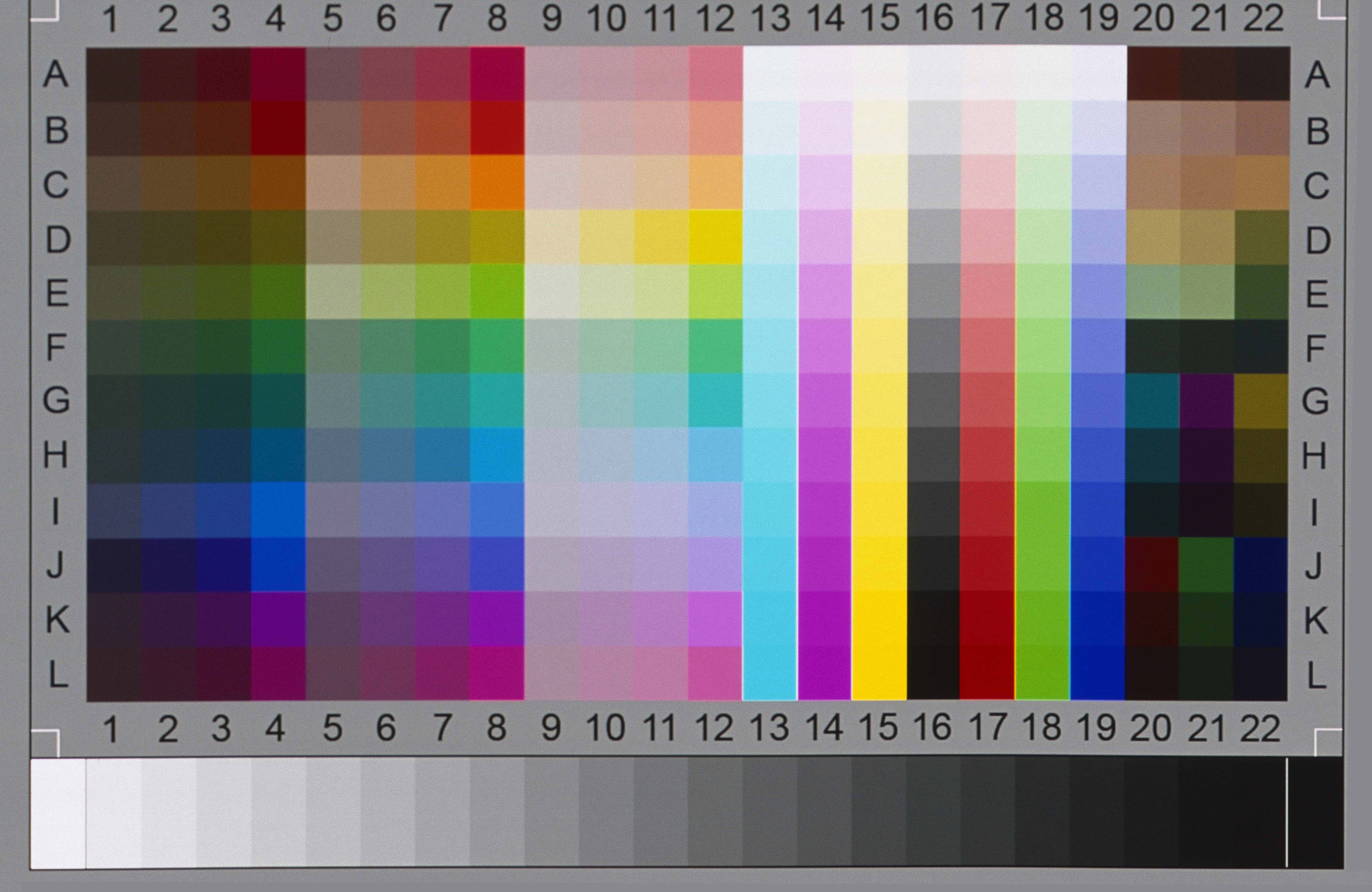
I have a large set of slide scans that show a (constant) bow-like distortion. One could say that the upper part of the image has a barrel-type and the lower part has a pincushion type of distortion.
I would like to correct this distortion in post-processing, at least for images where it is disturbing. All the tools I found up to now are intended for lens-related distortions, which are azimuthally symmetric and thus cannot be applied in this case. Does anybody know about a tool which can correct a non-symmetric distortion? (Rescanning is not an option.)
In case there is no ready tool available, I would consider doing my own programming. I believe there is e.g. a Python package that can at least decode/encode jpeg format. I would be interested in any practical experience with this kind of work.
Is it possible that your distortion are Newton rings? They occur when regular glass is on top of the slide/negative which is sitting on the flatbed scanner glass. You can't remove this kind of rings in PP.
If you are using a cover glass to scan your slides, it is recommended to get an anti-Newton ring glass. I have one for my negatives and slides, and there is no distortion.
I should have mentioned that I am using a slide scanner (Reflecta DigitDia 6000).
This effect is not from Newton rings; most of my slides are without glass.
Ok. Here's your corrected scan. Free Transform and a bit of Puppet Warp at the same time. Your problem is that your scanner has a shitty lens although it's not as bad as you think. Real question is why are you scanning your IT8 as such a high res? I don't thing any profiling app will accept it. A couple of mb as a tiff is more than enough, not a couple of megs as a jpeg which has been crunched down.
Yeah. It could be that the film is warped in the cardboard mount, a very common problem, or that the mounting system in the scanner is not perfectly square. Regardless, if this is the problem on every slide, it's not a hard correction to make. You could try mounting in a glass slide mount which would guarantee flatness but not necessarily make it square to the lens.
Peter: thanks a lot for the corrected version. Will get my hand on a recent PS version and try it. Given the large number of scans, it only really works for me if the action can be automated via droplets etc (with settings detemined once from the test chart scan), but assume this can be done in PS.
Concerning flatness or warping issues of the film/slide itself, I made the following test: I scanned the test chart a second time upside down („seascape“), and then rotated the image back in Software. As one can see in
if one flips between the two files, the two scan results are not identical; the bow distortion goes up in one case and down in the other. So the issue seems to be related to the scanner.
Well, here's the deal on using Free Transform for this, which is all I used. You make your transformation, which, in this case, was a combo of Free Transform, then clicking the Puppet Warp icon in the tool bar while in FT. Make your adjustment and then commit it. Then, as long as you don't do any other Free Transforms, you can simply use the Edit>FreeTransform>Again function and it will apply that last transformation to the file. Of course, you can't close Ps either as that is stored in active ram, and since you can't save a preset for FT, this is probably your next best bet.
I really doubt that you will notice the curvature much in normal pictures and all images are skewed to some extent as the slide is nearly always slightly rotated in the scanner.The latter can as Peter has shown be corrected by free transform -skew. It is possible your scanner software has a skew correction and they might have a lens profile correction you can apply. Pretty well all negatives and slides 'bulge' in some way or other. You could try using newton glass to flatten the slides, but that opens up a new problems, trapped dust.
Following your suggestions, I found that a combination of "distort" and the various "warp" transforms seems to do a good job. These transforms can be stored in a droplet and executed in one go, presumably also in batch mode (though I did not try this yet). This looks promising.
mikeengles wrote:
I really doubt that you will notice the curvature much in normal pictures and all images are skewed to some extent as the slide is nearly always slightly rotated in the scanner.The latter can as Peter has shown be corrected by free transform -skew. It is possible your scanner software has a skew correction and they might have a lens profile correction you can apply. Pretty well all negatives and slides 'bulge' in some way or other. You could try using newton glass to flatten the slides, but that opens up a new problems, trapped dust.
You are right, for the majority of my images it does not matter - the lenses I used at the time were far from distortion-free, to say the least. But for some architectural pictures one notices that there is something else.