This topic is in the 2019 archive. You can read it and like its posts here. It is read only.
Archive 2019Nikon Z Camera Setup

p.1 #1Nikon Z Camera Setup
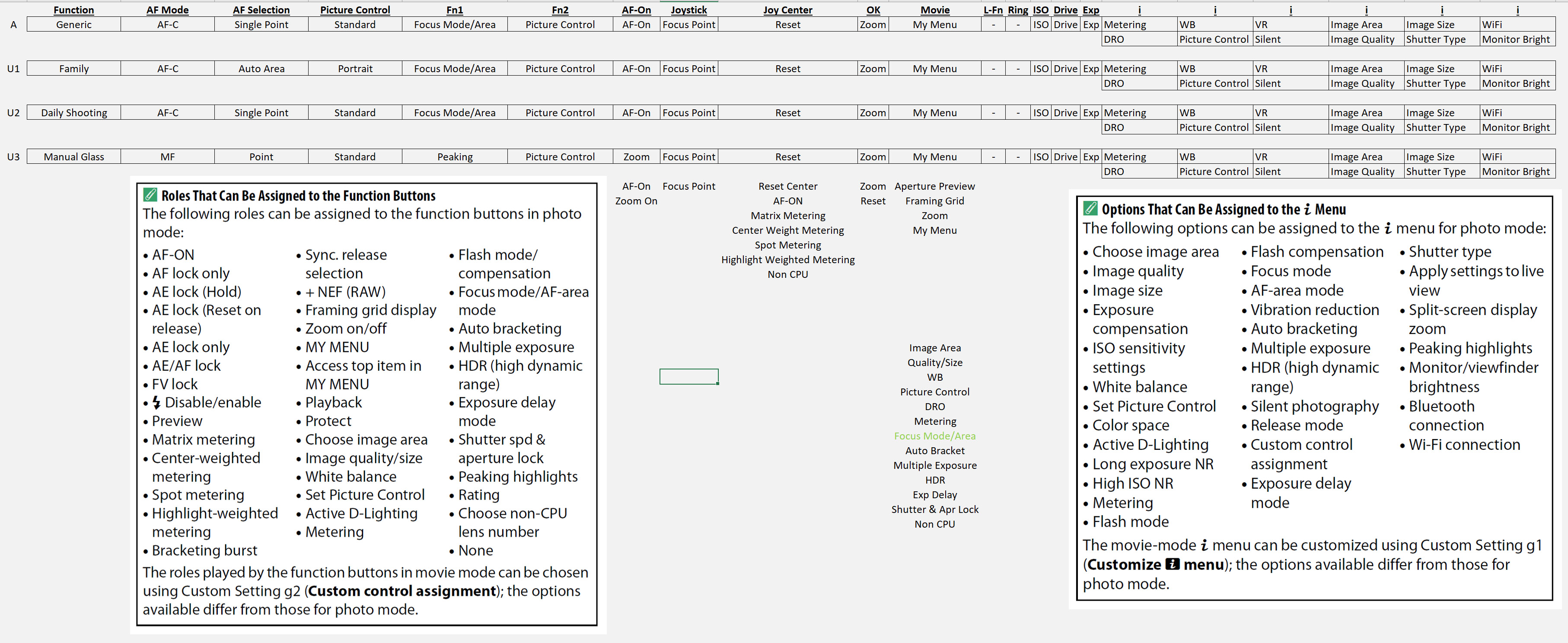
At Dj R's request, thought I'd share what I mapped out while setting up my camera. The ability of the U1-3 modes to save control configurations, as well as some basic XMP data being read by ACR opens up some possibilities. Feel free to pick apart my layouts or offer suggestions. There are probably some other slight differences I haven't mapped out yet, but its a good starting point.
A Mode is my default and where I spend a lot of time. U1 is for shooting family and switched to Auto Area and AF-C to hopefully get Eye AF if my girls are paying attention. U2 is similar to my every day A mode, but if I've been shooting something random it's a safety net of sorts that goes back to my most used settings. U3 is for manual glass, re-purposing the AF-On button. Otherwise most controls are fairly similar. I think I'll change Fn2 but haven't decided what too yet.
This ability to change controls in U modes basically made the Z6 for me. I hated that Sony ditched the AF/MF - AEL switch on the MkIII cameras. I used Up for AF-On and Down for Focus Magnify, so focus was always in the same place. The A7III messed with my muscle memory and was a big reason I switched back to the A7RII. Now AF-On is always focus. Big Win.
I included a couple crops of the Fn button and i Menu options. My typed notes are incomplete, I got lazy and ignored options I didn't care about. For complete options, see the second image.
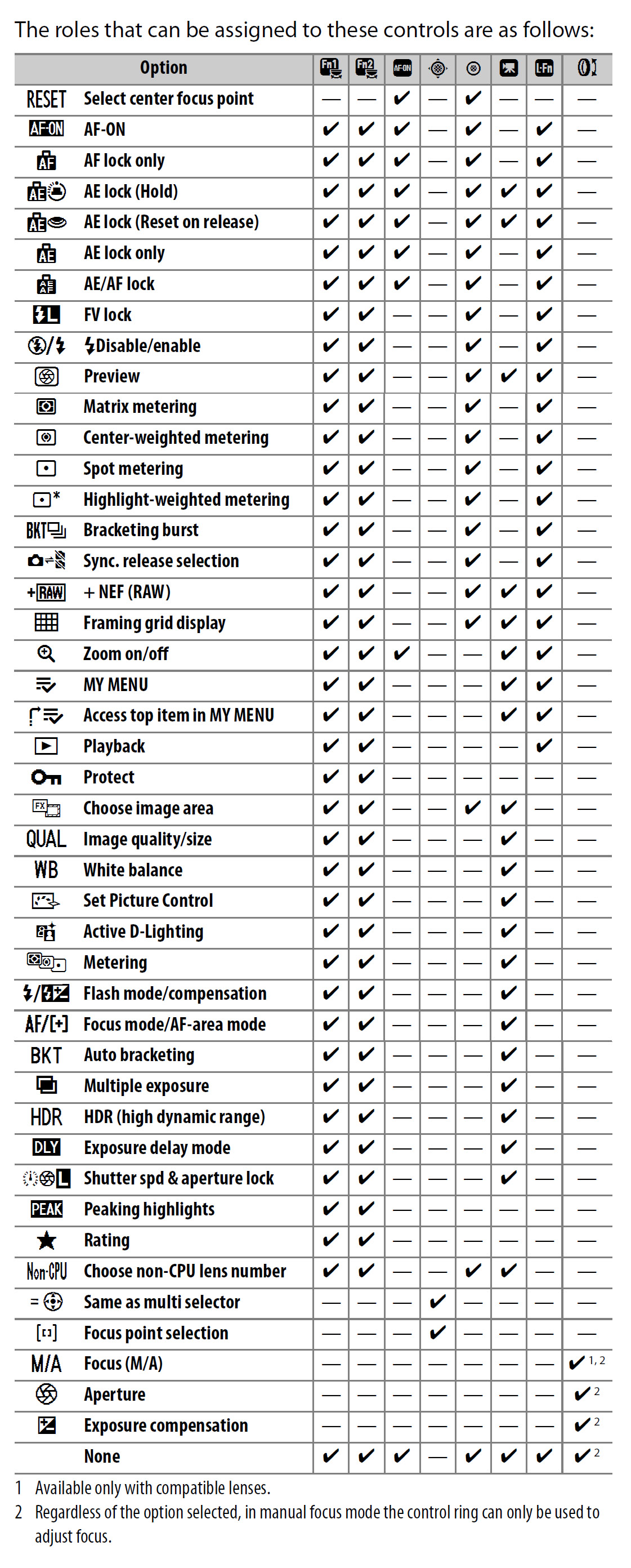
Second image is Nikon's table of what can be assigned to given controls. They really need to make everything assignable to everything but I'll live for now. Hopefully they won't mind me cropping and putting into 1 table instead of a 3 page spread in their manual...
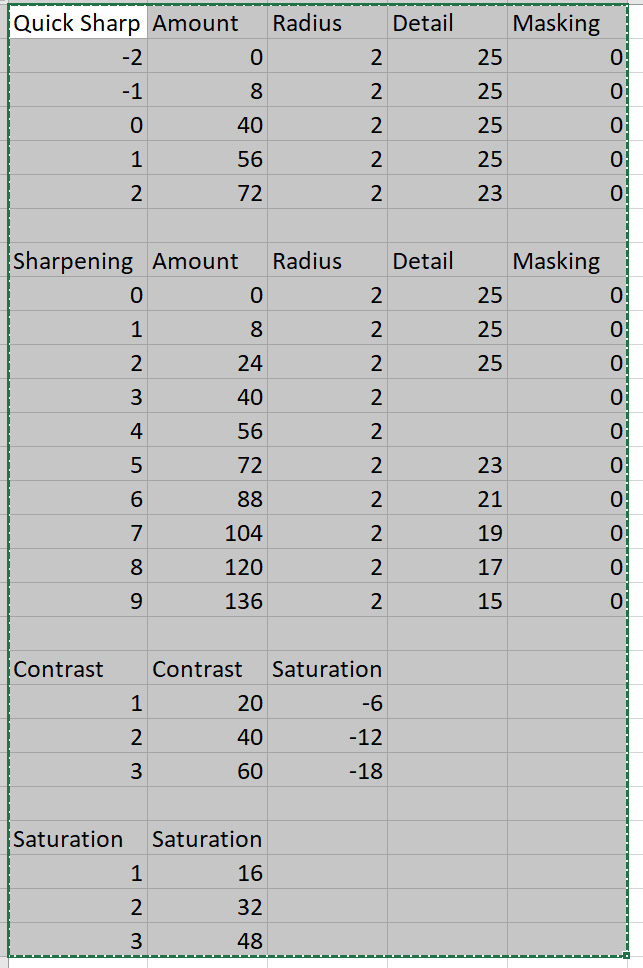
Third image is what I can see ACR doing with the Picture Control settings. It's a start, but a lot of adjustments don't seem to carry into the RAWs, but still better than it used to be. Need to play with picture controls more and make a couple custom ones, especially a B&W profile. Use this to set your sharpening, etc since ACR is now receiving these values. For the Picture Profile controls I didn’t mention, I see no value changes in ACR.
Edited on Jun 13, 2019 at 05:51 PM · View previous versions
A Mode is my default and where I spend a lot of time. U1 is for shooting family and switched to Auto Area and AF-C to hopefully get Eye AF if my girls are paying attention. U2 is similar to my every day A mode, but if I've been shooting something random it's a safety net of sorts that goes back to my most used settings. U3 is for manual glass, re-purposing the AF-On button. Otherwise most controls are fairly similar. I think I'll change Fn2 but haven't decided what too yet.
This ability to change controls in U modes basically made the Z6 for me. I hated that Sony ditched the AF/MF - AEL switch on the MkIII cameras. I used Up for AF-On and Down for Focus Magnify, so focus was always in the same place. The A7III messed with my muscle memory and was a big reason I switched back to the A7RII. Now AF-On is always focus. Big Win.
I included a couple crops of the Fn button and i Menu options. My typed notes are incomplete, I got lazy and ignored options I didn't care about. For complete options, see the second image.
Second image is Nikon's table of what can be assigned to given controls. They really need to make everything assignable to everything but I'll live for now. Hopefully they won't mind me cropping and putting into 1 table instead of a 3 page spread in their manual...
Third image is what I can see ACR doing with the Picture Control settings. It's a start, but a lot of adjustments don't seem to carry into the RAWs, but still better than it used to be. Need to play with picture controls more and make a couple custom ones, especially a B&W profile. Use this to set your sharpening, etc since ACR is now receiving these values. For the Picture Profile controls I didn’t mention, I see no value changes in ACR.
Edited on Jun 13, 2019 at 05:51 PM · View previous versions
Jun 13, 2019 at 02:31 PM
p.1 #2Nikon Z Camera Setup
This is killer! Thanks for posting. Very helpful to this fellow mixed AF and adapted MF shooter. I'll have to delve back into the menus and utilize the U1-3 settings.
Jun 13, 2019 at 03:30 PM
p.1 #3Nikon Z Camera Setup
Yeah, being a RAW shooter I also almost never deal with the picture control type stuff. But with that now passing into Adobe and the controls configurable and savable, it’s a pretty awesome combo.
uscmatt99 wrote:
This is killer! Thanks for posting. Very helpful to this fellow mixed AF and adapted MF shooter. I'll have to delve back into the menus and utilize the U1-3 settings.
uscmatt99 wrote:
This is killer! Thanks for posting. Very helpful to this fellow mixed AF and adapted MF shooter. I'll have to delve back into the menus and utilize the U1-3 settings.
Jun 13, 2019 at 03:35 PM
p.1 #4Nikon Z Camera Setup
Good stuff brother. Everyone should chime in with ideas. We all learn from each other!
Consider Dropbox or google drive link for your file so others may customize and report back.
🍻
Consider Dropbox or google drive link for your file so others may customize and report back.
🍻
Jun 13, 2019 at 04:19 PM
p.1 #7Nikon Z Camera Setup
Good idea, will drop the file in tomorrow morning so others can tweak it.
Dj R wrote:
Good stuff brother. Everyone should chime in with ideas. We all learn from each other!
Consider Dropbox or google drive link for your file so others may customize and report back.
🍻
Dj R wrote:
Good stuff brother. Everyone should chime in with ideas. We all learn from each other!
Consider Dropbox or google drive link for your file so others may customize and report back.
🍻
Jun 13, 2019 at 05:52 PM
p.1 #8Nikon Z Camera Setup
What kills the U1-U3 modes for me is that they also record exposure related settings - ISO, aperture, shutter speed, exp comp etc - which I find pointless. These are settings that are too dynamic to be worth remembering, and in fact doing so has significant downsides. Hopefully Nikon corrects this glaring (for me) deficiency in future firmware revs.
My use scenario involves using U1-U3 to emulate the hardware bracketing buttons on semi-pro bodues. U1= 3 frames, U2=5 frames, U5=7 frames. I don't want the body changing exposure settings or ISO on me as I change settings banks.
My use scenario involves using U1-U3 to emulate the hardware bracketing buttons on semi-pro bodues. U1= 3 frames, U2=5 frames, U5=7 frames. I don't want the body changing exposure settings or ISO on me as I change settings banks.
Jun 14, 2019 at 05:11 PM
p.1 #9Nikon Z Camera Setup
Understandable. I would want ISO changing, but it’s usually on auto for me. One of my modes is on f/8 and it’s a bit annoying, but also easy to fix. And with my use, I’m changing if the shooting scenario changes so I’m okay with a variation in exposure settings...
But variety is good... love to hear what others are doing.
GroovyGeek wrote:
What kills the U1-U3 modes for me is that they also record exposure related settings - ISO, aperture, shutter speed, exp comp etc - which I find pointless. These are settings that are too dynamic to be worth remembering, and in fact doing so has significant downsides. Hopefully Nikon corrects this glaring (for me) deficiency in future firmware revs.
My use scenario involves using U1-U3 to emulate the hardware bracketing buttons on semi-pro bodues. U1= 3 frames, U2=5 frames, U5=7 frames. I don't want the body changing exposure settings or ISO on me as I change settings banks.
But variety is good... love to hear what others are doing.
GroovyGeek wrote:
What kills the U1-U3 modes for me is that they also record exposure related settings - ISO, aperture, shutter speed, exp comp etc - which I find pointless. These are settings that are too dynamic to be worth remembering, and in fact doing so has significant downsides. Hopefully Nikon corrects this glaring (for me) deficiency in future firmware revs.
My use scenario involves using U1-U3 to emulate the hardware bracketing buttons on semi-pro bodues. U1= 3 frames, U2=5 frames, U5=7 frames. I don't want the body changing exposure settings or ISO on me as I change settings banks.
Jun 14, 2019 at 07:02 PM
p.1 #10Nikon Z Camera Setup
I have a WANT. How about the ability to control ISO or SS with control ring? Does this make sense to anyone? I may call our local Nikon Ambassador and suggest it.
“The newly adopted control ring, to which functions such as focus (M/A), aperture and exposure compensation can be assigned, enables comfortable shooting with its superior operational feel.”
“The newly adopted control ring, to which functions such as focus (M/A), aperture and exposure compensation can be assigned, enables comfortable shooting with its superior operational feel.”
Aug 03, 2019 at 06:42 PM
p.1 #11Nikon Z Camera Setup
To me, it’s like assigning ISO to the back jog dial on the old Sony’s. Way to easy to accidentally mess it up or move it. Maybe with a button hold like the Focus Mode?
Dj R wrote:
I have a WANT. How about the ability to control ISO or SS with control ring? Does this make sense to anyone? I may call our local Nikon Ambassador and suggest it.
“The newly adopted control ring, to which functions such as focus (M/A), aperture and exposure compensation can be assigned, enables comfortable shooting with its superior operational feel.”
Dj R wrote:
I have a WANT. How about the ability to control ISO or SS with control ring? Does this make sense to anyone? I may call our local Nikon Ambassador and suggest it.
“The newly adopted control ring, to which functions such as focus (M/A), aperture and exposure compensation can be assigned, enables comfortable shooting with its superior operational feel.”
Aug 03, 2019 at 08:54 PM
p.1 #12Nikon Z Camera Setup
Awesome work Mathieu! Nikon need to pay you a commission 
Aug 03, 2019 at 09:53 PM
p.1 #13Nikon Z Camera Setup
Never thought of putting the settings "on paper"
Highly usable idea and great work Mathieu.
Kudos!
Highly usable idea and great work Mathieu.
Kudos!
Aug 03, 2019 at 11:02 PM
p.1 #14Nikon Z Camera Setup
Me neither, kudos to Nikon for giving even more choice which required some thought and planning!
Thern wrote:
Never thought of putting the settings "on paper"
Highly usable idea and great work Mathieu.
Kudos!
Thern wrote:
Never thought of putting the settings "on paper"
Highly usable idea and great work Mathieu.
Kudos!
Aug 04, 2019 at 06:54 AM
p.1 #15Nikon Z Camera Setup
Dj R wrote:
Good stuff brother. Everyone should chime in with ideas. We all learn from each other!
Consider Dropbox or google drive link for your file so others may customize and report back.
Even better would be to share the NCSET file created by the camera's Save Settings function, that way people can apply all these settings to their Z6 with a simple 'Load Settings'.
Good stuff brother. Everyone should chime in with ideas. We all learn from each other!
Consider Dropbox or google drive link for your file so others may customize and report back.
Even better would be to share the NCSET file created by the camera's Save Settings function, that way people can apply all these settings to their Z6 with a simple 'Load Settings'.
Aug 04, 2019 at 08:14 AM
p.1 #16Nikon Z Camera Setup
Good thought and don’t mind sharing but didn’t think everyone would want it setup my way, was more trying to give ideas and a reference to build your own U profiles. That controls are saved as well as some minor RAW profile changes for ACR makes the a lot more useful than Sony IMO.
snapsy wrote:
Consider Dropbox or google drive link for your file so others may customize and report back.Even better would be to share the NCSET file created by the camera's Save Settings function, that way people can apply all these settings to their Z6 with a simple 'Load Settings'.
snapsy wrote:
Dj R wrote
Good stuff brother. Everyone should chime in with ideas. We all learn from each other!Consider Dropbox or google drive link for your file so others may customize and report back.
Aug 04, 2019 at 11:05 AM
p.1 #17Nikon Z Camera Setup
hello everyone
I'm using afc with eye af, quite a bit these days.
but at times, I am composing, and the camera is selecting something on the bottom of the frame, and locking on there, instead of on the subject/eyes (maybe the subject has temporarily turned sideways or something).
in this case, I can't find any way to get the camera to get back in gear and on the subject at all, let alone the face/eye.
with sony, it moves from eye to face
so if it can't lock an eye, moves to face/head, or the body at least. it always sticks on the subject. this way when the eye comes back to face you, it locks on fast.
do you have any tricks? there is no way for me to "nudge" the camera and say, hey, you're focusing on the background here, not my subject.
I am forced to switch out of eye AF and into another AF method. this is frustrating.
am I missing anything?
I'm using afc with eye af, quite a bit these days.
but at times, I am composing, and the camera is selecting something on the bottom of the frame, and locking on there, instead of on the subject/eyes (maybe the subject has temporarily turned sideways or something).
in this case, I can't find any way to get the camera to get back in gear and on the subject at all, let alone the face/eye.
with sony, it moves from eye to face
so if it can't lock an eye, moves to face/head, or the body at least. it always sticks on the subject. this way when the eye comes back to face you, it locks on fast.
do you have any tricks? there is no way for me to "nudge" the camera and say, hey, you're focusing on the background here, not my subject.
I am forced to switch out of eye AF and into another AF method. this is frustrating.
am I missing anything?
Aug 13, 2019 at 02:27 PM
p.1 #18Nikon Z Camera Setup
Quickest fix I can thing of, and its far from elegant, would be to take it to an entirely new scene, prefereably at a different focus distance (closer if possible) then back to the scene. Kind of reset the focus. Haven't seen it back focus too much but don't do a ton of Eye AF. That said, i have seen it focus behind at times, and focusing on something different and closer then back to what I'm shooting usually helps it reset.
Dj R wrote:
hello everyone
I'm using afc with eye af, quite a bit these days.
but at times, I am composing, and the camera is selecting something on the bottom of the frame, and locking on there, instead of on the subject/eyes (maybe the subject has temporarily turned sideways or something).
in this case, I can't find any way to get the camera to get back in gear and on the subject at all, let alone the face/eye.
with sony, it moves from eye to face
so if it can't lock an eye, moves to face/head, or the body at least. it always sticks on...Show more →
Dj R wrote:
hello everyone
I'm using afc with eye af, quite a bit these days.
but at times, I am composing, and the camera is selecting something on the bottom of the frame, and locking on there, instead of on the subject/eyes (maybe the subject has temporarily turned sideways or something).
in this case, I can't find any way to get the camera to get back in gear and on the subject at all, let alone the face/eye.
with sony, it moves from eye to face
so if it can't lock an eye, moves to face/head, or the body at least. it always sticks on...Show more →
Aug 14, 2019 at 11:35 AM
p.1 #19Nikon Z Camera Setup
This is what I’ve done as well. Just reframe and focus on the ground, then back to my intended framing.
I have a question regarding metering with eye-detect. When I’m shooting TTL with a flash on the camera and using eye-detect in C-AF, the camera meters ambient for the subject’s face and often blows out the background, when set to matrix. My intention is to meter for the background ambient, and use the flash for balanced fill. If I switch to any of the other focus modes, it works as intended, but I have to focus and recompose, or fiddle with the AF point joystick. Is this just the native behavior of the system? I’d have thought that for ambient light shooting, metering off the face would be great for proper subject exposure with eye-detect, but once the camera detected a mounted flash (Godox for what it’s worth), it would meter the whole scene with matrix metering when set that way.
Mathieu18 wrote:
Quickest fix I can thing of, and its far from elegant, would be to take it to an entirely new scene, prefereably at a different focus distance (closer if possible) then back to the scene. Kind of reset the focus. Haven't seen it back focus too much but don't do a ton of Eye AF. That said, i have seen it focus behind at times, and focusing on something different and closer then back to what I'm shooting usually helps it reset.
I'm using afc with eye af, quite a bit these days.
but at times, I am composing, and the camera is selecting something on the bottom of the frame, and locking on there, instead of on the subject/eyes (maybe the subject has temporarily turned sideways or something).
in this case, I can't find any way to get the camera to get back in gear and on the subject at all, let alone the face/eye.
with sony, it moves from eye to face
so if it can't lock an eye, moves to face/head, or the body at least. it always sticks on the subject. this way when the eye comes back to face you, it locks on fast.
do you have any tricks? there is no way for me to "nudge" the camera and say, hey, you're focusing on the background here, not my subject.
I am forced to switch out of eye AF and into another AF method. this is frustrating.
am I missing anything?
I have a question regarding metering with eye-detect. When I’m shooting TTL with a flash on the camera and using eye-detect in C-AF, the camera meters ambient for the subject’s face and often blows out the background, when set to matrix. My intention is to meter for the background ambient, and use the flash for balanced fill. If I switch to any of the other focus modes, it works as intended, but I have to focus and recompose, or fiddle with the AF point joystick. Is this just the native behavior of the system? I’d have thought that for ambient light shooting, metering off the face would be great for proper subject exposure with eye-detect, but once the camera detected a mounted flash (Godox for what it’s worth), it would meter the whole scene with matrix metering when set that way.
Mathieu18 wrote:
Quickest fix I can thing of, and its far from elegant, would be to take it to an entirely new scene, prefereably at a different focus distance (closer if possible) then back to the scene. Kind of reset the focus. Haven't seen it back focus too much but don't do a ton of Eye AF. That said, i have seen it focus behind at times, and focusing on something different and closer then back to what I'm shooting usually helps it reset.
Dj R wrote
hello everyoneI'm using afc with eye af, quite a bit these days.
but at times, I am composing, and the camera is selecting something on the bottom of the frame, and locking on there, instead of on the subject/eyes (maybe the subject has temporarily turned sideways or something).
in this case, I can't find any way to get the camera to get back in gear and on the subject at all, let alone the face/eye.
with sony, it moves from eye to face
so if it can't lock an eye, moves to face/head, or the body at least. it always sticks on the subject. this way when the eye comes back to face you, it locks on fast.
do you have any tricks? there is no way for me to "nudge" the camera and say, hey, you're focusing on the background here, not my subject.
I am forced to switch out of eye AF and into another AF method. this is frustrating.
am I missing anything?
Aug 15, 2019 at 03:56 AM
p.1 #20Nikon Z Camera Setup
for folks shooting jpg and raw, or jpg
JPG Fine “★ “ (star)
vs.
JPG Fine (no star)
“Choose options with ★ to maximize quality, options without ★ to ensure that all images have more or less the same file size.”
JPG Fine “★ “ (star)
vs.
JPG Fine (no star)
“Choose options with ★ to maximize quality, options without ★ to ensure that all images have more or less the same file size.”
Aug 16, 2019 at 04:16 PM