This topic is in the 2019 archive. You can read it and like its posts here. It is read only.
Archive 2019A7r3 banding posterization in sky
p.1 #1A7r3 banding posterization in sky
This seems to happen or at least is more apparent with the sky in the picture. Even with the smallest amount of post, I start seeing banding and posterization issues in the sky. The more I pp the fuglier it gets. I shoot 14 bit uncompressed, tried it with Lightroom and Capture One. Both the same. Will post samples shortly but this is starting to really tick me off.
Has anyone else noticed this ? Is there a fix or in camera setting that is causing this ?
Has anyone else noticed this ? Is there a fix or in camera setting that is causing this ?
Jan 16, 2019 at 02:40 PM
p.1 #2A7r3 banding posterization in sky
Picture This! wrote:
This seems to happen or at least is more apparent with the sky in the picture. Even with the smallest amount of post, I start seeing banding and posterization issues in the sky. The more I pp the fuglier it gets. I shoot 14 bit uncompressed, tried it with Lightroom and Capture One. Both the same. Will post samples shortly but this is starting to really tick me off.
Has anyone else noticed this ? Is there a fix or in camera setting that is causing this ?
If you are editing the 14-bit RAW uncompressed, I'm not sure what could cause this unless the image is very underexposed.
It would be great if you could share a RAW file showing the banding.
Jan 16, 2019 at 02:44 PM
p.1 #3A7r3 banding posterization in sky
Thanks Fred. I'll post a sample this evening. I dont see the banding initially but once I start processing the file, the banding shows up very quickly.
Jan 16, 2019 at 02:55 PM
p.1 #4A7r3 banding posterization in sky
I'm interested in seeing the raw as well. There were a few threads recently on dpreview highlighting radial banding with some lenses that looked like the raw-based vignetting correction Sony applies when that correctiom is enabled but occurred even when correction was disabled. The takeaway was that Sony appears to be unconditionally applying some type of correction to raws. IMO it's likely correction to offset pixel vignetting. I'm curious to see if that's what at play in your images as well.
Jan 16, 2019 at 03:12 PM
p.1 #5A7r3 banding posterization in sky
snapsy wrote:
I'm interested in seeing the raw as well. There were a few threads recently on dpreview highlighting radial banding with some lenses that looked like the raw-based vignetting correction Sony applies when that correctiom is enabled but occurred even when correction was disabled. The takeaway was that Sony appears to be unconditionally applying some type of correction to raws. IMO it's likely correction to offset pixel vignetting. I'm curious to see if that's what at play in your images as well.
Yes, that was my next question.
____________
Picture This!:
I just discovered that your username can't be tagged! I will fix it.
Did you activate vignetting correction in-camera? This used to cause banding a couple years ago. I'm not sure if Sony corrected the issues. I always have all corrections turned off in-camera when shooting RAW.
I'm interested in seeing the raw as well. There were a few threads recently on dpreview highlighting radial banding with some lenses that looked like the raw-based vignetting correction Sony applies when that correctiom is enabled but occurred even when correction was disabled. The takeaway was that Sony appears to be unconditionally applying some type of correction to raws. IMO it's likely correction to offset pixel vignetting. I'm curious to see if that's what at play in your images as well.
Yes, that was my next question.
____________
Picture This!:
I just discovered that your username can't be tagged!
I will fix it.Did you activate vignetting correction in-camera? This used to cause banding a couple years ago. I'm not sure if Sony corrected the issues. I always have all corrections turned off in-camera when shooting RAW.
Jan 16, 2019 at 03:59 PM
p.1 #6A7r3 banding posterization in sky
Fred Miranda wrote:
Yes, that was my next question.
____________
Picture This!:
I just discovered that your username can't be tagged! I will fix it.
Did you activate vignetting correction in-camera? This used to cause banding a couple years ago. I'm not sure if Sony corrected the issues. I always have all corrections turned off in-camera when shooting RAW.
Dont know. Will check this evening when I get home. I purchased the camera used so it could very well be on ! The problem is Sony seems to be baking this into the raw vs having a sw/config/metadata to change this in post ! Too bad this happened to my files from a trip to Spain/Portugal :-(
snapsy wrote
I'm interested in seeing the raw as well. There were a few threads recently on dpreview highlighting radial banding with some lenses that looked like the raw-based vignetting correction Sony applies when that correctiom is enabled but occurred even when correction was disabled. The takeaway was that Sony appears to be unconditionally applying some type of correction to raws. IMO it's likely correction to offset pixel vignetting. I'm curious to see if that's what at play in your images as well.____________
Picture This!:
I just discovered that your username can't be tagged!
I will fix it.Did you activate vignetting correction in-camera? This used to cause banding a couple years ago. I'm not sure if Sony corrected the issues. I always have all corrections turned off in-camera when shooting RAW.
Dont know. Will check this evening when I get home. I purchased the camera used so it could very well be on ! The problem is Sony seems to be baking this into the raw vs having a sw/config/metadata to change this in post ! Too bad this happened to my files from a trip to Spain/Portugal :-(
Jan 16, 2019 at 04:24 PM
p.1 #7A7r3 banding posterization in sky
Picture This! wrote:
Yes, that was my next question.
____________
Picture This!:
I just discovered that your username can't be tagged! I will fix it.
Did you activate vignetting correction in-camera? This used to cause banding a couple years ago. I'm not sure if Sony corrected the issues. I always have all corrections turned off in-camera when shooting RAW.Dont know. Will check this evening when I get home. I purchased the camera used so it could very well be on ! The problem is Sony seems to be baking this into the raw vs having a sw/config/metadata to change this in post ! Too bad this happened to my files from a trip to Spain/Portugal :-(
If it's on, I would advise turning it off. I never see banding on A7R III files and sometimes I push raws quite a bit.
The only time I may see some posterization around solid areas (like sky, still water etc.) is when averaging more than 64 images as noise gets so low that it can't dither tonal transitions. (In that case I usually add noise!)
Fred Miranda wrote
snapsy wrote
I'm interested in seeing the raw as well. There were a few threads recently on dpreview highlighting radial banding with some lenses that looked like the raw-based vignetting correction Sony applies when that correctiom is enabled but occurred even when correction was disabled. The takeaway was that Sony appears to be unconditionally applying some type of correction to raws. IMO it's likely correction to offset pixel vignetting. I'm curious to see if that's what at play in your images as well.____________
Picture This!:
I just discovered that your username can't be tagged!
I will fix it.Did you activate vignetting correction in-camera? This used to cause banding a couple years ago. I'm not sure if Sony corrected the issues. I always have all corrections turned off in-camera when shooting RAW.
If it's on, I would advise turning it off. I never see banding on A7R III files and sometimes I push raws quite a bit.
The only time I may see some posterization around solid areas (like sky, still water etc.) is when averaging more than 64 images as noise gets so low that it can't dither tonal transitions. (In that case I usually add noise!)
Jan 16, 2019 at 04:37 PM
p.1 #8A7r3 banding posterization in sky
You guys were right. The lens shading comp setting was on :-(
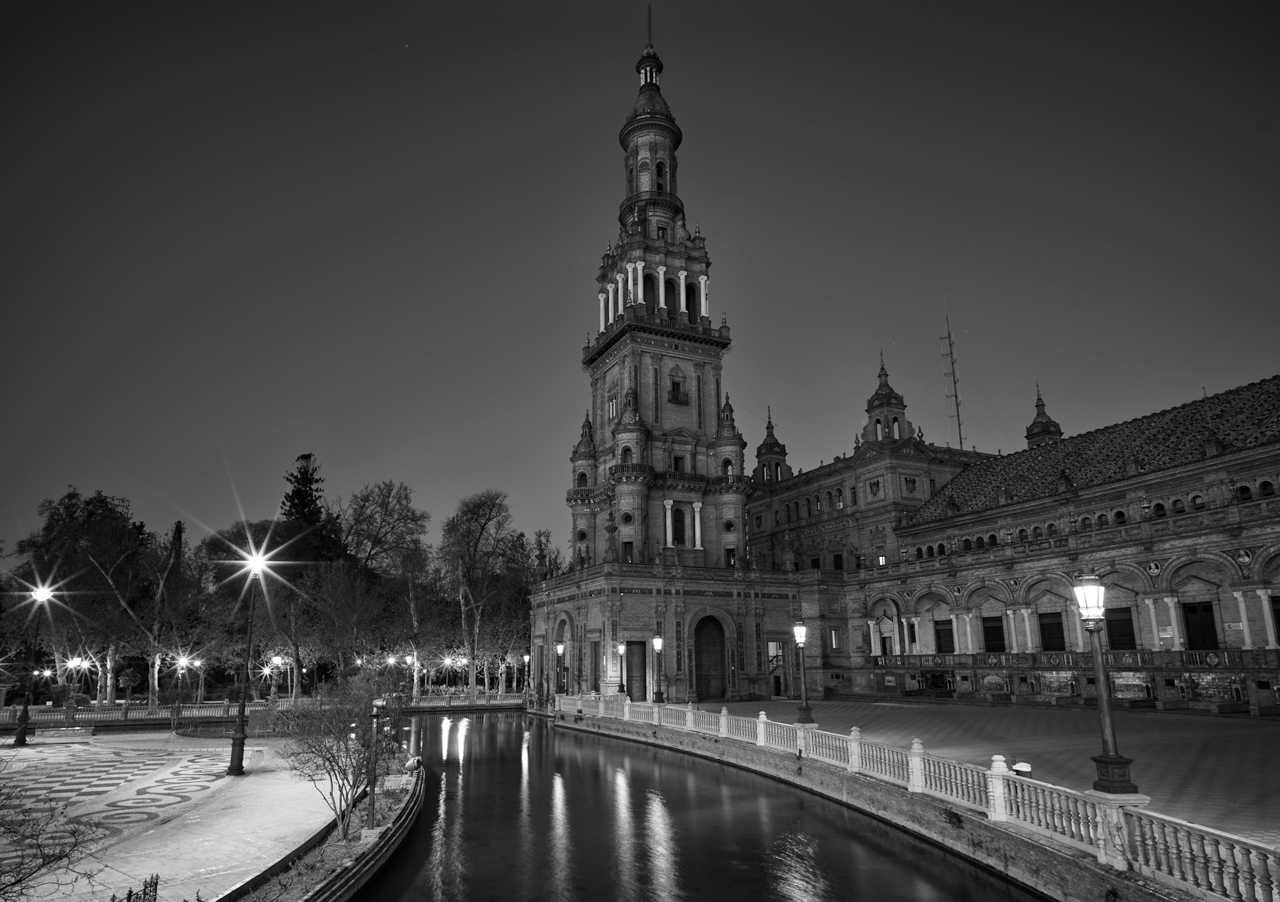
I looked at the file again and it seems fairly ok in Capture One. However, when I move it to Photoshop and do a mid tone contrast adjustment with luminosity mask or even just a vanilla contrast adjustment the banding shows up. Quickly...
Link to the raw
Here's what the file after a contrast adjustment looks like in photoshop. Converted to bw so the issue is a bit easier to see.
 |
||
 |
||
|
Jan 17, 2019 at 12:37 AM
p.1 #9A7r3 banding posterization in sky
Without looking to the RAW file... This looks like an 8-bit conversion before adding contrast.
While you switch to PS, do you convert them at any time to 8-bit?
How did you create the mask in PS? Pixel-masks in PS are normally 8-bit too. Even if your file is 16-bit. If you push them, the effect will be even stronger. There are workarounds in 16bit like most famous luminosity mask-plugins using it (eg. TK-luminosity mask). You can do them on your own, but I don't remember how as I'm just using the plugins.
Nice picture!
Jan 17, 2019 at 01:38 AM
p.1 #10A7r3 banding posterization in sky
Could you do these adjustments in ACR rather than PS after rendering? I pulled the file into ACR, converted to B&W, added some clarity and pulled the blue slider. It nearly matches your image but does not have any banding either in the ACR screen or in PS as a Tiff or a resized jpg.
Jan 17, 2019 at 05:21 AM
p.1 #11A7r3 banding posterization in sky
Your file seems perfectly fine to me. I imported it into Lr CC Classic and then exported into SilverEfex pro as a 16bit TIFF file and it saves back into Lr showing know posterisation at all. On the other hand if I edit it as an 8 Bit JPEG then I see posterisation as in your image. I have lens shading comp in my cameras set to auto and don't get this issue and shoot compressed Raw files unless I really feel I need to go for ultimate DR
Jan 17, 2019 at 06:07 AM
p.1 #12A7r3 banding posterization in sky
Viramati wrote:
Your file seems perfectly fine to me.
Looks good to me as well.
However, the gradation in that sky is very gradual and more or less one color, which makes it very difficult to maintain when going to lower quality output (ie JPEG). If I push the file a bit, and save as JPEG, there's definitely banding. Save the same pushed file as TIFF and it's good. Specifying higher quality settings when saving JPEG can help.
Here's a JPEG sample from Lightroom -
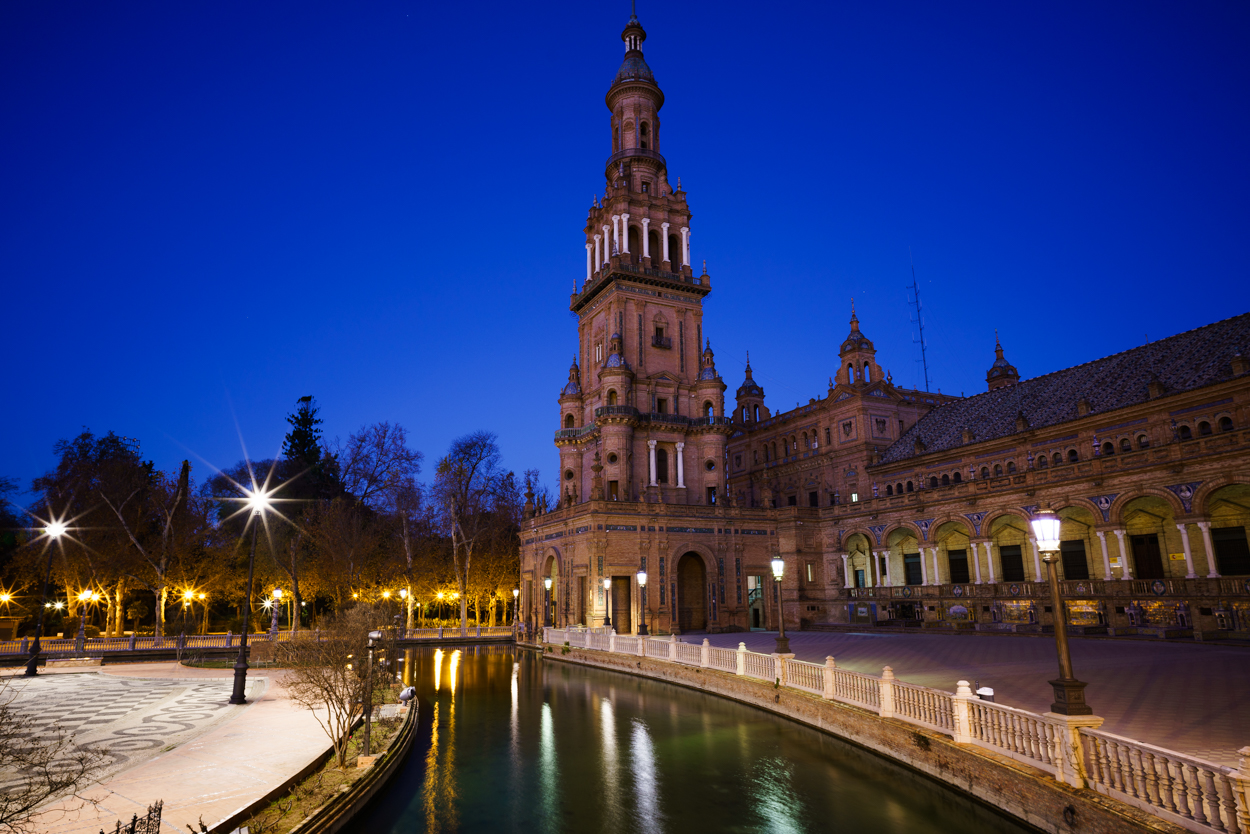
Exposure +.9, Contrast +80, Saturation +10
Your file seems perfectly fine to me.
Looks good to me as well.
However, the gradation in that sky is very gradual and more or less one color, which makes it very difficult to maintain when going to lower quality output (ie JPEG). If I push the file a bit, and save as JPEG, there's definitely banding. Save the same pushed file as TIFF and it's good. Specifying higher quality settings when saving JPEG can help.
Here's a JPEG sample from Lightroom -
Exposure +.9, Contrast +80, Saturation +10
Jan 17, 2019 at 07:06 AM
p.1 #13A7r3 banding posterization in sky
Definitely try opening this as a 16 bit image in Adobe's Camera Raw (it's at the bottom of the Camera Raw program). I played around with your RAW file and it came out fairly clean.
Jan 17, 2019 at 07:53 AM
p.1 #14A7r3 banding posterization in sky
I’d be looking at my color management right out of the gate. It’s usually the cause for banding are these SRGB monitors and what your outputting at.
Jan 17, 2019 at 08:29 AM
p.1 #15A7r3 banding posterization in sky
When I first opened C1 i had SRGB set for a job and i saw banding. Switched it to ProPhoto color profile and went away in C1 processed out to Prophoto and 16 bit than converted it from there to SRGB for the web. Check your PS color space too
Im on a wide gamut monitor and all seems fine.
Prophoto is the higher RGB color space. You can use Adobe RGB as well
Im on a wide gamut monitor and all seems fine.
Prophoto is the higher RGB color space. You can use Adobe RGB as well
Jan 17, 2019 at 08:49 AM
p.1 #16A7r3 banding posterization in sky
i checked your file with exiftool and it says it has a bit depth of 12bits.
a bit of a black art, but i think its accurate as i check my own files are all 14. i'm not sure how you got color space 'uncalibrated' i get sRGB on all of mine; probably doesn't matter.
I remember reading there are caveats that would cause this, like using drive mode that is not single shot would drop down 14->12bit (?)
FileName = _DSC0908.ARW, Image_COUNT<<<(0)>>>
a) Camera Used = ILCE-7RM3
b) Bits Per Sample R G B = {12} [JPEG and Camera Histogram]
c) Color Space = Uncalibrated
j) Image Quality = {RAW} [JPG, RAW, S RAW, M RAW]
k) Scale Factor To 35 mm = {1.0} [1.6 = APS-C, 1.0 = Full Frame]
l) Samples Per Pixel = 1
m) Image Size = 8000x5320
n) Mega Pixels = 42.6
Jan 17, 2019 at 08:56 AM
p.1 #17A7r3 banding posterization in sky
blob loblaw wrote:
i checked your file with exiftool and it says it has a bit depth of 12bits.
a bit of a black art, but i think its accurate as i check my own files are all 14. i'm not sure how you got color space 'uncalibrated' i get sRGB on all of mine; probably doesn't matter.
I remember reading there are caveats that would cause this, like using drive mode that is not single shot would drop down 14->12bit (?)
FileName = _DSC0908.ARW, Image_COUNT<<<(0)>>>
a) Camera Used = ILCE-7RM3
b) Bits Per Sample...Show more →
The A7rIII only drops to 12-bit when shooting in bulb mode, continuous shooting compressed mode, or when Long Exposure NR is enabled and utilized for the exposure. The latter is the case for this photo - the EXIF reports a dark frame was taken by the camera and subtracted (it's a 6-second exposure). That said, 12-bit raws by itself shouldn't cause banding, though it may aggravate it. I'm looking at the file now.
Jan 17, 2019 at 09:08 AM
p.1 #18A7r3 banding posterization in sky
Picture This! wrote:
You guys were right. The lens shading comp setting was on :-(
Since you used a Zeiss Loxia 21mm I doubt the camera applied vignetting correction, unless that lens model happens to share the correction information with the camera. I would guess only Sony's lenses do that, although I can't say that with certainty.
Jan 17, 2019 at 09:12 AM
p.1 #19A7r3 banding posterization in sky
I'm still evaluating the raw but in the meantime if you'd like a way to eliminate the visual banding then adding 4% noise to the sky does the trick, even on a downsampled version that aggravates the banding. Here's an animated GIF of the image that demonstrates before/after:
https://photos.smugmug.com/photos/i-Vk84R6c/0/c7f0a729/O/i-Vk84R6c.gif
https://photos.smugmug.com/photos/i-Vk84R6c/0/c7f0a729/O/i-Vk84R6c.gif
Jan 17, 2019 at 09:47 AM
p.1 #20A7r3 banding posterization in sky
Firstly a BIG thanks to everyone for taking the time to look into this. Much appreciated.
I used 16bit (not 8). The luminosity masks (TK) also use calculations and put out 16 bit masks based on photoshop calculations. I dont think that's the issue.
@GMPhotography - I use ProPhoto all the way till I save for web output. However, I did install a new version of C1 (you'd think it would carry settings over), but I'll check to ensure its not sRGB
@snapsy, I did not know having NR on would drop to 12 bit raws. Although that isnt the cause, its something I did not know, so thanks !! I need to reset my camera settings and go through it again.
Jan 17, 2019 at 10:10 AM