If it just goes in that folder and not in the Sony folder how can i find it in lightroom? I've tried putting it in the Sony folder and I also can't find it. Any tips?
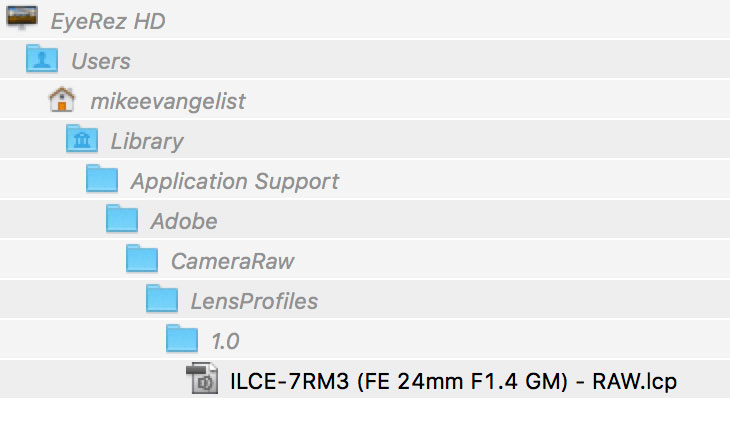
It has to be in that hierarchy, under the Camera Raw path. Also, you need to restart Lightroom for them to show up.
nycdude wrote:
If it just goes in that folder and not in the Sony folder how can i find it in lightroom? I've tried putting it in the Sony folder and I also can't find it. Any tips?
nycdude wrote:
If it just goes in that folder and not in the Sony folder how can i find it in lightroom? I've tried putting it in the Sony folder and I also can't find it. Any tips?
His directory/ folder structure was pretty straight forward and I just placed it there and re-launched LR. It works!
Here it is on my system:
Sorry but I also put the unzipped profile in the "1.0" folder and after relaunching Lightroom a couple of times it's still not available to me and my new 24mm Gm.
Previously I put the profile in the 1.0/Sony folder as that seemed more logical to me, but that didn't work either.
I'm running Lightroom 6.14 on Mac(s)
I've tried both the above methods on three Macs now...