This topic is in the 2018 archive. You can read it and like its posts here. It is read only.
Archive 2018issues with Sony 100-400 G Master - vignette
p.1 #1issues with Sony 100-400 G Master - vignette
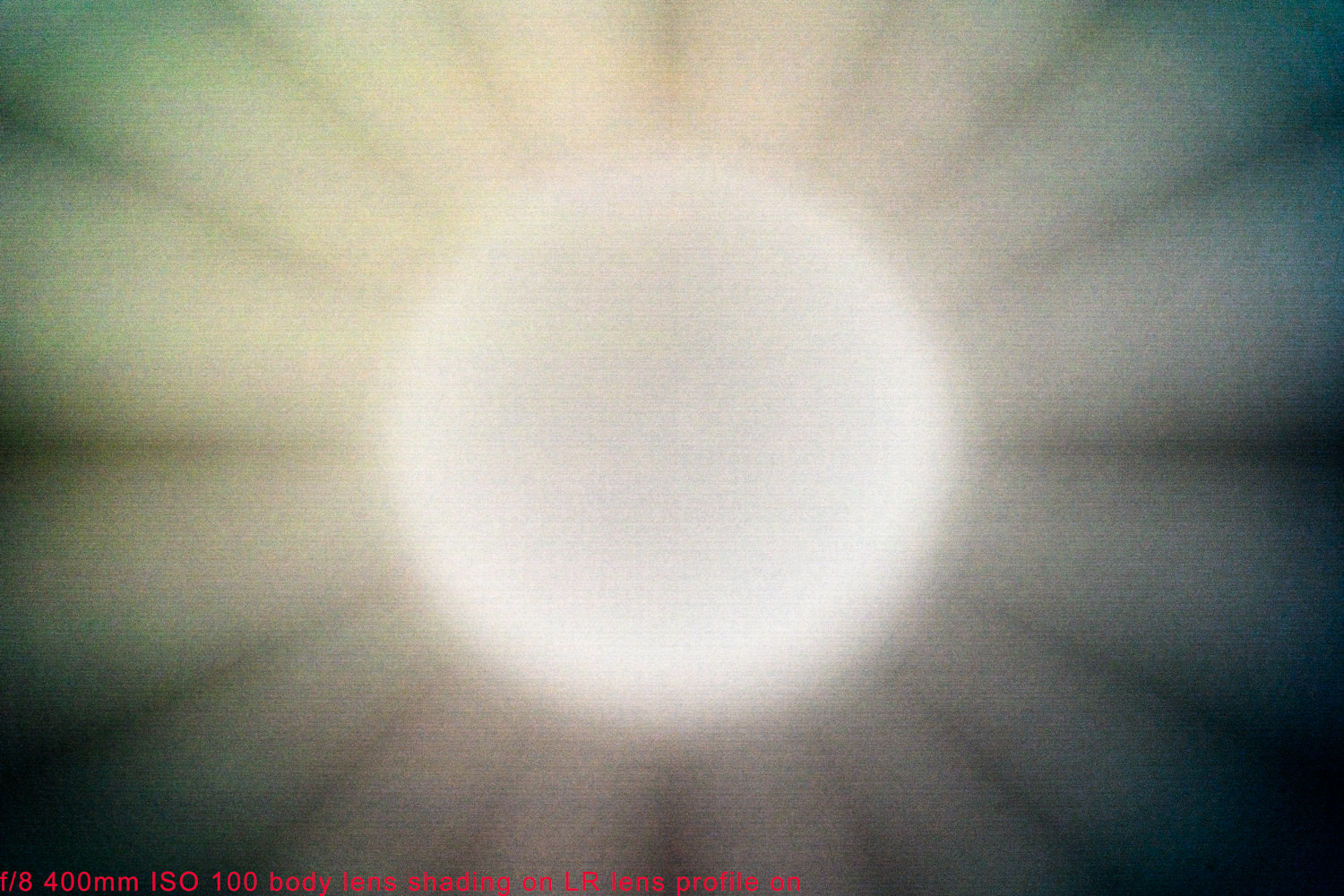
My 100-400 GM has really pronounced vignette, I tried many different ways to get rid of it, in body "lens shading", lens correction in LR, in PS and in Affinity Photo and I just can't get rid of it. Is this typical of this lens? I never had that issue with the Canon 100-400 I or II
I'm attaching a jpeg (converted from RAW) picture I took today to show how bad it is, dark corners and a lighter ring in the center
Also here is a dropbox folder I sent to Sony Pro support last week and haven't heard anything back from them, there's RAW files and jpeg exports of various f stops, with LR lens correction, in body correction and both applied:
https://www.dropbox.com/sh/hljprqy122x8gd7/AAAXUFei1YgxXjeQhcibR0-va?dl=0
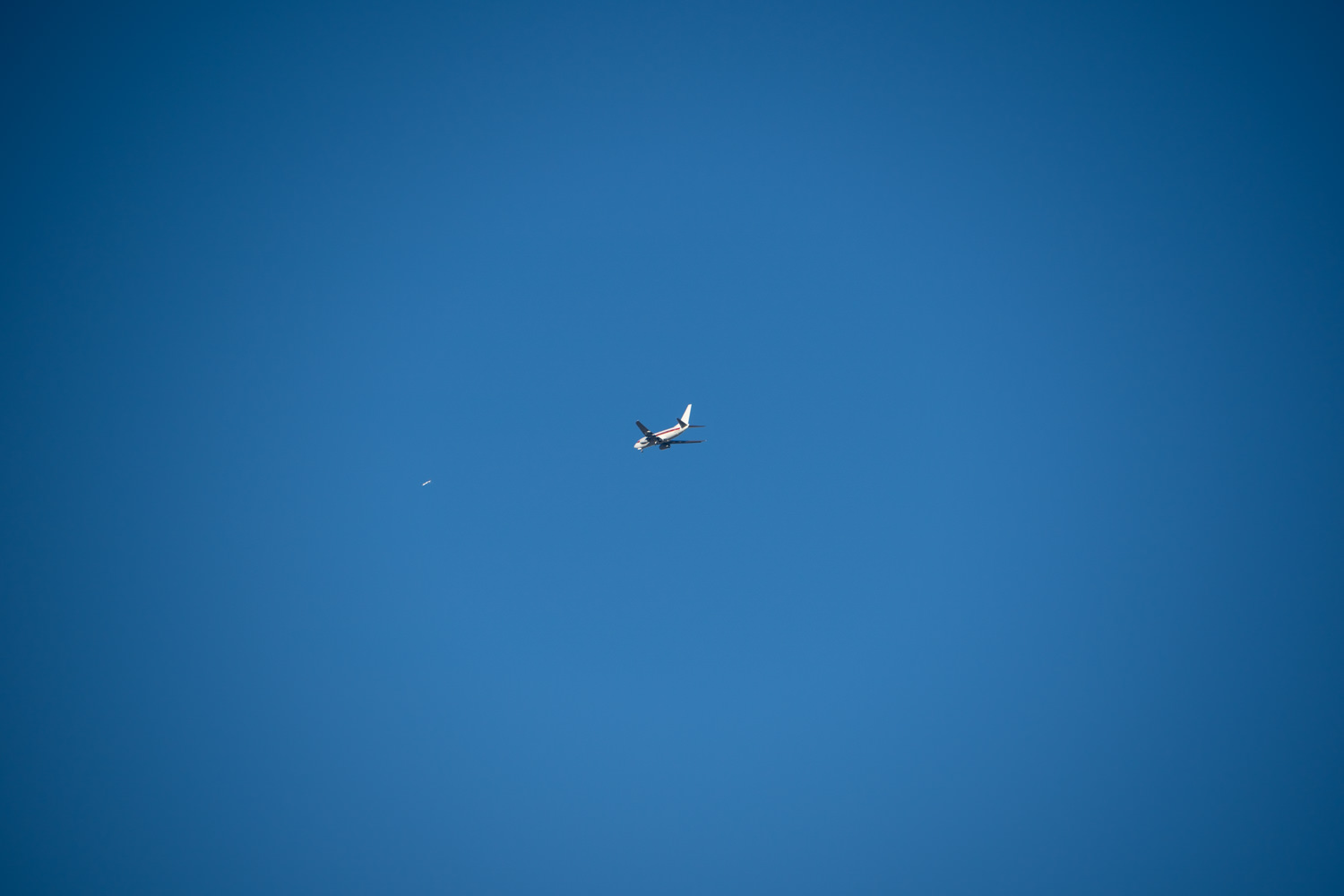
I'm attaching a jpeg (converted from RAW) picture I took today to show how bad it is, dark corners and a lighter ring in the center
Also here is a dropbox folder I sent to Sony Pro support last week and haven't heard anything back from them, there's RAW files and jpeg exports of various f stops, with LR lens correction, in body correction and both applied:
https://www.dropbox.com/sh/hljprqy122x8gd7/AAAXUFei1YgxXjeQhcibR0-va?dl=0
Sep 21, 2018 at 05:44 PM

p.1 #2issues with Sony 100-400 G Master - vignette
The Canon counterpart has basically similar vignetting issue  . I had the Canon lens before. There are two ways to minimize the vignetting issue. First, try taking real-life images rather than test shots of 95% evenly lit target, such as the blue sky, like above. Second, turn on the lens profile in LR on and it will address that issue by quite a bit. I am not sure whether we are referring to the same feature here. But again, under normal circumstances, the vignetting issue is not to barely noticeable.
 Sep 21, 2018 at 05:59 PM
p.1 #3issues with Sony 100-400 G Master - vignette
AGeoJO wrote:
The Canon counterpart has basically similar vignetting issue. I had the Canon lens before. There are two ways to minimize the vignetting issue. First, try taking real-life images rather than test shots of 95% evenly lit target, such as the blue sky, like above. Second, turn on the lens profile in LR on and it will address that issue by quite a bit. I am not sure whether we are referring to the same feature here. But again, under normal circumstances, the vignetting issue is not to barely noticeable.
I had very little vignette on all my 100-400 from Canon on 5D3, 5D4 and 1DX, and never anything that I could not easily remove using lens profile correction in LR.
Using lens profile correction in LR on the Sony lens actually makes it worse! In most cases it intensifies the ring in the center, and in some cases even introduces very weird flower petal like patterns (see pics below)
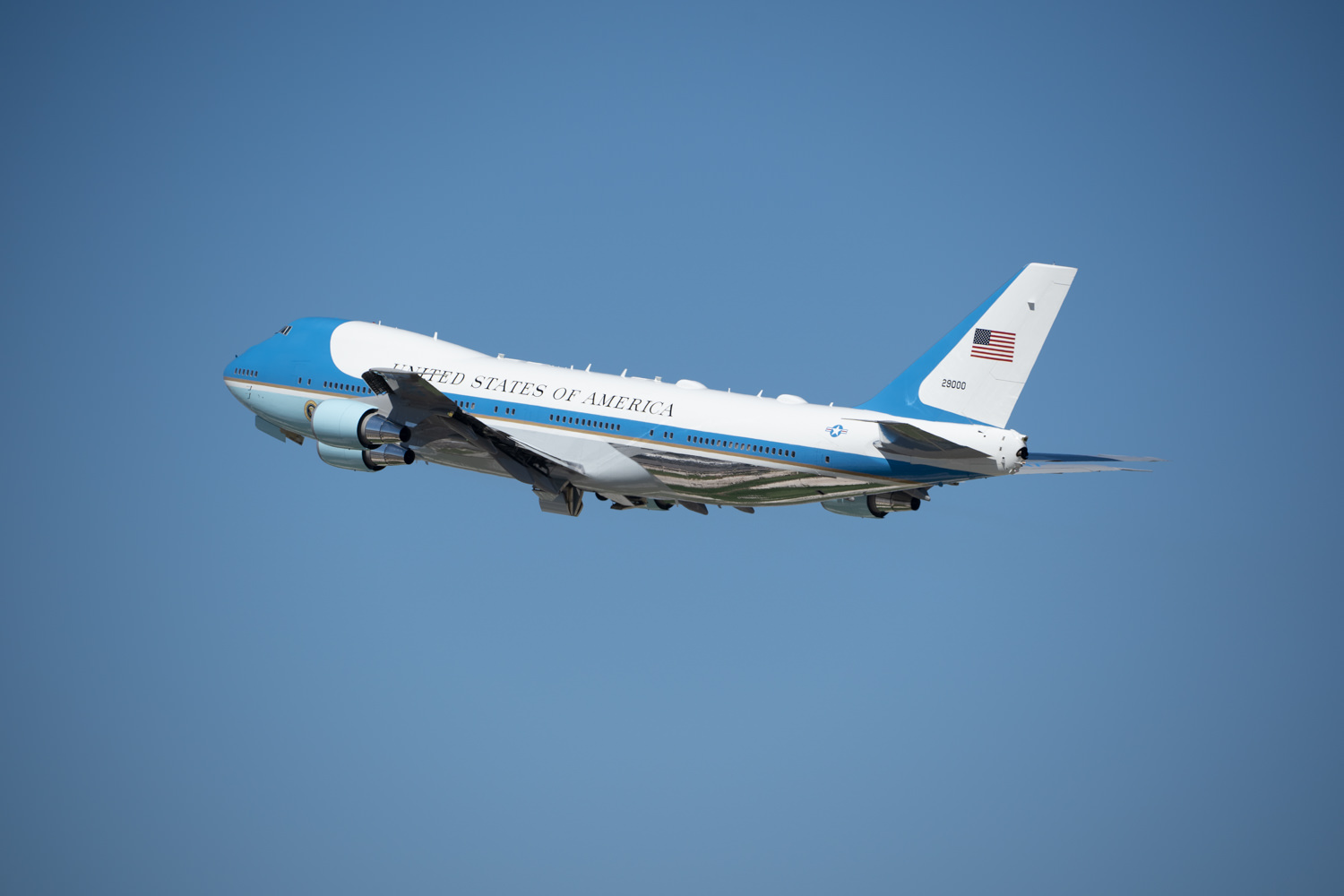
Problem is most pictures I take with the 100-400 are of planes in flight, granted they take more frame than the example I posted but still has very visible dark corners and visible center ring that is about 1/2 stop lighter.
I am adding the following pics:
1: 400mm f/8 iso 100 as imported in LR
2: same as above but with LR lens profile correction turned on
3: Same as 1 but with in body correction turned on
4: Same as 2 but with in body correction turned on
5: Plane on blue sky with visible vignette with 100-400 GM
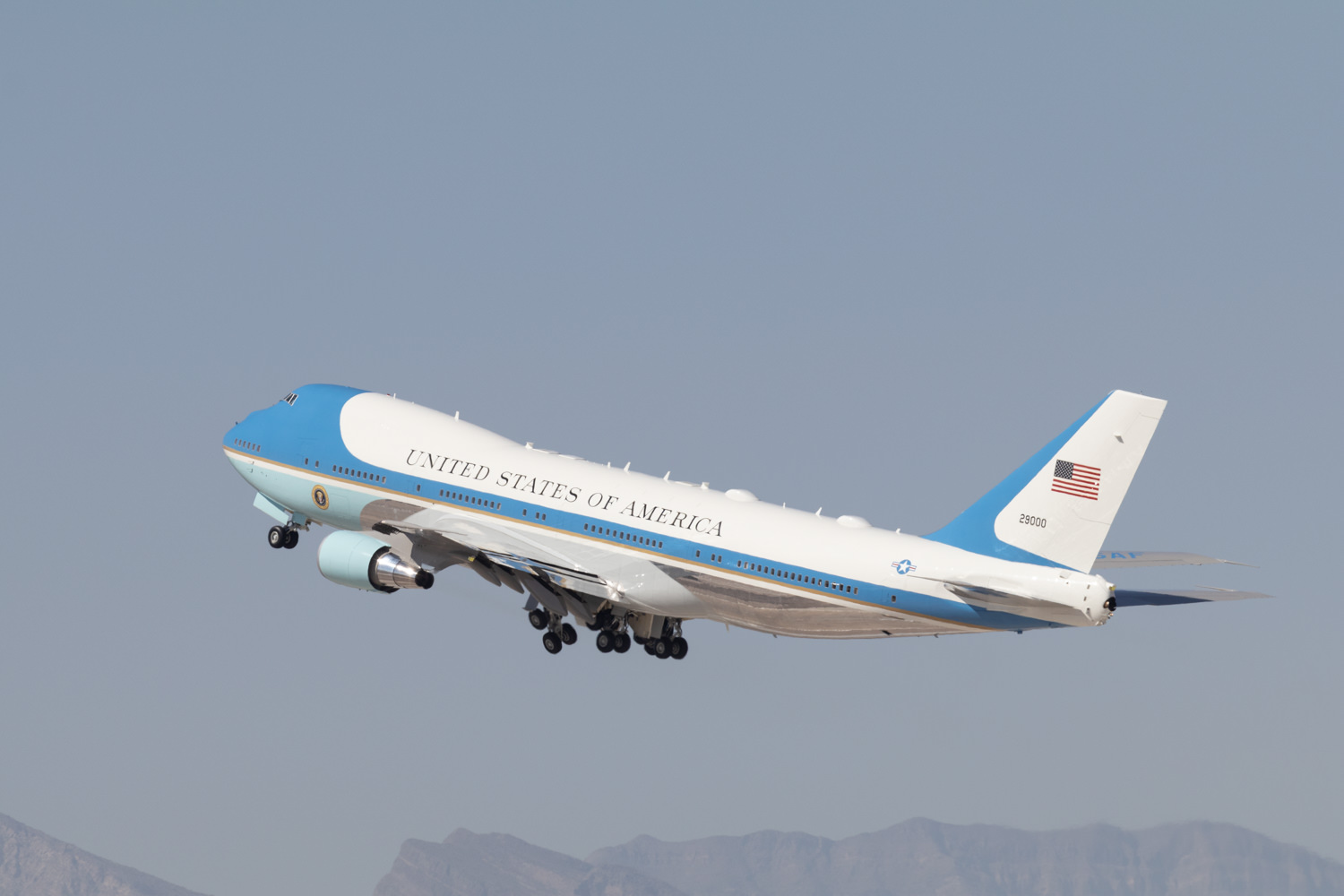
6: Plane on blue sky with Canon 100-400 II
note: f/8 is my go to f stop, the phenomenon does not really change at wider or narrower apertures.
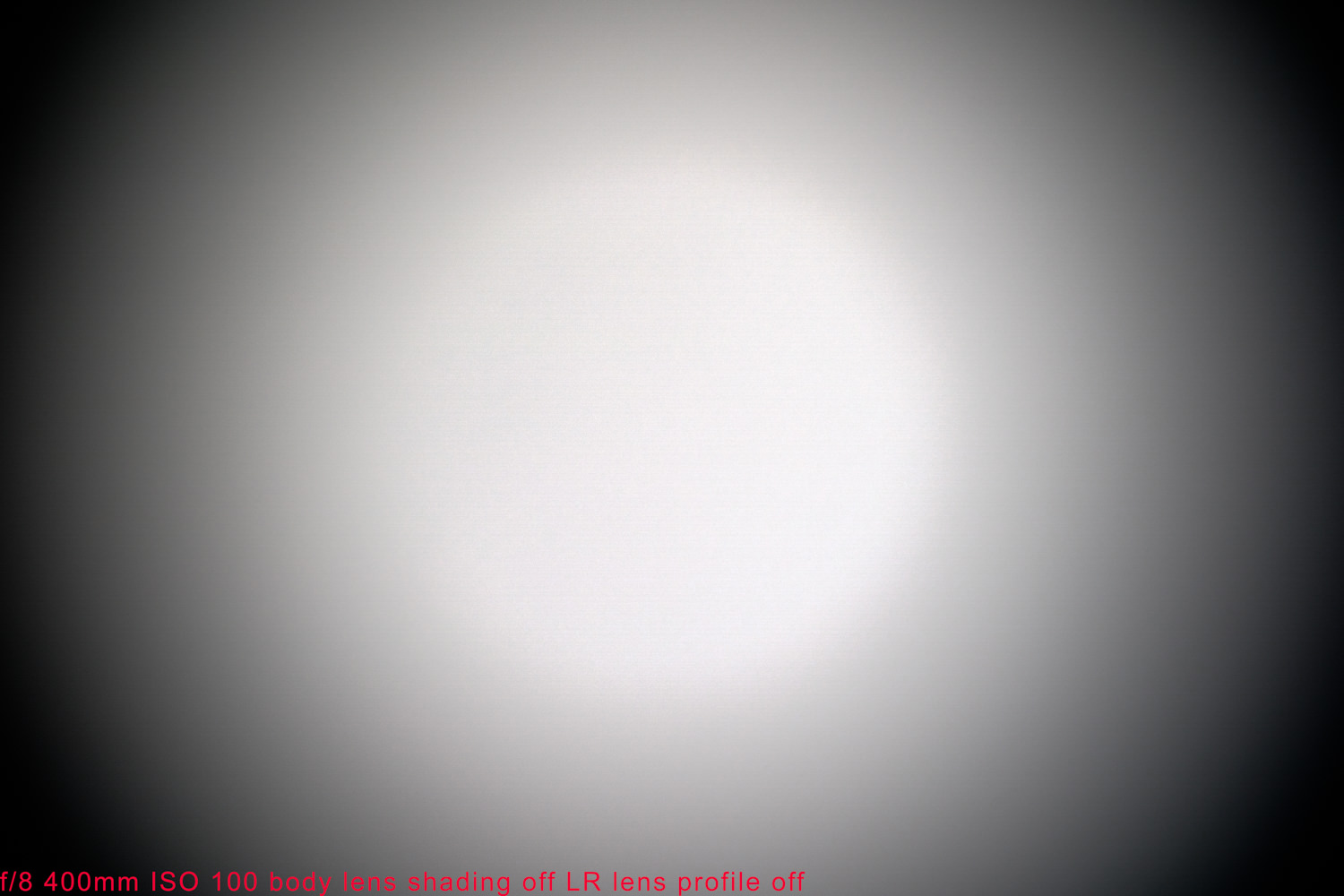
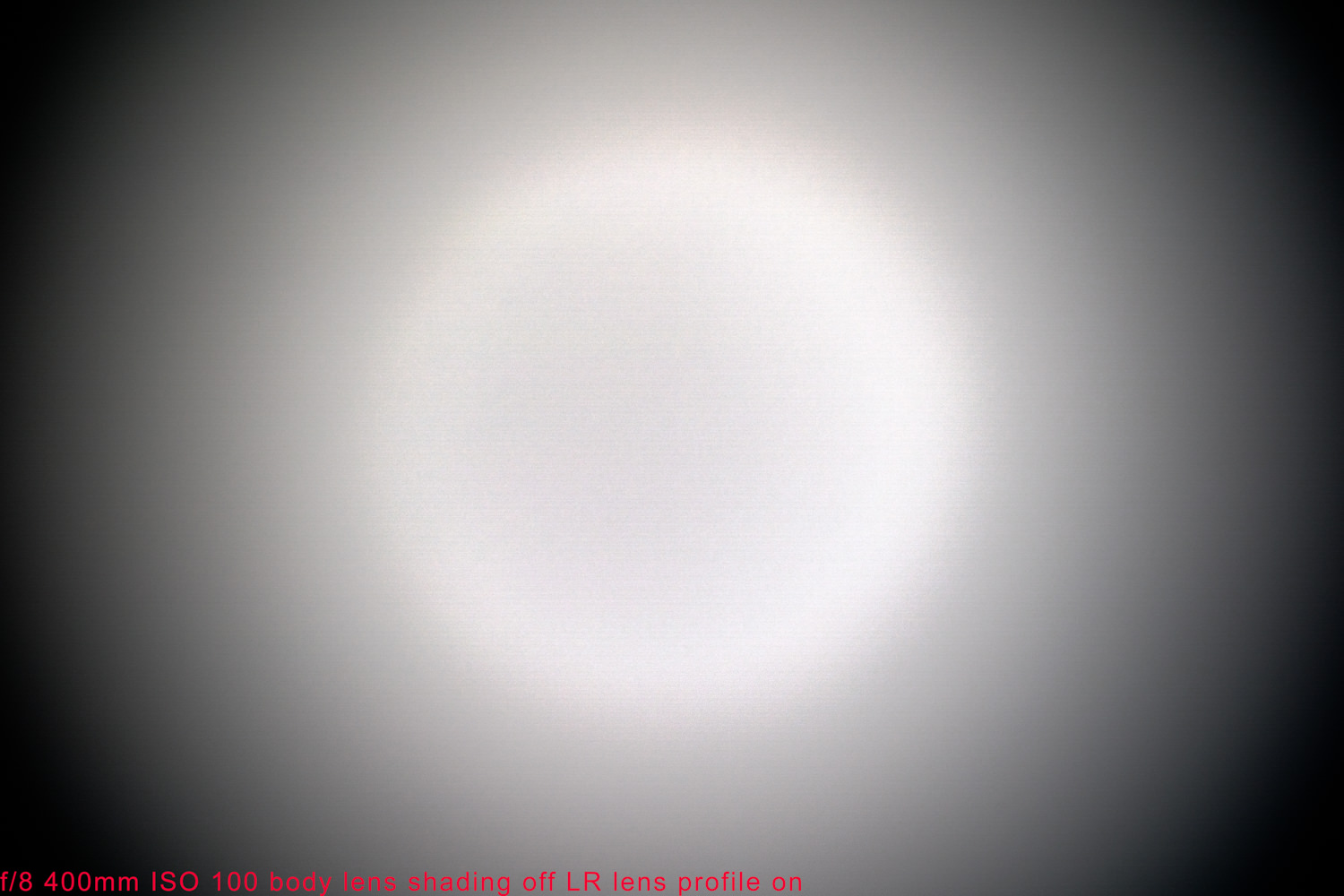
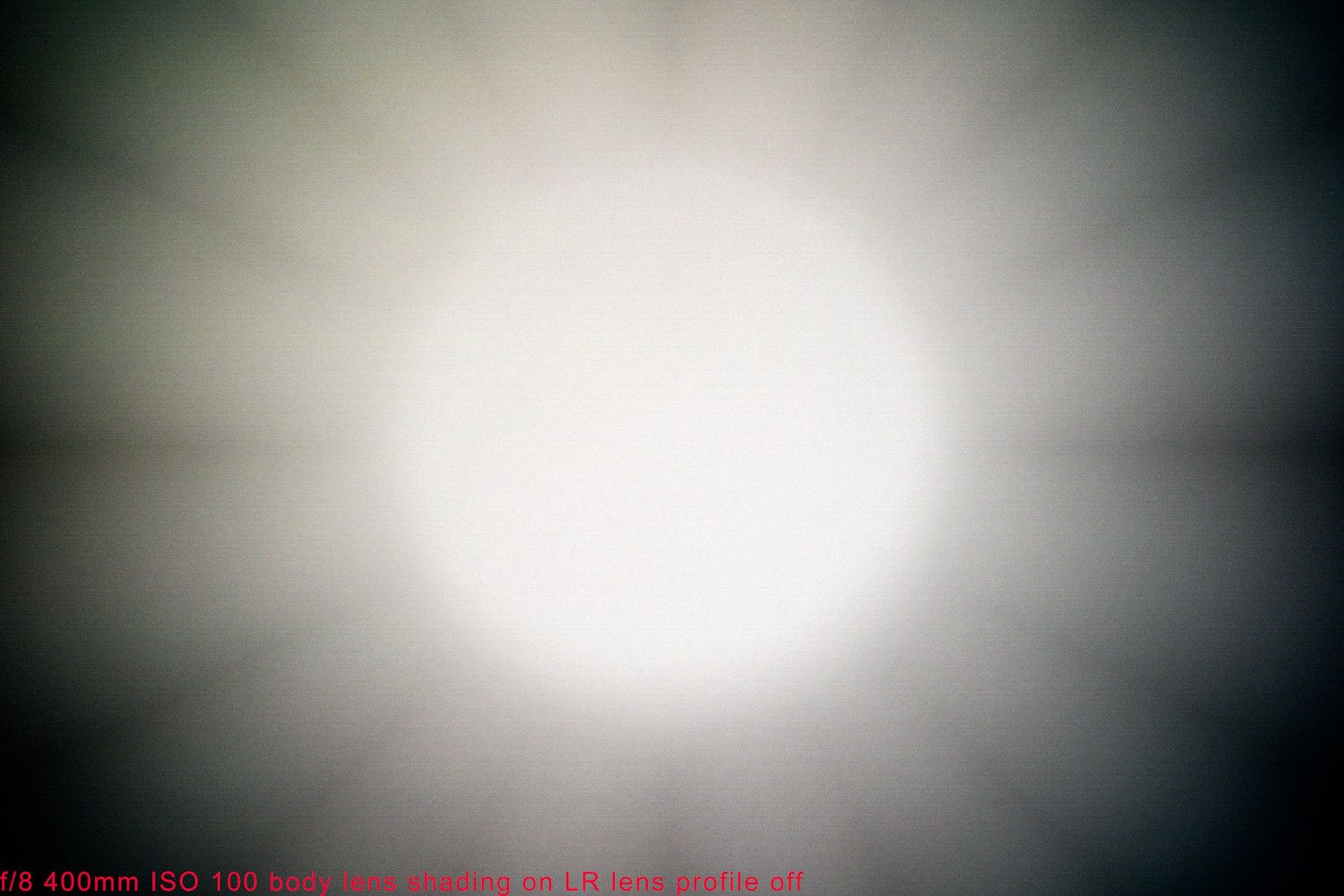
The Canon counterpart has basically similar vignetting issue
. I had the Canon lens before. There are two ways to minimize the vignetting issue. First, try taking real-life images rather than test shots of 95% evenly lit target, such as the blue sky, like above. Second, turn on the lens profile in LR on and it will address that issue by quite a bit. I am not sure whether we are referring to the same feature here. But again, under normal circumstances, the vignetting issue is not to barely noticeable. I had very little vignette on all my 100-400 from Canon on 5D3, 5D4 and 1DX, and never anything that I could not easily remove using lens profile correction in LR.
Using lens profile correction in LR on the Sony lens actually makes it worse! In most cases it intensifies the ring in the center, and in some cases even introduces very weird flower petal like patterns (see pics below)
Problem is most pictures I take with the 100-400 are of planes in flight, granted they take more frame than the example I posted but still has very visible dark corners and visible center ring that is about 1/2 stop lighter.
I am adding the following pics:
1: 400mm f/8 iso 100 as imported in LR
2: same as above but with LR lens profile correction turned on
3: Same as 1 but with in body correction turned on
4: Same as 2 but with in body correction turned on
5: Plane on blue sky with visible vignette with 100-400 GM
6: Plane on blue sky with Canon 100-400 II
note: f/8 is my go to f stop, the phenomenon does not really change at wider or narrower apertures.
Sep 21, 2018 at 06:19 PM
p.1 #4issues with Sony 100-400 G Master - vignette
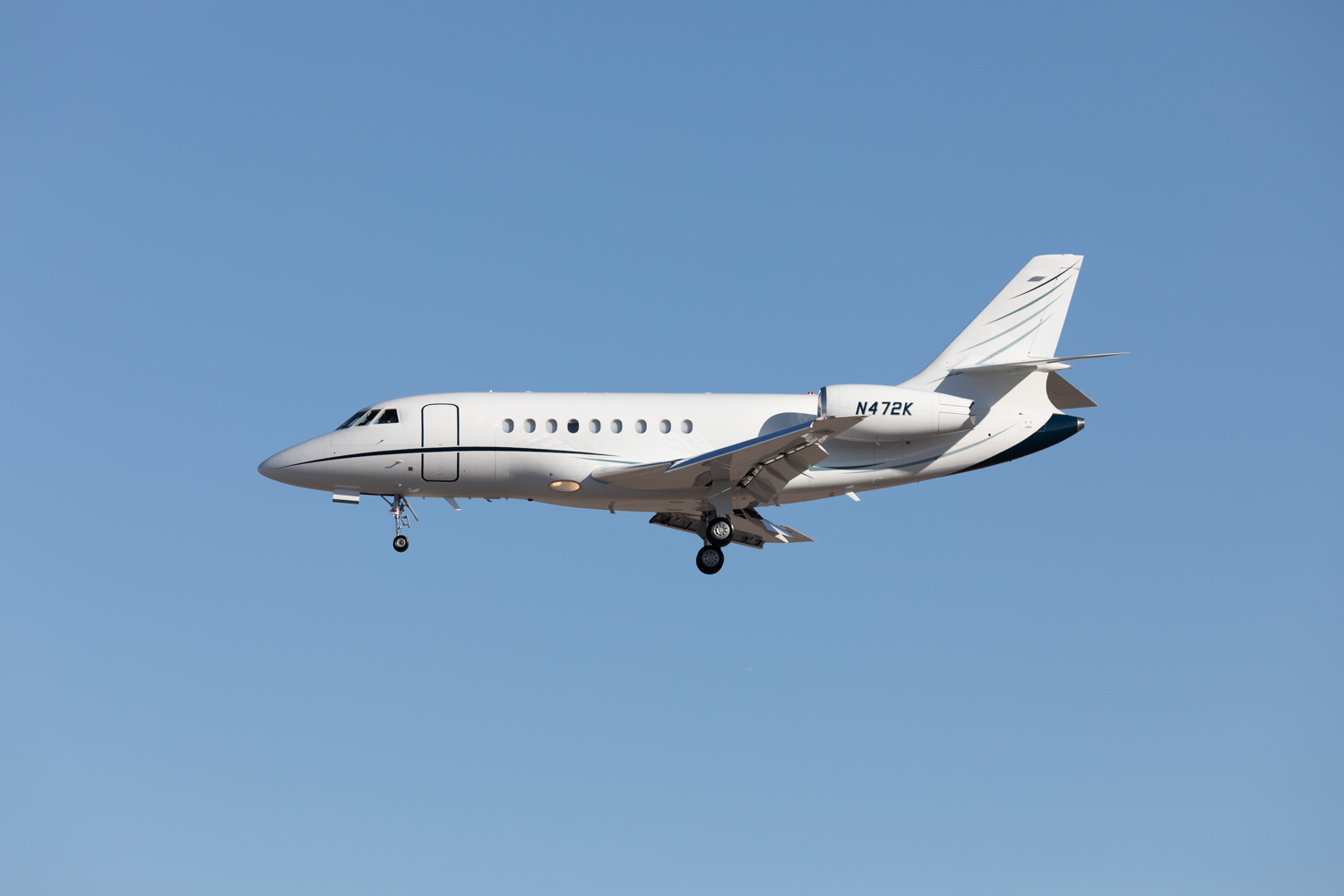
Just realized that Canon pic was taken with an 80D let me find a FF shot
Sep 21, 2018 at 06:20 PM
p.1 #6issues with Sony 100-400 G Master - vignette
Hm, the vignetting you showed seems to be indeed really excessive. I heard of a similar problem from someone that was referred by an FMer (@philber) although the owner of the lens is in GB actually. He ended up sending the lens in, too and Sony did work on the lens or gave him a replacement lens; I don't remember what. He was happy with either the correction or replacement lens.
Since you already sent yours in, too, why don't we wait until we hear back from them. I believe that would the wise thing to do.
Since you already sent yours in, too, why don't we wait until we hear back from them. I believe that would the wise thing to do.
Sep 21, 2018 at 07:06 PM
p.1 #7issues with Sony 100-400 G Master - vignette
I checked one of your Sony raws. You have lens vignetting correction turned off in the camera settings. Unlike other systems, Sony actually applies their vignetting correction to the raw data when it's enabled. I'm not saying you should need to enable it to get reasonable results that don't vignette with the lens (esp at f/8), but it's worth a shot as a possible workaround if you find Adobe's correction doesn't work well.
You can enable the correction via Menu -> Camera Settings 1 -> Lens Comp -> Shading Comp
You can enable the correction via Menu -> Camera Settings 1 -> Lens Comp -> Shading Comp
Sep 21, 2018 at 07:19 PM
p.1 #8issues with Sony 100-400 G Master - vignette
AGeoJO wrote:
Hm, the vignetting you showed seems to be indeed really excessive. I heard of a similar problem from someone that was referred by an FMer (@philber) although the owner of the lens is in GB actually. He ended up sending the lens in, too and Sony did work on the lens or gave him a replacement lens; I don't remember what. He was happy with either the correction or replacement lens.
Since you already sent yours in, too, why don't we wait until we hear back from them. I believe that would the wise thing to do.
Actually I haven't sent the lens in yet, I called and described the issue, they asked for sample pics (the Dropbox folder I linked above) I called a couple of times since they said they're looking into it but I still have the lens with me, I provided all the info for a repair order and still waiting to hear back from them.
Hm, the vignetting you showed seems to be indeed really excessive. I heard of a similar problem from someone that was referred by an FMer (@philber) although the owner of the lens is in GB actually. He ended up sending the lens in, too and Sony did work on the lens or gave him a replacement lens; I don't remember what. He was happy with either the correction or replacement lens.
Since you already sent yours in, too, why don't we wait until we hear back from them. I believe that would the wise thing to do.
Actually I haven't sent the lens in yet, I called and described the issue, they asked for sample pics (the Dropbox folder I linked above) I called a couple of times since they said they're looking into it but I still have the lens with me, I provided all the info for a repair order and still waiting to hear back from them.
Sep 21, 2018 at 07:33 PM
p.1 #9issues with Sony 100-400 G Master - vignette
snapsy wrote:
I checked one of your Sony raws. You have lens vignetting correction turned off in the camera settings. Unlike other systems, Sony actually applies their vignetting correction to the raw data when it's enabled. I'm not saying you should need to enable it to get reasonable results that don't vignette with the lens (esp at f/8), but it's worth a shot as a possible workaround if you find Adobe's correction doesn't work well.
You can enable the correction via Menu -> Camera Settings 1 -> Lens Comp -> Shading Comp
I tried with and without, the samples are in the Dropbox folder (I may have called it lens shading on the sample pics, I meant shading compensation). It didn't seem to help. The best results I got so far are with shading compensation off and lens profile correction in Photoshop (the LR one does screwy things). I submit pics to an online aviation database and most of my pics with the Sony are getting rejected for vignette. I tried to manually get rid of it but it's somewhat tricky and adds a lot of time to editing to get it right. So far the Sony has been superior to my Canon, except for that lens, my first G Master ...... I thought those were supposed to be the best lol
I checked one of your Sony raws. You have lens vignetting correction turned off in the camera settings. Unlike other systems, Sony actually applies their vignetting correction to the raw data when it's enabled. I'm not saying you should need to enable it to get reasonable results that don't vignette with the lens (esp at f/8), but it's worth a shot as a possible workaround if you find Adobe's correction doesn't work well.
You can enable the correction via Menu -> Camera Settings 1 -> Lens Comp -> Shading Comp
I tried with and without, the samples are in the Dropbox folder (I may have called it lens shading on the sample pics, I meant shading compensation). It didn't seem to help. The best results I got so far are with shading compensation off and lens profile correction in Photoshop (the LR one does screwy things). I submit pics to an online aviation database and most of my pics with the Sony are getting rejected for vignette. I tried to manually get rid of it but it's somewhat tricky and adds a lot of time to editing to get it right. So far the Sony has been superior to my Canon, except for that lens, my first G Master ...... I thought those were supposed to be the best lol
Sep 21, 2018 at 07:38 PM
p.1 #10issues with Sony 100-400 G Master - vignette
71sbeetle wrote:
You can enable the correction via Menu -> Camera Settings 1 -> Lens Comp -> Shading CompI tried with and without, the samples are in the Dropbox folder (I may have called it lens shading on the sample pics, I meant shading compensation). It didn't seem to help. The best results I got so far are with shading compensation off and lens profile correction in Photoshop (the LR one does screwy things). I submit pics to an online aviation database and most of my pics with the Sony are getting rejected for vignette. I tried to manually get rid of it but it's somewhat tricky and adds a lot of time to editing to get it...Show more →
I looked at the two airplane raws and both had vignetting correction off.
snapsy wrote
I checked one of your Sony raws. You have lens vignetting correction turned off in the camera settings. Unlike other systems, Sony actually applies their vignetting correction to the raw data when it's enabled. I'm not saying you should need to enable it to get reasonable results that don't vignette with the lens (esp at f/8), but it's worth a shot as a possible workaround if you find Adobe's correction doesn't work well.You can enable the correction via Menu -> Camera Settings 1 -> Lens Comp -> Shading Comp
I looked at the two airplane raws and both had vignetting correction off.
Sep 21, 2018 at 07:41 PM
p.1 #11issues with Sony 100-400 G Master - vignette
snapsy wrote:
You can enable the correction via Menu -> Camera Settings 1 -> Lens Comp -> Shading CompI tried with and without, the samples are in the Dropbox folder (I may have called it lens shading on the sample pics, I meant shading compensation). It didn't seem to help. The best results I got so far are with shading compensation off and lens profile correction in Photoshop (the LR one does screwy things). I submit pics to an online aviation database and most of my pics with the Sony are getting rejected for vignette. I tried to manually get rid of it but it's somewhat tricky and adds a lot of time to editing to get it right. So far the Sony has been superior to my Canon, except for that lens, my first G Master ...... I thought those were supposed to be the best lolI looked at the two airplane raws and both had vignetting correction off.
Correct I left it off for all airplane pictures I posted. After I did the test on white background lit with 2 bright lights I posted above I noticed it didn't help or even made it worse when turned on. The white background pics are SOOC but equalized to really show the patterns.
71sbeetle wrote
snapsy wrote
I checked one of your Sony raws. You have lens vignetting correction turned off in the camera settings. Unlike other systems, Sony actually applies their vignetting correction to the raw data when it's enabled. I'm not saying you should need to enable it to get reasonable results that don't vignette with the lens (esp at f/8), but it's worth a shot as a possible workaround if you find Adobe's correction doesn't work well.You can enable the correction via Menu -> Camera Settings 1 -> Lens Comp -> Shading Comp
Correct I left it off for all airplane pictures I posted. After I did the test on white background lit with 2 bright lights I posted above I noticed it didn't help or even made it worse when turned on. The white background pics are SOOC but equalized to really show the patterns.
Sep 21, 2018 at 07:44 PM
p.1 #12issues with Sony 100-400 G Master - vignette
71sbeetle wrote:
You can enable the correction via Menu -> Camera Settings 1 -> Lens Comp -> Shading CompI tried with and without, the samples are in the Dropbox folder (I may have called it lens shading on the sample pics, I meant shading compensation). It didn't seem to help. The best results I got so far are with shading compensation off and lens profile correction in Photoshop (the LR one does screwy things). I submit pics to an online aviation database and most of my pics with the Sony are getting rejected for vignette. I tried to manually get rid of it but it's somewhat tricky and adds a lot of time to editing to get it right. So far the Sony has been superior to my Canon, except for that lens, my first G Master ...... I thought those were supposed to be the best lolI looked at the two airplane raws and both had vignetting correction off.Correct I left it off for all airplane pictures I posted. After I did the test on white background lit with 2 bright lights I posted above I noticed it didn't help or even made it worse when turned on. The white background pics are SOOC but equalized to really show the patterns.
I just compared two of your white background raws, one with vignetting correction off (1287) and one with it on (1293) - both are f/8 and have the same exposure. Here's an animated GIF of the two:
https://photos.smugmug.com/photos/i-wPfzF4J/0/b263888d/O/i-wPfzF4J.gif
What aspect of the the corrected raw do you see as worse than the uncorrected one?
snapsy wrote
71sbeetle wrote
snapsy wrote
I checked one of your Sony raws. You have lens vignetting correction turned off in the camera settings. Unlike other systems, Sony actually applies their vignetting correction to the raw data when it's enabled. I'm not saying you should need to enable it to get reasonable results that don't vignette with the lens (esp at f/8), but it's worth a shot as a possible workaround if you find Adobe's correction doesn't work well.You can enable the correction via Menu -> Camera Settings 1 -> Lens Comp -> Shading Comp
I just compared two of your white background raws, one with vignetting correction off (1287) and one with it on (1293) - both are f/8 and have the same exposure. Here's an animated GIF of the two:
https://photos.smugmug.com/photos/i-wPfzF4J/0/b263888d/O/i-wPfzF4J.gif
What aspect of the the corrected raw do you see as worse than the uncorrected one?
Sep 21, 2018 at 07:58 PM
p.1 #13issues with Sony 100-400 G Master - vignette
snapsy wrote:
You can enable the correction via Menu -> Camera Settings 1 -> Lens Comp -> Shading CompI tried with and without, the samples are in the Dropbox folder (I may have called it lens shading on the sample pics, I meant shading compensation). It didn't seem to help. The best results I got so far are with shading compensation off and lens profile correction in Photoshop (the LR one does screwy things). I submit pics to an online aviation database and most of my pics with the Sony are getting rejected for vignette. I tried to manually get rid of it but it's somewhat tricky and adds a lot of time to editing to get it right. So far the Sony has been superior to my Canon, except for that lens, my first G Master ...... I thought those were supposed to be the best lolI looked at the two airplane raws and both had vignetting correction off.Correct I left it off for all airplane pictures I posted. After I did the test on white background lit with 2 bright lights I posted above I noticed it didn't help or even made it worse when turned on. The white background pics are SOOC but equalized to really show the patterns.I just compared two of your white background raws, one with vignetting correction off (1287) and one with it on (1293) - both are f/8 and have the same exposure. Here's an animated GIF of the two:
https://photos.smugmug.com/photos/i-wPfzF4J/0/b263888d/O/i-wPfzF4J.gif
What aspect of the the corrected raw do you see as worse than the uncorrected one?
Interesting! I don't think I see that much of an improvement on my computer. I wonder what I am doing wrong. Also the worse one is the one I use a lot, f/8 at 400mm, it introduces a weird flower petals look to it (doesn't do it at other focal length or f stop) and it only does that with the shading compensation on
71sbeetle wrote
snapsy wrote
71sbeetle wrote
snapsy wrote
I checked one of your Sony raws. You have lens vignetting correction turned off in the camera settings. Unlike other systems, Sony actually applies their vignetting correction to the raw data when it's enabled. I'm not saying you should need to enable it to get reasonable results that don't vignette with the lens (esp at f/8), but it's worth a shot as a possible workaround if you find Adobe's correction doesn't work well.You can enable the correction via Menu -> Camera Settings 1 -> Lens Comp -> Shading Comp
https://photos.smugmug.com/photos/i-wPfzF4J/0/b263888d/O/i-wPfzF4J.gif
What aspect of the the corrected raw do you see as worse than the uncorrected one?
Interesting! I don't think I see that much of an improvement on my computer. I wonder what I am doing wrong. Also the worse one is the one I use a lot, f/8 at 400mm, it introduces a weird flower petals look to it (doesn't do it at other focal length or f stop) and it only does that with the shading compensation on
Sep 21, 2018 at 08:47 PM
p.1 #14issues with Sony 100-400 G Master - vignette
71sbeetle wrote:
You can enable the correction via Menu -> Camera Settings 1 -> Lens Comp -> Shading CompI tried with and without, the samples are in the Dropbox folder (I may have called it lens shading on the sample pics, I meant shading compensation). It didn't seem to help. The best results I got so far are with shading compensation off and lens profile correction in Photoshop (the LR one does screwy things). I submit pics to an online aviation database and most of my pics with the Sony are getting rejected for vignette. I tried to manually get rid of it but it's somewhat tricky and adds a lot of time to editing to get it right. So far the Sony has been superior to my Canon, except for that lens, my first G Master ...... I thought those were supposed to be the best lolI looked at the two airplane raws and both had vignetting correction off.Correct I left it off for all airplane pictures I posted. After I did the test on white background lit with 2 bright lights I posted above I noticed it didn't help or even made it worse when turned on. The white background pics are SOOC but equalized to really show the patterns.I just compared two of your white background raws, one with vignetting correction off (1287) and one with it on (1293) - both are f/8 and have the same exposure. Here's an animated GIF of the two:
https://photos.smugmug.com/photos/i-wPfzF4J/0/b263888d/O/i-wPfzF4J.gif
What aspect of the the corrected raw do you see as worse than the uncorrected one?Interesting! I don't think I see that much of an improvement on my computer. I wonder what I am doing wrong. Also the worse one is the one I use a lot, f/8 at 400mm, it introduces a weird flower petals look to it (doesn't do it at other focal length or f stop) and it only does that with the shading compensation on
I processed both raws in PS, with Adobe's lens correction profile not enabled. I see your flower petal JPG images but don't see it any of the raws you shared. Can you tell me which raws those correspond to?
snapsy wrote
71sbeetle wrote
snapsy wrote
71sbeetle wrote
snapsy wrote
I checked one of your Sony raws. You have lens vignetting correction turned off in the camera settings. Unlike other systems, Sony actually applies their vignetting correction to the raw data when it's enabled. I'm not saying you should need to enable it to get reasonable results that don't vignette with the lens (esp at f/8), but it's worth a shot as a possible workaround if you find Adobe's correction doesn't work well.You can enable the correction via Menu -> Camera Settings 1 -> Lens Comp -> Shading Comp
https://photos.smugmug.com/photos/i-wPfzF4J/0/b263888d/O/i-wPfzF4J.gif
What aspect of the the corrected raw do you see as worse than the uncorrected one?
I processed both raws in PS, with Adobe's lens correction profile not enabled. I see your flower petal JPG images but don't see it any of the raws you shared. Can you tell me which raws those correspond to?
Sep 22, 2018 at 08:46 AM
p.1 #15issues with Sony 100-400 G Master - vignette
snapsy wrote:
I looked at the two airplane raws and both had vignetting correction off.Correct I left it off for all airplane pictures I posted. After I did the test on white background lit with 2 bright lights I posted above I noticed it didn't help or even made it worse when turned on. The white background pics are SOOC but equalized to really show the patterns.I just compared two of your white background raws, one with vignetting correction off (1287) and one with it on (1293) - both are f/8 and have the same exposure. Here's an animated GIF of the two:
https://photos.smugmug.com/photos/i-wPfzF4J/0/b263888d/O/i-wPfzF4J.gif
What aspect of the the corrected raw do you see as worse than the uncorrected one?Interesting! I don't think I see that much of an improvement on my computer. I wonder what I am doing wrong. Also the worse one is the one I use a lot, f/8 at 400mm, it introduces a weird flower petals look to it (doesn't do it at other focal length or f stop) and it only does that with the shading compensation onI processed both raws in PS, with Adobe's lens correction profile not enabled. I see your flower petal JPG images but don't see it any of the raws you shared. Can you tell me which raws those correspond to?
It should be 1290 and 1296. I processed mine in LR but it should be the same right? You can't really see the flower petals on the plain white background, it's more visible in actual pictures, but if you equalize the white bg pic you'll see it too
71sbeetle wrote
snapsy wrote
71sbeetle wrote
snapsy wrote
71sbeetle wrote
I tried with and without, the samples are in the Dropbox folder (I may have called it lens shading on the sample pics, I meant shading compensation). It didn't seem to help. The best results I got so far are with shading compensation off and lens profile correction in Photoshop (the LR one does screwy things). I submit pics to an online aviation database and most of my pics with the Sony are getting rejected for vignette. I tried to manually get rid of it but it's somewhat tricky and adds a lot of time to editing to get it right. So far the Sony has been superior to my Canon, except for that lens, my first G Master ...... I thought those were supposed to be the best lolhttps://photos.smugmug.com/photos/i-wPfzF4J/0/b263888d/O/i-wPfzF4J.gif
What aspect of the the corrected raw do you see as worse than the uncorrected one?
It should be 1290 and 1296. I processed mine in LR but it should be the same right? You can't really see the flower petals on the plain white background, it's more visible in actual pictures, but if you equalize the white bg pic you'll see it too
Sep 22, 2018 at 11:07 AM
p.1 #16issues with Sony 100-400 G Master - vignette
71sbeetle wrote:
Correct I left it off for all airplane pictures I posted. After I did the test on white background lit with 2 bright lights I posted above I noticed it didn't help or even made it worse when turned on. The white background pics are SOOC but equalized to really show the patterns.I just compared two of your white background raws, one with vignetting correction off (1287) and one with it on (1293) - both are f/8 and have the same exposure. Here's an animated GIF of the two:
https://photos.smugmug.com/photos/i-wPfzF4J/0/b263888d/O/i-wPfzF4J.gif
What aspect of the the corrected raw do you see as worse than the uncorrected one?Interesting! I don't think I see that much of an improvement on my computer. I wonder what I am doing wrong. Also the worse one is the one I use a lot, f/8 at 400mm, it introduces a weird flower petals look to it (doesn't do it at other focal length or f stop) and it only does that with the shading compensation onI processed both raws in PS, with Adobe's lens correction profile not enabled. I see your flower petal JPG images but don't see it any of the raws you shared. Can you tell me which raws those correspond to?It should be 1290 and 1296. I processed mine in LR but it should be the same right? You can't really see the flower petals on the plain white background, it's more visible in actual pictures, but if you equalize the white bg pic you'll see it too
Ok, if I do extreme black level and contrast adjustments I can see it in 1296 but not 1290, which means those petals are likely just a side effect of the camera-based raw vignetting correction. If you have some airplane photos with the camera raw vignetting correction enabled I can take a look otherwise if it shows up with typical content+processing, otherwise it's still looking like the raw correction might be a workable solution for you.
snapsy wrote
71sbeetle wrote
snapsy wrote
71sbeetle wrote
snapsy wrote
I looked at the two airplane raws and both had vignetting correction off.https://photos.smugmug.com/photos/i-wPfzF4J/0/b263888d/O/i-wPfzF4J.gif
What aspect of the the corrected raw do you see as worse than the uncorrected one?
Ok, if I do extreme black level and contrast adjustments I can see it in 1296 but not 1290, which means those petals are likely just a side effect of the camera-based raw vignetting correction. If you have some airplane photos with the camera raw vignetting correction enabled I can take a look otherwise if it shows up with typical content+processing, otherwise it's still looking like the raw correction might be a workable solution for you.
Sep 22, 2018 at 01:57 PM
p.1 #17issues with Sony 100-400 G Master - vignette
snapsy wrote:
I just compared two of your white background raws, one with vignetting correction off (1287) and one with it on (1293) - both are f/8 and have the same exposure. Here's an animated GIF of the two:
https://photos.smugmug.com/photos/i-wPfzF4J/0/b263888d/O/i-wPfzF4J.gif
What aspect of the the corrected raw do you see as worse than the uncorrected one?Interesting! I don't think I see that much of an improvement on my computer. I wonder what I am doing wrong. Also the worse one is the one I use a lot, f/8 at 400mm, it introduces a weird flower petals look to it (doesn't do it at other focal length or f stop) and it only does that with the shading compensation onI processed both raws in PS, with Adobe's lens correction profile not enabled. I see your flower petal JPG images but don't see it any of the raws you shared. Can you tell me which raws those correspond to?It should be 1290 and 1296. I processed mine in LR but it should be the same right? You can't really see the flower petals on the plain white background, it's more visible in actual pictures, but if you equalize the white bg pic you'll see it tooOk, if I do extreme black level and contrast adjustments I can see it in 1296 but not 1290, which means those petals are likely just a side effect of the camera-based raw vignetting correction. If you have some airplane photos with the camera raw vignetting correction enabled I can take a look otherwise if it shows up with typical content+processing, otherwise it's still looking like the raw correction might be a workable solution for you.
Ok thank you! I will turn it back on and report with actual pictures
71sbeetle wrote
snapsy wrote
71sbeetle wrote
snapsy wrote
71sbeetle wrote
Correct I left it off for all airplane pictures I posted. After I did the test on white background lit with 2 bright lights I posted above I noticed it didn't help or even made it worse when turned on. The white background pics are SOOC but equalized to really show the patterns.https://photos.smugmug.com/photos/i-wPfzF4J/0/b263888d/O/i-wPfzF4J.gif
What aspect of the the corrected raw do you see as worse than the uncorrected one?
Ok thank you! I will turn it back on and report with actual pictures
Sep 22, 2018 at 02:40 PM
p.1 #18issues with Sony 100-400 G Master - vignette
I think I started a similar thread some months ago, although not the lens itself, I had very severe vignetting on the 100-400 with the 1.4 TC. Some people had this issue but some didn't. Sony asked me to send the TC to them to exchange, I did but they didn't have the TC in stock, so they sent me a check for a full refund. I bought another one later but it had the same problem, called Sony and they told me to send it to them again, this time they sent me a new TC, so I am on my third one now. Haven't tested this one yet. They seemed to know this problem exists in serial numbers.
Sep 22, 2018 at 02:57 PM
p.1 #19issues with Sony 100-400 G Master - vignette
kdrk888 wrote:
I think I started a similar thread some months ago, although not the lens itself, I had very severe vignetting on the 100-400 with the 1.4 TC. Some people had this issue but some didn't. Sony asked me to send the TC to them to exchange, I did but they didn't have the TC in stock, so they sent me a check for a full refund. I bought another one later but it had the same problem, called Sony and they told me to send it to them again, this time they sent me a new TC, so I am...Show more →
Yes thank you, I had seen that thread too. It was only visible with the TC correct? I did drive to the local store I bought my lens from to test another one yesterday, it does show vignetting but not as pronounced add my copy, but it appears it was from the same batch.
I just received an email from Sony Pro support, lens is going out Monday morning to CT!
I think I started a similar thread some months ago, although not the lens itself, I had very severe vignetting on the 100-400 with the 1.4 TC. Some people had this issue but some didn't. Sony asked me to send the TC to them to exchange, I did but they didn't have the TC in stock, so they sent me a check for a full refund. I bought another one later but it had the same problem, called Sony and they told me to send it to them again, this time they sent me a new TC, so I am...Show more →
Yes thank you, I had seen that thread too. It was only visible with the TC correct? I did drive to the local store I bought my lens from to test another one yesterday, it does show vignetting but not as pronounced add my copy, but it appears it was from the same batch.
I just received an email from Sony Pro support, lens is going out Monday morning to CT!
Sep 22, 2018 at 05:32 PM
p.1 #20issues with Sony 100-400 G Master - vignette
I just tested this myself on mine on an R3 and don't see that pronounced vignetting.
When shooting JPG, and having all the in camera Lens Compensation turned OFF, there's some light vignetting, being 300mm the least noticeable. This is at f/5.6 at 100, 200, 300 and 400 mm.
I can send you the 4 JPG if you'd like. Just send me your email via PM. I don't have my laptop with me just now but can WiFi the files to my phone with the PlayMemories app.
When shooting JPG, and having all the in camera Lens Compensation turned OFF, there's some light vignetting, being 300mm the least noticeable. This is at f/5.6 at 100, 200, 300 and 400 mm.
I can send you the 4 JPG if you'd like. Just send me your email via PM. I don't have my laptop with me just now but can WiFi the files to my phone with the PlayMemories app.
Sep 22, 2018 at 05:47 PM