Mark Metternich
Offline
• • • • • •
Upload & Sell: On
|
Technicals for the techie or inquisitive:
I cannot overstate the euphoric feeling of finding new lessor trodden epic locations. Or the excitement of seeing peoples jaws drop to the floor almost like a religious experience, when witnessing glorious light at these locations at the same time. It drives me each year to spend many months intensely studying Google Earth (creating GPS paths to new places) and scouting 100's of miles by foot to find more new locations.
Again, this year I get the incredible privilege of showing some people some of these places. I can not wait, because I know they will be blown away! This will include a place that looks very much like White Pocket, but even my most knowledgeable southwest friends do not know where my scouting images were taken from. 
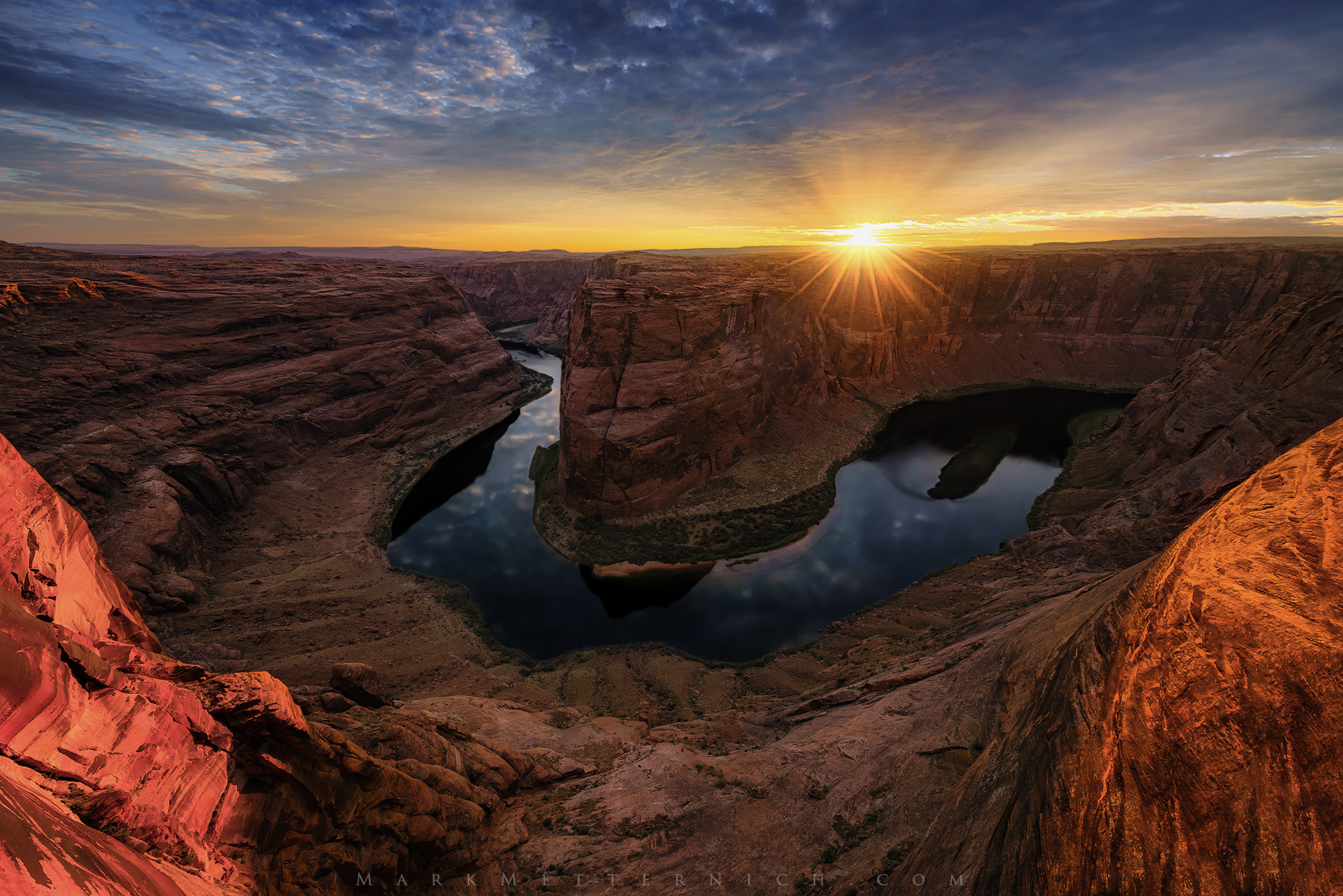
The technicals for this image are straight forward. I shot it with my favorite lens I have ever had, the Canon 11-24@11mm. I do have the Voigtlander 10mm, but the 11 mm is a quality piece of glass, and I have been able to produce files that can easily be 60, 70, 80, or even 96 inches at the 2:3 aspect ratio. Though f/8 shows better detail in the middle 80% of the image, the edges are much softer. So sometimes, like here I compromise and go to f/11. Another technique I will occasionally use is to shoot it at f/8 and f/11 and then Focus Stack the image to get the better corners of the f/11 image. Maybe others do this too, but I have never heard of it.
The image is a single shot (no ND grads or filtration). The Dynamic Range of the Sony A7RII and the Nikons are amazing. But truth be told if I make a huge print of this I will use a blend of a brighter image taken down in exposure for cleaner shadow through middle tones (much better pixel data) for much of the darker land. It can not be seen for web, but mastering fine art printing is another beast altogether in photography.
Where we remove color noise specs by using color noise reduction, leaves a “graininess” or inconsistency in pixel tonality (artifacting) that prevents masterful Capture Sharpening (which can add 5-10% more quality to an enlargement). So, many master printmakers - like print guru extraordinaire (and FM member) Robert Park of Nevada Art Printers - are now advocating this to be done in Photoshop as a layer, on a COPY of your finished master file, NOT in RAW, so as not to introduce damaging artifacts into your precious master file! A short free Youtube video can be found here: https://youtu.be/_x8KqIYD5Qs
As far as processing goes, nothing extraordinary was done here except for the normal. Bringing the image up in my Custom Presets (which have taken 16 years to develop) then make the image look as best as possible in Lightroom or Camera Raw (turning Sharpening OFF!!!). Next import to Photoshop as a Raw “Smart Object,” duplicate it and then use some very careful finessed masking and selections and other very critical Photoshop tools to fine tune it to the finish line. YES, Photoshop skills are still very vital today to genuinely optimize images whether you are a literalist or are creative in your processing approach. Nothing beats getting your necessary Photoshop skills up!
My online Skype post-processing clients often ask me what I do first, second, third and so on. The answer is that I NEVER approach an image the same way. So what I teach is what I do, and I call it "knocking down the worst offender.” What I mean by this is to figure out what is the most wrong with the image and then correct it. So I see most of post processing as a sort of correcting process (even if some creativity is employed).
I generally start with major things like global and local exposure, global and local color balance, global and local color balance, global and local contrast issues. Then eventually work all the way down to nitpicking the image to death trying to find anything that bugs me, like distracting elements, small local discolorations, and many other things...
One correction I worked on here was a touch of green in a part of the sky. I have had photographers in the past tell me this green is not natural in skies, but I see subtle green in skies quite often. But I do not prefer it to be in my images! So in the Raw Smart Object Layer in Photoshop I used the Camera Raw local tools to slightly move the local area color more toward orange.
Some lens flare was cloned out (healing brush tool in PS). But the main thing for processing to me today is making masks of key individual areas like Sky, Water, Land and so forth, and using Lossless Raw Smart objects in Photoshop to get these areas corrected before converting the image into a rasterized 16 bit Tiff, PSD, PSD or whatever other uncompressed file format. In other words get as much done in Lightroom Raw, and then in Photoshop Raw for much better image quality. This definitely helps tonality and color when making critical prints or fine art enlargements.
Lastly, for web I often work on my 27 Mac Thunderbolt (WEB calibrated to 2.2 Gamma, 6500 white Point and 125CD or Brightness - X-Rite iOne Display Pro). I know Macs run cooler than PC's (especially wide gamut PC's) which I also own, so I try to find a balance in color between PC's and my Mac's. Most of my clients use Mac, so I rely on them a little more for Web images.
The wide gamut PC I rely heavily on for critical PRINT.
I hope it helps someone.
All the best to you and yours, and Great Light to you!
|


 ??
??  ...You must have a great "soul mate"! I know you do!