rdeloe wrote: MAubrey wroteSteve Spencer wrotePeter Figen wroteLuis Cunha wroteleonasj wroteno games for me.like clean jpeg from camera photos. so, only native gf lenses.sigma art70 macro sent back to seller. GF120+canon 72mm close up 500D = 1:1 Macro , GF50+45mm macro ring= 1:1 Macro Could you please show examples of these two ways to get 1:1 macro? Thanks.My guess is that both of these are going to be seriously compromised in image quality - one, because the 45-50 are not macro lenses and are far from optimized to work properly with extension tubes. Perhaps if you want ethereal images that are only sorta sharp in the center you might be happy, and the same thing goes with the Fuji macro. Because of the floating elements in it, when you tube it, those floating element groups are not longer where they should be the performance suffers, but if you're only shooting hand held jpegs like our friend Leon, you might be happy.
Personally, I'm just about to order the Rodenstock HR 105mm 5.6 Macro FLOAT lens with the manually adjustable to the your specific reproduction ratio, floating element set. I've got several 1:2 macros, all three Canon tilt shifts plus the Milvus 100 which is 1:2 and then the two 1:1 Sigmas - the 70mm ART and the 150mm 2.8OS. They all have different strengths but the Rodenstock with its manual floating element can be continually optimized from 1:4 through 4:1 reproduction ratios. Not inexpensive though and you need either something like a Novoflex or an Actus for it to go on.
Should be very interesting.I think the Rodenstock is an excellent but expensive option. I use the Contax 645 120 f/4 APO with the Fringer adapter and I am very happy with it. Does 1:1 with aplomb, and excellent micro contrast. I think it is the best Macro lens I have used. I am sure the rodenstock would be great but the Contax 645 is about a fifth the price.This.
I think everyone should consider taking a look at any of the 120mm macros lenses designed for 645, whether Contax, Pentax, or Mamiya.
For my part: the Mamiya 120mm is a 9/8 FLE design. Superb resolution and excellent color. I shoot film with mine, but I've also had a couple opportunities to use it on Phase One backs and the quality is just excellent. You'd need the version with an aperture ring though (which is the cheaper version anyway).Indeed. The SMC Pentax-A 645 120/4 macro is a not-so-hidden gem. https://www.pentaxforums.com/lensreviews/SMC-Pentax-A-645-120mm-F4-Macro-Lens.html
Yes, I have had the Mamiya and the Contax and have heard great things about the Pentax. All these 645 macros are excellent. I kept the Contax because I liked it just a bit better for distance shots, but really the Mamiya was very close in performance.
leonasj wrote:
received today china no name or andoer ef-gfx af adapter.no working,dark screen,shows lens error. does any tried ebay cheap ef-gfx adapter?
Are you really surprised? Jeez. Get yourself a Fringer and be done with it. They actually work but they aren't cheap. But they work. Did I remember to say that they worked?
Peter Figen wrote: leonasj wrotereceived today china no name or andoer ef-gfx af adapter.no working,dark screen,shows lens error. does any tried ebay cheap ef-gfx adapter?Are you really surprised? Jeez. Get yourself a Fringer and be done with it. They actually work but they aren't cheap. But they work. Did I remember to say that they worked?
i have techart adapter.still worked with all ef lenses i tried.this china adapter received after 3month im payed. seller refunded 1month ago.so im got it for free.
leonasj wrote: Peter Figen wroteleonasj wrotereceived today china no name or andoer ef-gfx af adapter.no working,dark screen,shows lens error. does any tried ebay cheap ef-gfx adapter?Are you really surprised? Jeez. Get yourself a Fringer and be done with it. They actually work but they aren't cheap. But they work. Did I remember to say that they worked?i have techart adapter.still worked with all ef lenses i tried.this china adapter received after 3month im payed. seller refunded 1month ago.so im got it for free.
Leon - It doesn't matter what you paid for it. If you got it for free and it doesn't work, what's the point. It still doesn't work. Toss it.
Peter Figen wrote: leonasj wrotePeter Figen wroteleonasj wrotereceived today china no name or andoer ef-gfx af adapter.no working,dark screen,shows lens error. does any tried ebay cheap ef-gfx adapter?Are you really surprised? Jeez. Get yourself a Fringer and be done with it. They actually work but they aren't cheap. But they work. Did I remember to say that they worked?i have techart adapter.still worked with all ef lenses i tried.this china adapter received after 3month im payed. seller refunded 1month ago.so im got it for free.Leon - It doesn't matter what you paid for it. If you got it for free and it doesn't work, what's the point. It still doesn't work. Toss it.
i can remove pins and use with manual ef mount lenses
Speaking of cheap EF adapters... Has anyone tried a Sigma EF lens on GFX with the Viltrox adapter? I'm mainly interested in if focal length is reported correctly to the camera, so that IBIS will work (since I presume OIS won't), and that the aperture functions as it should. AF isn't even necessary.
The reason is that I have a Sigma 100-400 that I occasionally use with my Sony, but I would like to use it on GFX instead (possibly in crop mode if it vignettes too much). However, I bring it out like once every other month, so there's no point in buying an expensive adapter for it.
ultra sharp even at f2.8 sigma art 70mm macro,i like sharpness very,like shooting open aperture for that buying fast lenses to use...,but sigma 70 vigneting heavy shows,im never adding any vigneting to my photos. no keep this lens. few photos at 1:1,techart pro adapter. jpeg out of camera.
leonasj wrote: Creative Edge wroteCanon EF 100mm 2.8 Macro with 100s
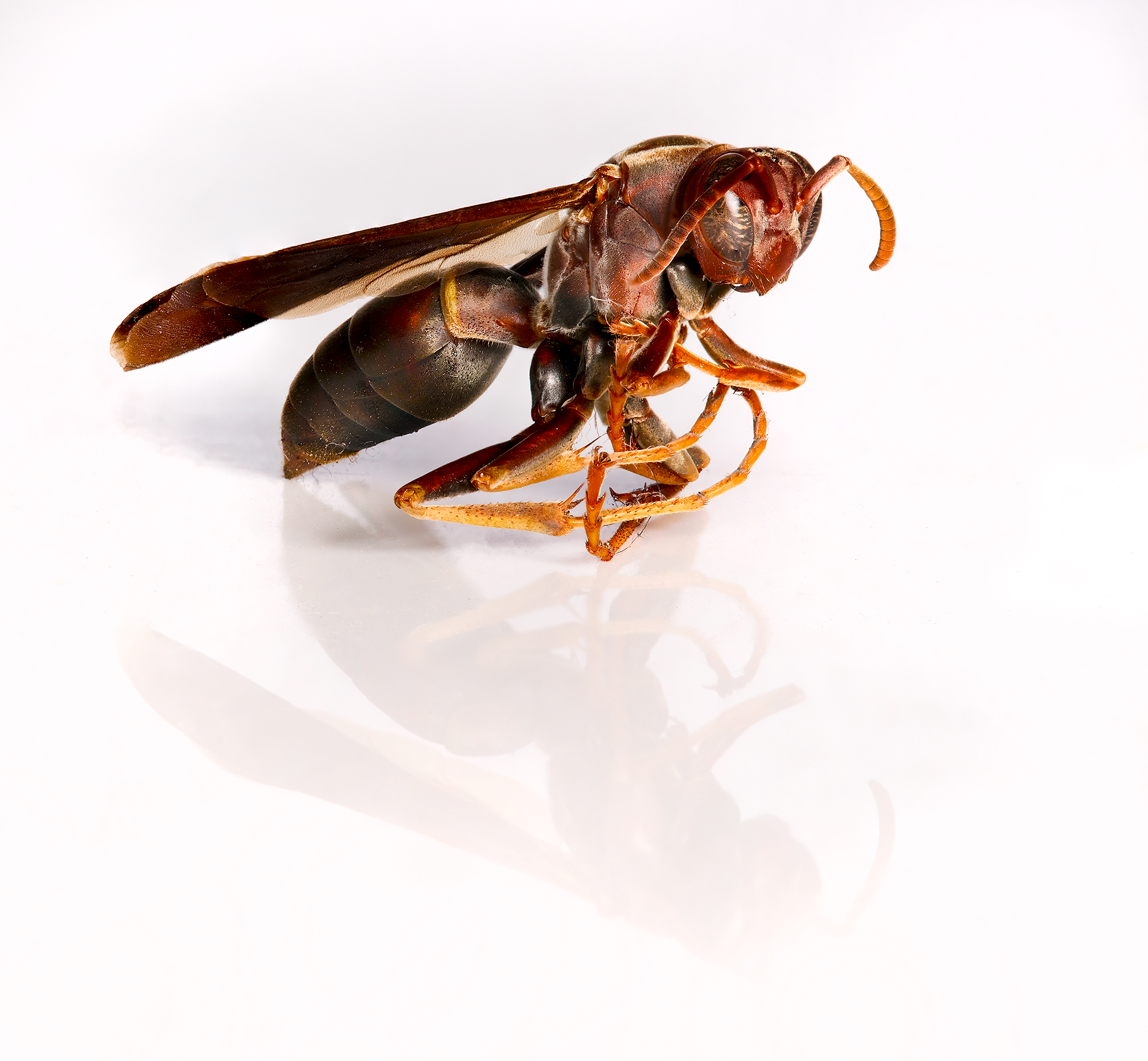
Found this little guy dead in my studio. Decided to do a quick macro stacked shoot.how much photos stacked?what step?
if I remember correctly it was 68 photos. I used the auto feature first focused on the closest point to me and then focused on the tail. Lighting was strobes so I set it at 5 seconds between shots, to let the strobes recycle.
All files taken into photoshop where they were stacked and blended.
Peter Figen wrote: leonasj wrotemaybe not lucky,but dont liked all adapted ef lenses on gfx,so selling ef-gfx adapter. keep only native gf lenses .Get yourself a Fringer and quit messing around with the rest.
Ironically not knowing what was the best or would work better than the next, I got 3 adapters at the same time but have literally never even mounted the others and have only used the Fringer with control/aperture ring the entire time. It's been flawless.
Also, all my EF-GFX testing has given me great results IMO.
Creative Edge wrote: leonasj wroteCreative Edge wroteCanon EF 100mm 2.8 Macro with 100s
Found this little guy dead in my studio. Decided to do a quick macro stacked shoot.how much photos stacked?what step?if I remember correctly it was 68 photos. I used the auto feature first focused on the closest point to me and then focused on the tail. Lighting was strobes so I set it at 5 seconds between shots, to let the strobes recycle.
All files taken into photoshop where they were stacked and blended.
SIXTY-EIGHT 100s raw files ?! I don't know how a stacking process works within PS but I do know if layered in by hand the computer ought to lock up around 20 images? Is there a selection in PS for this process to help it's data handling?
I have seen a feature in-camera for the focus bracketing which I guess is what you referenced about the far and near ends but I should read up on this because a recent landscape shot test at f32 was a little surprisingly not sharp to me. A lot different than my experience before with a view camera lens at f32 or 45 but I suppose when the ideal F is around 16, then 32 isn't far off whereas on the Fuji 32-64 zoom the best spot is probably more like f8/11 so 32 at it's extreme is truly less overall sharpness. It's just that it was a LOT worse than expected.
I did try to keep track of having IBIS OFF for tripod shots but there is no way I can see to know in metadata if it was on or off in an exposure.
wwwest wrote: Peter Figen wroteleonasj wrotemaybe not lucky,but dont liked all adapted ef lenses on gfx,so selling ef-gfx adapter. keep only native gf lenses .Get yourself a Fringer and quit messing around with the rest.Ironically not knowing what was the best or would work better than the next, I got 3 adapters at the same time but have literally never even mounted the others and have only used the Fringer with control/aperture ring the entire time. It's been flawless.
Also, all my EF-GFX testing has given me great results IMO.
I had a Fotodiox "smart" adapter that apparently never went to class. Almost made me give up on the whole idea of the GFX. The Fringer kicks ass.
wwwest wrote: Creative Edge wroteleonasj wroteCreative Edge wroteCanon EF 100mm 2.8 Macro with 100s
Found this little guy dead in my studio. Decided to do a quick macro stacked shoot.how much photos stacked?what step?if I remember correctly it was 68 photos. I used the auto feature first focused on the closest point to me and then focused on the tail. Lighting was strobes so I set it at 5 seconds between shots, to let the strobes recycle.
All files taken into photoshop where they were stacked and blended.SIXTY-EIGHT 100s raw files ?! I don't know how a stacking process works within PS but I do know if layered in by hand the computer ought to lock up around 20 images? Is there a selection in PS for this process to help it's data handling?
I have seen a feature in-camera for the focus bracketing which I guess is what you referenced about the far and near ends but I should read up on this because a recent landscape shot test at f32 was a little surprisingly not sharp to me. A lot different than my experience before with a view camera lens at f32 or 45 but I suppose when the ideal F is around 16, then 32 isn't far off whereas on the Fuji 32-64 zoom the best spot is probably more like f8/11 so 32 at it's extreme is truly less overall sharpness. It's just that it was a LOT worse than expected.
I did try to keep track of having IBIS OFF for tripod shots but there is no way I can see to know in metadata if it was on or off in an exposure. ...Show more →
Your old view camera shots still suffered from the same degree of diffraction that your more recent f/32 image did but you probably never viewed them as critically or at a high enough magnification to see it.
The optimal aperture on your digital camera is dependent on both the lens and the pixel size of the sensor you happen to be using. Thankfully with digital you can easily do your own testing to see how much diffraction you can tolerate in your images - which will depend on how large you might print. Our GFX 100s is usually best by f/5.6 and as you stop down from there you start to see slight image degradation. A tiny bit at f/8. A tiny bit more at f/11. More at f/16 and getting substantial by f/22, and as you saw, f/32 is really quite soft. All images involve compromise optically, so you might want to sacrifice a small amount of detail in favor of more depth of field. The trick is to be aware of what's happening so you are making a self informed decision and are not surprised. In the real world of the GFX, f/11 works very well and you probably will never notice the very slight amount of diffraction that shows up at that aperture. F/16 might be usable in certain situations but you will be compromising detail, and stopping down further you do at your own peril.
And then in reference to the stacked photo macro shot, diffraction is even a bigger issue and here's why: Let's say, for the sake of argument that you're using macro lens at a 1:1 reproduction ratio and you think you need to stop down to f/16 just to get a small amount of depth of field. Pretty normal, right? At a 1:1 ratio, that f/16 becomes effectively two full stops smaller, or f/32, and you already know what happens at f/32. The principle is the same across aperture choices. At 1:1, f/5.6 becomes an effective f/11, etc. But let's say you want to move in even closer and shoot twice life sized on the sensor, or what they call 2:1 ratio. Well then you've got three f-stops of compensation to account for and your f/5.6 is suddenly now f/16, already softening the image by a noticeable amount. This is why people use focus stacking - to be able to continue to use a more optimal aperture and still get the depth of field they want. And as far as stacking goes, I've never gotten a good focus stack from Photoshop. Far too many artifacts. The two applications of choice for stacking, and each has its own strengths, are Helicon Focus and Zerene Stacker. Both much better than Ps.
Ya! Helicon Focus is very very nice and looks modern too. It has excellent tools to refine the blending after stacking is complete if there are major artifacts.
Helicon Focus handles 100+ 50MP TIFFs easily with average setup.
JimKasson wrote: leonasj wrotedoes gfx50r has built in camera raw editor?No. Camera Raw is an Adobe product. However, there is a way to use the camera's processor to create film simulations.
I think he was asking if it has an raw editor in camera.


 ,techart pro adapter. jpeg out of camera.