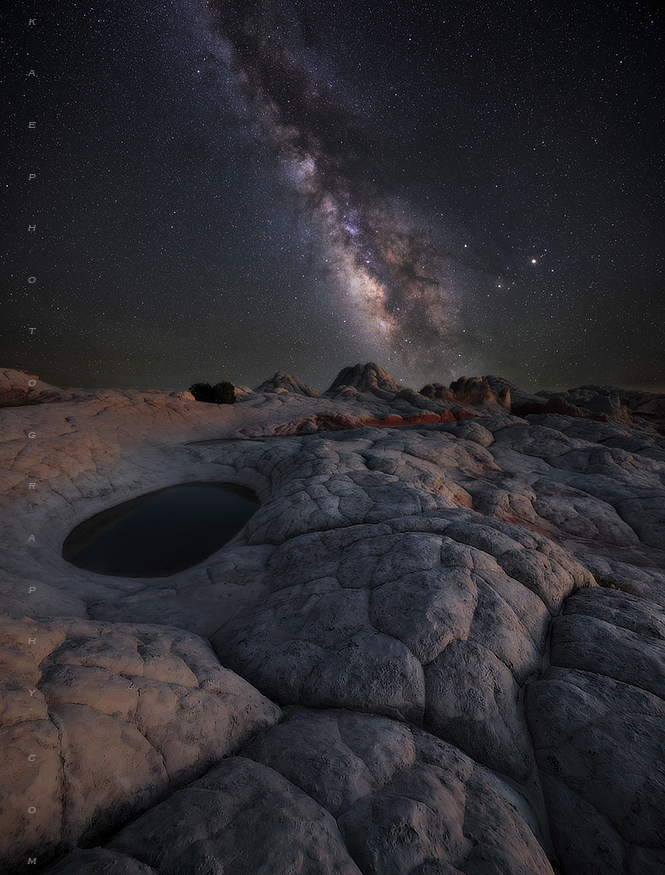
Ok, so the feedback here was basically unanimous, darken sky, brighten up the MW stars, and slightly darken the foreground. So I went through all the steps, in the end I came up with an image that feels a little more contrasty. Now I'm thinking it may come across too dark. Who knows, maybe slight monitor calibration issues, or just a personal taste thing...
I think this looks better Kane. but it's hard to tell with it on the 2nd page. It's best with edits, to just edit your original post and place it there below your original, so people can easily see the difference.
Kane Engelbert wrote:
Hi Gary, No need to enlarge an image to match another when shooting scenes with equal pixel counts.
Thanks. I just assumed that the sharp foreground exposure would not align well when placed over the MW exposure (with the blurred foreground (Astrotrac)). My guess (perhaps wrong) was that you would need to adjust the MW layer accordingly before combining... PS - second image looks awesome!
Kane, I love the details in this photo. I can only imagine what the high res version looks like. I was wondering, do you do any additional sharpening before posting here on FM, to help keep the small files looking sharp? My uploads seem quite blurry in comparison, yet my originals are sharp as a tack.
Gorgeous - excellent composition and execution of idea. I'm with the darken the foreground crowd. I love this version as photo art, but would also like to see a version that looks more realistic with a much darker foreground that still retains detail and form. Thanks for sharing.
Spectacular image delivered with solid technique. Excellent vision and PP.
The edit does look a bit heavy on the contrast, considering how other worldly the scene.
It's a matter of personal taste, and may be varied depending upon the medium.