Exceptional control of the highlights Aztatlan. The light rays direct me to the beautifully lit foreground rocks. It's a super image with great composition. Congrats on your first feature thread!
Fred
Holy Crap Fire I have looked at a lot of images over the past decade to inspire me to be better. This one I will remember. I'm breathless. I saw it, immediately searched for location...I'll never see it, I'm in Denver.
Looks like a really cool scene here. Really cool to see the rays and congrats on featured thread.
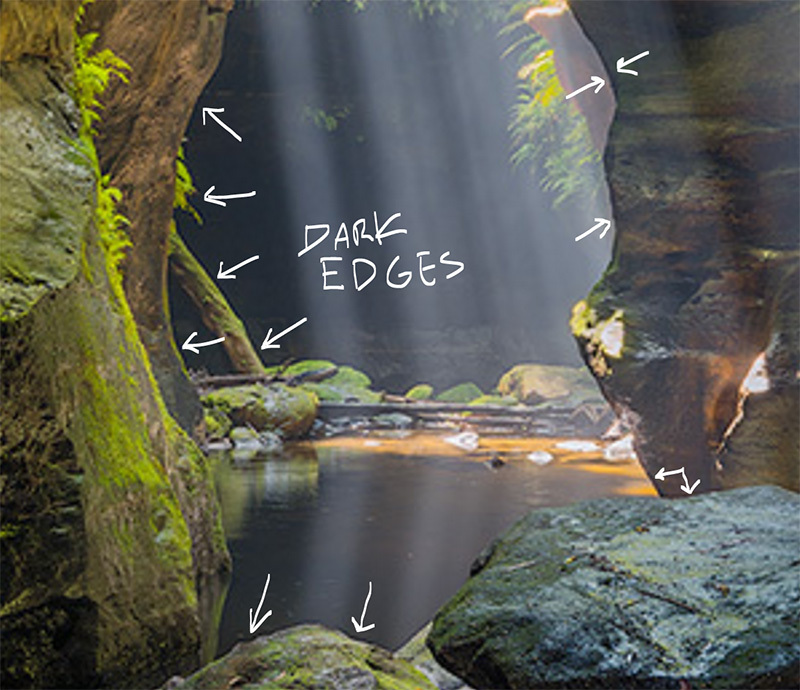
The highlights coming down at the top of the screen with the beams seem clipped and pulled down too far. Also there appears to be a black edge along the foreground rocks and the screen right edge of the canyon wall, like from a matte edge. Were the light rays super bright and there's a mask here to try to bring them down? The clipped highlights on the green plants right at the top of the frame have a blue hue that I find to be typical for when CMOS sensors clip out white. It's not perfect white, so when you bring down the highlights too hard (like with Lightroom's highlight slider past -50), the RGB values roll off into a slightly bluish grey which contrasts greatly with the yellow-green foliage of adjacent pixels. Call me crazy but I think it would look a bit better if you let the white parts of the exposure stay white and don't try to recover them so much.
kurt765 wrote:
Looks like a really cool scene here. Really cool to see the rays and congrats on featured thread.
The highlights coming down at the top of the screen with the beams seem clipped and pulled down too far. Also there appears to be a black edge along the foreground rocks and the screen right edge of the canyon wall, like from a matte edge. Were the light rays super bright and there's a mask here to try to bring them down? The clipped highlights on the green plants right at the top of the frame have a blue hue that I find to be typical for when CMOS sensors clip out white. It's not perfect white, so when you bring down the highlights too hard (like with Lightroom's highlight slider past -50), the RGB values roll off into a slightly bluish grey which contrasts greatly with the yellow-green foliage of adjacent pixels. Call me crazy but I think it would look a bit better if you let the white parts of the exposure stay white and don't try to recover them so much....Show more →
The highlights have been pulled down, although this is a multi-exposure blend so I tried to avoid pulling them back too much. With that said, blending is definitely not my forte as I don't need to do it that often.
As for your comment around the black edge along the foreground rocks and right edge of the wall, to be honest I can't actually see what you're referring to. However in answer to your specific question, there was a number of masks employed in the processing. Thanks for the thoughts/tips though; I'll probably revisit this image (or one from the same spot with a different composition) sometime soon and will see how I can improve on the first round. Cheers
Aztatlan wrote:
The highlights have been pulled down, although this is a multi-exposure blend so I tried to avoid pulling them back too much. With that said, blending is definitely not my forte as I don't need to do it that often.
As for your comment around the black edge along the foreground rocks and right edge of the wall, to be honest I can't actually see what you're referring to. However in answer to your specific question, there was a number of masks employed in the processing. Thanks for the thoughts/tips though; I'll probably revisit this image (or one from the same spot with a different composition) sometime soon and will see how I can improve on the first round. Cheers...Show more →
I annotated where I'm seeing edges so you can see what I was talking about. Next time you revisit it you can make this sweet image even better! They become really visible if you zoom in. Cheers.