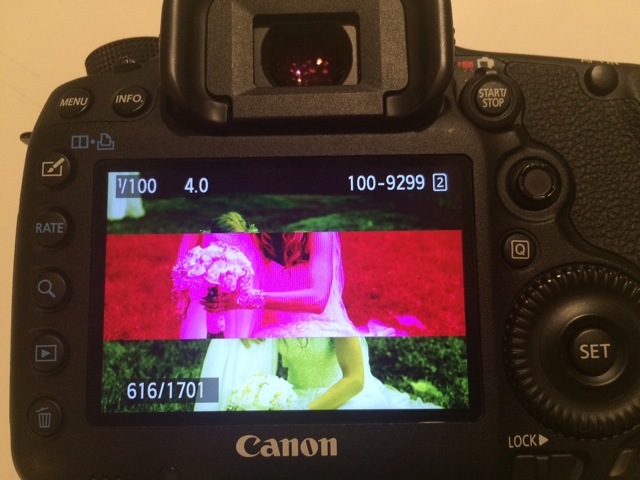
Hi, guys, we've been having an ongoing issue with my 5DMK3 cameras and over the course of three years, this same issue has happened multiple times with all three of our 5DMK3 bodies. My main body has had this occur three times in the last four months; May 12, July 23 and Aug 30.
You can see the samples below and it appears that the processor is compiling portions of multiple images into one corrupt frame. Canon CPS has replaced the CPU in two of the bodies, reset-updated firmware, but the issue continues to happen.
We regularly maintain our cameras at CPS and are using brand new SanDisk Extreme cards purchased in July.
We record MRAW to SD and CF cards in manual mode, silent shutter mode, single shot, and the images are on both cards. As part of our back up protocol, we remove the CF card to take to the studio and leave the SD card in the camera, and you can see the corrupt image on the back of the camera before card was removed from camera so the issue isn't with our import process or computer.
Has anyone else had this happen and if so, what was the remedy, other than switch to Nikon?
I've heard an awful lot about this from the Mk3. Lots of folks joke that it's canon's attempt to win more fearless awards.
Not heard of a solution to it though, some people think it's related to the dual card slots and a problem with the buffer. Nobody has a solution as far as I can see though.
I found it only happens in Silent Shutter mode, and on specific cards; in 'multi shot', ever hear the shutter almost make a 'hiccup' type of sound? Like, the shutter trips once, then almost halfway through, does again? I could never reproduce it, just any time it occurred, I ntoed and sure enough - corrupt. I turned of silent+burst shooting (in H Speed mode) and it went away.
I have experienced this once or twice in several years of owning a 5D3. Similar corruption but not quite the same. It happened when using the Silent Shutter mode, but only single shot. Hasn't happened enough for me to worry about trying to fix it. I can't reproduce the error, and as I said, it's happened twice in several years. I agree with you that it appears to be an image processing issue. As if you're shooting too fast for the camera to keep up...although I know I wasn't. Good luck.
I had this issue happen on 3 different 5D Mark III's
It's pretty much certainly a design flaw
Most suspect it's a Buffer error problem - I suspect it happens to us because we record RAW to both cards - and that causes a buffer error or something
Good idea RE: silent shutter, I'll try switching it off during critical phases like the walking in shots
Dawei Ye wrote:
I had this issue happen on 3 different 5D Mark III's
It's pretty much certainly a design flaw
Most suspect it's a Buffer error problem - I suspect it happens to us because we record RAW to both cards - and that causes a buffer error or something
Good idea RE: silent shutter, I'll try switching it off during critical phases like the walking in shots
I seem to recall the last time it happened to me was during a theatre production shoot or a dress rehearsal. I was taking a few shots here and a few shots there, trying to ensure I avoid weird expressions or mouth movements while people are delivering lines. And I looked down to chimp a shot and the camera was taking forever to write the shot (red light was lit), before showing me the preview. When it finally came up, the file was glitched like the second one in your example. No weird colours, just two sequential images sliced and mashed together.
Dawei Ye wrote:
I had this issue happen on 3 different 5D Mark III's
It's pretty much certainly a design flaw
Most suspect it's a Buffer error problem - I suspect it happens to us because we record RAW to both cards - and that causes a buffer error or something
Good idea RE: silent shutter, I'll try switching it off during critical phases like the walking in shots
Dawei, thanks for posting that link. I've been going crazy trying to figure this out with Canon CPS and they act like they've never heard of this before. Clearly, I'm not the only one who's experienced this and your files look exactly like mine.
I have had this happen once in 221,000 pictures. I thought it had to do with hitting the buffer. I didn't know of this happening to anyone else until now. At least is very infrequent.
The only time I have seen this was on one I rented. It was a backup, and only happened on a few images, none of which were crucial. Thought a CF card was the culprit and changed it immediately. Didn't think about it again until this post. Only happened on that one 5d3.
In total, this has happened six times on three bodies. All bodies were bought new and regularly serviced by CPS. Two of the motherboards have been replaced, including the camera with the most recent corrupt images.
I'd love to find out if it's a combination of our settings, or some other issue, but I'm glad to hear I'm not the only one this happened to.