The images make those two women look like they're about to turn into incredible hulks. Inability to handle yellows might help explain some of it? I'm hoping this can be fixed with a firmware, but I don't think it will be the case.
That looks like a WB issue and would be pretty easy to fix in post processing. If you want to fix it at import it seems likely a custom profile would work well. A custom white balance would also probably work well. I highly doubt Sony would provide a firmware fix for this, but a tweak of the RAW converters profile might improve things considerably. That said, I think the custom WB is one of the weak point of the earlier Sony A7 series cameras and I would not be surprised if that were true for the A7R II as well.
hcubell wrote:
Thanks for the test results. While "color" itself was not part of the test, the way the A7RII handles yellows v. the A7R is interesting. The yellow patch with the A7RII is both low in saturation and has, to my eye, a considerable green cast.
It may be more a demonstration of how Adobe's A7rII profiles handle yellows. A custom color profile of both cameras in this shot would have to be created to know for sure. But the A7s does have low raw color saturation OOC and the A7rII may have inherited this as well - again something that can be accounted for with profiles and PP.
Here's an A7s vs A7r vs A7 vs Df High ISO test I did some time ago, which includes a color-checker chart. Note the lower A7s saturation. Also note that leaving ACR/LR's default chroma noise reduction to 25 destroys colors differently on different sensors and needs to be tailored for the specific sensor.
In agree with the yellow color comment. Just to be clear, WB was set to Daylight for both cameras and not changed in Lightroom (Used As shot). It could very well be a LR profiling issue. I will test the same images in Capture One.
Thanks Fred. I got a lot of reports on nicer noise and color coming off C1. I have yet to test any of it but if there is some advantage than I think that is good data to know. ISO 3200 looks amazing coming out of it. My A7r days I could not get past 800 or 1000 so as your test reveal we are gaining some advantages.
snapsy wrote:
FYI, here's a quick yellow comparison of the A7r vs A7rII @ ISO 100 and 6400 using Adobe Standard vs Camera Neutral profiles in LR6. Raws are from Imaging Resource (A7r ISO 100 raw, A7rII 100 raw, A7r ISO 6400 raw, A7rII ISO 6400 raw):
Fred Miranda wrote:
Thanks for that snapsy. Your samples show it's a Lightroom profile difference.
This is at least the case for the nominal ISO images, without the exposure being pushed. There's an added complication for DR tests that push the exposures in post - they manifest differences in per-color channel black levels, causing color casts. For example, here's an A6000 vs Coolpix-A DR and ISO test I did a while ago:
Notice how the A6000's ISO 100 -7EV image has funky color casts vs the equivalent ISO 12800 nominal exposure - by equivalent I mean they both have same aperture and shutter speed, only ISO is different. The issue specific to the A6000 is rather extreme and luckily can be corrected by manipulating the per-channel black points of the raw data. Here's the full-sized A6000 ISO 100 -7EV image before and after that correction:
Fred Miranda wrote:
Thanks for that snapsy. Your samples show it's a Lightroom profile difference.
Thanks. Very interesting in this comparison using different LR profiles that (1) the colors other than yellow do not seem to be so affected by the different Adobe Standard profiles, and (2) the A7RII yellow with the Adobe Standard profile is less saturated than the A7R, but with the Camera Neutral profile, the yellow with the A7RII is slightly MORE saturated than the A7r. I also think the differences in the yellows in the original comparison in the start of this thread are way more dramatic than the differences based upon the LR profiles.
snapsy wrote:
This is at least the case for the nominal ISO images, without the exposure being pushed. There's an added complication for DR tests that push the exposures in post - they manifest differences in per-color channel black levels, causing color casts. For example, here's an A6000 vs Coolpix-A DR and ISO test I did a while ago:
Notice how the A6000's ISO 100 -7EV image has funky color casts vs the equivalent ISO 12800 nominal exposure - by equivalent I mean they both have same aperture and shutter speed, only ISO is different. The issue specific to the A6000 is rather extreme and luckily can be corrected by manipulating the per-channel black points of the raw data. Here's the full-sized A6000 ISO 100 -7EV image before and after that correction:
Unfortunately this type of black level change doesn't work on all cameras, esp those which exhibit much smaller but still noticeable color casts....Show more →
I wanted to confirm that the difference in colors (including yellow) is due to Adobe's profiling. Here are two crops at ISO 3200 set to "Camera Neutral" instead of "Adobe Standard". So even images underexposed in-camera by 1.5EV and pushed 3EV at ISO 3200 have very similar colors when comparing the actual "camera" profiles.
https://www.fredmiranda.com/Buzz/Screen Shot 2015-08-14 at 2.13.59 PM copy.jpg
______
And here is again, the same exposure settings using "Adobe Standard" for both files. Something else I noticed is that the LR "Adobe Standard" profile for the A7RII is not showing the 'orange' color correctly.
On the 'real' cube, the last patch on the first row is actually orange.
https://www.fredmiranda.com/Buzz/Screen Shot 2015-08-13 at 3.30.25 PM copy.jpg
The images make those two women look like they're about to turn into incredible hulks. Inability to handle yellows might help explain some of it? I'm hoping this can be fixed with a firmware, but I don't think it will be the case.
I actually think the Sony colors look a bit more realistic there. The Canon makes them too pink/purple. Skin is actually often greener and yellower in real life than people think. That said the Sony might be a trace too far that direction there, but between the two I'd take the Sony. I'm not sure that test means much though, not sure my Canon shots look so purple tinted for skin as the one there does.
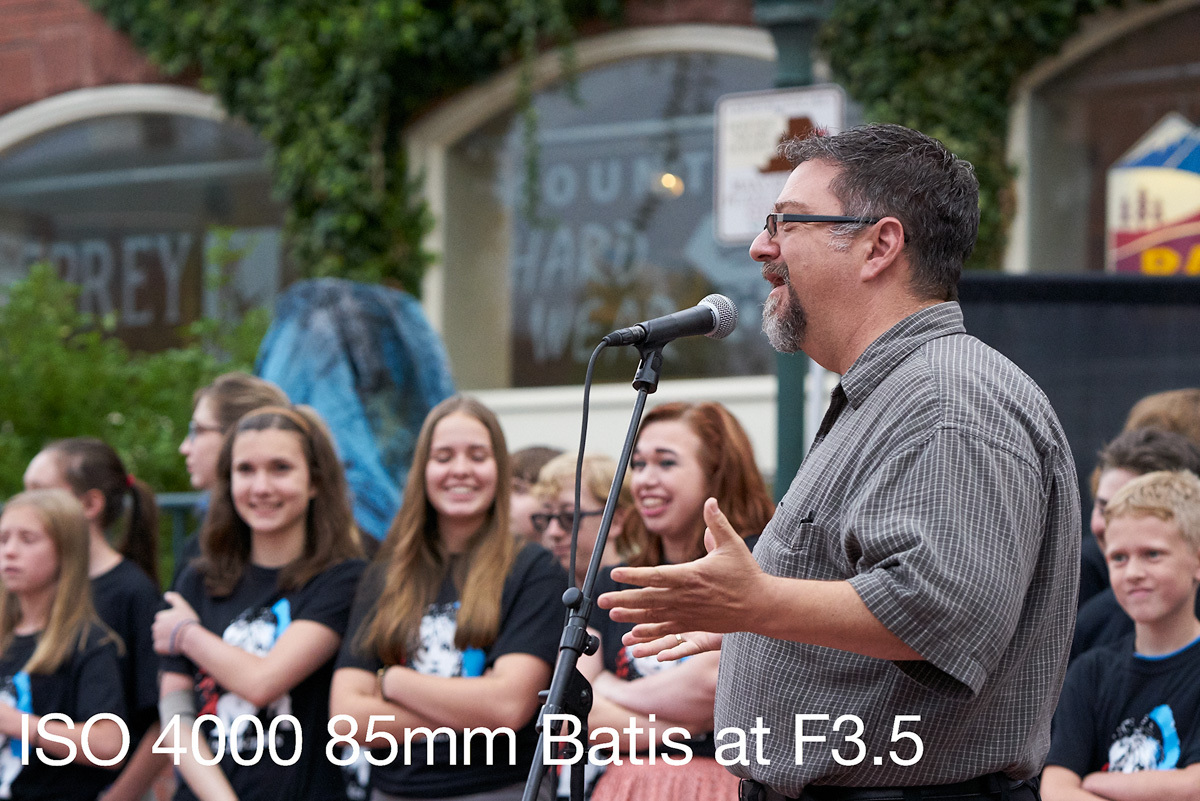
Not to get off the topic but I am finding this amazingly good for ISO 4000. Seriously I would have never shot the A7r this high. Processed in C1. No color changes and very little noise reduction. Honestly this lights up my life for PR crap. I can deliver this quality to a client