fredmiranda.com
Login

Moderated by: Fred Miranda
  New fredmiranda.com Mobile Site
  New Feature: SMS Notification alert
  New Feature: Buy & Sell Watchlist
  

FM Forums | Sony Forum | Join Upload & Sell

1       2       3              5              7       end
  

Archive 2014 · Lossless RAW files from the Sony A7/A7R?


how2fly
Offline

Upload & Sell: Off
p.6 #1 · Lossless RAW files from the Sony A7/A7R?


I would like to point out that the suggested fix for the compression issue is an option for the user to disable lossy compression. We are not asking Sony to fix the compression artifacts, but to simply provide the option to avoid them entirely.

As an embedded programmer I have to believe this is a relatively trivial software task, and if Sony designed this camera with the knowledge it could not function properly without lossy compression due to heat issues , then I believe they have no business including '14 bit' in their description of this camera.


Dec 30, 2014 at 07:41 AM
Matt Grum
Offline
• • •
Upload & Sell: Off
p.6 #2 · Lossless RAW files from the Sony A7/A7R?


I'm actually working on a program to remove the lossy compression artifacts directly from the RAW file. I was going to wait until I was slightly further along but since Fred just bumped the thread...

I just don't buy the "heat" argument. The A7ʀ pushes far more pixels than the A7 without heat problems, plus lossless compression is implemented very efficiently in dedicated hardware, Canon use lossless JPEG which amounts to nothing more than JPEG compressing the image (which we already know the camera can do) comparing it with the original and doing simple entropy encoding on the difference.

In my mind the reason is simply that Sony regard the compression as visually lossless (because they just can't conceive of people raising the shadows during RAW conversion, a view clearly shared at Canon) and genuinely believe they are doing you a favour by saving space on your inexpensive memory cards. Thus I don't expect a lossless/uncompressed option on a future A7ʀII or A9 camera.

So instead of complaining on forums I thought I fix the problem myself. This is what can be achieved with an hour or so's work, adding about three lines of code to the decompression algorithm. The fact that Sony didn't bother doing this with their RAW converter is further proof they just don't consider these artifacts to be a problem (again because you only see them if you raise the shadows):

Before:

http://mattgrum.com/fm/lossy/before.png

After:

http://mattgrum.com/fm/lossy/after.png

Note the image was shot portrait so the artifacts run vertical instead of horizontal as you might have seen previously.

This is version 0 which simply assumes a base level of noise and applies it to the most heavily posterised areas, ensuring the final values fall within known upper and lower bounds of the true pre-compression value. It should be enough to fix the artifacts seen in diglloyd's star trails image (if anyone has a good Sony star trails RAW they could send me that would be very helpful).

Version 1 will measure noise statistics from the closest similar unposterised area in order to more accurately reconstruct the signal.

Version 2 will perform constrained texture synthesis based reconstruction of affected areas.

There are currently no estimated release dates for any of these phases


Apr 21, 2015 at 06:12 AM
lozoyad
Offline

Upload & Sell: On
p.6 #3 · Lossless RAW files from the Sony A7/A7R?


Matt Grum -
Wow! You did it, you got rid of the artifacts...very very interesting. I have the A7 and just ordered the A7II. I also suspect the RAW lossy compression and subsequent artifacts will be minor issues for most of my photography (landscape) as it appears to occur in high contrast/dark regions. I am very interested in learning how you did this, software you are using and how I can obtain a copy of it. Again excellent job sir.


May 14, 2015 at 12:42 AM
dgdg
Offline
• • • • •
Upload & Sell: Off
p.6 #4 · Lossless RAW files from the Sony A7/A7R?


Great work.
If you can manipulate the code, can you simply bypass the compression?


May 14, 2015 at 06:03 AM
namestaken
Offline

Upload & Sell: Off
p.6 #5 · Lossless RAW files from the Sony A7/A7R?


The fact that Sony didn't bother doing this with their RAW converter is further proof they just don't consider these artifacts to be a problem
Computer graphics card companies will do anything just to get an extra ounce of performance, for reviews.

It's interesting how different camera companies are


May 14, 2015 at 06:06 AM
davewolfs
Offline
• • • •
Upload & Sell: Off
p.6 #6 · Lossless RAW files from the Sony A7/A7R?


This is very interesting, good work! Is Sony's firmware open? Where did you get the original code?

Edit:

After reading more of thread I see that you are fixing this in the RAW so effectively smoothing the signal on these artifacts.

Matt Grum wrote:
I'm actually working on a program to remove the lossy compression artifacts directly from the RAW file. I was going to wait until I was slightly further along but since Fred just bumped the thread...

I just don't buy the "heat" argument. The A7ʀ pushes far more pixels than the A7 without heat problems, plus lossless compression is implemented very efficiently in dedicated hardware, Canon use lossless JPEG which amounts to nothing more than JPEG compressing the image (which we already know the camera can do) comparing it with the original and doing simple entropy encoding on the difference.

In my
...Show more


May 14, 2015 at 07:37 AM
Matt Grum
Offline
• • •
Upload & Sell: Off
p.6 #7 · Lossless RAW files from the Sony A7/A7R?


lozoyad wrote:
I am very interested in learning how you did this, software you are using and how I can obtain a copy of it. Again excellent job sir.


This was just a first experiment to remove artifacts in a very specific scenario, there's a lot more work to make it work for all images. I'm using dcraw, which is an open source RAW converter written in C as a base and modifying the routine it uses to decompress Sony RAW files.

Currently it's not useful for anything other than non-interactive RAW conversion to TIFF, the next step is to make it output a DNG file that someone can process in Lightroom or whatever their default workflow is. I'll release the code when I've done this (currently being held up as I can't get the @%$! Adobe DNG SDK to compile)...


dgdg wrote:
Great work.
If you can manipulate the code, can you simply bypass the compression?


I'm working directly on RAW files after they've been transferred from the camera. I don't know if anyone's been able to modify the camera firmware in any way. I don't have the knowledge to attempt this, hopefully one of the magic lantern guys could have a go as this would be much better than trying to fix compression artifacts after the fact!


namestaken wrote:
Computer graphics card companies will do anything just to get an extra ounce of performance, for reviews.

It's interesting how different camera companies are


The problem is there's no standard reproducible benchmark for testing cameras, each review site has it's own tests and methodologies so it's much harder to game. Also people rely on benchmarks and scores much more when buying graphics cards than cameras.


davewolfs wrote:
This is very interesting, good work! Is Sony's firmware open? Where did you get the original code?

Edit:

After reading more of thread I see that you are fixing this in the RAW so effectively smoothing the signal on these artifacts.


Yeah sorry I haven't found a way to alter the camera firmware!


Edited on May 14, 2015 at 08:44 AM · View previous versions


May 14, 2015 at 08:15 AM
lozoyad
Offline

Upload & Sell: On
p.6 #8 · Lossless RAW files from the Sony A7/A7R?


Thx for the quick replies Matt. Hope you get that Adobe SDK compile issue resolved. All the best.


May 14, 2015 at 08:25 AM
TheEmrys
Offline
• • • •
Upload & Sell: Off
p.6 #9 · Lossless RAW files from the Sony A7/A7R?


Magic Lantern folks need to reverse engineer Sony's.....


May 14, 2015 at 08:33 AM
davewolfs
Offline
• • • •
Upload & Sell: Off
p.6 #10 · Lossless RAW files from the Sony A7/A7R?


I'm technical myself so just going to ramble on some random thoughts that immediately come to mind.

A challenge might be false positives on artifact detection. Which means that the ideal approach to this might be applying it manually using visual introspection where required. E.g. A plugin/brush of some sort.

This point is obviously moot if you are absolutely sure that the method used to detect the artifacts has a very low false positive rate.

I really don't get why Sony wouldn't just add the option to push uncompressed images. Unless they are doing this compression somewhere within the hardware for whatever reason.


May 14, 2015 at 08:55 AM
dgdg
Offline
• • • • •
Upload & Sell: Off
p.6 #11 · Lossless RAW files from the Sony A7/A7R?


Thanks for clarifying Matt. I saw you mention three lines of code and thought you were writing them. I realize you meant that they could fix it with a few lines. Kinda dove tails with the disposable camera thread a little? That being said, I still love my A7R. However, many including myself, feel a little disappointed with the extra potential not realized.

David


May 14, 2015 at 09:49 AM
Matt Grum
Offline
• • •
Upload & Sell: Off
p.6 #12 · Lossless RAW files from the Sony A7/A7R?


davewolfs wrote:
I'm technical myself so just going to ramble on some random thoughts that immediately come to mind.

A challenge might be false positives on artifact detection. Which means that the ideal approach to this might be applying it manually using visual introspection where required. E.g. A plugin/brush of some sort.

This point is obviously moot if you are absolutely sure that the method used to detect the artifacts has a very low false positive rate.


It is moot - detecting artifacts isn't a problem. Artifacts occur due to high levels of quantisation in certain 32 pixel windows. You can read the level of quanitisation right out of the RAW file (this is in fact already part of the existing decompression code) so you basically know for sure where all the problem areas are before you start!

davewolfs wrote:
I really don't get why Sony wouldn't just add the option to push uncompressed images. Unless they are doing this compression somewhere within the hardware for whatever reason.


I addressed this point earlier. I'm pretty sure they regard the compression as being "visually lossless", and I believe they've used this term in their literature. Given than it is visually lossless why would you ever want to disable it, since the effects are invisible?

The answer is of course that the effects become visible if you start to push the file around in post. Camera manufacturers across the board don't seem to be very aware that people do push files around in post. A lot. This is evident in missing features (such as RAW histograms), Canon not acknowledging shadow noise etc. They all seem to be stuck in the film era still.


May 14, 2015 at 09:50 AM
Matt Grum
Offline
• • •
Upload & Sell: Off
p.6 #13 · Lossless RAW files from the Sony A7/A7R?


dgdg wrote:
Thanks for clarifying Matt. I saw you mention three lines of code and thought you were writing them. I realize you meant that they could fix it with a few lines. Kinda dove tails with the disposable camera thread a little? That being said, I still love my A7R. However, many including myself, feel a little disappointed with the extra potential not realized.


I was referring to adding three lines of code to their own RAW converter to reduce the chance of artifacts showing up. The fact that no-one at Sony seems to have thought "is there anything we can do when decompressing these RAW files to reduce the chance of visible artifacts in the image?" is telling. Had they done so the very minor change I did to dcraw (which was about 3 extra lines) ought to have been the first thing they came up with.

I have no idea how many lines of code would be required to provide an option to disable RAW compression in camera, but it would not be that many in the grand scheme of things!


May 14, 2015 at 09:58 AM
dgdg
Offline
• • • • •
Upload & Sell: Off
p.6 #14 · Lossless RAW files from the Sony A7/A7R?


thanks for all your hard work!

David


May 14, 2015 at 12:04 PM
pmklausler
Offline

Upload & Sell: Off
p.6 #15 · Lossless RAW files from the Sony A7/A7R?


Matt Grum wrote:
I have no idea how many lines of code would be required to provide an option to disable RAW compression in camera, but it would not be that many in the grand scheme of things!


That might be true if the interleaved 16px -> 128bit block encoder is implemented in firmware. However, the encoder would be amenable to hardware acceleration in the "BIONZ" ASIC with real advantages in latency, and it seems likely that the bits are long gone before the firmware writes the ARW. My suspicion is that the block encoding is baked into the ASIC and won't be fixed without an expensive chip respin.


May 19, 2015 at 11:49 AM
pdmphoto
Offline
• • • •
Upload & Sell: Off
p.6 #16 · Lossless RAW files from the Sony A7/A7R?


pmklausler wrote:
That might be true if the interleaved 16px -> 128bit block encoder is implemented in firmware. However, the encoder would be amenable to hardware acceleration in the "BIONZ" ASIC with real advantages in latency, and it seems likely that the bits are long gone before the firmware writes the ARW. My suspicion is that the block encoding is baked into the ASIC and won't be fixed without an expensive chip respin.


I'm thinking that must be the case (block encoding is baked into the ASIC, or some form of hardware). Samsung has been able to go from uncompressed RAW to compressed lossless and compressed lossy with firmware upgrades for their cameras. One of the main features I'm hoping to see in the A7rII is lossless RAW. I think there will be IBIS and pixel shift (for a higher res mode) , but I'm much less certain about lossless RAW. It doesn't make any sense for a camera of this stature. Either Sony are real stubborn, there is a hardware limitation, or maybe some contract with Nikon prevents them from offering that feature To bad Sony has lied about from the beggining, and continues, in their ad campaigns that tout "14bit RAW files" , when it's really 11+7


May 19, 2015 at 11:31 PM
hankd
Offline

Upload & Sell: Off
p.6 #17 · Lossless RAW files from the Sony A7/A7R?


KARWY, the free software tool I've been building for credible repair of Sony ARW2 raw artifacts , is now live as a Beta-test version. The current version is run via a WWW form interface, so you don't need to install anything to use it. The home page for this research project is:

http://aggregate.org/DIT/KARWY/

Rather than posting repair examples, I encourage you to try your own -- and please use the rating and comment mechanism in the KARWY server to help me improve the performance of future versions of KARWY.

The tool works only on Sony ARW2 raw files to produce DNG raw files. Sony camera models producing ARW2 files include:

Full Frame E-mount: NEX-VG900, A7, A7R, A7S, A7II, and A7RII; APS-C E-mount: NEX 3, 5, 5N, 5R, 5T, 6, 7, C3, F3, VG20, and VG30, and ILCE 3000, 3500, 5000, 5100, 6000, and QX1; A-mount: DSLR A450, A500, A550, A560, A580, A700, A850, and A900, and SLT A33, A35, A37, A55, A57, A58, A65, A77, and A99, and ILCA-77M2; Cyber-shot: DSC RX100, RX100M2, RX100M3, RX100M4, RX10, RX10M2, and RX1

It is quite rare that ARW2 artifacts are visible in well-exposed, normally-processed, images. It probably isn't worthwhile running images that look OK through KARWY because it takes minutes to upload, process, and download a single image. However, if you've got some problem images, give it a try -- it's doing a really good job on all my test images.


Sep 26, 2015 at 02:19 PM
Fred Miranda
Offline
Admin
Upload & Sell: On
p.6 #18 · Lossless RAW files from the Sony A7/A7R?


hankd wrote:
KARWY, the free software tool I've been building for credible repair of Sony ARW2 raw artifacts , is now live as a Beta-test version. The current version is run via a WWW form interface, so you don't need to install anything to use it. The home page for this research project is:

http://aggregate.org/DIT/KARWY/

Rather than posting repair examples, I encourage you to try your own -- and please use the rating and comment mechanism in the KARWY server to help me improve the performance of future versions of KARWY.

The tool works only on Sony ARW2 raw files to produce DNG raw files.
...Show more

That would be a great achievement if it indeed works. It could be a great tool for repairing our existing compressed ARW2 files. (prior to the uncompressed firmware update)
Thanks for posting and welcome to FM.


Sep 26, 2015 at 04:49 PM
hiepphotog
Offline
• • • •
Upload & Sell: Off
p.6 #19 · Lossless RAW files from the Sony A7/A7R?


hankd wrote:
KARWY, the free software tool I've been building for credible repair of Sony ARW2 raw artifacts , is now live as a Beta-test version. The current version is run via a WWW form interface, so you don't need to install anything to use it. The home page for this research project is:

http://aggregate.org/DIT/KARWY/

Rather than posting repair examples, I encourage you to try your own -- and please use the rating and comment mechanism in the KARWY server to help me improve the performance of future versions of KARWY.

The tool works only on Sony ARW2 raw files to produce DNG raw files.
...Show more

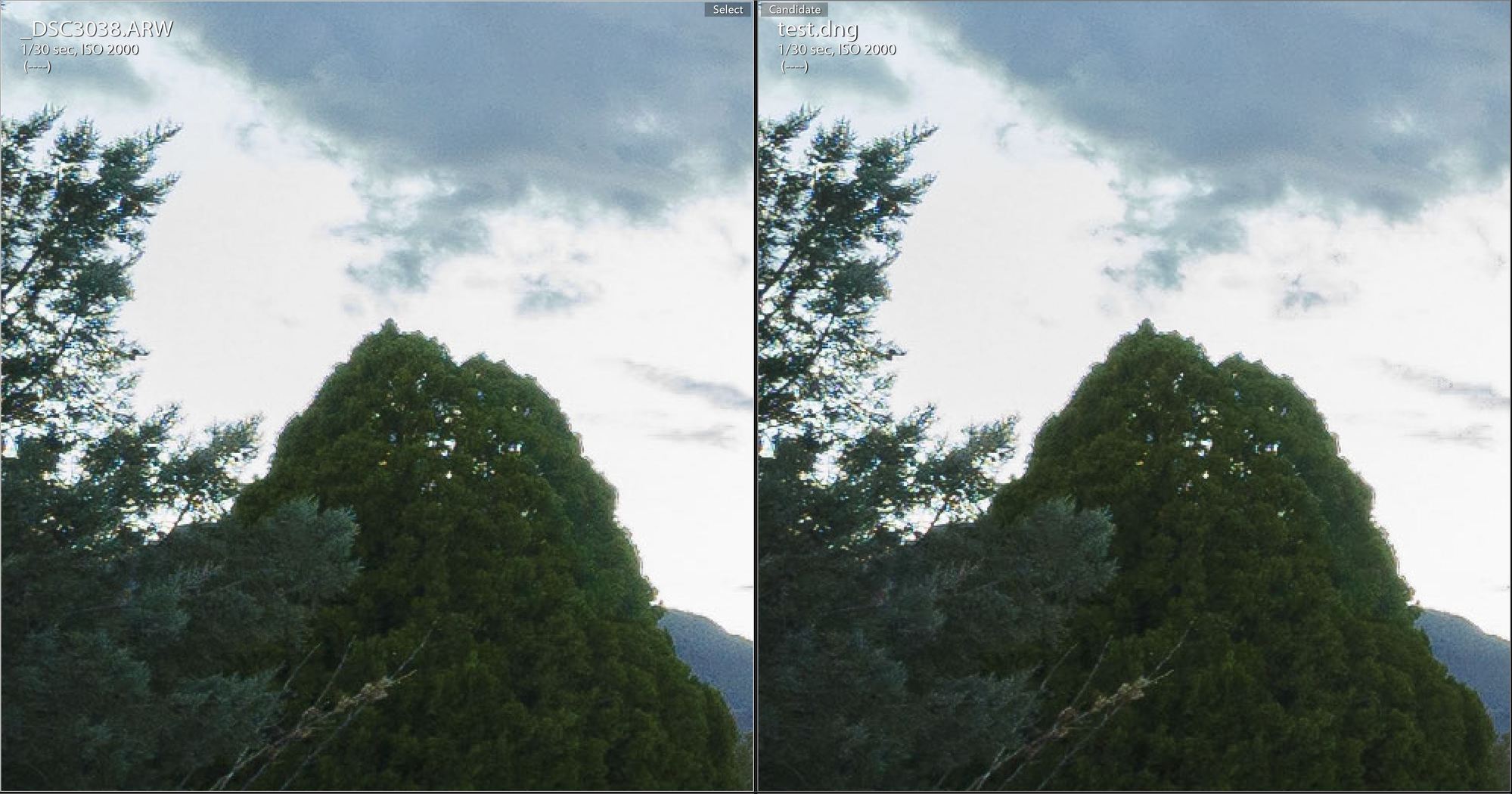
Thank you Hank. Welcome to FM. I tried KARWY, but the artifact is still there. I left all of the sliders at 0 so that might be the reason. But if you can chime in that would be great.


Sep 26, 2015 at 10:34 PM
hankd
Offline

Upload & Sell: Off
p.6 #20 · Lossless RAW files from the Sony A7/A7R?


If the artifact you're talking about is the double line around the tree, that's not in the raw data -- neither the ARW2 nor the repaired version. Looks like a bad implementation of some algorithm in whatever tool you used for the final processing....

From the server, I can show you the real artifacting in this image. It isn't much, but there are the usual "Blondie artifacts": horizontal parallel line artifacts in various places in the ARW2, and gone from the KARWY version even with 0,0,0 smoothing:

http://aggregate.org/DIT/KARWY/karwytreeoops.jpg


Note that KARWY has also enhanced the texture of the trees slightly -- that's a natural side-effect of the texture synthesis, which is applied throughout the entire image in proportion to the size of the pixel value uncertainty.


Sep 26, 2015 at 11:26 PM
1       2       3              5              7       end


FM Forums | Sony Forum | Join Upload & Sell

1       2       3              5              7       end


Welcome back
Log in to your account