p.1 #1 · Any technique to leave IS switched on, but inactivate it?
I'm wondering if using the AF-ON button (or some programmed method) can bypass the shutter half-press activation of IS. That would be helpful in shooting situations where you might need to switch quickly from single-shot selective focus to high speed multi-shot and servo tracking. Experiments don't seem to give me a clear result.
p.1 #3 · Any technique to leave IS switched on, but inactivate it?
jasonpatrick wrote:
Not on Csnon cameras. The IS function is in the lens, not the camera body. The body doesn't know or care if a lens has IS. They operate separately.
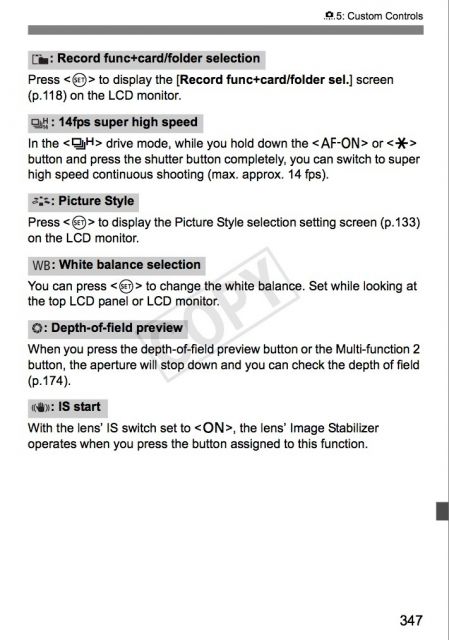
Actually, on some recent cameras (I know on 1DX and 5D3 for certain), you can assign a custom function to enable IS. Here is the page from the 1DX manual (the corresponding page in the 5D3 manual is page 335):
p.1 #4 · Any technique to leave IS switched on, but inactivate it?
jasonpatrick wrote:
Not on Csnon cameras. The IS function is in the lens, not the camera body. The body doesn't know or care if a lens has IS. They operate separately.
mitesh wrote:
Actually, on some recent cameras (I know on 1DX and 5D3 for certain), you can assign a custom function to enable IS. Here is the page from the 1DX manual (the corresponding page in the 5D3 manual is page 335):
Yep! I sometimes use it with my 1DX and 500/4L IS. I assign "IS start" to the M-Fn2 button and "toggle between AI Servo/One Shot AF modes" to the DOF preview button. This allows me to quickly change between a stationary subject, with IS on and AF in one-shot mode, to a moving subject, with IS off and AF in AI Servo mode.
p.1 #5 · Any technique to leave IS switched on, but inactivate it?
Interesting. I'm wondering what the advantage is when IS is off? Do some of you feel af is faster etc? I know some say they get sharper results with IS off, but I've always felt it was splitting hairs at best.
p.1 #6 · Any technique to leave IS switched on, but inactivate it?
I generally get better results when panning to track something like BIF and racing motorcycles when IS is turned off. IS Mode 2 is designed for panning, but it only works well when the subject moves in a horizontal direction or a vertical direction. When the subject moves at some angle between horizontal and vertical directions, then the stabilized axis can interfere with subtle 'jumps', as it tries to compensate for large motions, using the IS system that is intended to compensate for small, harmonic motions. Of course, this effect is much more pronounced if you try panning when in Mode 1.