As my first foray into printing my own photos, I picked up a used Epson Pro 3800 from a local wedding photographer and spent a week reading everything I could find on the subject while I waited for some new ink to arrive.
I've come across an issue I can't figure out though and was hoping someone here had some suggestions.
Basically the shadows are being crushed badly and it almost seems like the black ink isn't dark enough. The resulting effect looks similar to what happens when you look at a cheap LCD screen at a bad angle.
Here's the original photo I tried to print:
My first printing attempt was an 8.5x11" on Red River Paper UltraPro Satin 2.0. The print driver was set to "No Color Management" while Lightroom was using the ICC profile for the paper from Red River's site. For this one, the intent was set to Relative.
After that failed attempt, I tried printing on a 5x7" of the same paper with the intent set to Perceptual and the background set to black (the photo crop didn't match the 5x7 paper size).
This was much worse, but the more worrying part is the green bars above and below which were supposed to print as black.
So what do you guys think? Clogged nozzles? Bad ink? Bad settings somewhere? I'm totally at a loss here.
I want to get this sorted out before I try it on the more expensive metallic paper!
That does not look like a nozzle check pattern, it looks more like an auto head alignment pattern. A nozzle check patern would have eight colors and wouldn't have blocks of composite colors. (see p12 of your manual.)
You can do a nozzle check on any paper want, but a head alignment should be done on one the standard Epson papers.
That's the nozzle check pattern on my printer anyway, both through the software driver and through the control panel on the printer itself.
It never fully completes the pattern as it has once filled the maintenance cartridge, and twice finished off what was left of an ink cartridge. Once one of these things happens the test pattern aborts. From Google image searches it looks like it does this pattern for 8 ink colors.
I'm trying the Windex trick right now, with the print head resting over a microfiber cloth saturated in Windex. I also cleaned the capping station and covered it with another windex-soaked cloth. Hopefully this works!
So my Windex soaked cloth is totally saturated but the printer still has the same problem
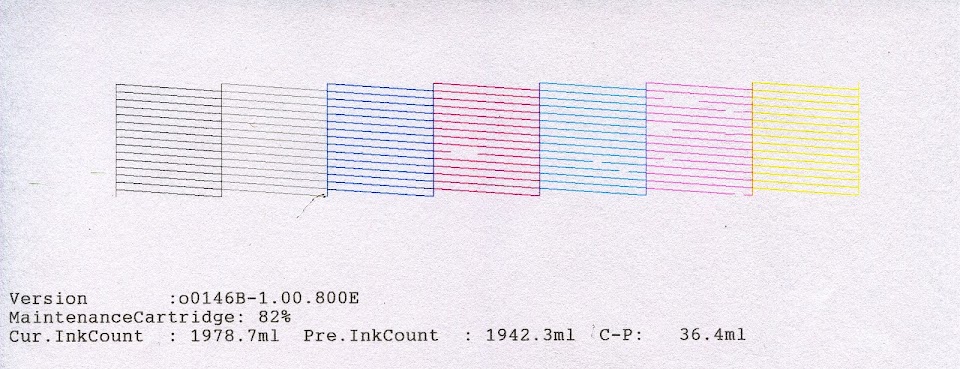
After doing some digging in the drivers I found the normal zigzag pattern that everyone posts (Do a manual nozzle check rather than the automatic one). Here's the result:
There's basically nothing where the black should be. It's the same thing with both Matte and Photo black.
3ntreri wrote:
So my Windex soaked cloth is totally saturated but the printer still has the same problem
After doing some digging in the drivers I found the normal zigzag pattern that everyone posts (Do a manual nozzle check rather than the automatic one). Here's the result:
There's basically nothing where the black should be. It's the same thing with both Matte and Photo black.
I am not familiar with the 3800, but the blacks should share a channel with another color. Do a pair cleaning with B and whatever it shares. Then do another manual nozzle check. Then even if that is clean, repeat the process an analyse the results, Do this before you doing any power cleaning.
There are some minor problems with the other nozzles too.
I would just do several cycles of a head cleaning. The more you do consecutively, the more aggresive the head cleaning is, then print the check pattern again and see if all the inks print correctly. I've never heard of doing anything with windex? The printer might have been working fine b4 you had it also and just got a little messed up when it was moved.
So after 7 new cartridges due to ink waste from power cleaning cycles and nozzle checks, it came time to replace the Photo Black cartridge. It turns out that the ink in that cartridge had completely dried up despite still reporting a large amount of ink. With the new PK cartridge everything seems to work great - FINALLY!
The only issue I'm dealing with now is messing with the platen gap as I'm getting some heavy ink smears/deposits on the corners of the paper an all but the widest gap settings. Using Red River Paper UltraPro Satin 2.0 paper.
I'm not as familiar with the 38** series of printers as I am with the wide format printers, but in the driver settings you should also be able to designate paper/media thickness in one of the box selections (near the platen gap selection). 1-15 are the choices. Smears on the corners can also be from paper curl. The 48** series of printers and larger have a vacuum which helps to keep the media flat. Room temperature and humidity can effect the amount of paper curl. You might want to select a better media with less curl characteristics.
I have the exact same issues!
This is not the first time but probably the 3rd time in about 3 months.
I think I unfortunately found out what the issue is now.
The ink cartridges are getting pressurized, but the photo balk is leaking. As such the drop counter in the cartridge chip thinks there is still ink while it is empty.
The logical remedy I did is go through the cleaning stages, many many times, the result is that all the other ink gets sucked into the waste container. The Photo black was already empty so they all just get more and more empty until I desperately started to replace one oat a time the cartridges. Starting with photo black, so you very fast think you fixed it.
Now after some prints again smear appeared, logic as the print head leaks which is the real root cause of the issue.
I must have spend 500 to 600 Euro's in ink and waste containers + parer to come to this conclusion today.
I will just purchase a new PR)3880, so I have all new ink cartridges and a new print head that together is about the investment cost. What a shame that I pumped so much ink to waste…
Hope this conclusion is handy for someone else who comes across this first time.







 Dude, you're screwed!

