uz2work wrote:
I'm sure that Romy can comment more, but I immediately see a couple of very different settings from what he is doing.
His settings--
Sharpening = 0
Luminance NR = 25
Luminance Detail = 80
Luminance Contrast = 0
Color NR = 25
Color Detail = 50
First, notice that he is doing no sharpening via the raw converter. With your sharpening settings, I would think that you are sharpening the noise before converting. Also note that some of his noise reduction settings are significantly different from the settings your are using.
Also, it would appear that your shot started out about 1/2 stop under exposed, and boosting the exposure and brightness would also be enhancing the noise.
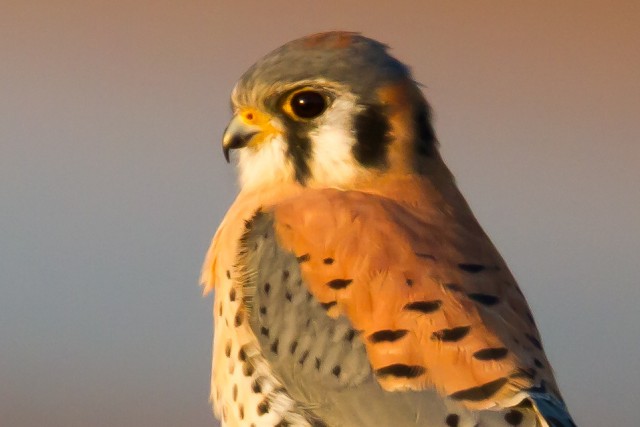
I just did a quick conversion of your raw file using the settings that Romy detailed earlier. Below is a web-sized version of the converted TIFF and a 100% crop. Note that I did no further post processing of the file in PS after conversion. I'm sure that Romy could tweak his settings to get better results, but I can immediately see quite a difference in noise from what your settings yielded.
Conrad Tan wrote:
Darn it.... I need to update everything including my workflow! Thanks a million Les!
I don't think that the noise with Romy's settings looks bad at all, and that is especially true considering that the shot was 1/2 stop under exposed in capture. If I were to continue with post processing the image in PS, I would be doing selective sharpening of just the bird so as not to re-enhance any remaining noise in the background.
As I said earlier in this thread, my skill at processing does not come close to that of some of the others who have posted in the thread, but I'm learning a lot here. For me, any noise from my 7D up to about ISO 1600 can be handled satisfactorily to my taste using default conversion settings. And, even if appears in 100% crops, it disappears in a print or at the image level. However, I'm hoping that I can use some of what I'm learning here to be able to expand use of the camera to ISOs higher than what I have been using.
Here is a quick go just using LR4. Had to pump the Luminance NR slider high to eliminate all the noise at 100% view. NR at 60. Then masked and sharpened. Also hit the Auto Tone button. That was all. May be too much sharpening as artifacts just starting to show. I'm not an expert at all with post processing, I don't use PS except to merge panoramics.
This is probably getting a bit too plastic looking with all the NR. Doesn't need nearly that much NR if viewed at normal sizes.
You got a very lovely capture here, Conrad - sweet light, a BG to die for and beautiful subject.
If I have something more to ask for, I wish the bird is larger in the frame and the detail a notch sharper. Nonetheless, if this were my capture, it will end up without doubt in my "keepers" folder.
I did a quick processing on the RAW file while sipping my morning coffee.
1. Screen shots of relevant ACR settings (PS is Camera Neutral)
jcolwell wrote:
Once you figure out what you want to do, the next thing is to figure out how to do it quickly. I'm still working on that...
Using Romy's settings in ACR took me about 5 seconds to change 3 of the sliders from default settings. After conversion, any other processing, including sharpening, would be no different than what I would be doing for any other image, and the amount of time that I spend doing that on most pictures is quite minimal.
uz2work wrote:
I don't think that the noise with Romy's settings looks bad at all, and that is especially true considering that the shot was 1/2 stop under exposed in capture. If I were to continue with post processing the image in PS, I would be doing selective sharpening of just the bird so as not to re-enhance any remaining noise in the background.
As I said earlier in this thread, my skill at processing does not come close to that of some of the others who have posted in the thread, but I'm learning a lot here. For me, any noise from my 7D up to about ISO 1600 can be handled satisfactorily to my taste using default conversion settings. And, even if appears in 100% crops, it disappears in a print or at the image level. However, I'm hoping that I can use some of what I'm learning here to be able to expand use of the camera to ISOs higher than what I have been using.
arbitrage wrote:
Here is a quick go just using LR4. Had to pump the Luminance NR slider high to eliminate all the noise at 100% view. NR at 60. Then masked and sharpened. Also hit the Auto Tone button. That was all. May be too much sharpening as artifacts just starting to show. I'm not an expert at all with post processing, I don't use PS except to merge panoramics.
This is probably getting a bit too plastic looking with all the NR. Doesn't need nearly that much NR if viewed at normal sizes.
I think at these 100% crops, the amount of work going into them are more than acceptable when posting or printing actual crops. Nice!!!
Liquidstone wrote:
You got a very lovely capture here, Conrad - sweet light, a BG to die for and beautiful subject.
If I have something more to ask for, I wish the bird is larger in the frame and the detail a notch sharper. Nonetheless, if this were my capture, it will end up without doubt in my "keepers" folder.
I did a quick processing on the RAW file while sipping my morning coffee.
1. Screen shots of relevant ACR settings (PS is Camera Neutral)
Conrad Tan wrote:
Ahhh... LOVE IT! My patented 3 tone BG! Good talking to you tonight Atma! Let me know when you're in SF again. Let's get some bird shooting in!