This topic is in the 2012 archive. You can read it and like its posts here. It is read only.
Archive 2012Sharpening for non-PS users
p.1 #1Sharpening for non-PS users
For those of us not using PS, I'm wondering if there's a good equivalent of denoir's sharpening workflow for alternative editors. I'm rather impressed with the results from it but really don't want to have to use PS just for sharpening.
I'm mostly thinking of those of us who work directly in LR or Aperture or who use C1 or something similar while rarely or never entering PS (I don't even have PS installed on my system). In my case I'm specifically thinking of LR with Nik Sharpener.
I'm mostly thinking of those of us who work directly in LR or Aperture or who use C1 or something similar while rarely or never entering PS (I don't even have PS installed on my system). In my case I'm specifically thinking of LR with Nik Sharpener.
Apr 04, 2012 at 08:47 PM

p.1 #2Sharpening for non-PS users
Exactly what I was thinking as well. I would like to know how to get the best out of Lightroom for sharpening....
Apr 04, 2012 at 09:05 PM
p.1 #3Sharpening for non-PS users
This would be great. I've found Aperture to be rotten for sharpening, and use Nik for my D700 NEF files and RPP for my Ricoh GXR .dng files. For web display, I've been much happier with the downsizing sharpening applied by Smugmug than Flickr when I export original size JPEG conversions. I'd be thrilled if I could get something useful out of Aperture though.
Apr 04, 2012 at 10:21 PM
p.1 #4Sharpening for non-PS users
I just started using Nik Sharpener Pro with Lightroom and I like it. The control points on the import sharpener allow you to sharpen only the in-focus areas and leave the bokeh untouched. The export sharpener is great for prints. I haven't found the key to web-sized exports with it, though. So far nothing I've done with those is better than what LR alone can do.
Apr 04, 2012 at 10:28 PM
p.1 #5Sharpening for non-PS users
I'm also trying to find a good sharpening workflow for web-sized photos. I've previously used Lightroom's own export sharpening, but it doesn't provide the pop I'm looking for. I was then introduced to denoir's workflow by Phillip Reeve, and I'm currently testing it out with LR -> PS Elements and LR -> GIMP, the reason being that I only have PSE on my laptop and GIMP on my workstation.
I'm getting wildly differing results by PSE/GIMP with seemingly similar settings, and GIMP's USM appears to be much more aggressive and produces some serious aliasing artifacts if not used carefully. At the same time it appears that there are no good alternatives to stepped downsizing and sharpening.
I'm getting wildly differing results by PSE/GIMP with seemingly similar settings, and GIMP's USM appears to be much more aggressive and produces some serious aliasing artifacts if not used carefully. At the same time it appears that there are no good alternatives to stepped downsizing and sharpening.
Apr 05, 2012 at 04:26 AM
p.1 #6Sharpening for non-PS users
I set the camera at RAW Neutral and import with no sharpening into aperture ! All sharpening sliders In the RAW section are at 0. After that I Use the RAW sharpener from NIK - better than the Output sharpener. Usually my Zeiss lenses need about 60% and more towards the contour sharp than area sharp. Quite easy.
Apr 05, 2012 at 06:29 AM
p.1 #7Sharpening for non-PS users
Gimp's Amount slider is very different (though you certainly can use the same radius numbers). GIMP's amount, though divide by 1000 for approximate amount equivalence (i.e. photoshop 100% = GIMP 0.1 you could consider this divide by 10 if you think of percent in it's true decimal form as well)
Edited on Apr 05, 2012 at 06:47 AM · View previous versions
Edited on Apr 05, 2012 at 06:47 AM · View previous versions
Apr 05, 2012 at 06:37 AM
p.1 #8Sharpening for non-PS users
Jman13 wrote:
Gimp's Amount slider is very different (though you certainly can use the same radius numbers). GIMP's amount, though divide by 1000 for approximate amount equivalence (i.e. photoshop 100% = GIMP 0.1)
Thanks! That does make sense. During testing I quickly realized that the amount slider was best kept at below 1.3.
Apr 05, 2012 at 06:43 AM
p.1 #9Sharpening for non-PS users
It's not about tools in this case - it's about understanding what you are doing. The step sharpening method many of use use here can be done almost any image processing software. I'm 100% sure it can be done with Gimp and Paint.net, I have even done it with the editor what comes with SnagIT.
I also don't prefer to work in Photo Shop. Due to this I have created droplets from most of my scripts, and it's really fast just to drop the 16-bit TIFF from Apple Aperture to droplet doing the step sharpening and changing from wide gamut gamma 1.0 color space to sRGB. Then drop the resulting TIFF to other droplet what adds my website logo to one of the corners of image. By working this way I rarely have to actually use Photo Shop.
I also don't prefer to work in Photo Shop. Due to this I have created droplets from most of my scripts, and it's really fast just to drop the 16-bit TIFF from Apple Aperture to droplet doing the step sharpening and changing from wide gamut gamma 1.0 color space to sRGB. Then drop the resulting TIFF to other droplet what adds my website logo to one of the corners of image. By working this way I rarely have to actually use Photo Shop.
Apr 05, 2012 at 07:48 AM
p.1 #10Sharpening for non-PS users
Hello Samuli,
Can you please share the steps to sharpen a 5d mII image to 1200pix width or height wise.
Thank you,
Hanh
Can you please share the steps to sharpen a 5d mII image to 1200pix width or height wise.
Thank you,
Hanh
Apr 05, 2012 at 08:10 AM
p.1 #11Sharpening for non-PS users
I too am too lazy to use PS5 for each image....really at all. I have personally found the best way to sharpen in LR is to select the paintbrush and selectively sharpen. Sliding the sharpen image slider over the entire image sharpens the oof area too much, so I just take the brush and apply a sharpen to the part of the image within the dof
Not as good as Luka's method, but usually fine for web size
Not as good as Luka's method, but usually fine for web size
Apr 05, 2012 at 08:23 AM
p.1 #12Sharpening for non-PS users
Hanh wrote:
Hello Samuli,
Can you please share the steps to sharpen a 5d mII image to 1200pix width or height wise.
Thank you,
Hanh
In order to achieve optimal results you cannot blindly use same script each time. Some starting points are on my PDF-instructions (Denoir links in end of his post), but I would recommend this archived thread:
https://www.fredmiranda.com/forum/topic/936822/0&year=2010#8846510
It really doesn't matter what tool you use, the generic idea is always same:
1 sharpen grazy amounts
2 let resizing to smaller soften image (use bicubic or similar)
3 sharpen little less grazy amounts
4 let resizing to smaller soften image (use bicubic or similar)
repeat steps 3 and 4 until you have reached your final size (typically my script contain 2-5 "resize steps"
5 OPTIONAL: USM (Unsharp mask) with small pixel radius and small %
6 change color space to final color space
7 from 16-bit to 8-bit
Only advice I give is that I always prefer resizing ratios, which don't allow "easy" resizing. Example of easy resize: from 1000px to 500px OR from 3000px to 2000px OR from 4000px tp 1000px. I know it shouldn't matter when you use bicubic method, but I have got less "stair" by following this princible.
For 1280px you may consider intermediate steps for example 4500px and 2100px. If it doesn't sharpen enough add one more steps and use for example 4800px, 3300px and 1900px. I would recommend to experiment little with these to see what gives closest to look you are after.
Apr 05, 2012 at 08:33 AM
p.1 #13Sharpening for non-PS users
I've used borderfx for aperture but would love to hear about other methods.
Apr 05, 2012 at 09:16 AM
p.1 #14Sharpening for non-PS users
Thank you so much Samuli! I will study and apply it to my workflow.
Apr 05, 2012 at 08:07 PM
p.1 #15Sharpening for non-PS users
Did small effort to get again familiar with command line tools. Here is recipe for one photo, I reprocessed for fun with these tools - script can be used base for other images, but you have to tweak the settings.
First the tools:
For installation refer to software "vendor" webpages and use google when you face issues. This method is bulletproof and works well for this kind of small software as well as 10+MEUR business software sorry if I revealed deep secrets of IT gurus... For least effort I installed VMware Fusion to my Mac (for Windows you have VMware player) and installed software running on the virtual computer (I have not upgraded to Lion yet and I had issues installing ImageMagick in 5 minutes, lost nervers and installed WMware Fusion + Linux image instead, took 20s to install ImageMagick to Linux with sudo apt-get install imagemagick)
Once you have installed the process has two steps:
1. convert RAW to 16-bit TIFF-image
For this image I ended up to these values:
dcraw -v -T -o 2 -6 -S 4000 -k 1024 -W -r 2.25 1.0 1.55 1.0 -b 0.71 -g 3.5 25 photo.CR2
Naturally you can use whatever RAW converter to produce the 16-bit TIFF, but try to use AdobeRGB (or ProPhoto if you have very wide gamut in your photo) instead if sRGB. Naturally Gamma 1.0 color spaces preferred BUT then the downsizing script is completely different.
2. resize, sharpen, convert from AdobeRGB to sRGB and save to 8-bit JPG
For this image I ended up to these values:
convert photo.tiff -level 19%,90%,1 -sharpen 1x50+0 tif:- | convert tif:- -interpolate bicubic -resize '4500' tif:- | convert tif:- -sharpen 0.6x25+0 tif:- | convert tif:- -interpolate bicubic -resize '2150' tif:- | convert tif:- -sharpen 0.2x5+0 tif:- | convert tif:- -interpolate bicubic -resize '975' tif:- | convert tif:- -profile sRGB.icc tif:- | convert tif:- -quality 87 photo.jpg
You can use this script as a base, just remove "-level" option if you use modern RAW-converted with possibility to change black point and other stuff...
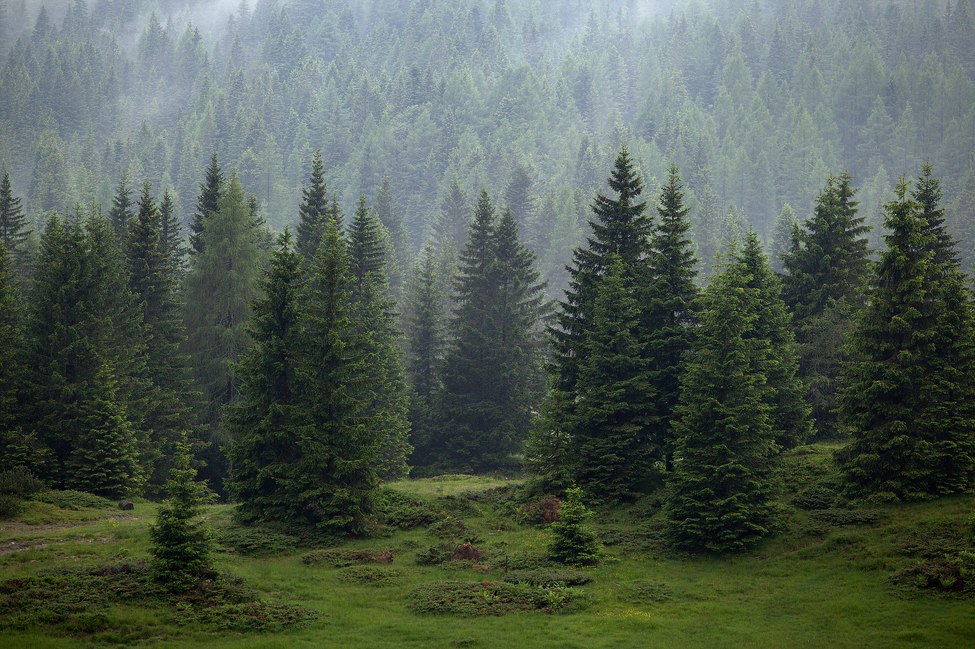
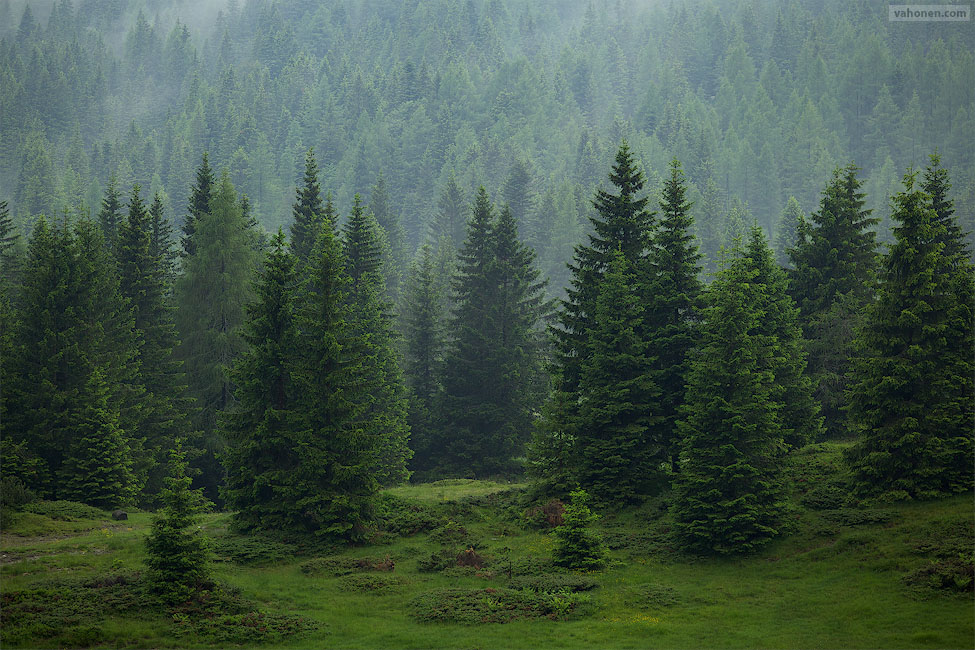
Major difference to between the two images is caused by that I did not rotate the ImageMagic image, while the Aperture image was rotated 0.8 degrees. Secondary difference are the slightly different colors, to which I ended up after finetuning the image - for the original image I spent the usual 20 seconds and I don't think I achieved optimal result in the 20 seconds... Third difference is better sharpening (subjective, this is my opinion) on the ImageMagick version, but again I spent over 10 minutes tuning the steps, while the Aperture image was dropped to automatic PhotoShop Droplet without specially thinking the sharpening for the image. (Note to myself: Too much time optimization, I have become too sloppy on the postprocessing if I can produce better results with command linetools in half an hour, while at same time re-learning how to use the tools I have not used for ages)
dcraw.c + ImageMagic version:
Aperture + PhotoShop step sharpening version:
Edit: Seems EXIF is lost with these tools. However there are plenty of tools allowing copying EXIF from image to another. I'll have to check later does ImageMagick preserve EXIF, since I know from past that you WILL lose EXIF when using dcraw.
First the tools:
- dcraw.c - Dave Coffin's free RAW converter, including support to most of the cameras. Great thing about this is that you get all information out from camera, no stupid "optimizations" by manufacturers for the not-so-skilled-people. Allows various methods to translate information from RGBG (and other format, but 5DmkII for example has RGBG) to various file formats, naturally most useful being 16-bit TIFFs. Dave provides C-program, what can be converted to any OS with small effort. With Google you should be able to find precombiled binaries if you can't do it yourself.
- ImageMagick - Free software package with large palette of tools. Offers command prompt user interface for easy and fast scripting and automation.
For installation refer to software "vendor" webpages and use google when you face issues. This method is bulletproof and works well for this kind of small software as well as 10+MEUR business software
sorry if I revealed deep secrets of IT gurus... For least effort I installed VMware Fusion to my Mac (for Windows you have VMware player) and installed software running on the virtual computer (I have not upgraded to Lion yet and I had issues installing ImageMagick in 5 minutes, lost nervers and installed WMware Fusion + Linux image instead, took 20s to install ImageMagick to Linux with sudo apt-get install imagemagick)Once you have installed the process has two steps:
1. convert RAW to 16-bit TIFF-image
For this image I ended up to these values:
dcraw -v -T -o 2 -6 -S 4000 -k 1024 -W -r 2.25 1.0 1.55 1.0 -b 0.71 -g 3.5 25 photo.CR2
Naturally you can use whatever RAW converter to produce the 16-bit TIFF, but try to use AdobeRGB (or ProPhoto if you have very wide gamut in your photo) instead if sRGB. Naturally Gamma 1.0 color spaces preferred BUT then the downsizing script is completely different.
2. resize, sharpen, convert from AdobeRGB to sRGB and save to 8-bit JPG
For this image I ended up to these values:
convert photo.tiff -level 19%,90%,1 -sharpen 1x50+0 tif:- | convert tif:- -interpolate bicubic -resize '4500' tif:- | convert tif:- -sharpen 0.6x25+0 tif:- | convert tif:- -interpolate bicubic -resize '2150' tif:- | convert tif:- -sharpen 0.2x5+0 tif:- | convert tif:- -interpolate bicubic -resize '975' tif:- | convert tif:- -profile sRGB.icc tif:- | convert tif:- -quality 87 photo.jpg
You can use this script as a base, just remove "-level" option if you use modern RAW-converted with possibility to change black point and other stuff...
Major difference to between the two images is caused by that I did not rotate the ImageMagic image, while the Aperture image was rotated 0.8 degrees. Secondary difference are the slightly different colors, to which I ended up after finetuning the image - for the original image I spent the usual 20 seconds and I don't think I achieved optimal result in the 20 seconds... Third difference is better sharpening (subjective, this is my opinion) on the ImageMagick version, but again I spent over 10 minutes tuning the steps, while the Aperture image was dropped to automatic PhotoShop Droplet without specially thinking the sharpening for the image. (Note to myself: Too much time optimization, I have become too sloppy on the postprocessing if I can produce better results with command linetools in half an hour, while at same time re-learning how to use the tools I have not used for ages)
dcraw.c + ImageMagic version:
Aperture + PhotoShop step sharpening version:
Edit: Seems EXIF is lost with these tools. However there are plenty of tools allowing copying EXIF from image to another. I'll have to check later does ImageMagick preserve EXIF, since I know from past that you WILL lose EXIF when using dcraw.
Apr 06, 2012 at 05:00 AM
p.1 #17Sharpening for non-PS users
After some more experimentation using dcraw.c becomes too laborious, I may use it for special cases, but mostly going to create the 16-bit TIFFs with Apple Aperture (similar to . So I focused on finetuning and automating the ImageMagick part. In order to preserve the EXIF-data, I added exiftools to the script (installation to Linux via command sudo apt-get install libimage-exiftool-perl. Script is also tested to work well with gamma 1.0 color space (CIE 1932 D65).
Script automatically processes all TIFF-images in the directory, and makes 975px wide and tall version of each one. Finally it removes the TIFF-images (you may comment this part if you prefer to keep them.
The ICC-profile script is using (sRGB.icc) can be found from ImageMagick directories.
#!/bin/bash
# First defining which files to process
FILES=/mnt/hgfs/RAWtest/*.tiff
# Then looping through TIFF files
for f in $FILES
do
# Finding base of the name (without the .tiff)
SAMULIBASENAME=`basename $f ".tiff"`
# Resizing and sharpening - 975px height
convert $SAMULIBASENAME.tiff -sharpen 1x50+0 tif:- | convert tif:- -interpolate bicubic -resize 'x3200' tif:- | convert tif:- -sharpen 0.6x25+0 tif:- | con
vert tif:- -interpolate bicubic -resize 'x1800' tif:- | convert tif:- -sharpen 0.2x5+0 tif:- | convert tif:- -interpolate bicubic -resize 'x975' tif:- | conv
ert tif:- -profile sRGB.icc tif:- | convert tif:- -quality 87 $SAMULIBASENAME'_x975px.jpg'
# Transferring EXIF from TIFF-file to created JPG-file
exiftool -tagsFromFile $SAMULIBASENAME.tiff $SAMULIBASENAME'_x975px.jpg'
# Removing the file exiftools adds
rm $SAMULIBASENAME'_x975px.jpg_original'
# Resizing and sharpening - 975px width
convert $SAMULIBASENAME.tiff -sharpen 1x50+0 tif:- | convert tif:- -interpolate bicubic -resize '4500' tif:- | convert tif:- -sharpen 0.6x25+0 tif:- | conv
ert tif:- -interpolate bicubic -resize '2150' tif:- | convert tif:- -sharpen 0.2x5+0 tif:- | convert tif:- -interpolate bicubic -resize '975' tif:- | convert
tif:- -profile sRGB.icc tif:- | convert tif:- -quality 87 $SAMULIBASENAME'_975px.jpg'
# Transferring EXIF from TIFF-file to created JPG-file
exiftool -tagsFromFile $SAMULIBASENAME.tiff $SAMULIBASENAME'_975px.jpg'
# Removing the file exiftools adds
rm $SAMULIBASENAME'_975px.jpg_original'
#removing the TIFF - if you don't want this then comment this
rm $SAMULIBASENAME.tiff
done
Apr 07, 2012 at 01:16 AM
p.1 #18Sharpening for non-PS users
Thanks for the script! I wasn't able to get dcraw working with the NEX5N (needed me to calibrate/add a profile) but the results with imagemagick and a lightroom generated tiff looked really good. I'll be sure to try out your new script.
Apr 07, 2012 at 06:05 AM
p.1 #19Sharpening for non-PS users
Thanks a lot for the valuable input, Samuli. I will need to try these myself.
Apr 08, 2012 at 06:01 AM
p.1 #20Sharpening for non-PS users
Ok, I've been testing out a workflow that is based on Samuli's ImageMagick script above, and it appears to work quite well. Even the EXIF info is in tact, as pointed out by Samuli. I just need to fix the icc profile. My files are stored on a LAN file server that runs on Ubuntu, so ImageMagick and exiftools were fairly easy to implement in the workflow.
I created the working directories for the conversion ("resize_landscape" and "resize_portrait") and placed the appropriate scripts in each directory. Then I created user export items in LR to export the TIF files directly into the working directories. After the files have been exported, I run the scripts to convert the files.
Here are the first two test files.


Thanks again for the very useful script, Samuli.
Jaakko
I created the working directories for the conversion ("resize_landscape" and "resize_portrait") and placed the appropriate scripts in each directory. Then I created user export items in LR to export the TIF files directly into the working directories. After the files have been exported, I run the scripts to convert the files.
Here are the first two test files.
Thanks again for the very useful script, Samuli.
Jaakko
Apr 09, 2012 at 01:27 PM