In post processing using aperture or LR, can some experts tell me how I can make a Nikon raw file processed to look like canon colors? Just personal preference, I like the skin color of Canon.
No bashing please, it's a humble question. Thanks.
It is an impossible question to answer the way you ask it because it hinges on what you think "Canon color" looks like and differs from "Nikon color" and appearance even within brands is affected by body and lens characteristics. There are also so many subjective variables I think it would be difficult to objectively spot the differences unless the same scene was photographed by both brands in a blind comparison where you saw both but didn't know beforehand which was which and could categorize what qualities you thought were better in one than the other.
francishmt wrote:
In post processing using aperture or LR, can some experts tell me how I can make a Nikon raw file processed to look like canon colors? Just personal preference, I like the skin color of Canon.
No bashing please, it's a humble question. Thanks.
When processing a raw file there are 3 ways you can manage colors.
One is with the white balance, which has a dramatic effect on colors.
One is with the camera profiles avaialable in the raw conversion (ACR/Lightroom).
One is with the "HSL" adjustments in the raw conversion.
To emulate the colors from one specific source (Canon?) I recommend you first experiment with the camera profiles. Cycle through the various default Nikon profiles that are available to you. See if any of them give you the specific skin tones you are after.
If none satisfy you, then maybe try the "cross camera" profiles from PSKiss. I took a quick look at them once and was not impressed, but maybe they will work for you.
If neither of these satisfy you, then take a look at generating you own custom profiles using the Adobe DNG editor. That is a fairly advanced and daunting process, with a steep learning curve. But it gives you the maximum control.
If you have a Canon and Nikon raw file of the indetical subject (preferably a color checker chart), you can load the Canon raw into the DNG Editor, record the RGB values of several samples, then load the Nikon raw and adjust the sliders until the RGB values match the ones you recorded for the Canon. Save the result as a custom profile and use it to process your Nikon raws.
That's the process many used to try to get two different Canon camera models to generate the same colors. It's not an exact science, but can be a farily good approximation.
Yes, you can - but only in good light. As per the answers above.
The point where it becomes impossible is in bad quality light (fluorescents, LED), or very low WB temperatures. Canon has a slightly different philosophy when it comes to colour, and this shows in the most basic physical part of the camera colour reproduction chain - the filters on the sensor.
A Canon is more geared towards "keeping colours generally ok in bad light" and Nikon filters have a lot better color hue resolution in good light. The red and the green channel in a normal modern canon camera are closer positioned to each other, and they should really be called "orange red" and "warm green".
This cannot be fully compensated for in the camera profile, colour in a digital camera is always a third-hand measurement. A three-stimuli facsimile of a complex light spectrum.
[light spectrum] x [reflection spectrum] x [Bayer filter spectrum] gives you the three raw channels. Getting metamerical faults when playing around with the combination of lights / filters is unavoidable.
If you're good, you can SPECIFY very methodically what you want from a skintone, and then modify your profile and settings to get there. This might be both the hardest and the easiest path, depending on what kind of person you are.
Saying that you want "Canon skintone" is kind of like a forum newb asking "how do I take awesome pictures?"... Not that I would imply that you're incompetent or comparable to the person asking that other question in any way - I just want to stress that you should be aware that you HAVE to specify in detail what you want to achieve before asking for help to get there. Getting to terms with what you seek is often the biggest part of the solution.
I've seen many excellently made images with both Canon and Nikon and can not tell the difference. As soon as you perform the first adjustment layer, the comparison is useless.
D600 user here. Have been frustrated with skin tones for a while now.. There's a super fine line between too saturated and too unsaturated. I find it especially difficult to process asian skin tones. I saw a different website where you could purchase custom color profiles..may give them a try
theSuede wrote:
A Canon is more geared towards "keeping colours generally ok in bad light" and Nikon filters have a lot better color hue resolution in good light. The red and the green channel in a normal modern canon camera are closer positioned to each other, and they should really be called "orange red" and "warm green".
Well, that helps my question a few years ago @ What color is Green? My assessment back then was that Green is really more of a yellow green and not green green. This might explain that a bit.
Does this have any influence (significant diff) on the red channel (i.e. Nikon vs. Canon) that folks have a tendency to blow out in certain subjects/lighting?
I think that rather than trying to emulate the supposed color balance of a particular camera or a "brand," it makes more sense to develop your color sense so that you can recognize the color quality that you desire in photographs in a brand independent way and target that in your post processing work, both at the raw conversion stage and in the follow-up Photoshop or Lightroom work.
I'm not a big believer in the whole Canon Look or Nikon Look business, but you could get a reference color target card, make a photograph of it with the camera whose "look" you are after, then shoot the same target card in the same light with your other camera, adjusting the second image in post to emulate the color values in the first and then saving the changes as a pre-set.
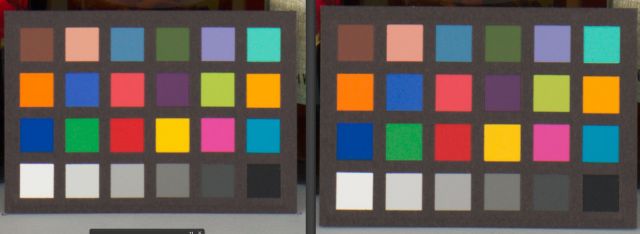
Here's a couple RAW downloads from IR of a Canon & Nikon (current production / equivalent models).
I'm not sure I could tell you which is which based on the RAW image alone (can you). Yes, there are some diff's, but it doesn't seem to me that they are sufficient to suggest a "signature look" from the RAW. I suspect that the diffs in the look may be more in the glass/pp (or color space) ... at least going by this comp on my display.
As an example, looking at the 2nd row (from the top), 1st & last swatch, I see only a few points (<5) diff in the colors.
255,118,0 vs. 255,113,0
255,159,0 vs. 255,162,0
The story repeats itself elsewhere as the diff's are seemingly small in most instances ... the red swatch in the 3rd row being the most notable exception from the numbers I'm seeing. Making changes to all the subtleties may be a challenge, but if you study the more significant differences, you may derive an 80/20 approach to those areas that have the most significant diff in the areas of your concern. Which color space you are operating in may have influence here as well.
FYI, the "as shot" for these differed in temp by 150 & tint by 1 ... no adjustments made to equalize.
Oh, there you go, getting all "scientific" on us. ;-) What's next, proof that people can't tell the difference between prints from the two cameras or between two good lenses from different manufacturers or between a fine zoom and a good prime?
What would people be left with to discuss about photography? Nothing but, well, uh, photographs!. Heresy! ;-)
Dan
RustyBug wrote:
Here's a couple RAW downloads from IR of a Canon & Nikon (current production / equivalent models).
I'm not sure I could tell you which is which based on the RAW image alone (can you). Yes, there are some diff's, but it doesn't seem to me that they are sufficient to suggest a "signature look" from the RAW. I suspect that the diffs in the look may be more in the glass/pp (or color space) ... at least going by this comp on my display.
As an example, looking at the 2nd row (from the top), 1st & last swatch, I see only a few points (<5) diff in the colors.
255,118,0 vs. 255,113,0
255,159,0 vs. 255,162,0
The story repeats itself elsewhere as the diff's are seemingly small in most instances ... the red swatch in the 3rd row being the most notable exception from the numbers I'm seeing. Making changes to all the subtleties may be a challenge, but if you study the more significant differences, you may derive an 80/20 approach to those areas that have the most significant diff in the areas of your concern. Which color space you are operating in may have influence here as well.
FYI, the "as shot" for these differed in temp by 150 & tint by 1 ... no adjustments made to equalize.