Thinking about it, its an interesting scenario an M module mirrorless. I have a feeling the sensor on such a module will be prone to what the Leica M9 has to deal with (the color shifting). In which case the Ricoh with its Live View shooting and EVF can take SLR lenses happily. I could see building up a hybrid SLR and Rangefinder stable of lenses for such a FF M-Module.
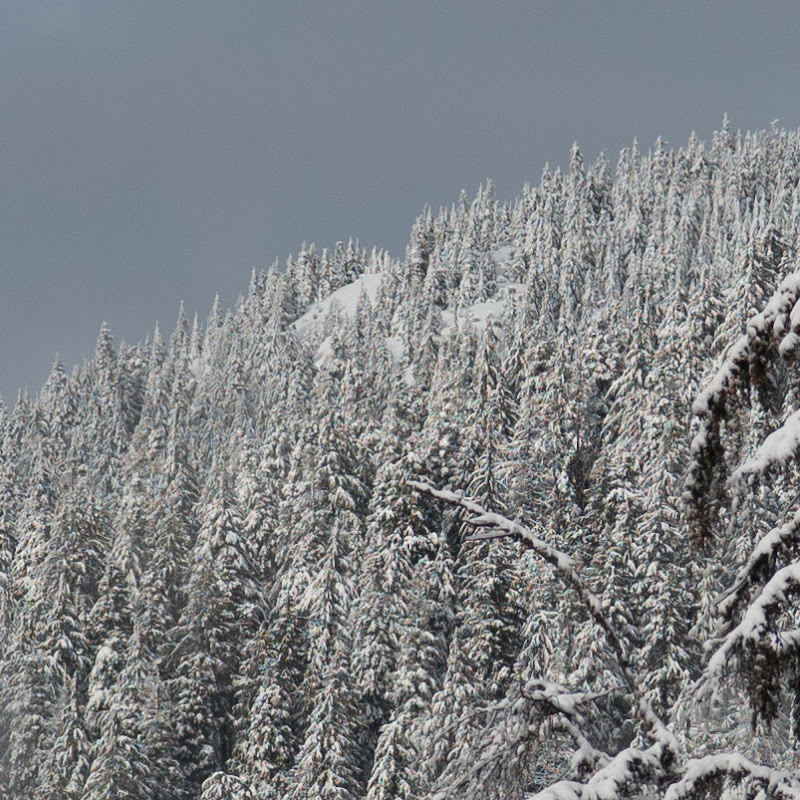
Michael; nice image. Unfortunately it also showcases the inability of ACR to deal with it. The image begs to be processed in RPP. Care to send me a file? I am sure most, if not all of it, would disappear.
I browsed some shots with the AA filter-less A16 Zoom module, it seems to be a pretty good performer. The sensor is (as expected) very capable and the zoom itself seems excellent in some regards with no moiré at all on sensitive subjects and only a very small trace amount of false color. Very respectable performance and a step up from the A12.
The lens seems very sharp and seems to have nice bokeh despite being a slow lens.
However, it seems the lens has quite severe distortion at mid distances on the wide end (16, equiv of 24mm) and on some shots it didn't quite render the corners sharp with evidence pointing to the lens and not the sensor layout to blame. There was no info on the aperture used and images seemed to be Jpeg based.
The distortion, the slow aperture and the sheer bulk of the lens plus the fact that it is zoom by wire and not manual zoom makes it a no go for me.
Here's my example, C/Y 50/1.4 @F4. Wish Ricoh will come up with a full frame M module.
Wouldn't that be simply amazing.
BTW, to all who use UWAs on the GXR M here: have you tried the in-camera corrections? Diglloyd showed me that there was very slight vignetting and shading in the corners on the 12 and 15 images of mine he posted on his blog which I honestly had not seen. No kind of a problem, in any case, but I am wondering if anyone has played with these features...
Henrik, I still haven't gotten around to trying out RPP. But based on your results, it just has to work better than Aperture does for me. In the mean time, I can only think of a couple of ways to prevent the green and red flecks of snow from showing up in my snowy day photos:
1: Take pics without much fine monochromatic details in focus:
In all seriousness, I've been having a lot of fun with the GXR, and the combo of size and IQ makes it see a lot more use than the DSLR setup these days. Also, based on the earlier exercise, it's really easy to either shoot at f/2.8 or f/11 to mitigate against the color artifacts and just sharpen in post.
I might have come across as somewhat of a spokesperson for RPP, but after I have seen it pretty much nullifying those artifacts and false color problems I feel I should have tried it earlier instead of being complacent with ACR.
After initial set up with RPP and saving settings there is usually very little to be done in RPP during the conversion, so the slower user interface is not really a problem. I spend less time in RPP as I have to do less work in the RAW conversion.
Kit: I have seen small amounts of color cast on my 15/4.5 (cyan/blue) at 3m/infinity against white walls. It has been very little though. In that one shot I corrected it with a slight cyan/blue desaturation and hue correction. I find cyan/blue corners easier to correct for than magenta corners and outdoors I haven't found a situation where I have had to apply corrections to the 18 or 15 I have.
I spent exactly ten seconds with Michaels image in RPP; that is the time it took for me to realize I needn't do anything with it with my presets, so I did nothing.
I boosted contrast to exaggerate my samples a bit and I spent literally no time on post with them. I could have made sure the crops were the same, but I am literally put the door on my way to work here.
I used the K64 (Kodachrome) setting in RPP and could have had a more pliable file with the A100 (Fuji Astia) setting or the NC160 (Portra neg film) setting. But this was a quickie. The usual downsizing and uploading through Flickr and then through to FM does a little trick on the image and it sure looks better on my computer.
Still, the traces of false color left is... ...wait for it... ...green. Go figure.
Very nice image and a nice file to boot, noteworthy is that the DNG file shows very little false color (very hard to spot) so I am sure ACR is not the way to do it.
Good to know what my GXR will perform like in Canada this summer. (though I hope the snow is gone...)
Thanks Henrik, your conversion and observation re the side car JPG file were very informative.
I hate to admit this but I almost never look at the in-camera produced JPGs and as you pointed out to me earlier, like the RPP conversion output, the in-camera produced JPG has no false colour problem. Clearly the converter makes a significant difference.
(Also using a laptop display to look at the files tends to mask the problem too. My much better display on the desktop shows all flaws, a good news bad news story.)
Given how many folks use ACR and the Lightroom equivalent, it sure would be nice if it did a better job with GXR files.
I need to work through the steps required to run Mac OS in a virtual machine so I can have a good look at RPP. Even if I were to switch to a Mac, which I am reluctant to do despite coming from the Unix industry professionally, I'd have to run virtualization software on the Mac to run Windows for one app I need (not photography related) that sadly has no peer on the Mac. Ugh.
Hey, is the K64 emulation in RPP any good? For a long while I shot nothing but K25 and K64.
Lots has changed in LR4 but it still feels familiar enough. Sadly so does too the false colour. Haven't had a chance to look at the moire removal tool yet.
michaelwatkins wrote:
Clearly the converter makes a significant difference.
Given how many folks use ACR and the Lightroom equivalent, it sure would be nice if it did a better job with GXR files.
I need to work through the steps required to run Mac OS in a virtual machine so I can have a good look at RPP. Even if I were to switch to a Mac, which I am reluctant to do despite coming from the Unix industry professionally, I'd have to run virtualization software on the Mac to run Windows for one app I need (not photography related) that sadly has no peer on the Mac. Ugh.
Hey, is the K64 emulation in RPP any good? For a long while I shot nothing but K25 and K64....Show more →
I use Virtual Box to run Windows in OSX......it''s fast.....and free. A friend tried running OSX in Windows 7......not very fast.
Michael: give RichM's advice a try, I haven't tried Virtualbox, but if it's for free you can try both it and RPP, since RPP is free too.
The K64 profile for the GXR/M is quite accurate and I really like it, I think you will like it.
Henrik
EDIT:
I run K64, A100 (Fuji Astia, low-ish contrast slide film) and NC160 (Kodak Portra) on RPP and I think they are all accurate "film look emulators". I have experience shooting those three and depending on type of shot those three work fine for me. A contrasty shot works best with A100, most other shots work for me on K64 and NC160.
I never really liked Velvia myself so I can't say if it's accurate or not.
I think I'm convinced and will probably go a step further and configure a PC as a Hackintosh running OS/X natively. I need to update one of my office machines anyway... the hardware I'd purchase isn't dissimilar to what I'd buy anyway so configuring a new u-built machine with OS/X compatibility isn't a big hardship. In the worst case scenario I can always go back to Windows or Linux (virtualizing Windows) on that hardware.
Never liked Velvia either although I have some in my fridge. Mostly shot Kodak films and some Ilford.
Are you RPPers converting to TIFF and doing other work on images elsewhere (cropping and such)? I'm not so deep into Lightroom that I couldn't do something else, but have been trying to keep up with metadata additions and whatnot and it is not a bad app for that. I also use Silver Efex for B+W conversions. I suppose I can fork RPP, process the DNG and save a sidecar TIFF or JPG and keep them associated. Details, need to look at it first.
michaelwatkins wrote:
I think I'm convinced and will probably go a step further and configure a PC as a Hackintosh running OS/X natively. I need to update one of my office machines anyway... the hardware I'd purchase isn't dissimilar to what I'd buy anyway so configuring a new u-built machine with OS/X compatibility isn't a big hardship. In the worst case scenario I can always go back to Windows or Linux (virtualizing Windows) on that hardware.
As long as you choose compatible parts with native OS X support - pay particular attention to your video card choice for instance - It's really not that big of a deal to make a Hackintosh. I have been running Hackintosh Desktops and laptops for about three years now. You can even set up a dual boot system with windows, though my preference is to run windows on one dedicated drive and OSX on another.
RPP will save converted DNGs as TIFF, I work my files in the old CS3/Photoshop as I am quite used to it and with converted RAWs my workflow hasn't changed much.
Though you can take the time to work the files near completion in RPP I find I do a better job when doing a thorough conversion and then nitpick in CS3. This also means I keep my converted TIFFs in a folder, separated from my DNGs, both for further processing and for keeping track on images I have worked with. I usually keep the side car JPEGs with the DNG files as they load faster in fast preview (hitting the space bar in Mac).
I have a ready made RPP default set up for the GXR M and can PM you the settings as I run it, you can tweak it from there.
Kit, I tried the CV 15 on GXR today. There are some vignetting on the short edge (I shoot 3:2 ratio), so I tried the "peripheral illum" from 0 to +3. The +3 setting seems to correct most of the vignetting, so I have it set in my CV15's in camera profile now. When I change lens, I will remember to load the CV15's profile for correction.
kosmo, I'd be very grateful if you could send me your default setup; I find that all files processed by RRP are a stop or so underexposed, and cold (skin tones, especially), even after careful WB. I need to re-read the manual, probably, but files straight out of Aperture with 'as shot' settings look almost perfect to my eye (not talking about the false colour and the other problems being discussed above).
As well (this for Mitch) I have not seen how to get Aperture to export Masters as DNGs: it seems to export as TIFFs, which RPP cannot read. As a result, I can't yet see how to use Aperture as a rating/organising/selecting step for RPP.
The hackintosh seems interesting, but with Apple's current pricing, especially on quadcore i7 laptops, why not but that gear as is? Is the price difference that significant, or do you folk like building your own machines?
Aleksander, that's interesting. I have a setup already for my interior work (all on tripod, so includes timer release) so adding that detail is no problem (and means that I can't forget it!).
What colour shading correction did you use? I note that there are two settings (R and B for what looks like each corner—that's an incredible amount of control). I have not shot tests yet (flat out on other things) but wondered if you had investigated this aspect yet.
Kit Laughlin wrote:
The hackintosh seems interesting, but with Apple's current pricing, especially on quadcore i7 laptops, why not but that gear as is? Is the price difference that significant, or do you folk like building your own machines?
It's the desktops which you would save a ton of money on. When I built mine, a similar Mac Pro would have cost me just over 3K. Mine with the same processor, more ram and larger drives costs me about 1K to build. That's a serious difference. For high end laptops, it's hard to beat what Apple offers. I basically used cheaper $300-400 netbooks (some with the same NVidia graphics) for a cheap MacBook Air substitute (though here the hardware was defiantly not even close to what Apple sells). So for me, it was about $$ but I did enjoy the projects.


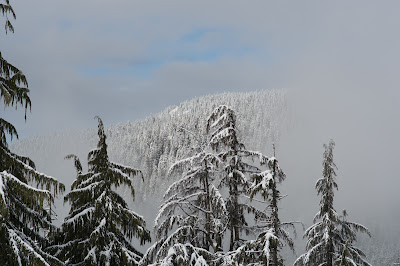

 I am sure most, if not all of it, would disappear.