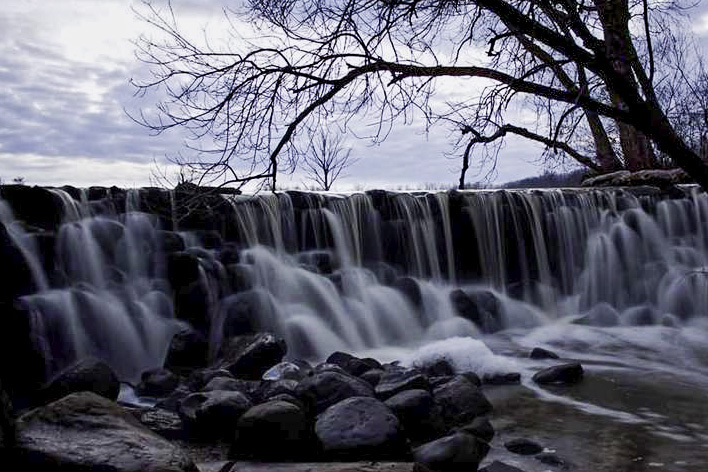
My first post here and my first photo after learning more about the manual settings on my 50D (I'm just getting started into photography). This photo is straight off the camera, no photoshopping done to it at all. Tell me what you think.
The shutter speed is a bit slow (too creamy) but not far off. I don't see anything blown out so the exposure while dark is probably workable. It seems sharp at web size so focus is good.
I will let other speak about composition, but I would maybe take some off the bottom and right side. But be careful not to let the horizon get centered or you will get complaints.
The biggest issue here is processing, or in your case lack of. I am sure you could bring up the shadows a lot more. But we would need to know what post processing programs you have and what your skill level is. I assume you shot in jpg but if in raw, you have something to work with.
This was shot in RAW, I believe f3.5 and the shutter speed was 2 or 3 seconds with the Canon 18-55mm kit lens. Picture was taken about 4:30 in the afternoon, pretty much right at sunset. I played with the settings but was having a hard time not blowing the sky out trying to lighten up the waterfall. This was the closest I could get. Photo editing software I have is CS5 though I really don't know too much about it yet. It was purchased thru the school my ex wife and I went to and I kinda walked away with it when we got divorced
You can probably open the image and while in ACR (Adobe camera raw) increase shadows up to maybe 40. Then get into the screen that does a gradient mask. You can drop the exposure down to the top of the waterfall about 1/2 stop and increase the overall exposure by the same amount. This will allow maybe 1 stop boost in the lower area. Be careful not to blow the white water though.
2-3 seconds is longer than I prefer. This is personal taste of course, but to get a silky look while retaining detail in the water, 1/10 second is a good starting place. I usually bracket from 1/5 to 1/15 and select the best looking water speed when I post process.
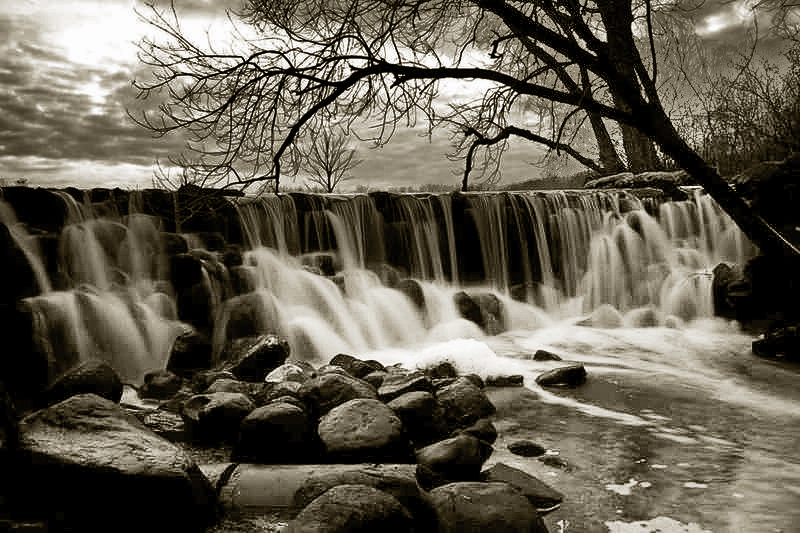
Quick edit. I opened in ACR used the gradient tool to pull the top down 0.35, then added +.9 exposure to the rest along with +40 shadows. I added some saturation +10 opened in Photoshop and ran another shadow highlight, cropped and saved.
Assocracer wrote:
There it is. It's got some funky colorization going on in the trees? What causes that?
Brown bark that appeared when I added shadow recovery. I would know better if I was working the raw. This was just an idea for what is possible. I would pull even more shadows with a raw and try to get some color in the trees while holding the sky down and prevent blowing .
Assocracer wrote:
That sounds way beyond my current skill level I'll have to try to figure out how to do that stuff.
This is a good place to ask and what I did was very basic. I am not skilled at capturing the screens or I would show them. However I use a later version so it might just confuse you when you try it on an older version.
But just for starters, open the file in ACR and look for a slider that increases the exposure. Then play with each slider to see what it does. Watch for changes that blow the exposure too high. There should be a histogram, it will show when you are too close to the end.
I forget what is available in CS5, but I am pretty sure it has shadows recovery, and know it has exposure, whites, blacks highlights and contrast.
Boost exposure as much as you can up to +1 (watch the right side of the histogram). Just bump the edge and pull back 5 points. My version has boxes that change from black to white to show when you exceed, not sure you have that,
Boost contrast, maybe 20 to start,
Pull down highlights, maybe -20 or watch the clouds for blown whites and pull back until they are gone.
Pull down whites for the same reason or until it looks good.
Increase shadow. +40 will work here I think.
Pull blacks back until it touches the left side then go back a bit.
You can add some saturation up to maybe 10.
All of this before you get into photoshop.
And it is non destructive, you can start over and change it all, the RAW is never changed.
Yeah, I did play around with something that seemed to increase the exposure on a picture of a hawk that I took with a Tamron 500mm mirror f/8 lens. Before I knew what I was doing with the camera.
Here is the original version:
and here is the version that I lightened up in Photoshop:
As you brightened it, the color cast became obvious and exaggerated. Fixing color comes towards the end of your Post processing learning curve, or at least for me as I am still working on it.
One of the hardest things to learn in post processing is to know when it is wrong or right and when to stop. All matters of visual judgement which is very subjective and hard to learn as objective science.
I think you did a nice job on your composition with the waterfall shot. It might have been a little better to include more to the left just a little.
Ben has given you some great advice so I won't go into any details.
An important thing to remember and understand when shooting RAW is that your unedited images will be just that, RAW. When you import RAW image files into your computer most if not all of your in-camera settings are ignored and you must apply your desired camera or custom profile settings. In other words, if you shot in say Landscape setting in your camera and it looks really nice on your cameras LCD display but after you import it, it looks bland then you would then select Landscape inside of your editing software camera setting menu. This is a VERY basic and general explanation I have given to try to keep it as simple as possible for right now.
The more you get out there and shoot and experiment with editing the faster and more you will begin to learn. It's a long but enjoyably fun journey with a ton of things to learn, but to me that's what is so great about photography. It's a fun and never ending journey with many doorways to open. Sometimes it takes us awhile to find the keys to open the door in front of us but once we unlock it, we then enter into the next room to discover and learn even more.
I myself am about at door #5 or 6 I think out of about 9,999,999,999 doors.
No photographer has ever even come close to reaching that last door. There is ALWAYS going to be something new to learn or discover.
So keep up the good shooting and post them up here should you need advice. Lot's of good and very talented folks here to help.
I think you've chosen a very challenging scene that is backlit by the sky making for an exposure conundrum ... i.e. properly expose for the sky and the waterfall is dark vs. properly expose for the waterfall and the sky is too bright. Welcome to the wonderful world of the camera doesn't record things the same way our eyes / brain interprets what we are looking at.
That said, it looks like the exposure is somewhere in the "split the difference" realm rather than a "sacrifice one" realm. From here it is a matter of using photo editing skills to bring the picture closer to where you want it to be.
The only other options are in the realm of bracketing for multiple exposure to combine portions of the image with proper exposure, or use some form of HDR software approach, etc.
Again, this is a very challenging scene, so take it with a grain of salt if it isn't how you wanted it to be. I'd say we all run up against that one at some point, and we still find it challenging to pull off well. Sure, why not just start off with a tough one.
Here's my take on things with a few tweaks toward a rendering of your capture. The upside is that I think you have some nice compositional elements in play with a nice range of tones, lines, mass, scale, shape and form to give your viewer the ability to move about the scene with that makes it worth the effort to work through the exposure challenges. A little blocked / blown in some places, but I think it can tolerate a bit without detracting too much from the overall vibe.
And don't feel embarrassed to ask simple questions about Photoshop. It can be intimidating to say the least. Start with the first thing you can't do but wish you could, even if it's just how to install or open it.
The journey of a thousand steps begins with the first one. We all started with that first one. It's a good journey, you'll make your way just fine. You just have to be willing to take the next step, however small or large it may be at a given place or point in time to keep progressing.
Then one day you look back and realize just how much you've progressed, to realize how much farther you can still go. The journey only stops when you do.
Welcome to the board...I joined about a year ago myself and not entirely new at the hobby, I'm returning after many years away.The people here have been most helpful and knowledgeable and are helping me improve both with my technique and my artistic vision.( sometime my lack of --)..Its been a great year....Enjoy.
The basic issue that that scene is extremely contrasty.
Yes, you can massage it in photochop, but the best solution is to find better lighting before pushing the shutter. IMO, 80% of "photography" should happen before the picture is taken. If you find yourself spending more time trying to "fix" an image than you did composing it, something is very wrong. I appreciate that you don't yet know just _what_ to do beforehand, but please don't give up and fall back on photochop as a substitute. "Photoshop is not photography." If you use your camera's jpeg output images as a "standard," and work on making those images look as good as possible w/o any post-processing, you'll be headed in the right direction. Once these look pretty good, THEN jump into post-processing of RAW images. This will allow you to add that little extra "pop" that a well composed and exposed image deserves.
Is there a time of day when the sun shines directly on the waterfall? If so, returning at the "right" time will yield a vastly better image. (And you'll enjoy the waterfall that much more, because it will look very pretty in person.)





 Great wealth of knowledge and experience here for sure.