Thank you very much LiveShots.
I have downloaded your file LVSTEST.DAT to my Mac computer and copied it to my memory card that also has my settings file with default name on it.
I then have successfully loaded either your or my settings file into my A1.
In both cases my A1 has rebooted successfully and the different settings have taken effect.
I see your “My Menu” settings with 2 pages of settings in addition to the last page of commands to modify/add/delete/etc. the My Menu pages in my A1.
Also when your settings file LVSTEST.DAT is loaded the LCD screen is active and my A1 doesn’t switch to the EVF when I put my eye close to the EVF.
Currently my settings file is loaded.
I will load your settings file again and activate the eye sensor detector.
Then I will change the Airplane mode from ON to OFF and study your settings.
Next I will follow this advice:
1) Download and install the Creators app on your iphone
1a) Create or Login to your Sony account
2) Go through the process to add a camera.
2a) Select the camera icon at the bottom of the screen
2b) Select the camera icon with the "+" symbol at the top of the screen
2c) Choose your camera from the list of "Cameras that can connect to this app"
2d) Select the black button: "My camera meets the required version"
3) On the camera, (Cnct/Remote Sht. -> Smartphone Connection). This will tell you to "Install Creators' App"
4) Follow the prompts from there. You should quickly see a photorealistic image of your camera model, with control options for Remote Shooting, Import, Network Streaming, and Camera Settings.
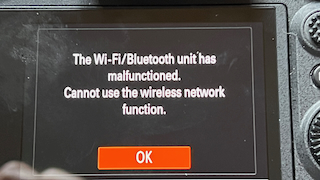
If your camera has the WiFi/Bluetooth problem, you will see an error message like the one in the attached photo. I suspect that alot of people are assuming that their unit is ok by simply connecting to a WiFi access point.
Douglas L wrote:
OK, I was very brave. I just updated the new to me A1 from FW 1.31 to 2.01. This body was purchased new by the previous owner in March 2022, presumably it was manufactured in 2021 or early 2022.
I have never used the wifi features in any of my cameras, this is the first time ever for me to try. It was able to detect the wifi networks, I entered the password, and got this screen. Hope it means it's working. I have another A1 that I bought new few months ago. I also just updated it from 2.0 to 2.01. I will try the wifi thingy on that one tomorrow to see if it works.
Multi-quote · Unlike · You and 1 member like this post.
“
I’ll keep you posted and would appreciate additional guidance.
As I have age-related poor eye sight I really don’t want to use my iPhone for this purpose.
Instead I would prefer to wirelessly send image s from my A1 to my Wi-Fi network with an iPad and an M2 Mac computer attached.
Thank you very much LiveShots.
I have downloaded your file LVSTEST.DAT to my Mac computer and copied it to my memory card that also has my settings file with default name on it.
I then have successfully loaded either your or my settings file into my A1.
In both cases my A1 has rebooted successfully and the different settings have taken effect.
I see your “My Menu” settings with 2 pages of settings in addition to the last page of commands to modify/add/delete/etc. the My Menu pages in my A1.
Also when your settings file LVSTEST.DAT is loaded the LCD screen is active and my A1 doesn’t switch to the EVF when I put my eye close to the EVF.
Currently my settings file is loaded.
I will load your settings file again and activate the eye sensor detector.
Then I will change the Airplane mode from ON to OFF and study your settings.
Next I will follow this advice:
1) Download and install the Creators app on your iphone
1a) Create or Login to your Sony account
2) Go through the process to add a camera.
2a) Select the camera icon at the bottom of the screen
2b) Select the camera icon with the "+" symbol at the top of the screen
2c) Choose your camera from the list of "Cameras that can connect to this app"
2d) Select the black button: "My camera meets the required version"
3) On the camera, (Cnct/Remote Sht. -> Smartphone Connection). This will tell you to "Install Creators' App"
4) Follow the prompts from there. You should quickly see a photorealistic image of your camera model, with control options for Remote Shooting, Import, Network Streaming, and Camera Settings.
If your camera has the WiFi/Bluetooth problem, you will see an error message like the one in the attached photo. I suspect that alot of people are assuming that their unit is ok by simply connecting to a WiFi access point.
Douglas L wrote:
OK, I was very brave. I just updated the new to me A1 from FW 1.31 to 2.01. This body was purchased new by the previous owner in March 2022, presumably it was manufactured in 2021 or early 2022.
I have never used the wifi features in any of my cameras, this is the first time ever for me to try. It was able to detect the wifi networks, I entered the password, and got this screen. Hope it means it's working. I have another A1 that I bought new few months ago. I also just updated it from 2.0 to 2.01. I will try the wifi thingy on that one tomorrow to see if it works.
Multi-quote · Unlike · You and 1 member like this post.
“
I’ll keep you posted and would appreciate additional guidance.
As I have age-related poor eye sight I really don’t want to use my iPhone for this purpose.
Instead I would prefer to wirelessly send image s from my A1 to my Wi-Fi network with an iPad and an M2 Mac computer attached.
Thank you very much LiveShots.
I have downloaded your file LVSTEST.DAT to my Mac computer and copied it to my memory card that also has my settings file with default name on it.
I then have successfully loaded either your or my settings file into my A1.
In both cases my A1 has rebooted successfully and the different settings have taken effect.
I see your “My Menu” settings with 2 pages of settings in addition to the last page of commands to modify/add/delete/etc. the My Menu pages in my A1.
Also when your settings file LVSTEST.DAT is loaded the LCD screen is active and my A1 doesn’t switch to the EVF when I put my eye close to the EVF.
Currently my settings file is loaded.
I will load your settings file again and activate the eye sensor detector.
Then I will change the Airplane mode from ON to OFF and study your settings.
Next I will follow this advice:
1) Download and install the Creators app on your iphone
1a) Create or Login to your Sony account
2) Go through the process to add a camera.
2a) Select the camera icon at the bottom of the screen
2b) Select the camera icon with the "+" symbol at the top of the screen
2c) Choose your camera from the list of "Cameras that can connect to this app"
2d) Select the black button: "My camera meets the required version"
3) On the camera, (Cnct/Remote Sht. -> Smartphone Connection). This will tell you to "Install Creators' App"
4) Follow the prompts from there. You should quickly see a photorealistic image of your camera model, with control options for Remote Shooting, Import, Network Streaming, and Camera Settings.
If your camera has the WiFi/Bluetooth problem, you will see an error message like the one in the attached photo. I suspect that alot of people are assuming that their unit is ok by simply connecting to a WiFi access point.
Douglas L wrote:
OK, I was very brave. I just updated the new to me A1 from FW 1.31 to 2.01. This body was purchased new by the previous owner in March 2022, presumably it was manufactured in 2021 or early 2022.
I have never used the wifi features in any of my cameras, this is the first time ever for me to try. It was able to detect the wifi networks, I entered the password, and got this screen. Hope it means it's working. I have another A1 that I bought new few months ago. I also just updated it from 2.0 to 2.01. I will try the wifi thingy on that one tomorrow to see if it works.
Multi-quote · Unlike · You and 1 member like this post.
“
I’ll keep you posted and would appreciate additional guidance.
As I have age-related poor eye sight I really don’t want to use my iPhone for this purpose.
Instead I would prefer to wirelessly send image s from my A1 to my Wi-Fi network with an iPad and an M2 Mac computer attached.
Thanks again for your help, K-H.
May 10, 2024 at 10:27 AM
Previous versions of k-h.a.w's message #16543571 « A1 Firmware v 2.01 is out now. On the fence about installing it though. :) »