Previous versions of mahimihi's message #16361153 « Leica M10-P and M10-R Touchscreen INFO display »
mahimihi Offline [X]
Re: Leica M10-P and M10-R Touchscreen INFO button
Desmolicious wrote: mahimihi wrote:
1bwana1 wrote: Fred Miranda wrote: 1bwana1 wrote:
Yep, use this feature extensively on my M10-P. The touch menu on the M11 is even better. I love the Leica usability features. So straight forward and efficient. A joy to shoot.
Indeed, Leica has taken a step further in refining this aspect with the M11, primarily adopting the software design and functionality from the Q and SL camera bodies. I find it quite handy when using it with my M10-R, especially for wirelessly transferring files to Lightroom. All I have to do is press the Wi-Fi button on the screen and wait for the camera to connect to my Mac.
You know it is not uncommon for people not to be aware of this functionality on many cameras. The LV screen on my Sony also displays most of the relevant camera data. Most people are not aware that these are also hot and you can click on them and adjust them.
That’s because Sony users don’t read camera manuals either. … they can use the Info button ….."read the manual"? I'm sure that will be a lot of fun and very informative.
Yes. Reading the manual would be.
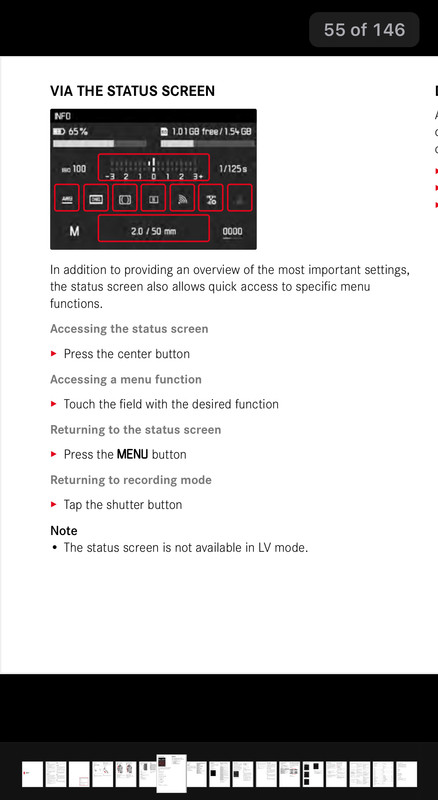
For example…
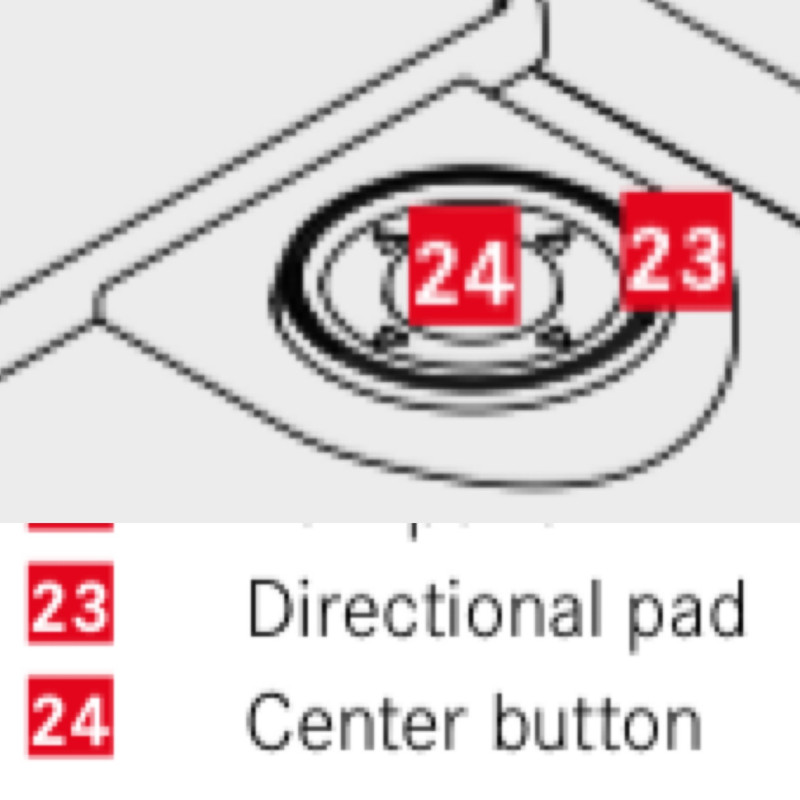
Also now you and everyone else knows the button is literally called the CENTER button and not the INFO button since this isn’t the M240. Again it’s in the manual.
Oct 08, 2023 at 01:13 PM
mahimihi Offline [X]
Re: Leica M10-P and M10-R Touchscreen INFO button
Desmolicious wrote: mahimihi wrote:
1bwana1 wrote: Fred Miranda wrote: 1bwana1 wrote:
Yep, use this feature extensively on my M10-P. The touch menu on the M11 is even better. I love the Leica usability features. So straight forward and efficient. A joy to shoot.
Indeed, Leica has taken a step further in refining this aspect with the M11, primarily adopting the software design and functionality from the Q and SL camera bodies. I find it quite handy when using it with my M10-R, especially for wirelessly transferring files to Lightroom. All I have to do is press the Wi-Fi button on the screen and wait for the camera to connect to my Mac.
You know it is not uncommon for people not to be aware of this functionality on many cameras. The LV screen on my Sony also displays most of the relevant camera data. Most people are not aware that these are also hot and you can click on them and adjust them.
That’s because Sony users don’t read camera manuals either. "read the manual"? I'm sure that will be a lot of fun and very informative.
Yes. Reading the manual would be.
For example…
Also now you and everyone else knows the button is literally called the CENTER button and not the INFO button since this isn’t the M240. Again it’s in the manual.
Oct 08, 2023 at 12:58 PM
Previous versions of mahimihi's message #16361153 « Leica M10-P and M10-R Touchscreen INFO display »