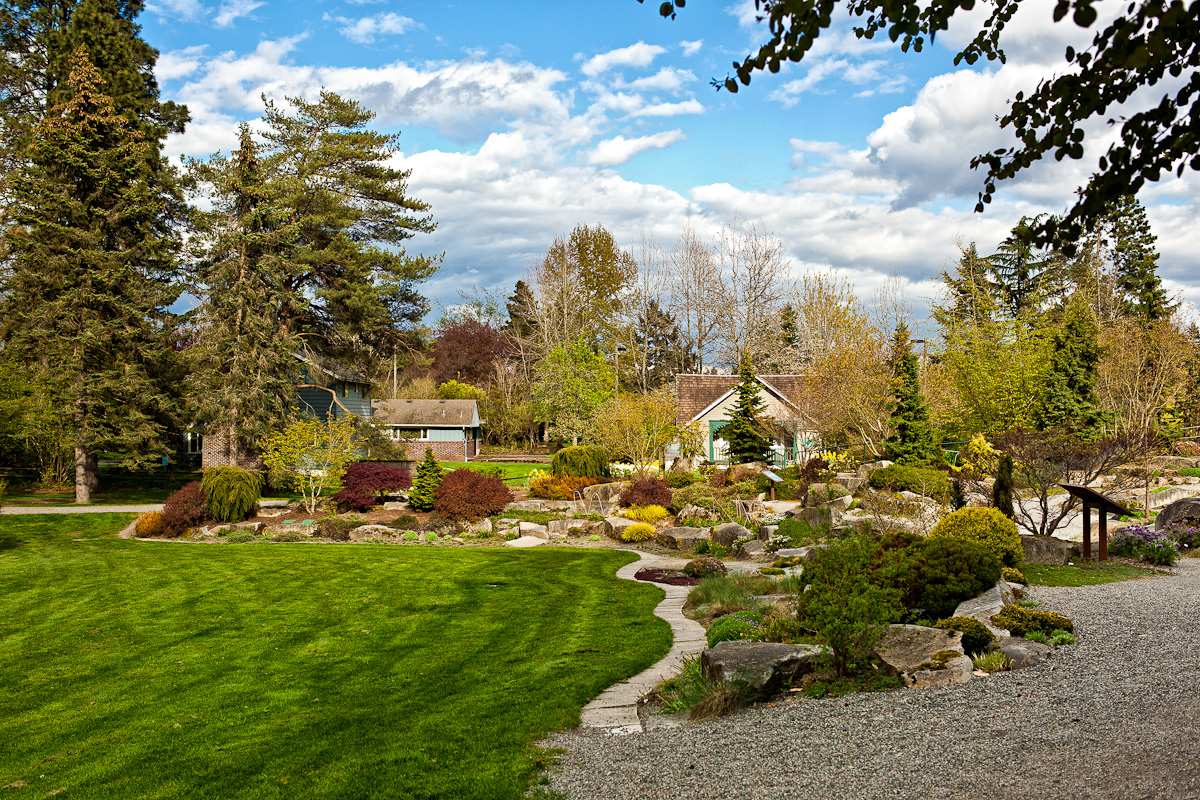
Possibly a bit overdone: reset original dng, adjustments and pre-sharpening in LR, NIK Sharpener 3.0 in PS5, resize and output sharpening again in LR. Just to show something completely different
Mirek, can you post a link to (or PM me) a full-sized JPEG version of your image, so I can post downsizing comparisons without the LR/Aperture initial conversion differences?
Great discussion, but a bit over my head and dealing mostly with PS, which I don't use. I have recently purchased LR,now 3.4, and still learning how to use it. Before that, I've used DPP for many years, Capture NX2 and PSE8.
I've very interested in getting the best web reproduction for these forum websites and my own. So any help is appreciated.
I don't know anything about multiple sharpening steps, masking, layers, etc. Even in Elements, I've kept it simple, and no PS of higher types. For me, it is all done in one layer on RAW files.
The "usual" settings that I adjust for Canon RAW are like:
Lens Profile
Exp: -0.32 to -.67
Recovery: 8
Fill: 10-40
Black: 5-7
Contrast: +25 to 35
Clarity: +20
Sat: 0 to +3
Sharp: +55
Radius: 0.5-1.0
Masking: 5-10
Lum: 5-10
These settings look good on my 23" HD monitor, but seem soft on publication here. I'd like to increase snap without making the images look oversharpened or over-saturated (which I see too often on forums).
I've been exporting either with each forum's method of publishing images, or using Photobucket. I'm exporting via LR, using 60 for quality and 1200 for pixels and 72 ppi. Sharpening for screen is turned off.
That's about it. So any help on these parameters would be welcome!
@Gunzorro: You should turn sharpening for screen on if you upload your exported files without further PP. If you only sharpen in the develop module of LR, the sharpening is applied before resizing. Resizing blurs fine detail, so you have to do some sharpening to recover the detail (unless you don't want it to be visible). Also, quality setting 60 is still a bit low and can cause posterization (color banding) in things like smooth blue skies. I'd say try 75.
mpmendenhall wrote:
Mirek, can you post a link to (or PM me) a full-sized JPEG version of your image, so I can post downsizing comparisons without the LR/Aperture initial conversion differences?
OK, Here's my conversion from Mirek's .jpg to the larger 1200 width; this one aims for fairly high sharpening, but trying not to completely overdo it. convert 35-1-4.jpg -quality 98% -interlace line -filter gaussian -define filter:support=0.55 -unsharp 7.0x4.0+0.7+0.10 -resize 1200x1200 20110504_scaled_d.jpg http://praetoriusphoto.images.s3.amazonaws.com/fmforums/20110504_scaled_d.jpg
I've noticed that my conversions tend to show less sharpness in the bottom-center grass area than some of the others. I think this is more true to the full-sized source file (the bottom/front area is indeed going soft out of the depth of field), though one might prefer to present the conversions that show a more uniform sharpness across the field than is truly present at full size.
Here is my try. Doing this reminds why I don't like working with 5D/5DII files. The colours and sharpness start in a place where I feel that they are lacking, and nothing I do can ever really recover from this without overcooking it. The files feel brittle, and it is so easy to overdo something. Sorry for inevitably stepping on feet with that comment.
Of course, if bringing out the sharpness in the foreground grass is a prioirity, this can be easily done by adding in an additional stronger USM component at a smaller feature scale (to match the partially-defocused grass), while slightly backing off on the other sharpening components to maintain a similar overall look: convert 35-1-4.jpg -quality 98% -interlace line -filter gaussian -define filter:support=0.65 -unsharp 8.0x5.0+0.3+0.10 -unsharp 3.0x2.5+1.5+0.001 -resize 1200x1200 20110504_scaled_e.jpg http://praetoriusphoto.images.s3.amazonaws.com/fmforums/20110504_scaled_e.jpg
Looking at some of these results, it is astounding that we all started with the same image. Luka's and mine look like they were taken minutes apart, with the sun peeking out from the clouds in his, and staying behind the clouds in mine
I deliberately resisted the temptation to boost the colours too much, because I don't think it looked like that at the time of capture, and the brittle look comes in very quickly in this file, in the branches of the trees in the distance for example. What I mean with brittle is that each pixel doesn't look like it is connected to its neighbours, just a bunch of pixels. I tried to keep mine coherent, but the weakness of the original capture makes this unsatisfying.
I am not saying that the capture was badly done, I think it is just that Canon CMOS sensor + Canon AA filter look that I don't like.
So far I like Luka's results the best. I think Mirek came the closest to that of all the others.
But then again sharpening is a personal issue and I doubt we will get consensus on what is the proper amount of sharpening.
I've looked at all of these for about 15 minutes now. Luka's is clearly the sharpest w/o any artifacts. My second attempts are close but get some artifacting in the trees.
Luka is that using the same script you have posted before?
Filter->Sharpen
Filter->Sharpen
Resize 3000 pixels long side, just bicubic only
Filter->USM 150% .5 radius
Resize 2000 pixels long side, just bicubic only
Filter->SmartSharpen 77%,.3 radius
Resize 1024 pixels long side, just bicubic only
Filter->SmartSharpen 100% .2 radius
No, I think I used a modified version that I usually use for M9 files as I wanted a less aggressive sharpening. It doesn't apply the two sharpens in the beginning and works in LAB mode (all my sharpening is done on the L channel nowadays).
Luka, isn't the bulk of the sharpening happening in the USM stage? How much would adding two Just Sharpen stages like you suggested a long time ago for the 5d2 change the result?
The initial sharpening is so high that even after the first resize there are white edges everywhere. This drops the overall contrast and of course adds artifacts.
Note that the above is from an M9 file. For 5DII files the 2x sharpening is usually good and not destructive. It's the M9's lack of an AA filter and higher per-pixel sharpness that means that you have to take it easy with the sharpening.
Thanks for the tips. I took the advice and 1) used Photobucket, 2) added "Sharpen for Screen" to the Export in LR, and 3) processed at 80 in Quality. Next I'll try going from 1200 to 1400 and see if it gags.
Next question: what is the simplest way to pull 100% crops from images in LR? Let's say I have a full image at 1200, and I want to show a 100% close-up of part of that image at 1200 to accompany it.
Cool, thanks Luka for the comparison shots. I have been wondering if maybe this routine with the two sharpens at the beginning maybe a little too much for 1ds3 files. Not sure if the AA filter is weaker in the 1ds3 or 5d2?
I was wondering which step maybe needing to be reduced but now you have given me something to check.
I tried to fix the lower contrast of my previous attempts. I moved the black point a bit and added USM radius 40, amount 26, opacity 30%. Here is the result: