Pondria wrote:
Re: Whether Canon is taking advantage of proprietary info in the raw data...
Certainly I do not know for sure. However, I doubt. Canon is not competing with Adobe in SW business. Actually, Canon's best interest is to help Adobe so that Canon images look the best out of ACR and PS etc.
I tend to agree with you but Canon must believe that they have some competive benefit by keeping their RAW format Proprietary. Otherwise, a Canon RAW file would be output as a DNG.
Pondria wrote:
Tariq,
I should apologize that I challenged your first hand experience
I know it was just in good fun.
Pondria wrote:
When "color, contrast, sharpening" are matched, how the pixels can differ ? It seems that I am missing something here.
Can you identify where in the scene DPP version has more "variation of the tone between the containers" than my ACR version ? I see the opposite.
And I didn't know that DPP supported calibration. I should try that. Thanks !
I will post some side by sides to show the pixel differences/artifacts when I get a chance between ACR and DPP.
The sides of the containers and the decking all seem to have the same sort of veiled tone in your posted ACR example. Very "muddy" looking. In the DPP verson, there is more local contrast between the various containers and in the Decking. This is something which could be tweaked in ACR to give whatever rendtion one prefers. I think my last posted example out of ACR is more accurate and close to the DPP version using Eyeballs settings as a start but adding shadow and highlight split toning. Again, I think Eyeball has shown that with a lot of tweaking, one can match DPP for color overall. The advantage of DPP is that there is no need to go through all that effort with ACR as DPP gives a very good straight RAW conversion right off based on the camera settings. Seeing that is what led to the start of this thread. I then additionally learned that ACR introduces some artifacts which DPP does not, even with sharpening at 0.
I read on this very site over a year ago that a poster's first hand knowledge from a canon rep was that canon does in fact make use of proprietary color tags in it's files that is not available in other programs. Makes sense to me why more precise color would result in more apparent sharpness, but I'm no expert. It's just that in my experience, the appearance of the dpp pics did in fact seem to support the idea that it is rendering color better.
This thread just depresses me overall. I've been spending v. much time over the last few months getting to know Lightroom b/c it was so much better at catalog management and raw rendering than ACR alone had been in v.3 or whatever. Then I am forced to acknowledge once again how much I like the results of both Bibble and DPP. The Sharpie plugin Cogitech mentioned is particularly a "wow" thing, esp. if you use the pro version.
Having said that, and not to challenge anyone's opinions on this thread in particular, what confuses me here is the number of professional photographers I see staking their word and reputation on Lightroom, or tools other than DPP. I went to a seminar hosted by one of the "explorers of light" this summer, and his tool of choice was Capture One. he didn't even mention DPP. Michael Reichmann and others swear by lightroom. And these are guys who apparently make decent buck advising people how to get the ultimate quality print. Not to be naieve, but these guys don't promote allegiance to anything else necessarily - they don't say "use canon because it will ...." or "use nikon because it will ..."; so if bibble, or dpp, is that much more superior, how come these guys don't endorse it? Are these artists really that beholden to the adobe dollar?
I've never seen reference to DPP in any color theory discussions on yahoo. Am I being duped? Are these guys just shills? Because if not, one interpretation may be that it's not as big a deal as we make it out to be, i.e. the discrepancies between bibble/dpp/lr/acr, etc. If that's the case, I can happily go back to my new one-tool workflow. If not, I'm fooked, as they say . Seriously. I'm really confused.
You guys made me curious about the jaggies/artifacts issues with ACR so I posted a question over on the Adobe camera raw user-to-user forum. You can see the responses here:
The main responder was Jeff Schewe. As I mentioned before, Jeff has collaborated with the Adobe team, is co-author of the soon-to-be-released camera raw book that he co-authored with the late Bruce Fraser, and has his own studio/photo business. He also is a member of the Pixel Genius gang, the guys who created Photokit Sharpener.
As I said in my reply there, I am not totally convinced but my feelings somewhat echo joe's in the previous post. You see professional people like Jeff Schewe who have studied the tool and collaborated in its development who believe it does just what it is supposed to. On the other hand, there are obviously pros who own the tool and still find it lacking compared to other raw converters on the market (and as Joe points out, these are people who would really, really like it to work since it would greatly speed and simplify their work flow).
I'm just an "enthusiast" so it's not life or death for me but I still would like to get the best out of my images without a lot of hassle.
Edited by Eyeball on Oct 25, 2007 at 09:36 PM GMT (Reason: Added Jeff's connection to PK Sharpener)
Eyeball wrote:
You guys made me curious about the jaggies/artifacts issues with ACR so I posted a question over on the Adobe camera raw user-to-user forum. You can see the responses here:
The main responder was Jeff Schewe. As I mentioned before, Jeff has collaborated with the Adobe team, is co-author of the soon-to-be-released camera raw book that he co-authored with the late Bruce Fraser, and has his own studio/photo business.
As I said in my reply there, I am not totally convinced but my feelings somewhat echo joe's in the previous post. You see professional people like Jeff Schewe who have studied the tool and collaborated in its development who believe it does just what it is supposed to. On the other hand, there are obviously pros who own the tool and still find it lacking compared to other raw converters on the market (and as Joe points out, these are people who would really, really like it to work since it would greatly speed and simplify their work flow).
I'm just an "enthusiast" so it's not life or death for me but I still would like to get the best out of my images without a lot of hassle. ...Show more →
I was a little disappointed by the response and logic which Jeff Schewe gave concerning these Jaggies on the thread you posted. Its obvious that there is a problem with the sharpening in ACR/LR when compared to DPP or C1 Pro. Give a Canon 5D Raw image the same amount of sharpening in these RAW programs and it is only the ACR/LR version which give the jaggies on these diagonals. Jeffs response seemed to suggest that:
1) its inevitable
2) it does not matter.
I hope that it does matter to Adobe, as it does certainly matter to me and I'm sure plenty of others.
joekraft wrote:
I read on this very site over a year ago that a poster's first hand knowledge from a canon rep was that canon does in fact make use of proprietary color tags in it's files that is not available in other programs. Makes sense to me why more precise color would result in more apparent sharpness, but I'm no expert. It's just that in my experience, the appearance of the dpp pics did in fact seem to support the idea that it is rendering color better.
This thread just depresses me overall. I've been spending v. much time over the last few months getting to know Lightroom b/c it was so much better at catalog management and raw rendering than ACR alone had been in v.3 or whatever. Then I am forced to acknowledge once again how much I like the results of both Bibble and DPP. The Sharpie plugin Cogitech mentioned is particularly a "wow" thing, esp. if you use the pro version.
Having said that, and not to challenge anyone's opinions on this thread in particular, what confuses me here is the number of professional photographers I see staking their word and reputation on Lightroom, or tools other than DPP. I went to a seminar hosted by one of the "explorers of light" this summer, and his tool of choice was Capture One. he didn't even mention DPP. Michael Reichmann and others swear by lightroom. And these are guys who apparently make decent buck advising people how to get the ultimate quality print. Not to be naieve, but these guys don't promote allegiance to anything else necessarily - they don't say "use canon because it will ...." or "use nikon because it will ..."; so if bibble, or dpp, is that much more superior, how come these guys don't endorse it? Are these artists really that beholden to the adobe dollar?
I've never seen reference to DPP in any color theory discussions on yahoo. Am I being duped? Are these guys just shills? Because if not, one interpretation may be that it's not as big a deal as we make it out to be, i.e. the discrepancies between bibble/dpp/lr/acr, etc. If that's the case, I can happily go back to my new one-tool workflow. If not, I'm fooked, as they say . Seriously. I'm really confused.
You are correct. It's not as big a deal as we make it out to be. If anything, that's what I've learned from this thread. I also don't regret being a part of the discussion, because I learned a lot and feel as though I might have finally convinced a few souls that Bibble (despite the name) is actually quite a nice option.
The bottom line for me is; I use Linux, so I use Bibble. It is my choice and I am very happy with it. I do not expect everyone to make the same choice. Whatever slight differences there may be between Bibble and the others is a small price to pay for the benefits I get from using Linux as my OS.
Cheers to all and their choices. Now get out and shoot!
Pondria - the colour checker shows 24 colours ( some more) but there are millions of colours that can be captured with a good sensor. It would therefore suggest that a compromise is being made somewhere when calibrating to these charts?
'Jaggies' on angled lines is one of the few flaws with the 5D.I think it's a problem with the sensor ( large pixels and weak AA filter) rather than the RAW convertor. Different convertors may show it more or less but it's still there. One final point - I would suggest everyone downloads a Beta copy of C1 4 - it really is an improvement on previous versions and something about the images from it look just right.
shirozina wrote:
Pondria - the colour checker shows 24 colours ( some more) but there are millions of colours that can be captured with a good sensor. It would therefore suggest that a compromise is being made somewhere when calibrating to these charts?
In case anyone is interested, Rags Gardner now has ACR calibration scripts available for the QPCard (30 color patches) and the IT8/Q60 card (228 patches) in addition to the 24 patch ColorChecker.
I have made an initial attempt with the Q60 but I need to do it again. It has a glossy AND dimpled surface that makes it a challenge to shoot without getting glare.
If ACR is limited in its calibration functionality, I believe it has more to do with the limited controls (2 per channel plus shadow) rather than a lack of color swatches. It seems difficult to get things like skin tones AND saturated colors both on spot with the same calibration.
I will have to say though that based on past posts Pondria has had some of the best success calibrating ACR that I have seen.
Eyeball wrote:
In case anyone is interested, Rags Gardner now has ACR calibration scripts available for the QPCard (30 color patches) and the IT8/Q60 card (228 patches) in addition to the 24 patch ColorChecker.
I have made an initial attempt with the Q60 but I need to do it again. It has a glossy AND dimpled surface that makes it a challenge to shoot without getting glare.
If ACR is limited in its calibration functionality, I believe it has more to do with the limited controls (2 per channel plus shadow) rather than a lack of color swatches. It seems difficult to get things like skin tones AND saturated colors both on spot with the same calibration.
I will have to say though that based on past posts Pondria has had some of the best success calibrating ACR that I have seen.
I have used the linked color calibration technique in the past with my Fuji S2 and ACR with partial success. By that, I mean that it turned out to be a good starting point which required further tweaking.
shirozina wrote:
'Jaggies' on angled lines is one of the few flaws with the 5D.I think it's a problem with the sensor ( large pixels and weak AA filter) rather than the RAW convertor. Different convertors may show it more or less but it's still there. One final point - I would suggest everyone downloads a Beta copy of C1 4 - it really is an improvement on previous versions and something about the images from it look just right.
I agree that even with DPP, one will still get "Jaggies" in certain situations. And like you say, and I believe what Jeff was saying in the other Adobe thread, its due to color interpolation of the Bayer mosaic and with the 5D, the weak AA filter. My question and concern is: Why does ACR give such worse results compared to both DPP and C1 Pro in this regard.
shirozina wrote:
Pondria - the colour checker shows 24 colours ( some more) but there are millions of colours that can be captured with a good sensor. It would therefore suggest that a compromise is being made somewhere when calibrating to these charts?
We need to think about what is calibration.
How many reference points do you need to calibrate a Volt meter ? Only few right ? Even though it has 12bit or 16bit resolution.
If the response is linear and 1 dimensional, you need just 2 points to calibrate. We are talking about 3 Axis and reasonably linear system, you probably need some more points than just 2. It is fair to challenge whether 24 is enough. It is enough for ME.
What I have noticed in the camera calibration process is that once the major axis are corrected, further correction returns no noticeable benefit. I used to calibrate manually with Excel sheet without using the scripts. First, correct the gamma with few gray patches. Then I just used 3 saturated Red, Blue and Green patches in the 3 rd row. That gave me pretty good result. Later, I started using scripts which uses all 24 patches. But the results are pretty similar to the ones from only 3 patches.
Thanks to EVERYONE who has contributed to this thread, with special thx to Tariq for launching it. These are the threads that really make FM interesting.
I started following this one about a week ago and just didn't have time to install the DPP upgrade. Finally got there this morning, and I like what I see so far. I tried DPP 1.6 when I had my 20D and it was a convincing argument for ACR. Since then I've moved on to a 1DsMkII, and DPP has improved considerably - beyond ACR, at the least. Sorry, cogitech, the Bibble gods aren't moving me yet...
Just printed my first image from DPP processing - I tried the same image in both ACR and DPP and couldn't get anywhere near the DPP image with ACR. I've been using ACR for the past three years, so I'm not a noob blundering around (well, I am with DPP).
I print every image I end up being satisfied with - perhaps one in five hundred, perhaps less, who knows. The slightly slower workflow, then, doesn't bother me, the only thing I do in batch is deletions. Thk the lord I don't do sports or weddings! I'm ruthless with the Epson P5000 - but a lot of things are easy to get by with cursory examination.
I'm moving my RAW processing over to DPP based on what I've read here, but more because of what I see - thx again, Tariq, without this thread I would have kept on walking by -
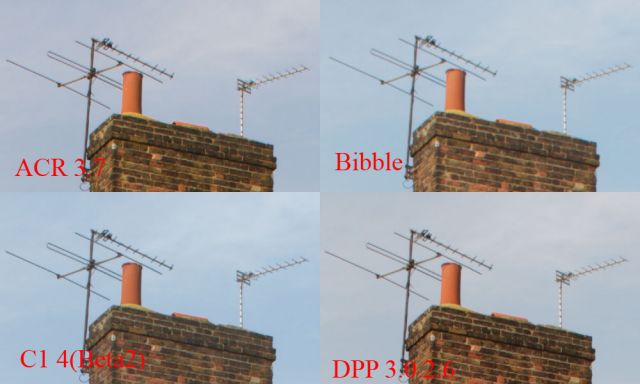
Here is a comparison between 4 RAW processors and how they handle 'jaggies'. All sharpening and NR was turned off as well as any other image processing /enhancement settings. As I do all my sharpening and other image enhancements/adjustments in PS this is relevent to my workflow - if you like to sharpen and adjust in the RAW processor then this test is not for you so please don't get upset and start telling me that it is flawed or not a proper representation etc. I welcome your observations though.
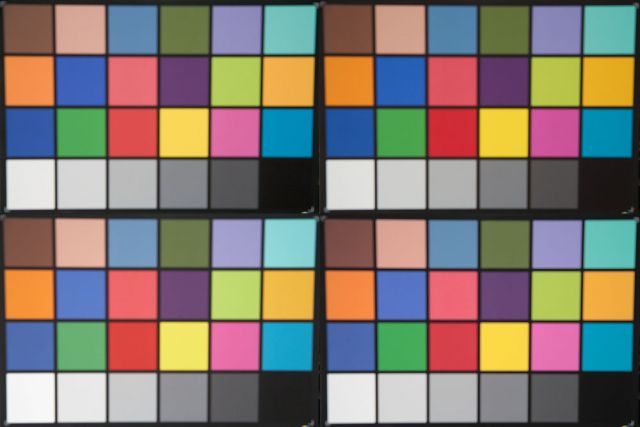
And here is how they all deal with a 24 patch colour chart - same order, same neutral settings. Colour balanced on the 2nd grey patch from the left. I shot this OOF to remove any surface texture artefacts. BTW the DPP setting on both these tests was 'neutral' which I find is the most err - neutral. This test is probably more open to question and I accept it's many obvious flaws. In the end all theses apps are available for download and most people have Photoshop so it's easy enough to do your own as well.
Edited by shirozina on Oct 31, 2007 at 07:14 PM GMT (Reason: image update)
Thanks Shirozina, C1 seems to be fine for the 5D files. We recently made a test with LR and C1-4b processing p30 files, the C1 was so much better I almost couldn't belive it. Though in this case DPP seems to be at least as good as C1
.Pondria wrote:
We need to think about what is calibration.
Colour is very subjective. I know someone working in printing art books. They actually dont work with calibrated screens. What they do is look at the sample, the original and sometimes they also know the colour of the object. Then they set up the printer to reproduce these values in print.
Now as a photographer you want to make a pleasing picture! This may mean to use colour in a creative way or to reproduce the colours as you shoot them. If you pass your picture to your client for printing or use on the net, it is important that your CD(DVD comes along with a print as sample and the correct colour space for the web. I would also give a print when you give away a file for large prints.
That is the only way I know of which makes sure your work will be handled as you see it yourself. Of course my experience is quite limited and people here may have another opinion on this
Bibble, once again, shows that it does *not* do any hidden sharpening of the file. Hence a complete lack of jaggies. It does tend to saturate the colours more than others on the colour chart, though. What tone curve did you have Bibble set to?
Tone curve was set to 'camera' - whatever that means?
I'm liking C1 4 a lot - seems to have a bit of inbuilt sharpening but not enough to creat a big problem with jaggies. It also seems to control CA and other fringing very well but doesn't have a direct CA control panel. The highlight recovery slider is welcome and Beta 2 seems to work with my 64bit XP.
I'm pretty certain the "Camera" tone curve tries to interpret the curve set in the metadata (Picture Style?) of the RAW file. It seems to work for the most part, but I do not use Picture Styles at all, so I cannot confirm this. What I do know is that I have my camera set to the default "Standard" picture style and when I choose "Camera" tone curve it seems to look a lot like a "Standard" picture style (contrasty and saturated) as the colour chart shot looks.
Anyone who uses Bibble seriously will typically set the tone curve to default to "Very Low", which provides a much more neutral base tone curve to start with. Any curve tweaks or custom curves are then applied on top of that base.
It is the little nuances like this that can make a Bibble experience go from "OK" to "excellent". Unfortunately, there seem to be enough of these nuances to scare a lot of people away. If that has been the case for anyone here, I understand, but I encourage you to try Bibble 5 when it is released.
I'm definatley keeping it in my 'arsenal' of RAW processors due to the lack of inbuilt sharpening but C1 4 is definatley looking like my 'weapon of choice' for now.
I have found that actually "Faithful" and not "Neutral" results in the most accurate in studio color reproduction in DPP, something which Jon mentioned earlier as well. You will notice this most in the reds but it will also show in other colors as well. Yes, DPP is reading all the Picture Style settings with regard to contrast, Saturation, tone, etc. Just from working in DPP daily for the past week, I can tell you that at least with my 5D, nothing comes close, not even C1 Pro, with regard to subtle color nuances and accuracy as DPP. This goes beyond the simple Macbeth color rendition chart test. I can get that chart to look just about identical in all these Raw processors BUT when I'm reproducing something like an oil pastel with very subtle hues, It is only DPP which I can one click WB with my Macbeth chart, do a straight conversion and slight PS level adjustment and perfectly match and reproduce the original with the first test print! With both ACR and C1 Pro, there is at least a few test prints and selective color adjustments which must always be made. This is something pretty amazing to me as I have been doing this for quite some time and its pretty rare to nail things like this perfectly right off but I guess it makes since that Canon would have the most accurate RAW processor for their cameras.


 . Seriously. I'm really confused.