p.1 #1 · FLX Film Lab - physics-based film simulations
Hi all,
over the last couple of months, I have been developing a film simulation app for myself. I’m quite happy with the results and so I decided to make it available to the public as a free, open-source Mac app.
The app is called “FLX Film Lab” and you can find it here: https://github.com/felixjablonka/flx-film-lab
(to install, download the .dmg file in "releases" and make sure to read the readme file, as a non-signed app like this requires running a command in Terminal once before it can be opened as normal)
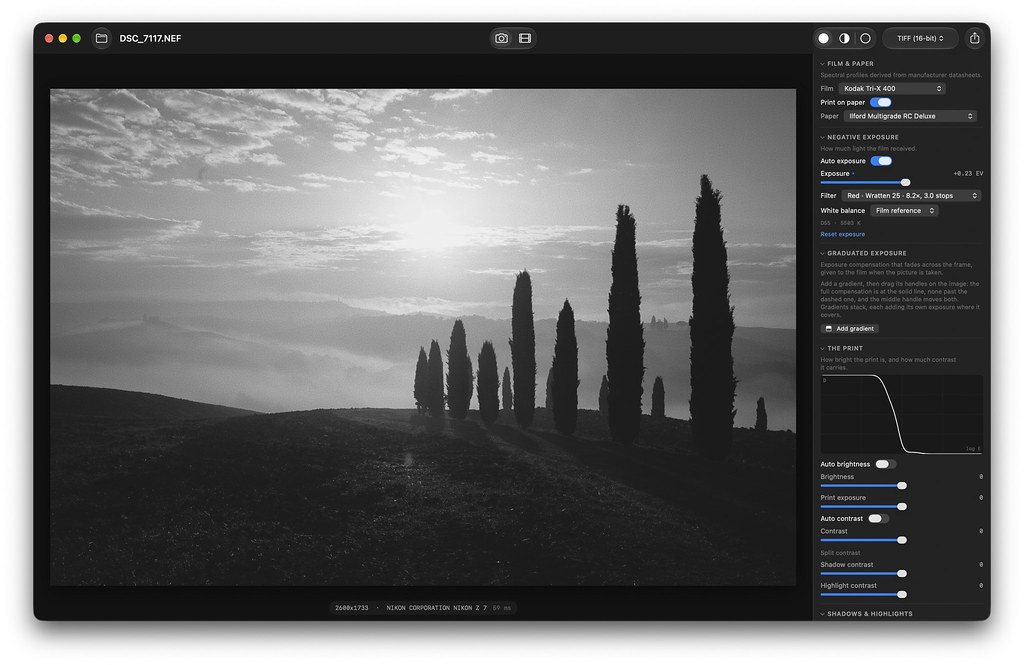
What’s special about this app is that these are not just presets. Instead, the app is based on a physics model that simulates the analog photographic process: light exposes a virtual negative, which is then printed on virtual paper. And the film and paper react to light based on their spectral sensitivities as published in their respective datasheets.
The core model is based on another open-source project on github called “spektrafilm”. This is what enabled me building this app, so full credit to Andrea for his amazing idea! Definitely worth checking out and it also has a GUI, but I didn’t find it ideal for my needs, which is why I decided to build my own.
Here’s what I built with my app:
- Faster, native Mac app with more intuitive user interface
- 16 additional film stocks and a complete rebuild of the slide films
- Additional tools to make the workflow more of a hybrid between digital editing and darkroom print controls (adding pre-print exposure adjustment, graduated filters, etc.)
- Darkroom controls inspired by NegPy
- Highlight Diffusion and Bloom effects
- “Motion” mode to grade log video clips and export LUTs from the app
I am also posting this in the Leica & Alt forum, because there is a special benefit for users of Panasonic cameras:
Ultimately this process can be translated to a function of each pixel’s color (all three input channels + exposure level) and thus it can be baked into a 3D LUT. The LUT should be based on Log formats because they offer full range data before tone mapping or clipping.
For most cameras this limits the use of these LUTs to video, but on Panasonic cameras you can apply it as a Real Time LUT, using V-Log as the base picture style. This means you can get a “physically accurate” film look straight out of camera!
I have just bought a Lumix S9 and here are some straight OOC images from this morning, using Portra 800, Ektar 100 and Fuji C200 LUTs (I also had a highlight diffusion filter on the lens):
I hope some of you will enjoy this app and find it useful. And I will certainly keep working on it.
Some things on my to do list for future releases:
- Crop and Rotation
- Windows support (this will need some time)
- Explore if the “print” part of the simulation can be used for more accurate film scanning without the guesswork in NLP and other film scanning apps
p.1 #5 · FLX Film Lab - physics-based film simulations
Pretty clean interface! A few glitches like auto brightness stops working after a bit, or some presets flip to negative and you have to uncheck "print on paper" to get them positive. If you could double click sliders to reset them to default values, that would help a ton. I hope you keep updating it!
p.1 #6 · FLX Film Lab - physics-based film simulations
With each new image you open in the app, are you generally starting over with your tweaks? Or is there a way to copy/paste settings from one image onto another and also to apply those settings to multiple images? From reading the Github documentation, it sounds like this app is aimed more at deliberate one by one image editing.
Also, I'm guessing I can do my usual base edits in LR, export non-RAW files and finish them FLX? I'm just thinking about how this could be integrated into a higher volume LR-centric workflow.
Thanks also for the Nymphenburg scenes as it was one of my favourite destinations in Munich during a period when I was a frequent visitor to the city.
p.1 #7 · FLX Film Lab - physics-based film simulations
RoamingScott wrote:
Nice, I was hoping you'd publish this! I'll try it and post some in here soon
Are you using the Apple RAW engine to add grain?
The Apple RAW engine is used for the initial conversion and some default denoise + sharpening, but grain is actually derived from the film specs. But grain and sharpness are a bit iffy still, so may need some tweaking in the future!
---------------------------------------------
RoamingScott wrote:
Pretty clean interface! A few glitches like auto brightness stops working after a bit, or some presets flip to negative and you have to uncheck "print on paper" to get them positive. If you could double click sliders to reset them to default values, that would help a ton. I hope you keep updating it!
Awesome samples, thanks for posting them here!
Yes definitely a few glitches here and there. And good idea with the sliders, will add that to my list of things to add with the next release.
p.1 #8 · FLX Film Lab - physics-based film simulations
rscheffler wrote:
With each new image you open in the app, are you generally starting over with your tweaks? Or is there a way to copy/paste settings from one image onto another and also to apply those settings to multiple images? From reading the Github documentation, it sounds like this app is aimed more at deliberate one by one image editing.
Also, I'm guessing I can do my usual base edits in LR, export non-RAW files and finish them FLX? I'm just thinking about how this could be integrated into a higher volume LR-centric workflow.
Thanks also for the Nymphenburg scenes as it was one of my favourite destinations in Munich during a period when I was a frequent visitor to the city....Show more →
Yes at the moment the app is built for one by one image editing. But that is also something I am looking to change at some point in the future. It requires some more development work though, so will take some time.
I have never tried the app with non-RAW files. I think they will load, but I don't expect it to work well because you will have non-linear, clipped data and that is not what the physics model expects. Probably better to go the other way round: use the app for a basic film look conversion, export as Tiff and import that to Lightroom for your edits and catalogue management.
Here's my current and still growing list of things to add / change in the app in the future:
Next Release (v1.1.0):
Glitches and bug fixes
- Check „Auto Brightness“ stops working after a bit
- Fix situations where slides present as negatives and you have to manually uncheck „print on paper“ for them to render normally
Usability improvements
- Double-click sliders to reset them to default value
- Copy current film & paper selection + slider settings and paste when a new image is opened
New Tools for Stills Mode
- Crop tool including predefined aspect ratios (original, 3:2, 4:3, 5:4, 65:24) + user-defined ratios + unconstrained
- Rotate tool
- Straighten horizon tool
New Film Stocks (Harman Phoenix 200, Kodak T-Max 100, Kodak Royal Gold 100, Kodak Vericolor III)
Warming filters for slide film (similar to how Colour Filters for BW work): Tiffen 812, Tiffen 81C
Support for additional Log Formats: I-Log (Insta360), D-Log (DJI)
Future Releases:
- Multi image workflow
- Windows Version (requires different programming language, different RAW engine, etc)
p.1 #9 · FLX Film Lab - physics-based film simulations
After futzing about with it some, it's certainly interesting. Many QOL improvements to be made (as I'm sure you know) but it's neat.
Kodak Gold Sim on a Leica M EV1 & LLL 35 APO shot with no further adjustments.
vs previous version I made
Raw | Portra 400 White Balance As Shot | Portra 400 Film Reference
I liked the black and white film simulations, particularly how they simulate red filter effects. Grain overall looks a bit strange to me.