p.1 #1 · Wit's End with Canon Pro-1000 (GY keeps clogging)
Just posting to see if anyone else has any experience with this issue and found a solution before I try hitting the print head with Windex...
I've had this Pro-1000 for about 6 months, bought second hand but practically new (< 50 prints). It printed flawlessly for the first 5 months. I send an automatic print job (nozzle check) to the printer every 6 hours to avoid Canon's punishing automatic cleaning cycles which kick in after that (2g of ink will purge into the maintenance cartridge if you print after a 6h delay), so the head has had plenty of exercise under my care! I am of course using genuine inks.
I printed off 6 postcards about 1 month ago, which went completely fine, but suddenly right after that prints were not coming out correctly at all. My first thought was that some software or driver got corrupted in an automatic update (I've been there before...) so I uninstalled and reinstalled the printer and all my profiles, and restarted everything, but prints still kept coming out wrong.
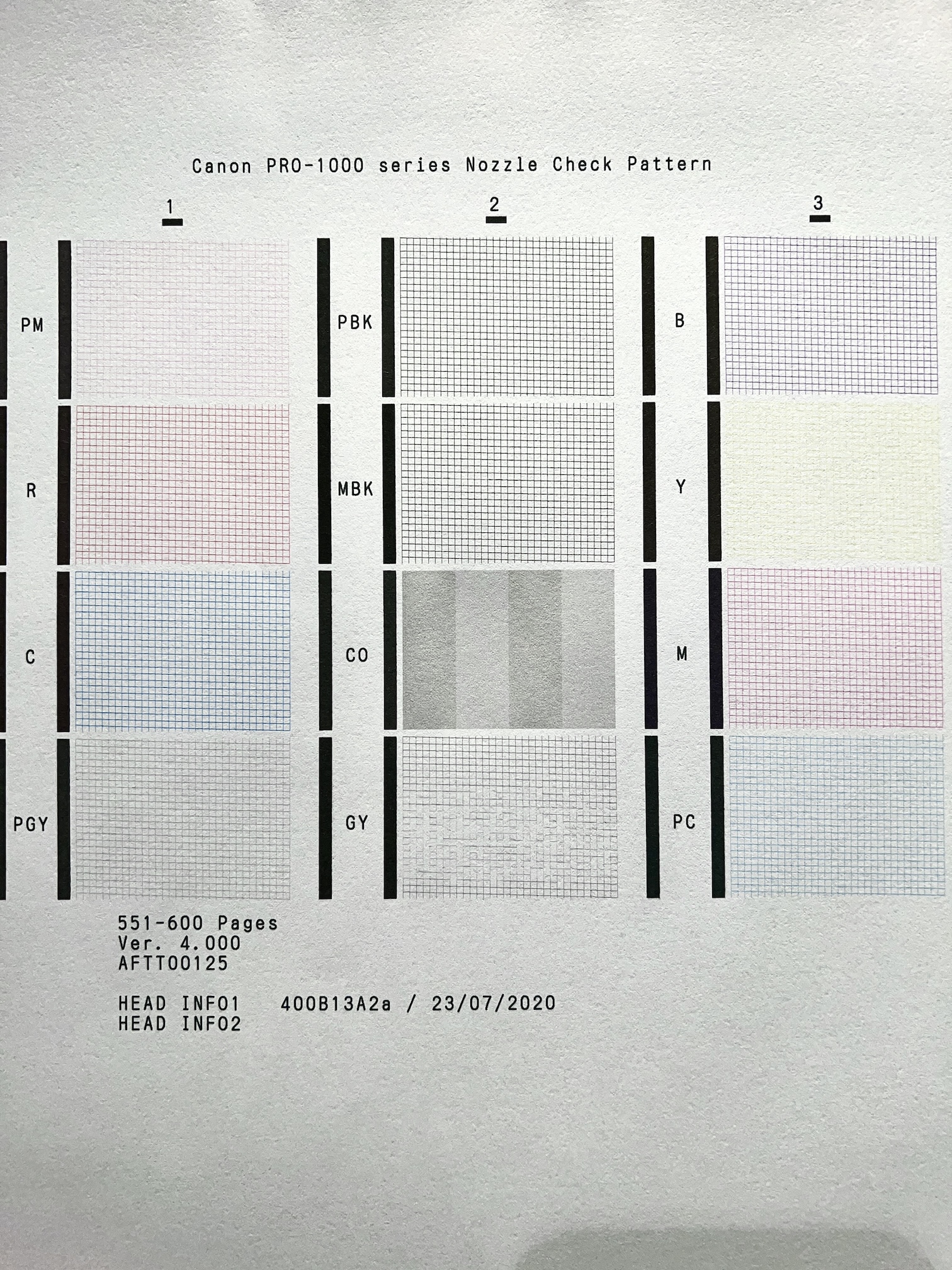
Eventually I noticed that the nozzle checks were not clean! 11 nozzles were perfect, but the all-important Gray was missing some lines. (I didn't notice the nozzle checks being bad because I reuse the same sheets over and over for my automatic 4x daily nozzle check jobs. I incorrectly assumed that with the amount of use the printer was getting that the head would be fine). So I did a cleaning cycle, which didn't fix it. I waited a while to see if it worked and it didn't, so I did another. That improved things but it didn't get perfect. So I did another clean. Then it was working properly, phew! Except the nozzle only stays clear for about 12 hours at the most. After that, the only way to get clean nozzle checks again is to do another cleaning cycle!
I've also tried the "deep clean" but I have not yet braved a "system clean". BTW, a regular clean uses 3g of ink and a deep clean uses 10g of ink (per 4-color group). I expect a system clean will use about 30-50g so I'd rather avoid it.
Any ideas before I drown this puppy in chemicals?
TLDR: Gray nozzle (only) keeps clogging despite repeated cleaning cycles. A cleaning cycle will initially clear the clog and produce good nozzle checks (and good prints), but after a few hours the gray nozzle always clogs again. I haven't tried printing larger than A4 in fear of the Gray nozzle re-clogging during the print.
Before cleaning. This looks particularly bad, normally there are only about 3 lines missing. Now that I'm looking really closely, MBK doesn't look quite perfect either, but nowhere near as bad as GY.
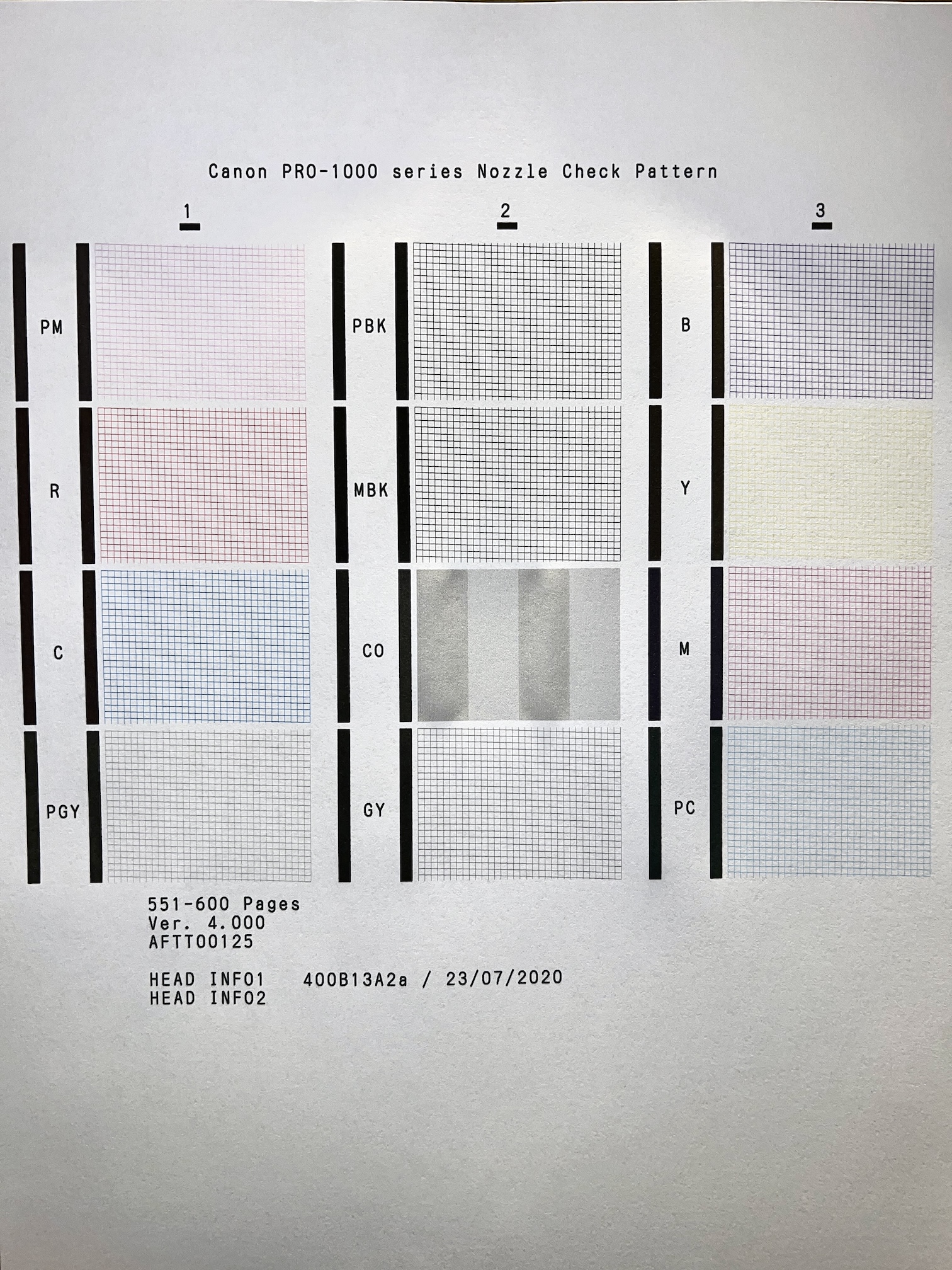
Everything looks perfect after one basic cleaning cycle. Do I just need to suck up the ink cost and do a 3g ink purge before every print? That $2 is a lot less than the cost of paper.
p.1 #3 · Wit's End with Canon Pro-1000 (GY keeps clogging)
macwest wrote:
According to Canon you want to do a system clean not deep clean . Been down that road lol.
Did you have the same issue I have, where the head was working properly after a clean but then ~12h later it clogged again? If so, I'll try that system clean and report back...
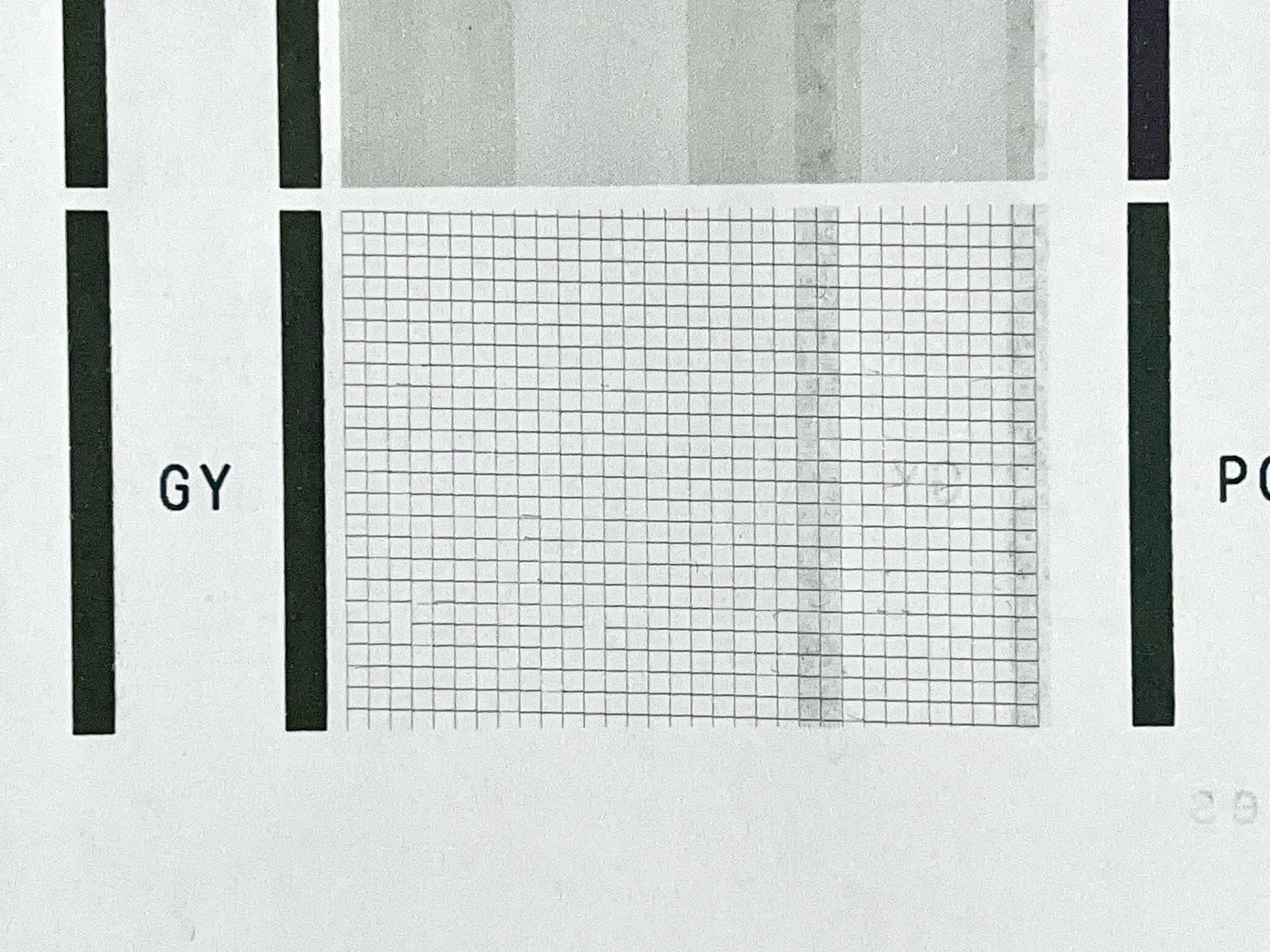
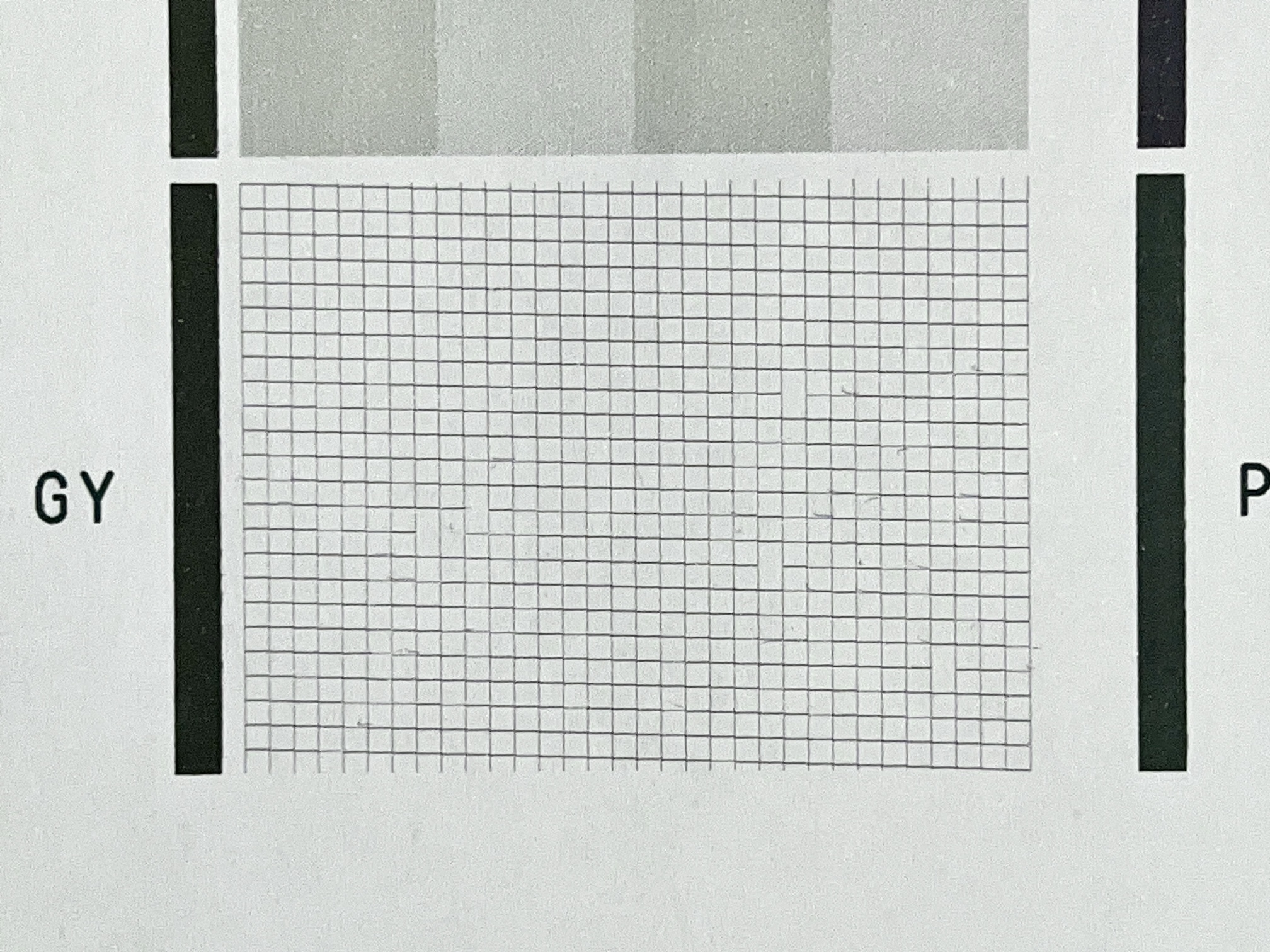
After running the cleaning cycle yesterday the nozzle checks were clear at hours 0, 2, and 8, but at hour 14 the gray had about a few broken lines, and at hour 20 it had significantly more broken lines.
p.1 #4 · Wit's End with Canon Pro-1000 (GY keeps clogging)
I hate to say it, but it sounds like the head is failing.
It is easily replaced- but expensive and eats ink like my kids eat candy.
All in all a great printer- but the head goes over time.
gary
p.1 #5 · Wit's End with Canon Pro-1000 (GY keeps clogging)
One other possible thing to think about- look at qimage.
I have used qimage to print for years and years.
It allows you to set up purge sheets using only the color/colors you are having problems with- saves the other ink channels.
gary
p.1 #6 · Wit's End with Canon Pro-1000 (GY keeps clogging)
I have a Pro 1000 and had a similar problem, but with MBK. After months of head cleanings and deep cleanings and wasted ink, I bit the bullet and bought a new head (ebay, so I was able to get a pretty good deal). That was about 18 months ago, and I haven't had a problem since. The only thing I do preventatively is print a small (6x8 on 8x10) photo every two weeks or so. Usually I print b&w on cotton paper to make sure that the MBK gets used, but occasionally I'll do a glossy color print.
I suspect the original head was faulty but I didn't recognize it quickly enough.
p.1 #7 · Wit's End with Canon Pro-1000 (GY keeps clogging)
i had been a long time Epson user and after so many clogs, i switched to canon 1000 and 2100. I use qimage, it has a scheduler and and unclog routine that i used from my Epson days and still use religiously every 7 days. my printer is also from 2020 era, just did your test and it cleared, so i have to agree with mkuznicki, its time for a new head!
Also besides being nitpicky, do u see anything in the prints that u notice?
if u can create new profiles, i do remember canon having a tool that dealt with the ink participation the new profiles , so can redo the profiles excluding the ink and start looking for deals on the new head.
p.1 #8 · Wit's End with Canon Pro-1000 (GY keeps clogging)
gchappel wrote:
I hate to say it, but it sounds like the head is failing.
It is easily replaced- but expensive and eats ink like my kids eat candy.
All in all a great printer- but the head goes over time.
gary
Have you replaced a head before? Any memory of how much ink it consumes? The Canon documentation says it takes 27 minutes combined to purge the old head and prime the new head... that sounds like it could be a ton of ink.
Both the regular clean and deep clean take 5 minutes at 3g and 10g respectively. So at the lower rate that is 16g of ink to change the head, and at the upper limit it is 54g (not that 10g in 5 minutes is necessarily the upper limit!).
mkuznicki wrote:
I have a Pro 1000 and had a similar problem, but with MBK. After months of head cleanings and deep cleanings and wasted ink, I bit the bullet and bought a new head (ebay, so I was able to get a pretty good deal). That was about 18 months ago, and I haven't had a problem since. The only thing I do preventatively is print a small (6x8 on 8x10) photo every two weeks or so. Usually I print b&w on cotton paper to make sure that the MBK gets used, but occasionally I'll do a glossy color print.
I suspect the original head was faulty but I didn't recognize it quickly enough. ...Show more →
Did you ever try a system clean, like macwest suggested above? Do you remember how much ink was used switching the heads, by any chance?
I'm suspecting my head must have been faulty also since I never go more than a few days without printing at least a 4x6 postcard. There is a guy on FB Marketplace selling a Pro-1000 in another city and I've just offered him his full asking price if to take the printhead out and ship it to me.
msadat wrote:
i had been a long time Epson user and after so many clogs, i switched to canon 1000 and 2100. I use qimage, it has a scheduler and and unclog routine that i used from my Epson days and still use religiously every 7 days. my printer is also from 2020 era, just did your test and it cleared, so i have to agree with mkuznicki, its time for a new head!
Also besides being nitpicky, do u see anything in the prints that u notice?
if u can create new profiles, i do remember canon having a tool that dealt with the ink participation the new profiles , so can redo the profiles excluding the ink and start looking for deals on the new head....Show more →
Thanks for that, I just downloaded the 14 day free trial of Qimage One! I printed the unclog pattern 3 times with nozzle checks in between like the guide says. The unclog patterns all looked perfect, but the nozzle checks unfortunately were no good. Actually they look worse than I've ever seen! So I'm not sure how well that Qimage unclog pattern works....
And yes, the prints look properly terrible, worse in real life than in the photo I attached below. I thought it was a double profiling issue at first but gray is just a really important color. Shadow areas have a very strange look to them.
p.1 #9 · Wit's End with Canon Pro-1000 (GY keeps clogging)
I have done the head on my 1000 a couple of times. I never weighed it- but it used a sizable amount of ink. I would guess closer to the 50cc range- 4-5cc per cartridge. Puts a fair amount of ink in the maintenance tank as well. But then you are done- and print away. In my experience once the head starts acting up- cleaning routines are not going to fix it. That is just wasting more ink.
Interesting experience with qimage. I have used it a couple times, when the nozzle check wasn't perfect. I would just run the color in question and it cleaned out. I think all it really does is print a lot with the color in question.
I wish you luck in your journey- let us know how it works out.
gary