fredmiranda.com
Login

Moderated by: Fred Miranda
  New fredmiranda.com Mobile Site
  New Feature: SMS Notification alert
  New Feature: Buy & Sell Watchlist
  

FM Forums | Nikon Forum | Join Upload & Sell


D200- Rename Existing Bank ?


rickster
Offline
• •
Upload & Sell: Off
p.1 #1 · D200- Rename Existing Bank ?


New-to-me D200. One of the existing banks has a custom name I want to delete. Can't find a way to do that- if I choose Rename, the menu seems to only allow me to ADD characters to existing name, no way to get down to the existing name and delete characters. If I add a character to existing name, I can delete that new character with Trash button, but cannot delete more than that. I know we are talking ancient history here, but would appreciate any assistance you could give!


May 21, 2026 at 01:38 PM
NightOwl Cat
Offline
• • • • • •
Upload & Sell: On
p.1 #2 · D200- Rename Existing Bank ?


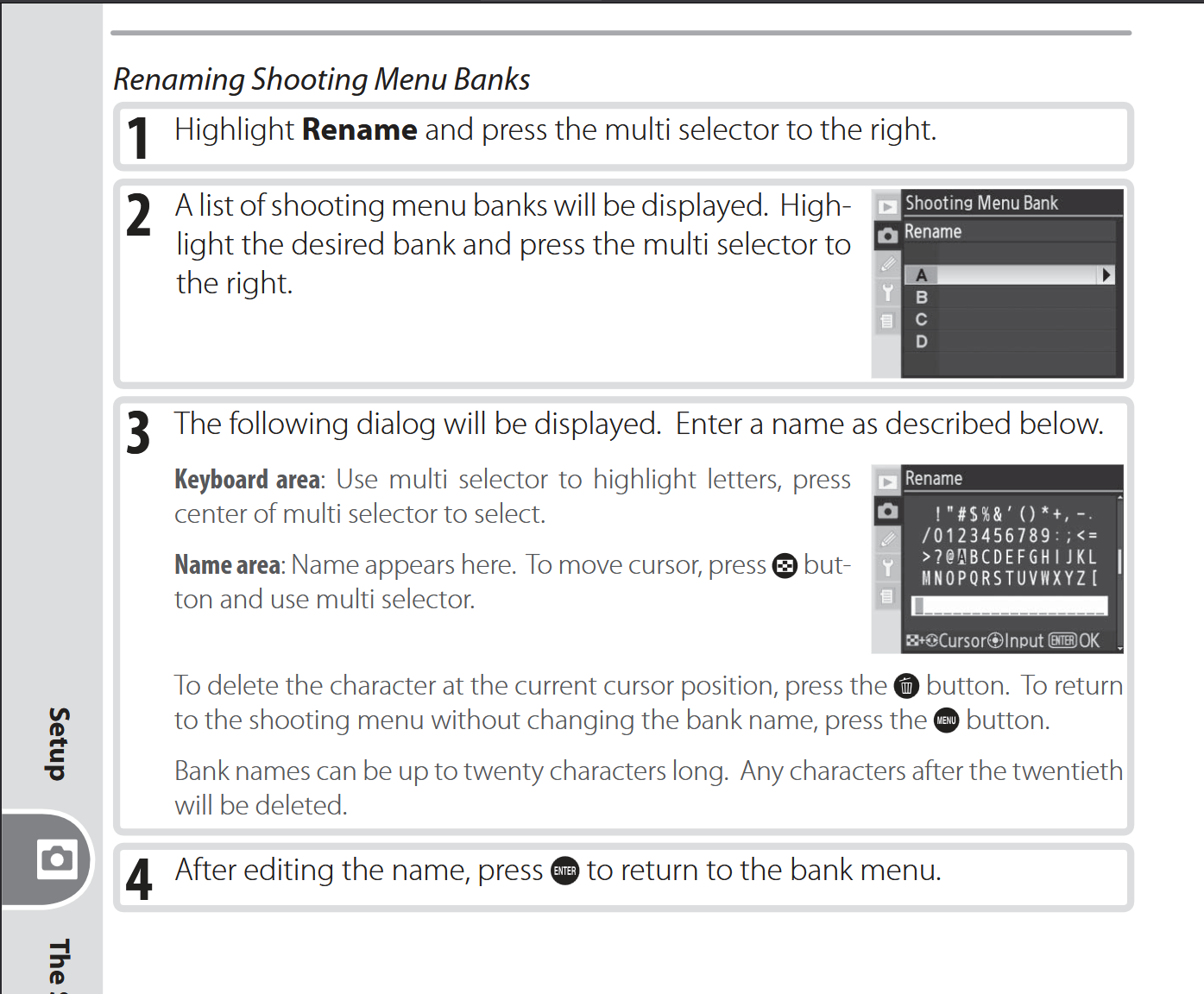
Explanation from the D200 Manual online.

https://downloadcenter.nikonimglib.com/en/products/10/D200.html

Hope that helps.


May 24, 2026 at 09:48 AM
rickster
Offline
• •
Upload & Sell: Off
p.1 #3 · D200- Rename Existing Bank ?


Thanks, eventually figured solution out. When following that process, the existing name is in the bottom "white" field but cursor is in the keyboard and can't navigate it to the white box. Going to suggest this process replace water boarding as torture of choice.


May 24, 2026 at 10:29 AM
EB-1
Offline
• • • • • • •
Upload & Sell: Off
p.1 #4 · D200- Rename Existing Bank ?


I'd think that using the D200 in 2026 would be enough torture.
I say this having purchased the D80 Q3 2006, and suffering of that same miserable 10MP sensor.

EBH


May 24, 2026 at 02:07 PM


FM Forums | Nikon Forum | Join Upload & Sell


Welcome back
Log in to your account