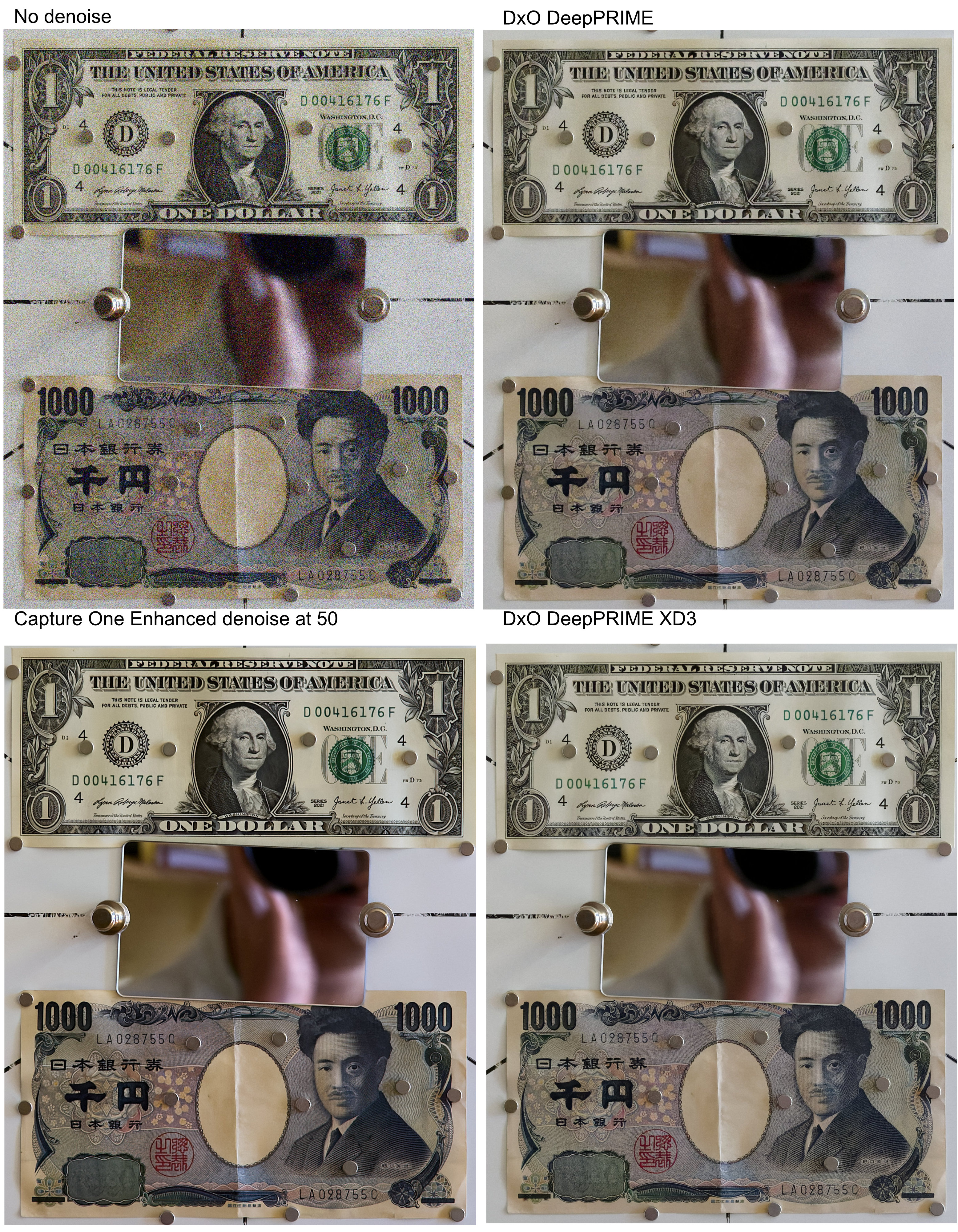
p.1 #1 · Enhanced Denoise in C1 - first impression
Capture One is adding a new denoising option - in the existing Noise Reduction tool there is a new option "Apply Enhanced Denoise." When clicked, it goes to the default setting of 50.
I compared the result of C1 denoising with those from DxO DeepPRIME and DeepPRIME XD3 denoising on a raw file from a micro-four-thirds OM-1 II at ISO 6400 (this is equivalent to full frame ISO 25600).
The crops at about 100% are compiled in the upload, below.
My immediate impression is that when used at 50, C1 enhanced denoise is slightly more aggressive than the DeepPRIME denoising. The result looks good overall.
When pixel-peeping, it seems that while there is a bit more noise with DeepPRIME XD3, there is also a bit more super-fine detail. I cannot claim that this observation is scientifically accurate. There is a chance that the difference in fine detail is simply due to differences in sharpening between DxO and C1. I don't know if there is a way of applying the same sharpening, because sharpening works differently in the two programs.
p.1 #5 · Enhanced Denoise in C1 - first impression
well I guess that update just cost a 6 percent price increase.
We're writing to let you know that prices for your Capture One subscription will increase by 6%. As a monthly subscriber, the new price will apply from your next renewal on or after July 6.
After June 2, you’ll be able to see your updated renewal price in your Capture One account.
Before May 31, you have the option to lock in today’s price and save at the same time.
If you switch to a yearly plan, you’ll get the same access, billed once a year, and save over 4 months compared to paying monthly over a year.
p.1 #6 · Enhanced Denoise in C1 - first impression
I first subscribed to Capture One in August last year, and this has become an essential tool to me. I also maintain an up-to-date DxO Photolab 9, and would be willing to upgrade to ver. 10. Both products deliver some outstanding tools for processing from raw, and my (costly) cameras and lenses are not very useful without C1 or PL9. I respect both companies and feel good about supporting them, unlike some others like Topaz.
In general, I am open to trying alternative software products - those that don't require storing and cataloguing raw files.
p.1 #8 · Enhanced Denoise in C1 - first impression
well I love it . It's the one thing that was always lacking on Capture 1. The only negative compared to DXO which is awesome is Cap 1 takes 5-7 seconds to run it Dxo is instant on my machine. My workaround was to add it as a custom style on import and wait for it to do its magic. Thanks for pointing out this new feature Mr.Ruthenium.
p.1 #9 · Enhanced Denoise in C1 - first impression
Thanks for doing this comparison OP.
It looks like the C1 image has some kind of saturation / contrast boost as well, for example the green stamp in the "ONE" of the dollar bill in the C1 image doesn't match the original as closely as the DxO result.
p.1 #10 · Enhanced Denoise in C1 - first impression
Wow this is a meaningful increase in quality of denoise from before although compared to DXO Deepprime X3D i feel like its a little too artificially smoothed out. Can you do a comparison with lightroom's denoise also at 50? Trying to find any reason not to give adobe any more money since I already use capture 1 to edit any photos that I dont need denoising on.
p.1 #11 · Enhanced Denoise in C1 - first impression
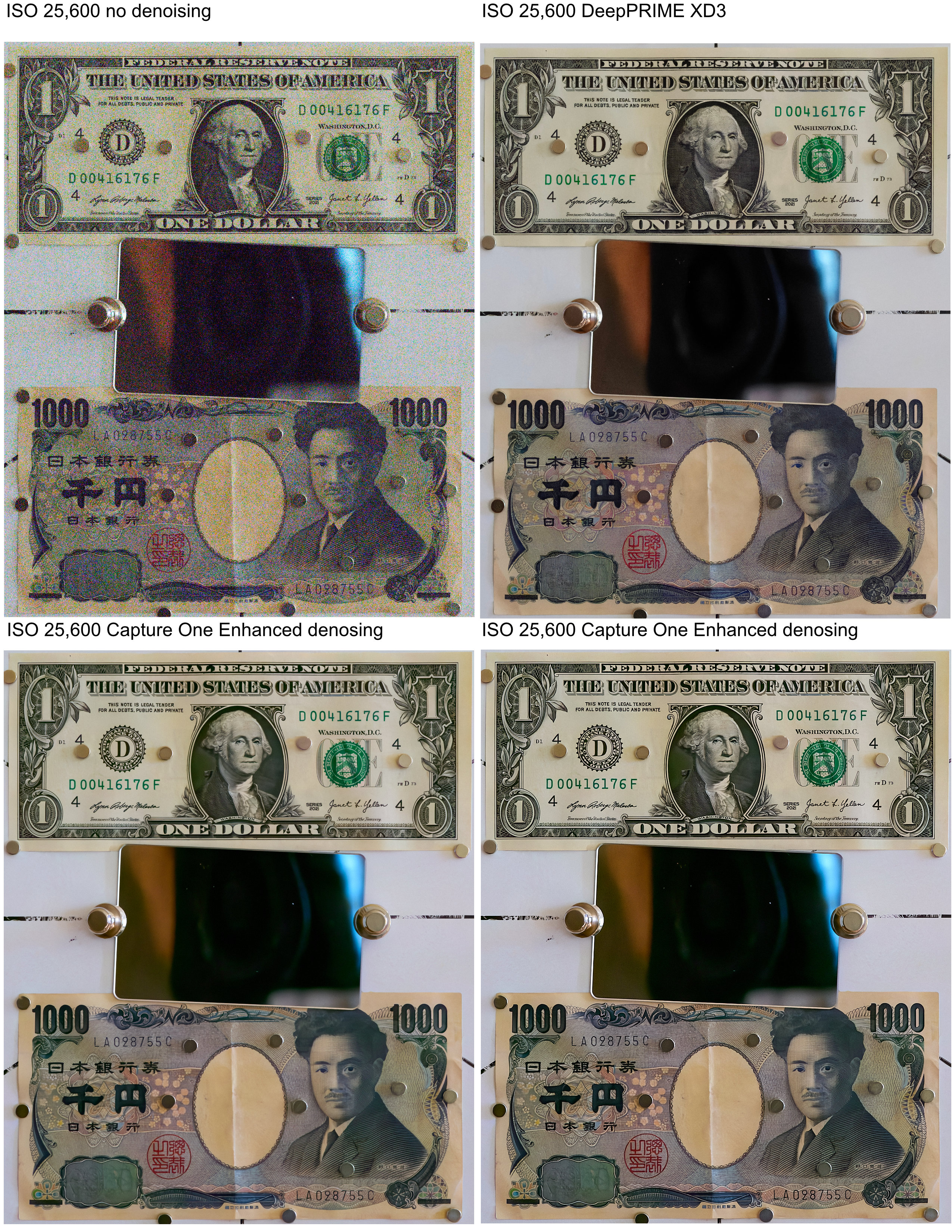
I repeated this comparison of DxO DeepPRIME XD3 with Capture One new Enhanced Denoise.
This time, I used a raw file from Sony A1 & 35mm GF at f/5.6, taken at ISO 25,600.
I did my best to equalize WB.
The upload shows 2317 x 2833 crops (6.6MP) from the full 8640 x 5760 (50MP) image
The crop from Capture One is given in two versions: with the sharpening that is set by default in C1 and with the stronger Soft Image Sharpening 2.
The differences are more pronounced on this high-resolution 50 MP file.
The superior ability of DeepPRIME XD3 denoising to recover fine detail is immediately obvious.
I also see a color shift in the image denoised with Capture One.
Thus, Capture One is making a good progress with their enhanced denoising, however presently, extremely noisy images at very high ISO can be better restored with DeepPRIME XD3
p.1 #12 · Enhanced Denoise in C1 - first impression
SaberArtori wrote:
Wow this is a meaningful increase in quality of denoise from before although compared to DXO Deepprime X3D i feel like its a little too artificially smoothed out. Can you do a comparison with lightroom's denoise also at 50? Trying to find any reason not to give adobe any more money since I already use capture 1 to edit any photos that I dont need denoising on.
I don't have access to LR - sorry!
Your other option is DxO PureRaw or Photolab. A raw file can be denoised by DxO, then exported as DNG.
In my experience, processing from DNG instead of the original raw files works well in Capture One.
There is only one caveat, those who work with Fuji raw file would not be able to use Fuji simulations (Provia, Velvia, etc.) on the DNG files.
Understandably, DxO software requires a purchase, however, it does not require subscription.
One can evaluate DxO software at no cost for 30 days. Give it a try.
p.1 #13 · Enhanced Denoise in C1 - first impression
ruthenium wrote:
I don't have access to LR - sorry!
Your other option is DxO PureRaw or Photolab. A raw file can be denoised by DxO, then exported as DNG.
In my experience, processing from DNG instead of the original raw files works well in Capture One.
There is only one caveat, those who work with Fuji raw file would not be able to use Fuji simulations (Provia, Velvia, etc.) on the DNG files.
Understandably, DxO software requires a purchase, however, it does not require subscription.
One can evaluate DxO software at no cost for 30 days. Give it a try.
I have considered DxO pureraw before however I wasn't sure how much I like exporting DNG and having those way larger files sizes. Maybe in the future when I finally finish my NAS setup. Although do you think the raw processing of DxO Pureraw is worth the cost? does it actually make a meaningful difference compared to how capture one reads the raw file?
p.1 #14 · Enhanced Denoise in C1 - first impression
SaberArtori wrote:
I have considered DxO pureraw before however I wasn't sure how much I like exporting DNG and having those way larger files sizes. Maybe in the future when I finally finish my NAS setup. Although do you think the raw processing of DxO Pureraw is worth the cost? does it actually make a meaningful difference compared to how capture one reads the raw file?
With DxO, you have two options for exporting DNG: uncompressed and High-fidelity compressed DNG.
The latter are smaller than the original raw. As a rough estimate, the size is about 1/2 of the raw, and can be smaller. E.g. I am looking at a 132.7MB RAF file from my GFX100S II with the corresponding high-fidelity compressed DNG of 56MB.
I understand your concern about doing raw processing (demosaicing, denoising, and lens corrections) in DxO instead of C1.
My workflow now involves batch converting raw to high-fidelity dng in Photolab 9, then I continue working in Capture One with both the raw and dng files, like with two variants. I have not developed a preference. Often, I like the result of processing from the dng, but from time to time there is a case when I like the result of processing from the raw file better. Something else to mention is that I normally export processed photos from C1 as tif files, and do some additional minor editing on the tif in Photolab 9, then export the final jpgs from there. I don't mean to recommend my workflow to others, the point here is only to explain what I do with Capture One and Photolab 9.
The ways different photographers process their photos can be totally different, and what one likes another may hate.
I suggest downloading a fully-functional trial version of either PureRAW or Photolab 9, to see if they should work for you. You get these free for 30 days - enough time to develop a sense of whether these are "worth the cost".
If you have any technical, practical questions - send me a PM.
p.1 #15 · Enhanced Denoise in C1 - first impression
SaberArtori wrote:
I have considered DxO pureraw before however I wasn't sure how much I like exporting DNG and having those way larger files sizes. Maybe in the future when I finally finish my NAS setup. Although do you think the raw processing of DxO Pureraw is worth the cost? does it actually make a meaningful difference compared to how capture one reads the raw file?
Since I bought DxO PureRaw 5, I almost always convert my RAW files to DNG, which I then process in C1.
DxO PR5 is able to extract more detail from RAW files taken with my Nikkor lenses.
After processing the DNG files with C1, I export a 16-bit TIFF for any further adjustments in Photoshop CS6. I don’t keep the DNG files, since I can always retrieve them with DxO PR5 in just a few seconds. But I've never had to reprocess a DNG file in C1.
Therefore the answer to your question (do you think the raw processing of DxO Pureraw is worth the cost?) is "yes I do".
However, be prepared to use a quality graphics card; software that uses AI is quite demanding in terms of GPU resources.
I use a NVIDIA GeForce RTX 5060 (8 GB); it's enough for my 24 Mpix files (it takes about 9 seconds to process a file and convert it to DNG).
p.1 #16 · Enhanced Denoise in C1 - first impression
Ripolini wrote:
Since I bought DxO PureRaw 5, I almost always convert my RAW files to DNG, which I then process in C1.
DxO PR5 is able to extract more detail from RAW files taken with my Nikkor lenses.
After processing the DNG files with C1, I export a 16-bit TIFF for any further adjustments in Photoshop CS6. I don’t keep the DNG files, since I can always retrieve them with DxO PR5 in just a few seconds. But I've never had to reprocess a DNG file in C1.
Therefore the answer to your question (do you think the raw processing of DxO Pureraw is worth the cost?) is "yes I do".
However, be prepared to use a quality graphics card; software that uses AI is quite demanding in terms of GPU resources.
I use a NVIDIA GeForce RTX 5060 (8 GB); it's enough for my 24 Mpix files (it takes about 9 seconds to process a file and convert it to DNG). ...Show more →
Wow did not realize it was this intensive to just process, my main rig is pretty set with a amd 9070xt but I am currently on a 4 month long trip to socal so only editing on a m1 mac book air. Really to need to upgrade as even loading files into capture 1 without any additional steps already takes a bit.
p.1 #17 · Enhanced Denoise in C1 - first impression
Ripolini wrote:
Since I bought DxO PureRaw 5, I almost always convert my RAW files to DNG, which I then process in C1.
DxO PR5 is able to extract more detail from RAW files taken with my Nikkor lenses.
After processing the DNG files with C1, I export a 16-bit TIFF for any further adjustments in Photoshop CS6. I don’t keep the DNG files, since I can always retrieve them with DxO PR5 in just a few seconds. But I've never had to reprocess a DNG file in C1.
Therefore the answer to your question (do you think the raw processing of DxO Pureraw is worth the cost?) is "yes I do".
However, be prepared to use a quality graphics card; software that uses AI is quite demanding in terms of GPU resources.
I use a NVIDIA GeForce RTX 5060 (8 GB); it's enough for my 24 Mpix files (it takes about 9 seconds to process a file and convert it to DNG). ...Show more →
Will do when I return to my main rig.I have been looking into DxO Pureraw for a while just never took the leap. It does look very impressive, especially for the lens distortion correction that seems to be a few steps above what C1 does.