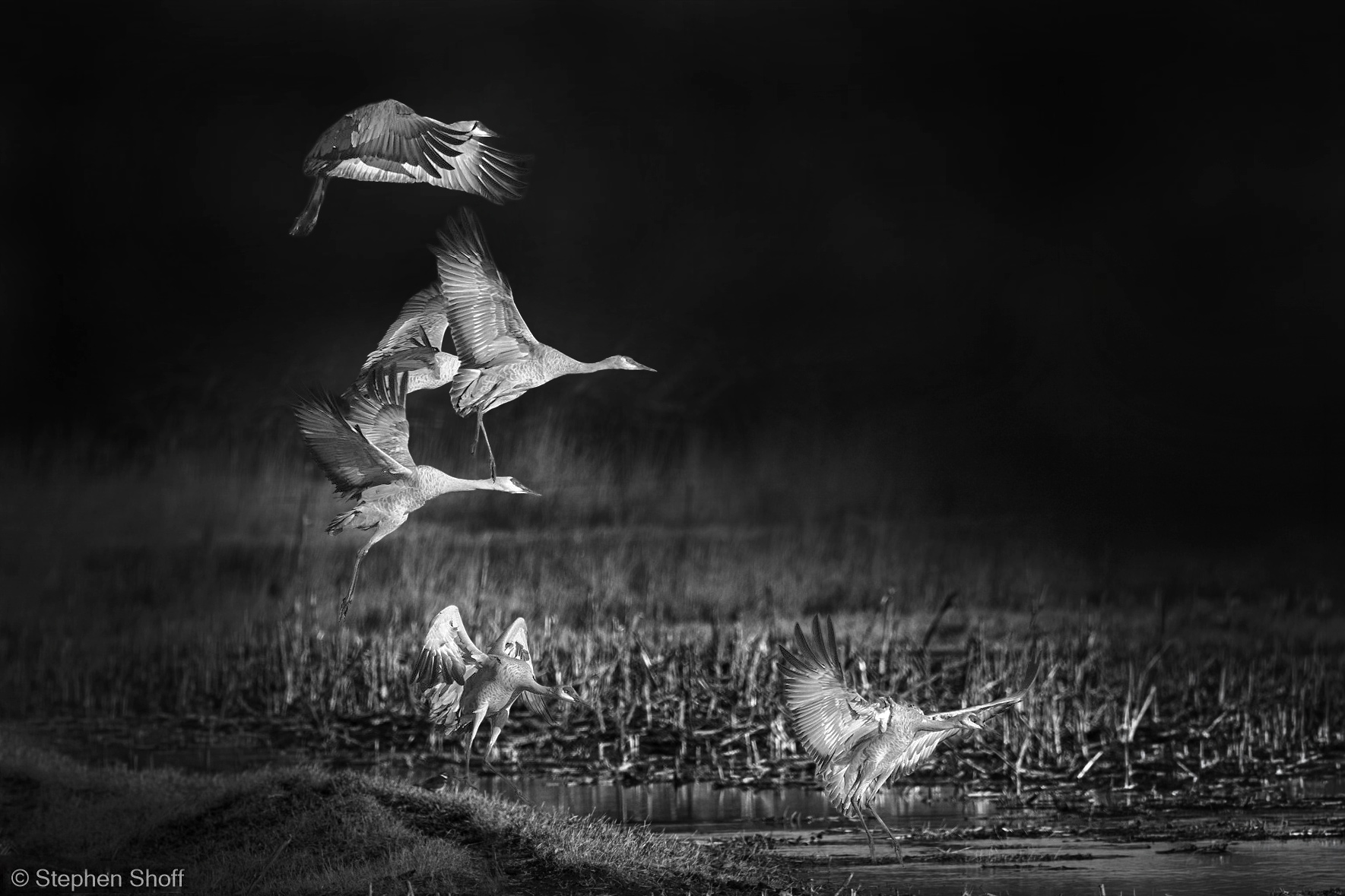
This image is an exercise in selective focus, highly obscured background B&W processing. It was created in LRC starting with a linear profile, then converted to B&W by reducing saturation in both the calibration and the color mixer tools. The effects were accomplished primarily with a couple of radial gradients combined into a single mask.
I'm interested in getting feedback and suggestions including whether or not the image is even appropriate for this kind of treatment.
I am guessing the black and white treatment added lots of texture; i.e., clutter. Then, if I guess correctly, you used post processing techniques to compensate by making the birds stand out from the blurred background.
To my eye the clutter was intensified and the birds do not stand out from the background. Some of the foreground even seems sharper and in better focus than the birds. It would be interesting to see how this compared with the out of camera image.
I really like the scene, Stephen, but I am not sure this image is the best choice for a B&W conversion. I am thinking the color version of this image may have a bigger impact, as it may offers a better (color) separation
As far as your treatment is concerned, PS offers many ways to convert an image to B&W. De-sat is one of them, but sometimes may not be the best choice, and I am not versed in LR.
Brightening (and sharpening) the birds, and darkening (and smoothing) the BG could help separating the birds from the cluttered BG, especially the bottom part. The top right dark area of the BG looks muddy on my monitor.
I am also thinking that a horizontal crop may be a better compositional choice, but that is always a personal preference.
I tried to revisit your image by applying (with a bit of exaggeration) the above suggestions hoping will give you some visual tips that will help you better achieve the results you are looking for.
Jim -- The background clutter is inherent in the photograph. Your observation, though did help me realize that the radial gradient I used for the cranes at the bottom extended into the foreground detail so that the adjustments I made for the cranes also served to "sharpen" the foreground. Good catch. Thank you.
Socrate -- thank you for your comment about scene selection. As I posted this image I observed that my adjustments made the upper right darks muddy but didn't take the trouble to correct it expecting that observation. The more consistent and darker background was not what I thought was needed for the mood I wanted, but I do like your treatment as horizontal crop better.
Years back I had done my B&W conversions in PS but now I try to work, sometimes futilely as in this case, in LRC. When I started in LRC, the Color Mixer sliders worked the same way as PS with a B&W adjustment layer. But Adobe's more recent process version where the B&W conversion replaces the profile with its own and removes the Color Mixer slider. I haven't figured out a way around that. That's part of the reason I took my starting point all the way back to a linear profile and had to use the channel and color mixer just to remove color.
I went back to recheck my understanding of the ACR Monochrome Profile. The Adobe Monochrome conversion destroyed the image...very pebbled texture "out of the box". I didn't try to fix it.
I also checked out the color sliders. In this image, they didn't accomplish much because of the uniformity of the background color tonality.
Socrate's rework, expanded to full frame content. Still done in LRC but with a lot more effort applied instead of simple radial masks. While this isn't the interpretation I started out trying to accomplish, I do like this concept. For me, this style image comes close to being a "wall hanger". I'd never consider that with the color version.