p.1 #1 · Upgrading from IMac 2017 to M4 Studio - My Experience
I have had my Imac 5k 2017 4 core 4.2gh 40gb for many years. It has been great and still works well for web browsing and basic photoshop stuff but:
- It will no longer update o/s
- Because of that it will not accept newest LR (batch find those in focus, gigapixel upscale add in, and more to come)
- With 45mpx, workign with DPP, Photomatix, LR is starting to be a chore - and its taking the joy out of photography.
It still is a good computer, 5k monitor, fast to browse, and It still opens my old aperture files ( a relic from 10 years ago).
After debate, I decided to go with apple certified refurbished M4 Studio Max base (32gb, 512gbssd). I thought about M4 mini but once you start upgrading RAM and SSD it quickly gets close to refurbished M4 Studio. I am now running my working file on TB3 enclosure and achieving 2500mb/s. My internal 512 ssd is about 4500mb/s.
Here are my observations:
1) DPP used to be 55s per 45mpx conversion to tiff. Now it is 24s. Not a big gain. DPP is not optimized for Silicon M4.
2) Photomatix HDR of AEBx3 to tiff used to be 40s per 45mpx x3, now it is 12s. A big gain.
3) LR Ingest/preview on new Studio is too fast to measure.
4) LR copy auto colour times 260 pictures is too fast to measure.
5) LR denoise/raw detail is about 16s/pic
7) ON1 Resize 30s for 4x to 10,000 pixels long at standard (similar to Topaz Gigapixel)
8) ON1 Resize is 10 minutes for extreme recovery setting (similar to Topaz Gigapapixel)
9) It has 10gb ethernet, but I only had 1gb fibre to my house to so no difference but not surprises. No I am considering upgrading.
10) Its going to cost me to get 80gb enclosure, gigabit switches, tb5 hub.... Don't be surprised another $1000 in mission creep.
Surprises:
1) My 2017 Imac, still sits side by side with my new system. I have 27" apple studio display and 27" Benq (Adobe RGB) monitor that used to be connected to my Imac. The two computers automatically share the mouse and keyboard, and when I drag my mouse off the Studio monitors it goes to the 5k Imac 2017. Eg I have 2 computers on my desk and only one keyboard. This is great. I plan to use my 5k Imac for browsing, opening legacy aperture libraries, and my music server. I need to plug in a separate mouse to imac to wake it though.
2) I can access my files/music on Studio from iMac through sharing.
3) You have to reinstall almost every application to get silicone speed. A pain.
4) I copied command /c a youtube video on my imac to my studio - surprise - makes them work together more effectively.
So bottom line is - I like it but I miss my 5k monitor on Studio. It brings back more joy (faster) faster in processing. But it is not a big enough change that photomatics on 300 pictures at 1/3 the time is still 1/2 an hour or so. But it was necessary to keep my LR catalogs synced between my silicone laptop (m1) and my base station - - and increasingly to access updates from LR and PS.
Likely I could have got buy at $700 for M4 mini base upgraded to 24gb, as long as I did not do lots of video.
p.1 #2 · Upgrading from IMac 2017 to M4 Studio - My Experience
I also upgraded from a 2017 iMac Pro to Studio M4 Max but strung for the 5K Studio Display. No noticeable difference for everyday tasks, but for multitrack music, video production, and processing images with lots of layers, the Studio really flies and never lags or drops frames, even loaded up with plugins. However, the most noticeable difference for me was the absence of fan noise. The Studio runs cool as a cucumber—fans are inaudible—whereas the iMac fans sound like a hurricane with 2 or 3 layers of 4K clips processing in Final Cut Pro.
You must have a R5? My R6 MK II RAW typically take 8 seconds in the LR denoise panel.
p.1 #3 · Upgrading from IMac 2017 to M4 Studio - My Experience
Yes all my numbers above were with r5 except the upscale[7),8) observations] ones that were from a legacy 7d heavily cropped and enlarged 4x to 10,000pixels long.
I have not moved to new display because editing in 2k monitor is closer to pixel density on print. eg arguably a better photo editor tool.
p.1 #4 · Upgrading from IMac 2017 to M4 Studio - My Experience
Scott Stoness wrote:
Yes all my numbers above were with r5 except the upscale[7),8) observations] ones that were from a legacy 7d heavily cropped and enlarged 4x to 10,000pixels long.
I have not moved to new display because editing in 2k monitor is closer to pixel density on print. eg arguably a better photo editor tool.
Now all you need is to hope this MSI monitor is released in a couple months. Mac users have been waiting many many years for this - a glossy 27" 5K display to replace their iMacs or use their MBP's with a higher refresh rate than 60Hz.. If this is release, you can move your iMac next to it, and use the built in KVM switch to switch between your Mac Studio and iMac with the same keyboard/mouse/etc. Check out the specs, it's really what the new ASD should have been. Rumored release of $899, but I have a feeling it might be more:
p.1 #6 · Upgrading from IMac 2017 to M4 Studio - My Experience
Scott Stoness wrote:
I have had my Imac 5k 2017 4 core 4.2gh 40gb for many years. It has been great and still works well for web browsing and basic photoshop stuff but:
- It will no longer update o/s
- Because of that it will not accept newest LR (batch find those in focus, gigapixel upscale add in, and more to come)
- With 45mpx, workign with DPP, Photomatix, LR is starting to be a chore - and its taking the joy out of photography.
It still is a good computer, 5k monitor, fast to browse, and It still opens my old aperture files ( a relic from 10 years ago).
After debate, I decided to go with apple certified refurbished M4 Studio Max base (32gb, 512gbssd). I thought about M4 mini but once you start upgrading RAM and SSD it quickly gets close to refurbished M4 Studio. I am now running my working file on TB3 enclosure and achieving 2500mb/s. My internal 512 ssd is about 4500mb/s.
Here are my observations:
1) DPP used to be 55s per 45mpx conversion to tiff. Now it is 24s. Not a big gain. DPP is not optimized for Silicon M4.
2) Photomatix HDR of AEBx3 to tiff used to be 40s per 45mpx x3, now it is 12s. A big gain.
3) LR Ingest/preview on new Studio is too fast to measure.
4) LR copy auto colour times 260 pictures is too fast to measure.
5) LR denoise/raw detail is about 16s/pic
7) ON1 Resize 30s for 4x to 10,000 pixels long at standard (similar to Topaz Gigapixel)
8) ON1 Resize is 10 minutes for extreme recovery setting (similar to Topaz Gigapapixel)
9) It has 10gb ethernet, but I only had 1gb fibre to my house to so no difference but not surprises. No I am considering upgrading.
10) Its going to cost me to get 80gb enclosure, gigabit switches, tb5 hub.... Don't be surprised another $1000 in mission creep.
Surprises:
1) My 2017 Imac, still sits side by side with my new system. I have 27" apple studio display and 27" Benq (Adobe RGB) monitor that used to be connected to my Imac. The two computers automatically share the mouse and keyboard, and when I drag my mouse off the Studio monitors it goes to the 5k Imac 2017. Eg I have 2 computers on my desk and only one keyboard. This is great. I plan to use my 5k Imac for browsing, opening legacy aperture libraries, and my music server. I need to plug in a separate mouse to imac to wake it though.
2) I can access my files/music on Studio from iMac through sharing.
3) You have to reinstall almost every application to get silicone speed. A pain.
4) I copied command /c a youtube video on my imac to my studio - surprise - makes them work together more effectively.
So bottom line is - I like it but I miss my 5k monitor on Studio. It brings back more joy (faster) faster in processing. But it is not a big enough change that photomatics on 300 pictures at 1/3 the time is still 1/2 an hour or so. But it was necessary to keep my LR catalogs synced between my silicone laptop (m1) and my base station - - and increasingly to access updates from LR and PS.
Likely I could have got buy at $700 for M4 mini base upgraded to 24gb, as long as I did not do lots of video.
I hope this information is useful to someone....Show more →
FWIW, I was using a 2019 27” iMac — basically the top model they made — which was originally a great Photoshop machine. Eventually though, and not unexpectedly, it began to bog down on various processes, including things as basic as locating files on a 16TB drive. It also was about reach the stage where it would not run new OS updates.
Things were beyond the point where it was “just a little slow” — the slowdowns (and occasional lockups) were seriously interfering with my work.
The 27” iMacs were great machines, and I wish that Apple still made them using their newer technology.
I replaced it with more or less the highest spec’ed M4Pro Mini with two 27” Apple displays. This system works great. The M4 processor Macs are great performers, and the difference between them and the older machines with pre-M4 processors is significant.
p.1 #7 · Upgrading from IMac 2017 to M4 Studio - My Experience
I also had a higher-end 27" iMac, albeit a 2010 model that still worked fine with LR6 standalone for ~20MP files until I started looking at options in 2022 on the cusp of transitioning to mirrorless. Other than being a bit slower, the biggest issue was dropped software support and inability to update LR. No OS updates meant no Adobe updates. And Adobe appears to maintain a much shorter backwards OS compatibility, if you want to keep up with their updates.
On one hand I'm kind of glad it kicked me in the pants to update because my workflow truly has benefitted from recent features such as smart masks and AI noise reduction. I can do more and faster with large image batches. Smart masks have virtually eliminated my need for additional steps in Photoshop, other than occasional heavier image retouching that involves copying/pasting portions of one image into another one.
Last June my M1 Pro MBP was starting to feel laggy, especially with 45MP files so I looked into updating either to the M4 Pro Mini or a Studio. I ended up with a refurbished M4 Max Studio with 16/40 cores that was very close in price to an M4 Pro Mini with similar RAM, storage and only 20 GPU cores. While I don't do much video, the extra 20 GPU cores of the Studio over the Mini have been extremely useful for large image batch processing with AI NR and/or smart masking. Adobe's AI NR heavily relies on the GPU, especially considering that they currently don't support Apple's Neural Engine for some technical reason. There was a brief period when LR did support ANE and it did make a substantial difference for my older M1 Pro, basically cutting AI NR in half. Based on a discussion in another thread on the Post Processing board, ANE support benefits lower GPU core-count builds more than higher core-count builds.
The Studio with LR15 is around 1/3 the AI NR time of the M1 Pro. R5/R5II files went from ~45 seconds to 12-15 seconds. It really adds up with thousands of images, but often still remains an overnight operation. Biggest LR quality of life improvement for me would be an update that eliminates the user being locked out when AI NR is doing its initial run.
While I kind of miss the iMac's display and dislike that the current iMac seems to have been relegated by Apple to the status of basically a larger iPad with no Max chip options, I also agree that I prefer to edit on a 2K display due to its pixel density. I ended up with a 2K BenQ model optimized for photo workflows and Adobe RGB support.
p.1 #8 · Upgrading from IMac 2017 to M4 Studio - My Experience
Interesting thread
I recently needed an upgrade as my old IMAC 27" had been crawling slow during processing, so purchased a 14" M5 laptop 16 GB
Processing using my DXO is lightning fast but downloading files from my cards seems quite slow, but faster than the old system
I had a major glitch with my 512 GB CF Exp card (Angelbird) ... downloading images would suddenly stop and an error code pop up .... The new laptop senses 1 corrupted file and the entire download fails, so currently I am just using the alt SD card. Need to replace that CF Ex card because it functions faster in my R5 than the SD
I also noticed that my older files can't be transferred because the same error stops it cold....
Oddly the old IMAC never did this when transferring from the CF Ex card to my external hard drives...
p.1 #9 · Upgrading from IMac 2017 to M4 Studio - My Experience
LuckyStrike88 wrote:
Interesting thread
I recently needed an upgrade as my old IMAC 27" had been crawling slow during processing, so purchased a 14" M5 laptop 16 GB
Processing using my DXO is lightning fast but downloading files from my cards seems quite slow, but faster than the old system
I had a major glitch with my 512 GB CF Exp card (Angelbird) ... downloading images would suddenly stop and an error code pop up .... The new laptop senses 1 corrupted file and the entire download fails, so currently I am just using the alt SD card. Need to replace that CF Ex card because it functions faster in my R5 than the SD
I also noticed that my older files can't be transferred because the same error stops it cold....
Oddly the old IMAC never did this when transferring from the CF Ex card to my external hard drives...
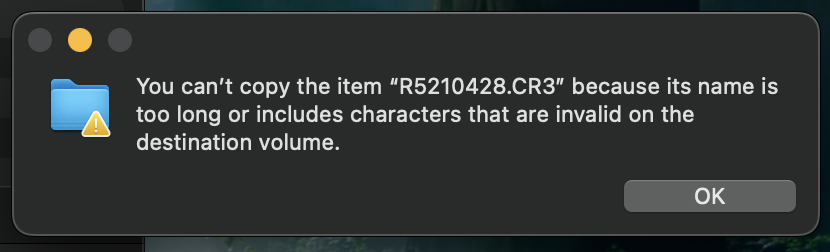
I had a very similar experience with transferring to a new MBP vs to one of my old workstations with a 27" iMac. It was giving me the "corrupt" error and the transfer would not finish on the MBP, but the old iMac worked just fine with the same card and card reader. Make sure to experiment with other cables and another card reader if you have access to one. I was also getting this error below but after using a different card reader and cable the problem resolved itself.
p.1 #10 · Upgrading from IMac 2017 to M4 Studio - My Experience
artsupreme wrote:
I had a very similar experience with transferring to a new MBP vs to one of my old workstations with a 27" iMac. It was giving me the "corrupt" error and the transfer would not finish on the MBP, but the old iMac worked just fine with the same card and card reader. Make sure to experiment with other cables and another card reader if you have access to one. I was also getting this error below but after using a different card reader and cable the problem resolved itself.
Hmmm a different card reader & cable ...I might just try that as it would be less expensive than to replace the card... Thank U !
p.1 #11 · Upgrading from IMac 2017 to M4 Studio - My Experience
Scott Stoness wrote:
I have had my Imac 5k 2017 4 core 4.2gh 40gb for many years. It has been great and still works well for web browsing and basic photoshop stuff but:
- It will no longer update o/s
- Because of that it will not accept newest LR (batch find those in focus, gigapixel upscale add in, and more to come)
- With 45mpx, workign with DPP, Photomatix, LR is starting to be a chore - and its taking the joy out of photography.
It still is a good computer, 5k monitor, fast to browse, and It still opens my old aperture files ( a relic from 10 years ago).
Here are my observations:
1) DPP used to be 55s per 45mpx conversion to tiff. Now it is 24s. Not a big gain. DPP is not optimized for Silicon M4.
9) It has 10gb ethernet, but I only had 1gb fibre to my house to so no difference but not surprises. No I am considering upgrading.
I hope this information is useful to someone....Show more →
I find DPP to be potentially the worst case scenario for an Apple Silicon machine.
1. It wasn't native till about six months ago. DPP was finally compiled for ARM64 Apple processors, but I don't know how optimal it is--I assume Apple's compilers try to optimize code for it. Up until version 4.20.30, mine was still running x86 code through Rosetta2 or whatever they call it.
2. There's no use of GPU acceleration on Apple Silicon as far as I can tell, so it is CPU compute performance for opening and previewing files, converting RAW to JPEG etc
3. I think DPP is multithreaded, so I see all, ten cores being used, but sometimes I swear I feel the app locks up waiting on some single process to finish.
4. Canon doesn't seem to put a lot of effort into DPP (well, they don't really sell it or historically made any revenue stream from it) and app software (vs embedded software) isn't really their forte.
If you evaluate them clock for clock, the Apple Silicon processors are certainly faster but their gains are are really centered around more cores and GPU. Given DPP doesn't use GPU (or at least not on MacOS) you're already losing half the benefit of the Apple Silicon machine.
You may BTW find having a NAS on a faster local Ethernet useful.
I upgraded to a refurbished M1 Max Studio in early 2023 64GB/1TB. When I got it, it didn't feel that much faster than my quad core Mac Pro cheese grater (Xeon W3520) working on 26MP RP and 21MP 5D2 files. Then when it went native, it felt faster. Then I stupidly bought an R5 and it felt a lot slower with 45MP files. Moral of the story: Grab an old 8MP Rebel and your machine will feel like a rocket (:
p.1 #12 · Upgrading from IMac 2017 to M4 Studio - My Experience
LuckyStrike88 wrote:
Interesting thread
I recently needed an upgrade as my old IMAC 27" had been crawling slow during processing, so purchased a 14" M5 laptop 16 GB
Processing using my DXO is lightning fast but downloading files from my cards seems quite slow, but faster than the old system
I had a major glitch with my 512 GB CF Exp card (Angelbird) ... downloading images would suddenly stop and an error code pop up .... The new laptop senses 1 corrupted file and the entire download fails, so currently I am just using the alt SD card. Need to replace that CF Ex card because it functions faster in my R5 than the SD
I also noticed that my older files can't be transferred because the same error stops it cold....
Oddly the old IMAC never did this when transferring from the CF Ex card to my external hard drives...
artsupreme wrote:
I had a very similar experience with transferring to a new MBP vs to one of my old workstations with a 27" iMac. It was giving me the "corrupt" error and the transfer would not finish on the MBP, but the old iMac worked just fine with the same card and card reader. Make sure to experiment with other cables and another card reader if you have access to one. I was also getting this error below but after using a different card reader and cable the problem resolved itself.
LuckyStrike88 wrote:
Hmmm a different card reader & cable ...I might just try that as it would be less expensive than to replace the card... Thank U !
TerryV
I use a Transcend CFe Type B USB-C reader and one of my CFe cards is an Angelbird from ~2022. Never had a problem with it in-camera or downloading (knock on wood, fingers crossed).
I also second trying a different reader and/or cable. It's the #1 cause of problems I've had doing event work when images are downloaded to a client's system by their operators. Lately these problems have been with SD card errors caused by their hardware. Often the systems use inexpensive or old, beat up readers. Back in the CompactFlash days, the only times I had bent pin problems with my cameras were with these clients because a pin in their cheap reader would break off lodged in my card, which in turn would bend a pin in my camera...
p.1 #13 · Upgrading from IMac 2017 to M4 Studio - My Experience
I upgraded from a Wintel 17 14th gen, with 64GB RAM and a RTX Nvidia 5070ti to a Mac Studio M4 Max with 128GB Unified memory. I added OWC Studio Stack on top into which I put a 4TB NMVe and a SATA 4TB SSD. Underneath is a RayCue dock with 2 NMVe 4TB SSDs. The Prograde Disk reader runs and downloads very fast. But the SSD reader in the Studio, and CFe reader in the Raycue are faster. Both docks connect with ThunderBolt 5.
I had 3 of the NMVe drives in the Wintel box so repurposed them to the Mac. Sold the 32GB memsticks on FleaBay for a great price due to the memory shortage.. Also sold the 5070ti for more than I paid for it.
Woweee Zowie. should have done it years ago. Happy camper here. (LrC, LR, DxO PL9, DxO PR6, On1 Profiles, Photoshop and Lumimar neo. (also Have DPP, and OM Workspace)) Geek be me.
p.1 #14 · Upgrading from IMac 2017 to M4 Studio - My Experience
Alan Kefauver wrote:
I upgraded from a Wintel 17 14th gen, with 64GB RAM and a RTX Nvidia 5070ti to a Mac Studio M4 Max with 128GB Unified memory. I added OWC Studio Stack on top into which I put a 4TB NMVe and a SATA 4TB SSD. Underneath is a RayCue dock with 2 NMVe 4TB SSDs. The Prograde Disk reader runs and downloads very fast. But the SSD reader in the Studio, and CFe reader in the Raycue are faster. Both docks connect with ThunderBolt 5.
I had 3 of the NMVe drives in the Wintel box so repurposed them to the Mac. Sold the 32GB memsticks on FleaBay for a great price due to the memory shortage.. Also sold the 5070ti for more than I paid for it.
Woweee Zowie. should have done it years ago. Happy camper here. (LrC, LR, DxO PL9, DxO PR6, On1 Profiles, Photoshop and Lumimar neo. (also Have DPP, and OM Workspace)) Geek be me....Show more →
Cool thats a lot of fast external in dock.
Tell me how do you like the StudioStack vs Raycue.
I was looking at Raycue 80gb but did not like that you had to raid the nvme's to get 6000mb/s. I like the Raycoe cfexpress in the front though. 1 drive goes or the controller goes and they both go? Or limited to 3500mb/s with 2 drives. [they used usb4 for controllers in a tb5 dock ]
Based on seeing your example and the extreme price of nvme's I am now leaning to StudioStack (no raid 0) with 2tb kingston kc3000 (I already have) and 24TB HDD together? The ability to buy a bigger NVME in StudioStack rather than raid 0 (2x failure risk) appeals to me more. I don't do much video so 2TB is sufficent for most projects as working drive.
p.1 #16 · Upgrading from IMac 2017 to M4 Studio - My Experience
dolina wrote:
On a different tangent have you tried the ASUS 32" 6K display?
I am a two monitor (plus Imac) enthusiast. I have room for it on my desk. And I like to have one monitor for browsing (imac 5k), 1 for LR preview with 2k adobe rgb (benq) and another for controls 2k srgb (apple cinema). I am noodling about replacing apple cinema (old old but continues to do well but has a limited colour space), with a 27" Benq PD2730s. But Benq would require a solution for sound (speakers) and camera. The 27" others that are possible are MSI 271KPD7, and Samsung S9. All in the sweet spot of much less than apple but really good colour, dpi, and esthetics. I like Benq the best because it matches my other Benq and it is targetted to creatives (matches apple colours and colour space). ASUS is not on my list.
My critera is 109 dpi or 2x (5k/27") or 4x (6k/32")so scaling does not create a mess. Broad colour space. Good price (>=$1000usd) . And aesthetics. Benq is the closest for me but I need a sale. Samsung S9 (cheapy looking and does not match apple or Benq that I have). MSI is vapourwear until it is tested but looks cheapy too.
Fortunately I am not in a hurray and maybe November black friday will be the trigger point.
p.1 #17 · Upgrading from IMac 2017 to M4 Studio - My Experience
Scott Stoness wrote:
I am a two monitor (plus Imac) enthusiast. I have room for it on my desk. And I like to have one monitor for browsing (imac 5k), 1 for LR preview with 2k adobe rgb (benq) and another for controls 2k srgb (apple cinema). I am noodling about replacing apple cinema (old old but continues to do well but has a limited colour space), with a 27" Benq PD2730s. But Benq would require a solution for sound (speakers) and camera. The 27" others that are possible are MSI 271KPD7, and Samsung S9. All in the sweet spot of much less than apple but really good colour, dpi, and esthetics. I like Benq the best because it matches my other Benq and it is targetted to creatives (matches apple colours and colour space). ASUS is not on my list.
My critera is 109 dpi or 2x (5k/27") or 4x (6k/32")so scaling does not create a mess. Broad colour space. Good price (>=$1000usd) . And aesthetics. Benq is the closest for me but I need a sale. Samsung S9 (cheapy looking and does not match apple or Benq that I have). MSI is vapourwear until it is tested but looks cheapy too.
Fortunately I am not in a hurray and maybe November black friday will be the trigger point. ...Show more →
I’m also a big fan of a dual monitor setup and have relied on one for almost a decade.
For photography, one is my image display screen and the other displays control palettes and similar.
p.1 #18 · Upgrading from IMac 2017 to M4 Studio - My Experience
Scott Stoness wrote:
Cool thats a lot of fast external in dock.
Tell me how do you like the StudioStack vs Raycue.
I was looking at Raycue 80gb but did not like that you had to raid the nvme's to get 6000mb/s. I like the Raycoe cfexpress in the front though. 1 drive goes or the controller goes and they both go? Or limited to 3500mb/s with 2 drives. [they used usb4 for controllers in a tb5 dock ]
Based on seeing your example and the extreme price of nvme's I am now leaning to StudioStack (no raid 0) with 2tb kingston kc3000 (I already have) and 24TB HDD together? The ability to buy a bigger NVME in StudioStack rather than raid 0 (2x failure risk) appeals to me more. I don't do much video so 2TB is sufficent for most projects as working drive....Show more →
Both docks work fine and I don't notice any differences (I don't measure speed or anything, I just use the stuff) I do like that the Raycue has card readers on the front for CFe type B cards as I shoot Canon R5s.
Sometimes, when the computer wakes up after sleep, one of the drives in the Racue don't show in finder and I have to run the disk utility to get it back. Some day when i am not lazy I will swap that drive into the Studio Stack and see if the same occurs. I don't run RAID on either dock.
p.1 #19 · Upgrading from IMac 2017 to M4 Studio - My Experience
Alan Kefauver wrote:
Both docks work fine and I don't notice any differences (I don't measure speed or anything, I just use the stuff) I do like that the Raycue has card readers on the front for CFe type B cards as I shoot Canon R5s.
Sometimes, when the computer wakes up after sleep, one of the drives in the Racue don't show in finder and I have to run the disk utility to get it back. Some day when i am not lazy I will swap that drive into the Studio Stack and see if the same occurs. I don't run RAID on either dock. ...Show more →
Thanks - it would bother me to have 2 4tb NVME's (3,000) going much slower than they could (6000). But if they are older gen 3 NVME's with lessor cache, this would be okay. And with the price of NVME's (doubled in last 12 months), gen3's (lower price slower eg 3000) are looking better. [And it has a front cfexpressb] But the raycue is not future proofed to gen 4 nvme 6000 (unless you raid 0).
On the other hand the cheapest tb5 enclosure is $150usd, a OWC tb5 is $300 dock combined is $500. The Raycue is $350 and you are getting hdd 24tb capability, ports, and cfexpress that looks good with your studio, and way less wires.




 ]
]