fredmiranda.com
Login

Moderated by: Fred Miranda
  New fredmiranda.com Mobile Site
  New Feature: SMS Notification alert
  New Feature: Buy & Sell Watchlist
  

FM Forums | Micro Four Thirds Forum | Join Upload & Sell


Help with my exposure compensation settings


runakid
Offline
• • • •
Upload & Sell: Off
p.1 #1 · Help with my exposure compensation settings


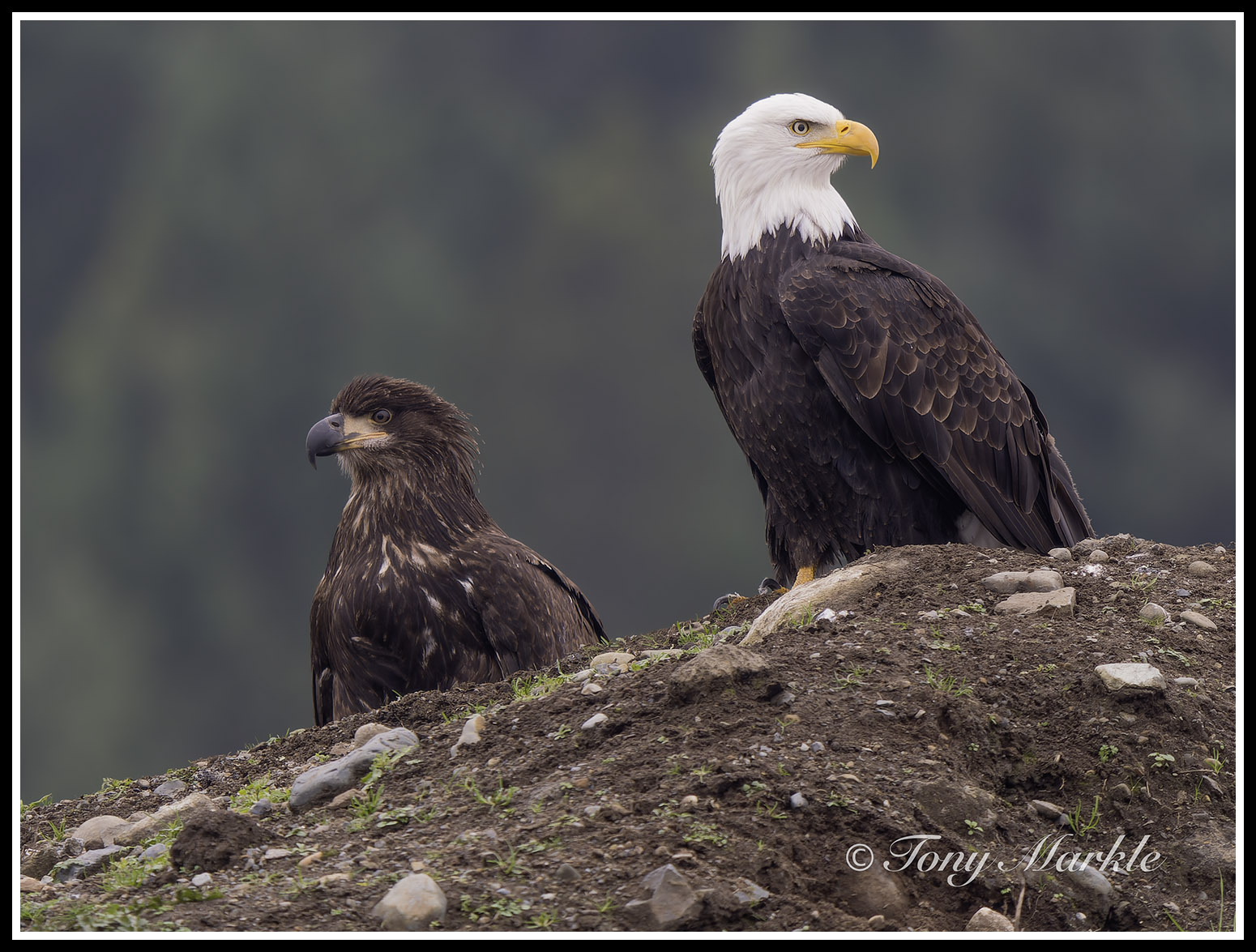
I am moving from Nikon DSLR to OM-1. On my Nikon I can set the exposure compensation for in this case + 2.0 so I do not blow out the head. I'd like to do that on my OM-1 but it affects the settings that I want to use as standard for the eagles. How can I set a +2 without affects shutter speed and aperature? I want a set 5.6 and maybe 1/2000 as an example.

Just wish I could explain it better.


Mar 03, 2026 at 10:07 AM
ROlsonSD
Offline

Upload & Sell: Off
p.1 #2 · Help with my exposure compensation settings


I think this video from Rob Trek has what you want. He shows three ways to set up the OM1 to do exposure compensation.


Mar 03, 2026 at 03:43 PM
runakid
Offline
• • • •
Upload & Sell: Off
p.1 #3 · Help with my exposure compensation settings


Thanks that works for shutter and aperture priority . I still can't make it work for bird detection.


Mar 03, 2026 at 10:58 PM
ROlsonSD
Offline

Upload & Sell: Off
p.1 #4 · Help with my exposure compensation settings


I don't have the camera; it's on my to-buy list so I've been reading, but can't test. But I'm surprised the bird detection mode matters. Exposure compensation shouldn't have anything to do with subject detection or autofocus. In my research it seemed like people on Reddit and other places were doing this using CAF, Bird Subject Detection, Manual, Auto ISO. I'd be very disappointed if this doesn't work. It's why I'm looking at the OM1.


Mar 04, 2026 at 01:40 AM
Imagemaster
Offline
• • • • • • •
Upload & Sell: On
p.1 #5 · Help with my exposure compensation settings


runakid wrote:
I am moving from Nikon DSLR to OM-1. On my Nikon I can set the exposure compensation for in this case + 2.0 so I do not blow out the head. I'd like to do that on my OM-1 but it affects the settings that I want to use as standard for the eagles. How can I set a +2 without affects shutter speed and aperature? I want a set 5.6 and maybe 1/2000 as an example.

Just wish I could explain it better.


You are confusing me a bit. If you don't want to blow out the white head you set exposure compensation to -2 not +2.


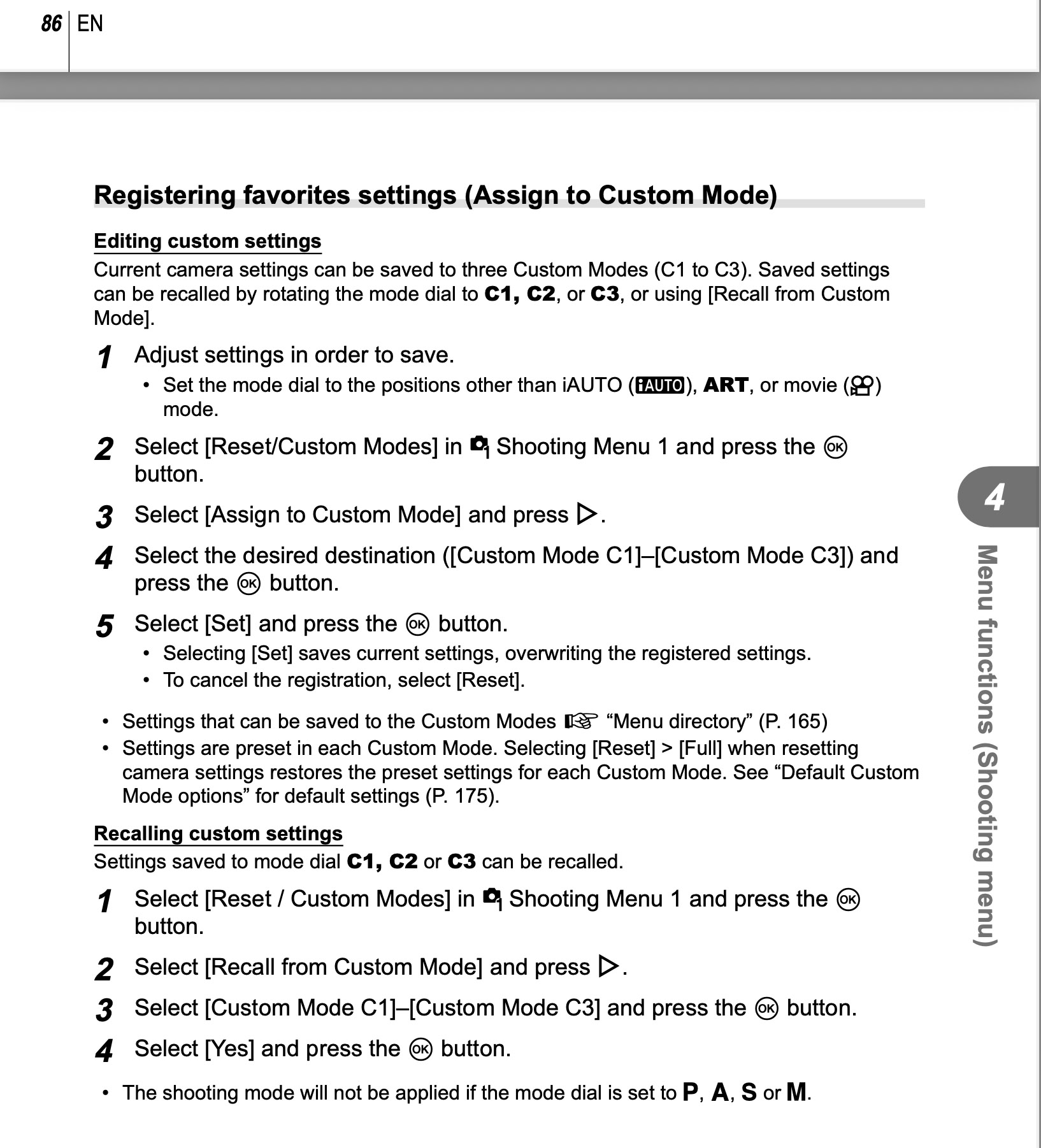
Set your camera to f5.6, 1/2000, -2 exposure compensation, and auto ISO. Now go into the Menu and assign those settings to one of your Custom Modes:

Now when you turn your control wheel to that Custom number, your camera will shoot at those settings. While in that mode you can still change any setting. When you turn your camera off and back on it will be back at your assigned settings.


  OM-1MarkII    OM 150-400mm F4.5 TC lens    500mm    f/5.6    1/125s    400 ISO    -1.0 EV  


Mar 06, 2026 at 12:35 PM
ruthenium
Offline
• • • •
Upload & Sell: On
p.1 #6 · Help with my exposure compensation settings


runakid wrote:
I am moving from Nikon DSLR to OM-1. On my Nikon I can set the exposure compensation for in this case + 2.0 so I do not blow out the head. I'd like to do that on my OM-1 but it affects the settings that I want to use as standard for the eagles. How can I set a +2 without affects shutter speed and aperature? I want a set 5.6 and maybe 1/2000 as an example.

Just wish I could explain it better.


Exposure compensation is meant to change exposure, and there are only two ways to change the exposure on a sensor: by changing the shutter speed or by opening/closing the aperture. This is what exposure compensation does on the mirrorless cameras I have used (OM-1 II, G9 II, A1, GFX100S II).

If you shoot at the base ISO (note this condition), the only way to prevent blown out highlights is by reducing the exposure. There is no alternative. Use the exposure compensation as needed.

If your shooting happens at the ISO = 2 x base ISO or higher ISO, then you have a different option. You can reduce the ISO gain instead of using exposure compensation. For example, if you shoot at Auto ISO 400 and the base ISO is 200, then you can switch to full manual and lower the ISO back to 200. This way you increase the headroom in the highlights prior to the analogue-to-digital conversion by 1 stop and prevent possible ADC overflow that can clip the highlights. This requires working in full manual, otherwise changing the ISO shall change the exposure by changing the SS or aperture. Thus, go to full manual, have your aperture set to f/5.6, and set the SS to 1/2000s if this is what you want. Keep the ISO at the base value, or set to 1/2 to 1/4 of the ISO that the camera would have set itself in Auto ISO. If your pictures should look dark in the viewfinder or on the camera back screen - don't worry, you can easily increase the brightness by raising the "Exposure" in post-processing. This "Exposure" in post has the same (or practically the same) effect as the ISO gain in camera.


Mar 07, 2026 at 11:48 AM
petersm59
Offline
• •
Upload & Sell: On
p.1 #7 · Help with my exposure compensation settings


Or, you can use Aperture Priority and auto ISO, set the minimum shutter speed to whatever you want, say 1/2000, so this way if it gets very bright or if you want to open your aperture, the shutter can compensate faster, but it will not go slower than the minimum setting, unless you hit the ISO ceiling that you've set.

This way you have your desired aperture, a minimum tolerable shutter speed set, and exposure compensation will adjust ISO values.

Just keep in mind, the meter in the camera wants to make whatever it's looking at 18% grey. Consider the meter stupid, and yourself smarter. I find the simple center weighted pattern to be the easiest to use as it's not trying to outsmart me like the

Make sure OVF is disabled in your finder and use the image to judge the exposure. Highlight and shadow false colors and often get in the way of seeing your image, so I keep mine off and just trust what I see and ride the exposure compensation wheel all day long.

With the OM1 I'm ISO agnostic up to 12,800 knowing that I can denoise it in ACR or LR easily and effectively.


Mar 07, 2026 at 03:02 PM
ruthenium
Offline
• • • •
Upload & Sell: On
p.1 #8 · Help with my exposure compensation settings


petersm59 wrote:
Or, you can use Aperture Priority and auto ISO, set the minimum shutter speed to whatever you want, say 1/2000, so this way if it gets very bright or if you want to open your aperture, the shutter can compensate faster, but it will not go slower than the minimum setting, unless you hit the ISO ceiling that you've set.

This way you have your desired aperture, a minimum tolerable shutter speed set, and exposure compensation will adjust ISO values.

Just keep in mind, the meter in the camera wants to make whatever it's looking at 18% grey. Consider the
...Show more

Re: "exposure compensation will adjust ISO values" - in Aperture Priority, exposure compensation will adjust the SS.
Exposure compensation has no control over the ISO.


Mar 07, 2026 at 03:54 PM


Search in Used Dept. 

Paul_100A
Offline
• • •
Upload & Sell: Off
p.1 #9 · Help with my exposure compensation settings


ruthenium wrote:
Re: "exposure compensation will adjust ISO values" - in Aperture Priority, exposure compensation will adjust the SS.
Exposure compensation has no control over the ISO.


I use A mode and Auto Iso with w/min shutter speed. My ISO limits are pre-set as well as my minimum shutter speed.

My camera is set so that the front dial adjusts the shutter speed and ISO. I see it happening in the viewfinder as it happens. The rear dial adjusts Av. My 'min shutter speed' is set to 1/320 for just walking around.

When I spin the front dial to compensate for light changes, it's the shutter speed that will be adjusted accordingly...until my min shutter speed setting of 1/320 is reached. At that point, if I continue to spin that same front dial the ISO is then adjusted since I've told the camera that I do not want to use a shutter speed lower than 1/320.

Some cameras work exactly the same (adjust the shutter first and then the ISO last) up to the point where when the ISO limit is reached, the camera will then go back to adjusting the shutter even beyond the min shutter pre-set. makes sense.
iirc my m4/3 camera's will not automatically adjust either the shutter or ISO values beyond their pre-sets. the user will just get under/over-exposure if no manual input is applied at those times.

I'm not eactly sure what the camera's default sequence is when I simply point the camera at areas with different levels of light and without spinning the dial. I'm guessing it's the same, camera adjusts Sv first then ISO when it must.


Mar 15, 2026 at 10:32 AM
ruthenium
Offline
• • • •
Upload & Sell: On
p.1 #10 · Help with my exposure compensation settings


Paul_100A wrote:
I use A mode and Auto Iso with w/min shutter speed. My ISO limits are pre-set as well as my minimum shutter speed.

My camera is set so that the front dial adjusts the shutter speed and ISO. I see it happening in the viewfinder as it happens. The rear dial adjusts Av. My 'min shutter speed' is set to 1/320 for just walking around.

When I spin the front dial to compensate for light changes, it's the shutter speed that will be adjusted accordingly...until my min shutter speed setting of 1/320 is reached. At that point, if I continue to spin
...Show more
This isn't clear to me: "My camera is set so that the front dial adjusts the shutter speed and ISO".
Go to 1. Operations --> Dial Settings --> Dial Function --> A
There must be a single(!) function assigned to the front dial, e.g Exposure compensation. You cannot have two functions operating simultaneously.

The behavior that you described "the shutter speed that will be adjusted accordingly...until my min shutter speed setting of 1/320 is reached. At that point, if I continue to spin that..." sounds consistent with the function that you change by rotation the dial being Exposure Compensation.

Indeed, when the ISO is Auto (this is an important condition, see below), then the SS is maintained at the set minimum, e.g. 1/320s, when the Exposure compensation is negative. In this case the ISO is reduced, and the image gets darker. When the Exposure compensation is increased (positive), you shall see the ISO increase until the set upper limit, then the SS is reduced if the Exposure compensation is increased further.

If the ISO is not in Auto, then, the camera keeps it unchanged. Then, changing Exposure compensation shall always change the SS.

You are right about the behavior being somewhat complicated. I actually like what the camera is doing in Aperture Priority with Auto ISO when the Exposure compensation is used. That is, I like it that the camera keeps the exposure constant (meaning unchanged SS and aperture), while varying the gain (ISO) as much as this is feasible.

I expect that you know that the exposure on the sensor is controlled exclusively by the two parameters: SS and aperture. The ISO doesn't directly influence the exposure. Exposure seems to be often misunderstood.


Mar 15, 2026 at 09:08 PM
Paul_100A
Offline
• • •
Upload & Sell: Off
p.1 #11 · Help with my exposure compensation settings


ruthenium wrote:
This isn't clear to me: "My camera is set so that the front dial adjusts the shutter speed and ISO".
Go to 1. Operations --> Dial Settings --> Dial Function --> A
There must be a single(!) function assigned to the front dial, e.g Exposure compensation. You cannot have two functions operating simultaneously.

The behavior that you described "the shutter speed that will be adjusted accordingly...until my min shutter speed setting of 1/320 is reached. At that point, if I continue to spin that..." sounds consistent with the function that you change by rotation the dial being Exposure Compensation.

Indeed, when
...Show more

--"My camera is set so that the front dial adjusts the shutter speed and ISO"
"You cannot have two functions operating simultaneously."
Correct. I cannot and I do not. Not simultaneously.
--"When I spin the front dial to compensate for light changes, it's the shutter speed that will be adjusted accordingly...until my min shutter speed setting of 1/320 is reached. At that point, if I continue to spin that same front dial the ISO is then adjusted since I've told the camera that I do not want to use a shutter speed lower than 1/320."

First the shutter and then the ISO. The sequence is then reversed when spinning the dial in the opposite direction. First the ISO then the shutter.

The way my camera is configured, according to the automated functions I have enabled with their limits selected and programmed, thus, how the camera operates and therefor controls the dial function.
When I spin the front dial the shutter value is adjusted until my pre-set minimum 1/320 shutter value is reached. Continuing to spin the very same dial then adjusts the ISO value.

*1/320 is my low (min) shutter value setting. *ISO 200 is my low ISO limit setting.

scene is metered at 1/640 and *ISO 200. spinning the dial to make the image darker will adjust the shutter value up. the front dial adjusts the Sv.

scene is metered at 1/640 (above my min Sv limit of 1/320. there is room for the camera to move the Sv) and *ISO 200. spinning the same front dial to make the image brighter will first adjust the shutter value down to the *1/320 limit and then adjust the ISO value up. the same dial adjusts the Sv and then the ISO value but not at the same time of course.

one dial does control both the shutter value and the ISO value though.

I'm not talking about metering where the camera, as you say, will try to maintain Av/Sv. I am talking about spinning the dial.

Exposure, yes, the amount of light and the amount of time the light has to reach the sensor/film. Film ISO chemical reaction to light, digital ISO is gain or amplification or something or other.
Yes, I have a basic, or perhaps even flawed, understanding of the science but that's only because I'm not very interested in the science.

I understand that exposure is set using Sv and Av and ISO is applied to those settings.
Folks whom poopoo Auto ISO don't understand that I think. They choose their Av/Sv settings poorly and then blame Auto ISO for what happens next.

With m4/3, when Av and Sv are at their limits, it's better to adjust the ISO to get the image 'to the right looking brightness' (what I simply and wrongly call exposure) instead of leaving the image 'too dark looking' (under-exposing) and correcting in post.

True story...when I shot (for years and years) in M mode, the process of how I changed the exposure was in the exact same order as what A mode with Auto ISO with min S/S does.
I usually shoot wide open so rarely touched the Av. To compensate for changing light levels I'd first adjust the Sv until I was no longer comfortable with adjusting the Sv any further. Then I'd adjust the ISO. Then I reversed the sequence and do so on and so on all day long spinning dials, pressing buttons, changing settings back and forth all day like a real camera operator. The automated way provides me the exact same results with a much simpler time, and more enjoyable time, in the field.
Turn on camera and adjust only one dial as required. Easy.

Edited on Mar 16, 2026 at 01:12 PM · View previous versions


Mar 16, 2026 at 12:01 PM
Alan Kefauver
Offline
• • •
Upload & Sell: Off
p.1 #12 · Help with my exposure compensation settings


ROlsonSD wrote:
I don't have the camera; it's on my to-buy list so I've been reading, but can't test. But I'm surprised the bird detection mode matters. Exposure compensation shouldn't have anything to do with subject detection or autofocus. In my research it seemed like people on Reddit and other places were doing this using CAF, Bird Subject Detection, Manual, Auto ISO. I'd be very disappointed if this doesn't work. It's why I'm looking at the OM1.


It works. With C-AF, bird detect, in both M and S modes. Bird detect has nothing to do with EC. Works with animal detect also.


Mar 16, 2026 at 12:57 PM
Alan Kefauver
Offline
• • •
Upload & Sell: Off
p.1 #13 · Help with my exposure compensation settings


ROlsonSD wrote:
I don't have the camera; it's on my to-buy list so I've been reading, but can't test. But I'm surprised the bird detection mode matters. Exposure compensation shouldn't have anything to do with subject detection or autofocus. In my research it seemed like people on Reddit and other places were doing this using CAF, Bird Subject Detection, Manual, Auto ISO. I'd be very disappointed if this doesn't work. It's why I'm looking at the OM1.


It works. With C-AF, bird detect, in both M and S modes. Bird detect has nothing to do with EC. Works with animal detect also.


Mar 16, 2026 at 01:01 PM
ruthenium
Offline
• • • •
Upload & Sell: On
p.1 #14 · Help with my exposure compensation settings


Paul_100A wrote:
--"My camera is set so that the front dial adjusts the shutter speed and ISO"
"You cannot have two functions operating simultaneously."
Correct. I cannot and I do not. Not simultaneously.
--"When I spin the front dial to compensate for light changes, it's the shutter speed that will be adjusted accordingly...until my min shutter speed setting of 1/320 is reached. At that point, if I continue to spin that same front dial the ISO is then adjusted since I've told the camera that I do not want to use a shutter speed lower than 1/320."

First the shutter and then the ISO. The
...Show more

Regarding "when Av and Sv are at their limits, it's better to adjust the ISO to get the image 'to the right looking brightness' (what I simply and wrongly call exposure) instead of leaving the image 'too dark looking' (under-exposing) and correcting in post." - I fully agree with your strategy, as long as the increased ISO gain doesn't lead to undesirable highlights clipping. I am sure you keep an eye on the highlights.
When the amount of light that falls on the sensor cannot be increased (the aperture and shutter speed cannot be changed), it makes sense to apply the right amount of gain on the signal from the sensor. This ensures that the signal is optimally digitized by the camera analog-to-digital converter (ADC). While the camera can do the same automatically with Auto ISO, there is certainly a risk that it can apply more gain than actually needed and clip the highlights.
This is very smart to allow Exposure compensation to adjust the gain when shooting with Auto ISO and a set minimum shutter speed. I belive that my other cameras GFX100S II and Sony A1) always change the shutter speed in Aperture Priority, when Exposure compensation is used. I should double check this claim, but I think I am not mistaken.


Mar 16, 2026 at 09:21 PM
ROlsonSD
Offline

Upload & Sell: Off
p.1 #15 · Help with my exposure compensation settings


Thanks for confirming that it works as I expected.


Mar 16, 2026 at 10:42 PM
Paul_100A
Offline
• • •
Upload & Sell: Off
p.1 #16 · Help with my exposure compensation settings


ruthenium wrote:
Regarding "when Av and Sv are at their limits, it's better to adjust the ISO to get the image 'to the right looking brightness' (what I simply and wrongly call exposure) instead of leaving the image 'too dark looking' (under-exposing) and correcting in post." - I fully agree with your strategy, as long as the increased ISO gain doesn't lead to undesirable highlights clipping. I am sure you keep an eye on the highlights.
When the amount of light that falls on the sensor cannot be increased (the aperture and shutter speed cannot be changed), it makes sense to apply
...Show more
Correct. I have no issues whatsoever with blown highlights.
I’ve learned that (and for some time now) “I” can trust certain camera automated features to provide “me” with great results. Auto ISO with minimal S/S is the best automated feature I know of aside from auto focus. For the very rare occasion I do rely on M mode.
I can only assume that others do not use Auto ISO with min S/S mainly because they do not understand how (easy and well) it works or do not know about it at all.
That and there is still the stigma that ‘serious camera operators’ shall use full Manual mode lest ye suffer the fate (ridicule) from their peers who were also told the same and only use M mode unaware of the benefits of not using M mode.
Funny how many of those M mode users use AF though. Why not only use MF too? Now that’s true old school.
I spoke, just yesterday, to a friend who has recently met a new photographer. They have gone out shooting a few times together. The new photographer has, wisely, been asking questions and advice about camera operation and so forth. My friend told me that he mentioned to newb the benefits of S and A priority in certain conditions. newbie then went online to ask other folks about S snd A priority and was told to stick with M mode and so that’s what newbie will do.
That true story gave me a laugh.
To each their own.
Carry around a bag of bricks all they like. Not my idea of fun though.


Mar 17, 2026 at 08:17 AM


FM Forums | Micro Four Thirds Forum | Join Upload & Sell


Welcome back
Log in to your account