p.1 #1 · Issue with Lightroom classic denoise (X-H2)
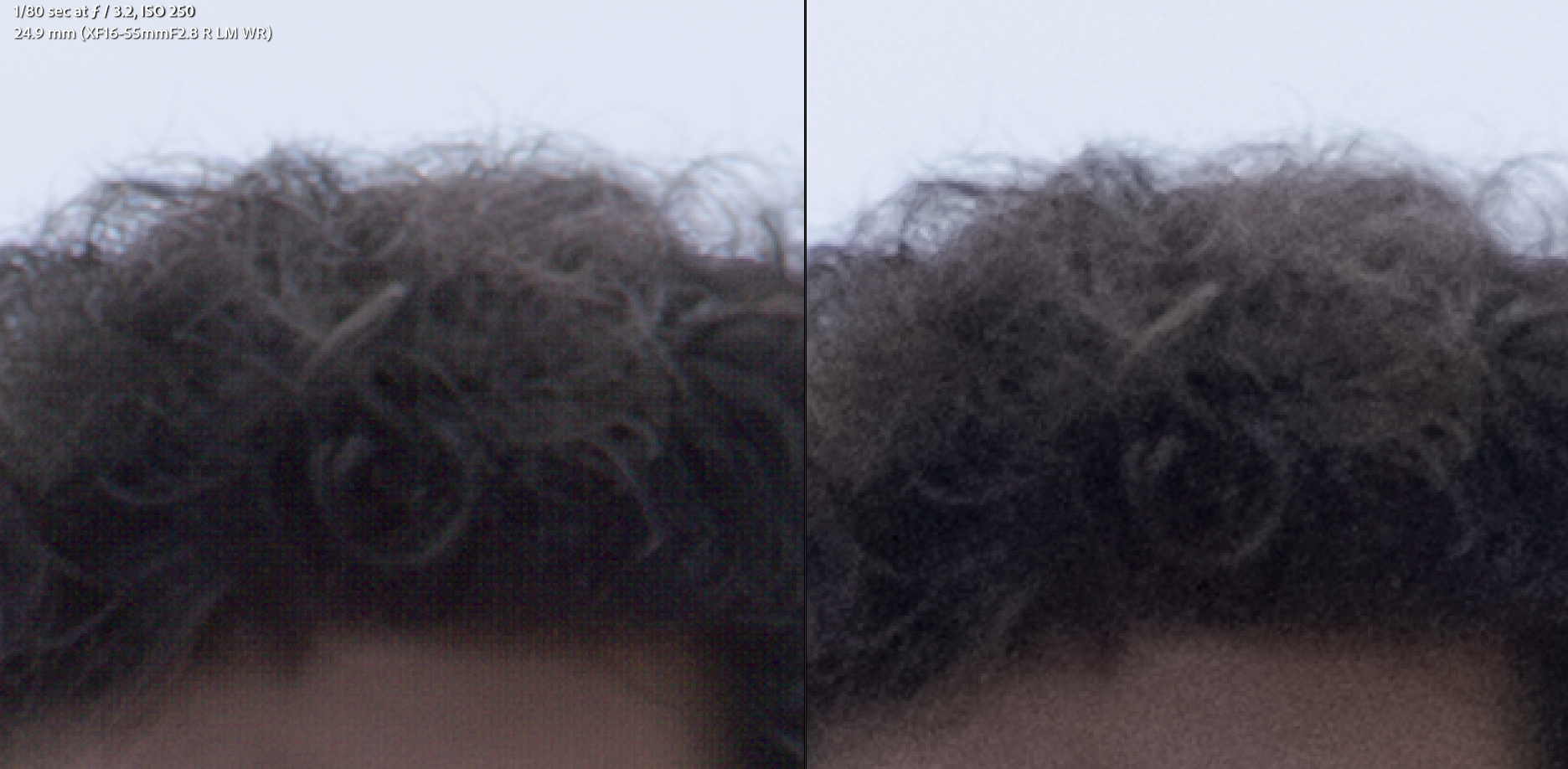
Hey, I recently upgraded from an X-H1 to an X-H2 and while editing (this case was more seeing if I could salvage it) some recent trip pics, I've noticed that raising exposure while also using the LrC AI denoise tool results in a grid of color artifacts. Going back to my pics with my X-H1, I see some of the same, but the artifacts are much less noticeable. Is this caused by pixel size on the sensor being smaller or something else?
If anyone has advice for dealing with this, I would love to hear. (Ideally in LrC, but if the answer is get DxO for the better demosaicing/NR algorithms, that's a solution, too)
Below is a picture with/without the denoise (yes I'm zoomed in to pixel-peeping territory, but it's still noticeable at a reasonable level of zoomed out). The only edits done were swapping to the Adobe Neutral profile, increase exposure by 2.11 stops, and set denoise to 50.
p.1 #4 · Issue with Lightroom classic denoise (X-H2)
Just to add another data point—I don’t see anything like that in the latest build of ACR/Denoise with the X-T50. As to DxO, I’ve been using the trial demo for a few weeks and don’t see improvements in demosaicing/NR algorithms over the Adobe solution.
p.1 #5 · Issue with Lightroom classic denoise (X-H2)
Sal Baker wrote:
Just to add another data point—I don’t see anything like that in the latest build of ACR/Denoise with the X-T50. As to DxO, I’ve been using the trial demo for a few weeks and don’t see improvements in demosaicing/NR algorithms over the Adobe solution.
Sal
Hi, I just tried using ACR with the same adjustments and I have the same problem. Using the trial for DxO avoids the artifacts (and has comparable/superior denoise -- maybe a bit lower contrast and a touch less red on the skin, but I can push exposure to +3.00 as shown in the screenshot below and it still looks good).
I'm happy there seems to be a solution; I'm unhappy the solution is paying money to another company. (I'm unhappy LrC doesn't have good demosaicing for X Trans sensors)
p.1 #6 · Issue with Lightroom classic denoise (X-H2)
I feel like a crazy man looking for a problem, but so far I can't duplicate that structured grid noise. I've tried to find it on RAF lossless files from ISO 250 to ISO 1600. I've applied Photoshop/ACR/Denoise at 50, and raised the exposure by 2.11 stops, viewing at 100-200 percent. I must be doing something wrong (right?)
Here are the other variables:
Mac Tahoe 26.2
Photoshop 27.4
ACR 18.2
Fuji X-T50
Stirred, not shaken
p.1 #8 · Issue with Lightroom classic denoise (X-H2)
Sal Baker wrote:
I feel like a crazy man looking for a problem, but so far I can't duplicate that structured grid noise. I've tried to find it on RAF lossless files from ISO 250 to ISO 1600. I've applied Photoshop/ACR/Denoise at 50, and raised the exposure by 2.11 stops, viewing at 100-200 percent. I must be doing something wrong (right?)
Here are the other variables:
Mac Tahoe 26.2
Photoshop 27.4
ACR 18.2
Fuji X-T50
Stirred, not shaken
Sal
---------------------------------------------
RoamingScott wrote:
Is your LRC fully up to date? I've never seen that, nor ever seen anyone else talk about it.
How many stops are you raising the exposure?
@Sal Baker Maybe the magic gremlins inside my computer just don't like me. A key difference is I'm on Win11 not Mac.
@RoamingScott LRC is fully up to date (Lightroom Classic version: 15.2 [ 202602111402-ec4112e8 ]) and I've rebooted the computer. I can see it in shadows even at 1 stop, but the more stops, the more visible.
@Sal Maybe the magic gremlins inside my computer just don't like me. A key difference is I'm on Win11 not Mac.
@Scott@ LRC is fully up to date (Lightroom Classic version: 15.2 [ 202602111402-ec4112e8 ]) and I've rebooted the computer. I can see it in shadows even at 1 stop, but the more stops, the more visible.
GPU drivers up to date, assuming you are using hardware/GPU acceleration? All signs point to a gremlin in your environment, not default LRC behavior.
p.1 #10 · Issue with Lightroom classic denoise (X-H2)
RoamingScott wrote:
GPU drivers up to date, assuming you are using hardware/GPU acceleration? All signs point to a gremlin in your environment, not default LRC behavior.
Yeah, just checked and updated them with the problem still persisting. It very well could be AMD playing poorly, I sure hope I don't need to get a new GPU.
p.1 #11 · Issue with Lightroom classic denoise (X-H2)
I've been using the Lightroom Classic AI Denoise for most of last year with raw files from my X-T5 (shooting birds with the XF 150-600mm, so higher shutter speeds and higher ISO) and I did not see anything like you are reporting. I often reduce the setting from the default 50, to 40 or 35 though if it's possible (less smooth plastic look).
I've been using it a fair bit this year with raw files from my X-E3 (shooting at night with high ISO as it has no IBIS), and again I don't see the type of effect/artifact you've experienced. I usually pull back the default 50 to 35 to get a more natural looking result.
p.1 #12 · Issue with Lightroom classic denoise (X-H2)
Not sure I would have gone denoise there. I have the same camera I would have tried the raw details because the ISO is pretty low. Also, my standard sharpening for the X-H2 is: Amount 65, Radius .7 and detail 100. Give that a try with the Raw Details instead of Denoise. If that doesn't work DXO Pure Raw will absolutely work
p.1 #13 · Issue with Lightroom classic denoise (X-H2)
johndill wrote:
Not sure I would have gone denoise there. I have the same camera I would have tried the raw details because the ISO is pretty low. Also, my standard sharpening for the X-H2 is: Amount 65, Radius .7 and detail 100. Give that a try with the Raw Details instead of Denoise. If that doesn't work DXO Pure Raw will absolutely work
I was trying to raise an underexposed face by ~2 stops as the background was what got metered, thus noise was high in the formerly shadowed areas, leading to my use of the denoise.
p.1 #14 · Issue with Lightroom classic denoise (X-H2)
I wonder if it's an issue with the smart preview. What happens when you export the file to JPG? Do the artifacts persist?
You might want to try turning hardware acceleration off in Preferences > Performance > Uncheck "Use Graphics Processor" (and restart LR).
Also, just to piggyback on the other comment about AI denoise -- even accounting for your increasing exposure in LR by approx. 2 stops, it's the equivalent of taking the same image at ISO 1000 instead of 250. So the original image shouldn't have much noise to begin with. The regular noise reduction should work just fine.
That being said, AI denoise shouldn't introduce these kinds of artifacts in the first place, and I am not practicing what I preach because I often apply AI denoise to images wherever I want to reduce noise regardless of ISO.
p.1 #15 · Issue with Lightroom classic denoise (X-H2)
mdude85 wrote:
I wonder if it's an issue with the smart preview. What happens when you export the file to JPG? Do the artifacts persist?
You might want to try turning hardware acceleration off in Preferences > Performance > Uncheck "Use Graphics Processor" (and restart LR).
Also, just to piggyback on the other comment about AI denoise -- even accounting for your increasing exposure in LR by approx. 2 stops, it's the equivalent of taking the same image at ISO 1000 instead of 250. So the original image shouldn't have much noise to begin with. The regular noise reduction should work just fine.
That being said, AI denoise shouldn't introduce these kinds of artifacts in the first place, and I am not practicing what I preach because I often apply AI denoise to images wherever I want to reduce noise regardless of ISO. ...Show more →
They persist upon export.
Unfortunately turning off acceleration didn't fix any problems.
Yeah I don't **need** the denoise here -- I was gonna put it at like 10-20 to make the image a little smoother, but it isn't necessary here.