johnvanr
Offline
• • • • •
Upload & Sell: On
|
 p.3 #15 · SHOTEN focus confirmation adapter for Leica M to Canon RF p.3 #15 · SHOTEN focus confirmation adapter for Leica M to Canon RF | |
In my experience, the active area can differ. I don't know based on what. It's also important to have contrast in the area you're trying to focus on.
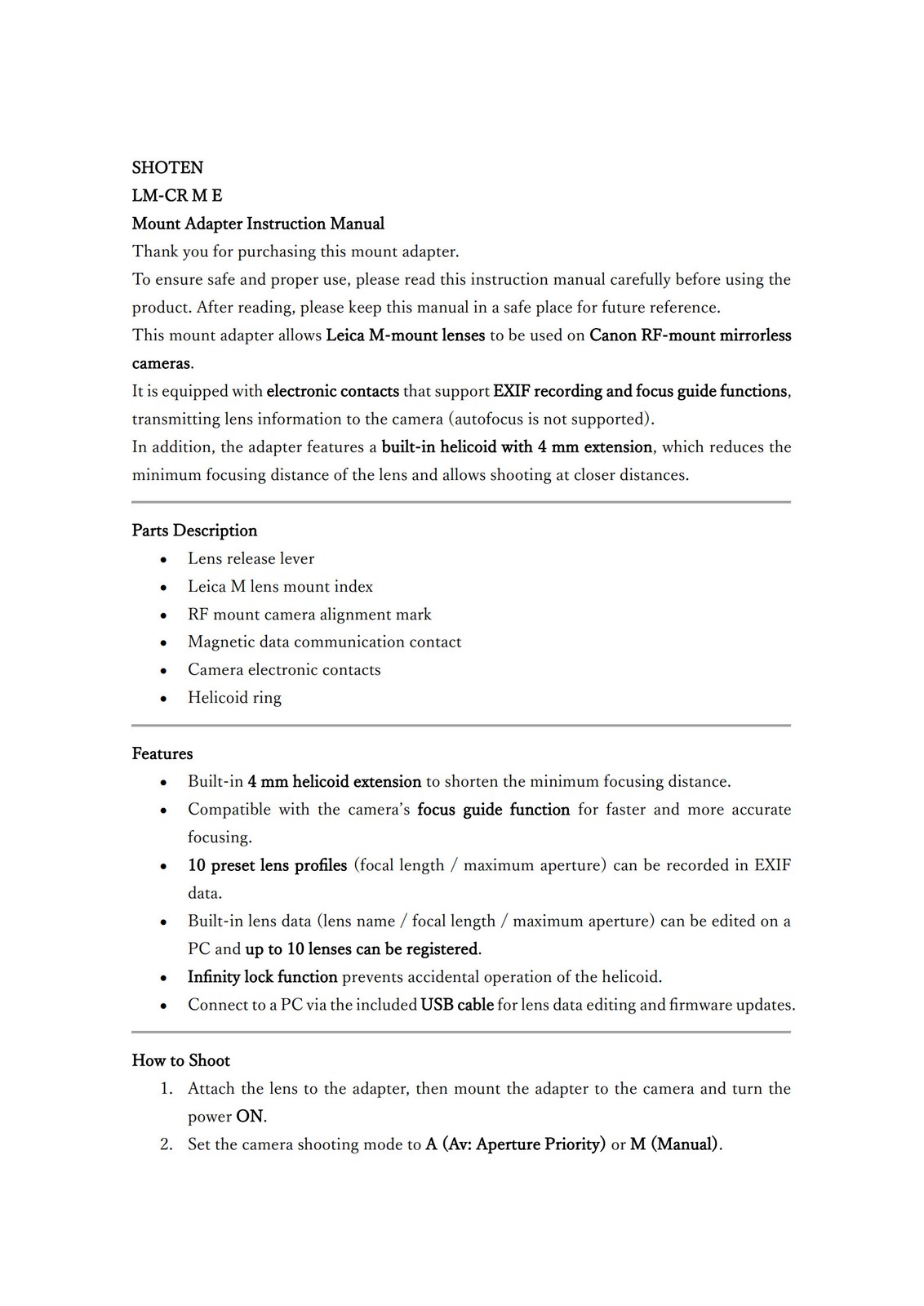
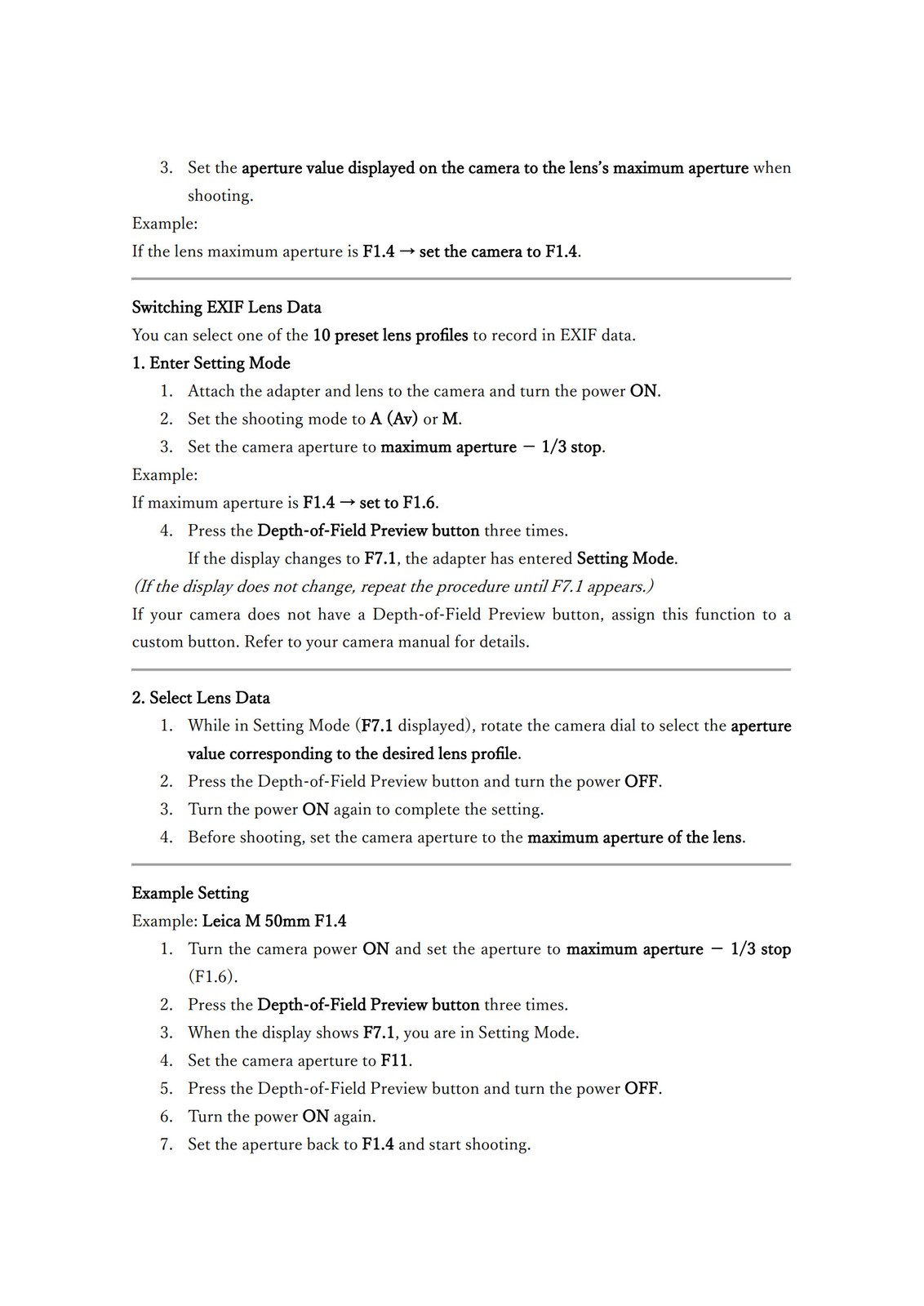
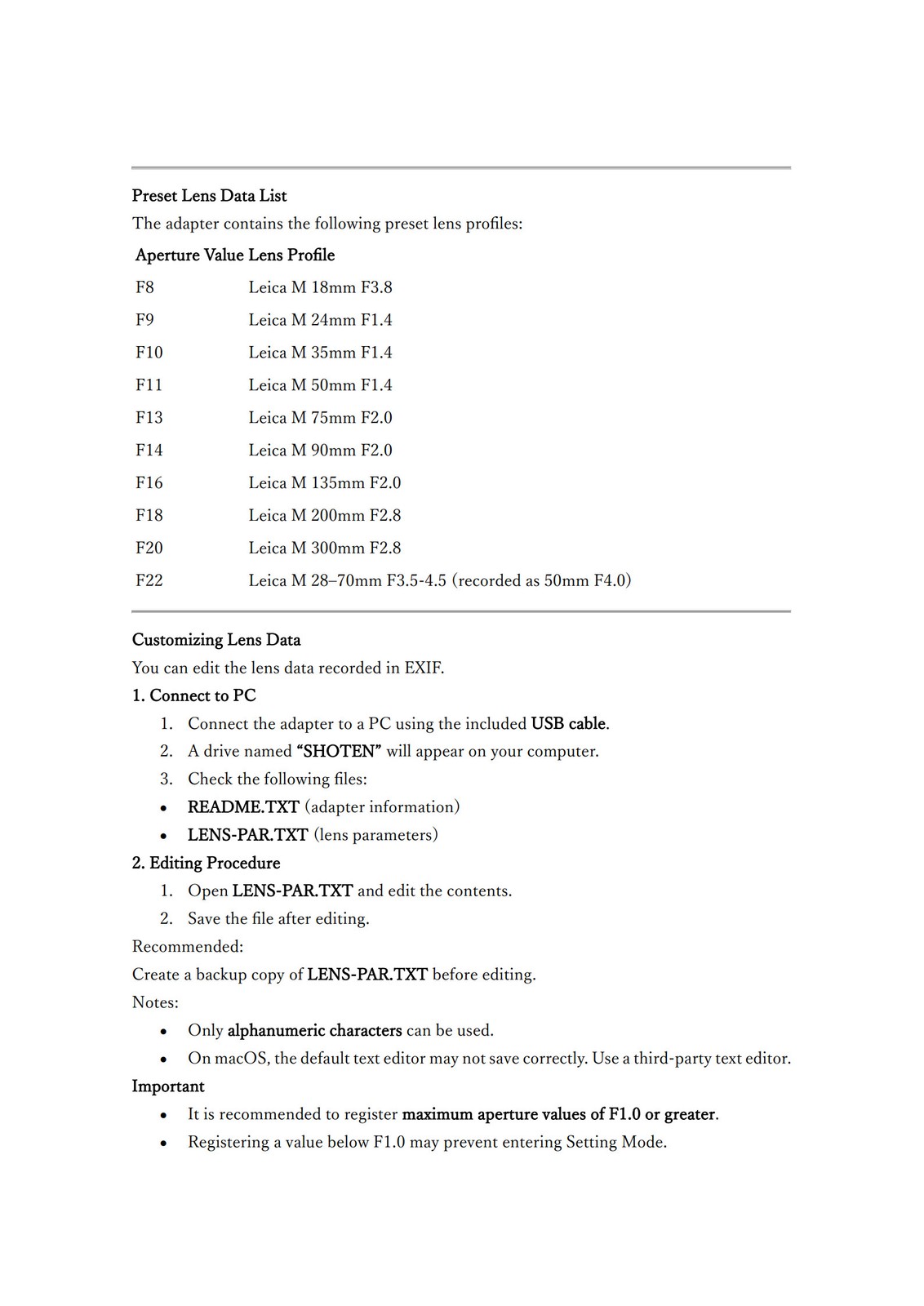
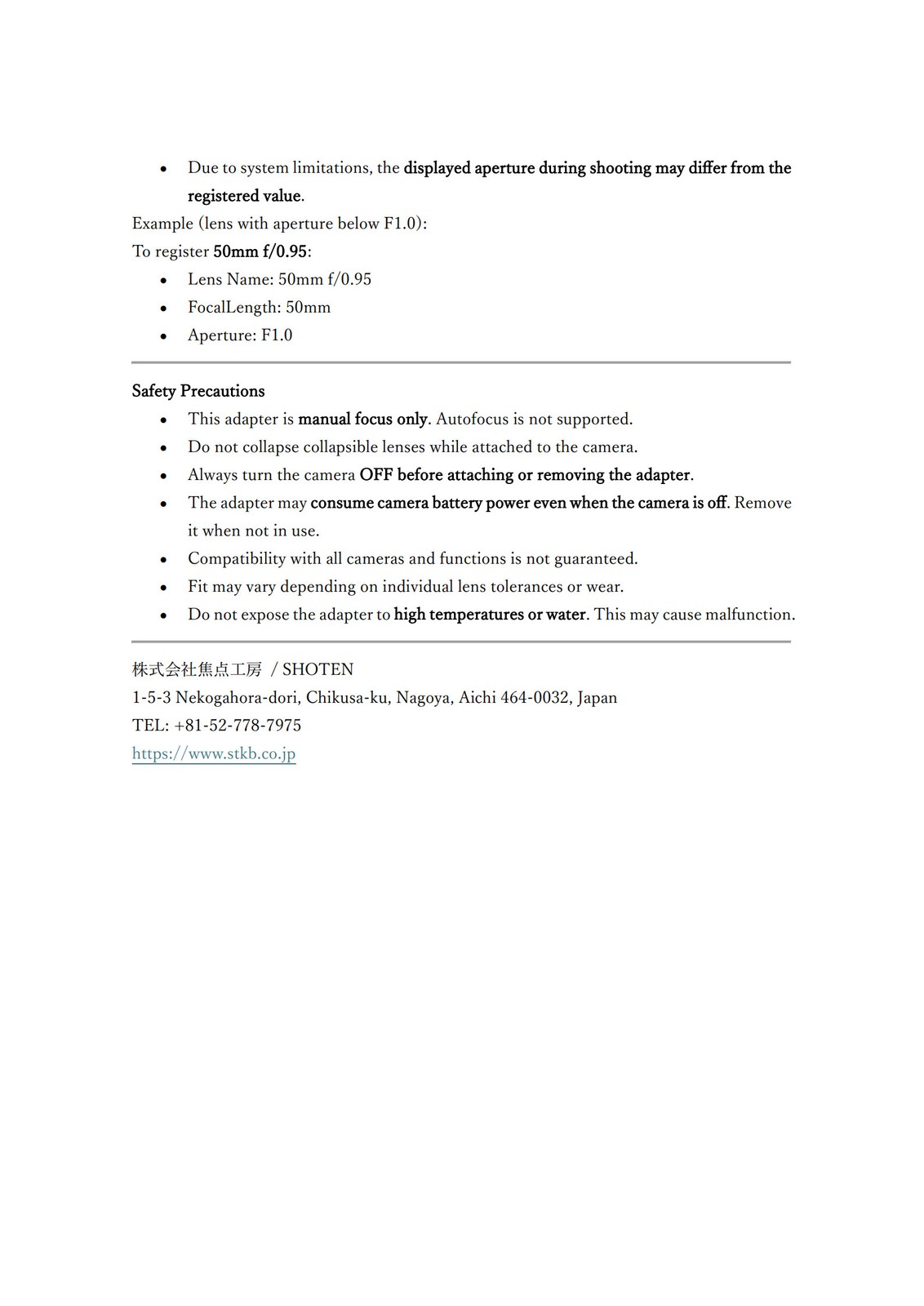
I had more communications with the company: this is my full eBay thread with them, the top is the latest message. (basically, it works fine for me if I make sure to dial the aperture on the camera down to the lowest possible after going through the setup procedure for the adapter; this is often f/7.1 on my R5). They sent me the manual in English, which I will try to share here.
New message from: shotenkobo (1,158RED_STAR Star)
When Auto ISO is enabled in M mode, some Canon cameras partially rely on the reported aperture value when calculating ISO after the exposure is taken. If the simulated aperture value differs significantly from the actual lens aperture, the exposure preview in the EVF may look correct, but the final image can appear brighter or darker.
This can also explain why your Leica 28mm Elmarit behaves normally, while other lenses show different results. Small differences in transmission and lens profile settings can influence how the camera interprets the exposure.
To obtain the most consistent behavior, we recommend the following:
Use M mode with a fixed ISO (disable Auto ISO).
Adjust exposure using shutter speed and the lens aperture ring.
Make sure the selected lens profile in the adapter is close to the actual lens focal length and maximum aperture.
With manual lenses, this method usually produces the most reliable exposure results.
Your adapter itself appears to be functioning normally based on your description.
Thank you again for your careful testing and for your patience.
We apologize if the setup and explanation may be a bit confusing. We hope our explanation was clear.
Please feel free to contact us anytime if you need further assistance.
Best regards
Reply
Make an offer
shotenkobo
Dear John,
Thank you for your detailed follow-up and for carefully testing the settings.
Your observation is actually very helpful, and the behavior you describe can occur on some Canon mirrorless cameras when using fully mechanical lenses together with Auto ISO.
To clarify your question first:
When we mentioned that “the camera’s displayed aperture should remain set to the lens’s maximum aperture,” we mean the actual maximum aperture of the lens itself, not the lowest value available on the camera.
For example:
If the lens maximum aperture is f/1.5, the camera display should ideally be set to f/1.5.
However, depending on the selected lens profile inside the adapter, the camera may limit the selectable aperture values (for example stopping at F7.1). In that situation, the camera is simply reflecting the simulated aperture range stored in the adapter’s lens data.
This leads to the behavior you observed.
Because Leica M lenses do not transmit real aperture information, the camera performs exposure metering based on:
• the simulated aperture value provided by the adapter (for EXIF)
• the actual light entering the sensor
shotenkobo
original images included.
shotenkobo
We sincerely apologize for any inconvenience caused. We have translated our instruction manual into English, and we hope this will be helpful to you.
Your previous message
I'm trying out what you suggested. I have one question, though: when you say "●Ensure the camera’s displayed aperture remains set to the lens’s maximum aperture,' do you mean that I set the aperture on the camera at the maximum possible even when that isn't the maximum aperture on the lens itself?
For example, I took some images with a lens that is identified by f/13 using your method. The lens itself has a maximum aperture of f/1.5. After setting up the camera according to your instructions, the aperture on the camera cannot go lower than f/7.1.
So, is your solution to then set the camera aperture to f/7.1?
This may work, but I want to be sure that is what you meant.
Thanks for the explanation.
Regards,
John
shotenkobo
If the issue persists after trying the steps above, could you please send us photos showing the aperture setting on the lens and the camera screen at the time of shooting? This will help us better understand the setup and assist you more accurately.
Thank you again for your careful testing and for your interest in our products.
Best regards,
shotenkobo
Dear John,
Thank you for your detailed message and for taking the time to test the adapter with different lenses.
Based on your description, the focusing function working normally indicates that the adapter itself is operating as expected. The behavior you are seeing is most likely related to how the camera performs exposure metering when using fully mechanical lenses through an electronic adapter.
Leica M lenses do not transmit electronic aperture information. Therefore, the adapter cannot detect the actual aperture position of the lens. The aperture value displayed on the camera is only a fixed value provided by the adapter for EXIF recording and camera compatibility, and it does not represent the real aperture set on the lens.
When shooting in M mode with Auto ISO, the camera may partially rely on the aperture value reported by the adapter when calculating exposure. If the stored lens data (such as focal length or maximum aperture) differs from the actual lens being used, the camera’s exposure simulation during live view may not perfectly match the final captured exposure. This can sometimes result in the EVF preview appearing correct while the recorded image shows a different exposure level.
Different lenses may also vary slightly in optical transmission and internal design, which can further influence how the camera’s live metering behaves. This may explain why your Leica 28mm Elmarit appears to work consistently while other lenses behave differently.
To help verify the behavior, we would suggest trying the following:
●Test shooting in M mode with a fixed ISO (disable Auto ISO)
●Ensure the camera’s displayed aperture remains set to the lens’s maximum aperture
●Confirm that the lens profile stored in the adapter corresponds to the lens being used
shotenkobo
Thank you for your purchase.
We sincerely apologize for the inconvenience caused. I will immediately report this issue to our technical department for further investigation.
We just returned from the 2026 CP+ Show, so our response may be slightly delayed.
We appreciate your patience and understanding.
Rest assured that we will do our best to resolve this for you as soon as possible.
Thank you for waiting.
Shotenkobo
Your previous message
Hello, can you tell me why this happens on my Canon R5 with this adapter?:
The focus works fine. No issues there.
What I absolutely don't understand, though, is how the camera metering reacts to different lenses and what's going on.
My one Leica M lens, the 28mm Elmarit, works without issues. I adjust the aperture on the lens, leave the aperture on the camera at the setting for the EXIF data, and the camera (in M mode) adjusts my ISO to give me a correct exposure at the chosen aperture on the lens. The preview in the EVF and the histogram match before and after the image is taken.
On my Voigtlander and Zeiss M lenses, however, the metering goes completely haywire. When setting up for the shot, the EVF and the histogram behave as expected, showing a balanced image, but after the picture is taken both the EVF/LCD and the histogram are overexposed.
Since there is no communication between the lens and the adapter but only between the adapter and the camera, I have no clue what causes this discrepancy. It does, however, make this adapter pretty much useless other than with my Leica lens.
Thank you,
John
|